
מָבוֹא
This manual provides essential information for setting up, operating, and maintaining your Roku 32-Inch Select Series 1080p Full HD Smart TV. Designed for a delightful streaming experience, this TV offers excellent picture quality, clear sound, and automatic updates. Please read this manual thoroughly before using your television.
מה יש בקופסה
ודא שכל הרכיבים נמצאים באריזה:
- Roku 32-Inch Select Series 1080p Full HD Smart TV
- שְׁלַט רָחוֹק
- מעמד (2 חלקים)
- ברגי מעמד (4 יחידות)
- כבל חשמל
- מדריך למשתמש (מסמך זה)

Image: Contents of the Roku TV box, showing the television, remote control, two stand pieces, and four screws.
הוראות התקנה
1. חיבור מעמד הטלוויזיה
- Carefully place your TV face-down on a soft, clean surface to prevent damage to the screen.
- יישרו את חלקי המעמד עם חורי הברגים בתחתית הטלוויזיה.
- Secure each stand piece with two screws using a Phillips head screwdriver. Do not overtighten.
2. חיבור חשמל ומכשירים
- חבר את כבל החשמל לכניסת החשמל של הטלוויזיה ולאחר מכן לשקע בקיר.
- Connect your external devices (e.g., cable box, gaming console, Blu-ray player) to the available HDMI ports on the back of the TV. This model features 3 HDMI ports.
- For older devices, use the AV input ports (yellow, white, red).
- An optical audio output is available for connecting to soundbars or home theater systems.
- A USB port is provided for media playback.

תמונה: אחורי view of the Roku TV displaying HDMI, AV, Antenna, USB, Optical, and Headphone ports.
3. הפעלה ראשונית וחיבור רשת
- לחץ על כפתור ההפעלה בשלט רחוק או בטלוויזיה.
- פעל לפי ההוראות שעל המסך כדי לבחור את השפה שלך ולהתחבר לרשת ה-Wi-Fi שלך.
- Activate your Roku account or create a new one. This is required to access streaming channels and features.
הוראות הפעלה
1. ממשק מערכת ההפעלה Roku
The Roku OS provides a simple and intuitive home screen for accessing all your entertainment. Easily navigate between streaming apps, live TV, and connected devices.

Image: The Roku TV home screen with a menu on the left and app icons on the right, including Netflix, Disney+, Apple TV, and Roku Channel.
2. Voice Remote
Your Roku TV comes with a voice remote for convenient control. Use your voice to search for content, launch apps, and control playback.
- חיפוש קולי: Press the voice button and speak your command (e.g., "Find comedies," "Open Netflix").
- קיצורי דרך לאפליקציה: Dedicated buttons provide quick access to popular streaming services.
- בקרת עוצמת הקול: כוונן את עוצמת הקול באמצעות הכפתורים בצד.
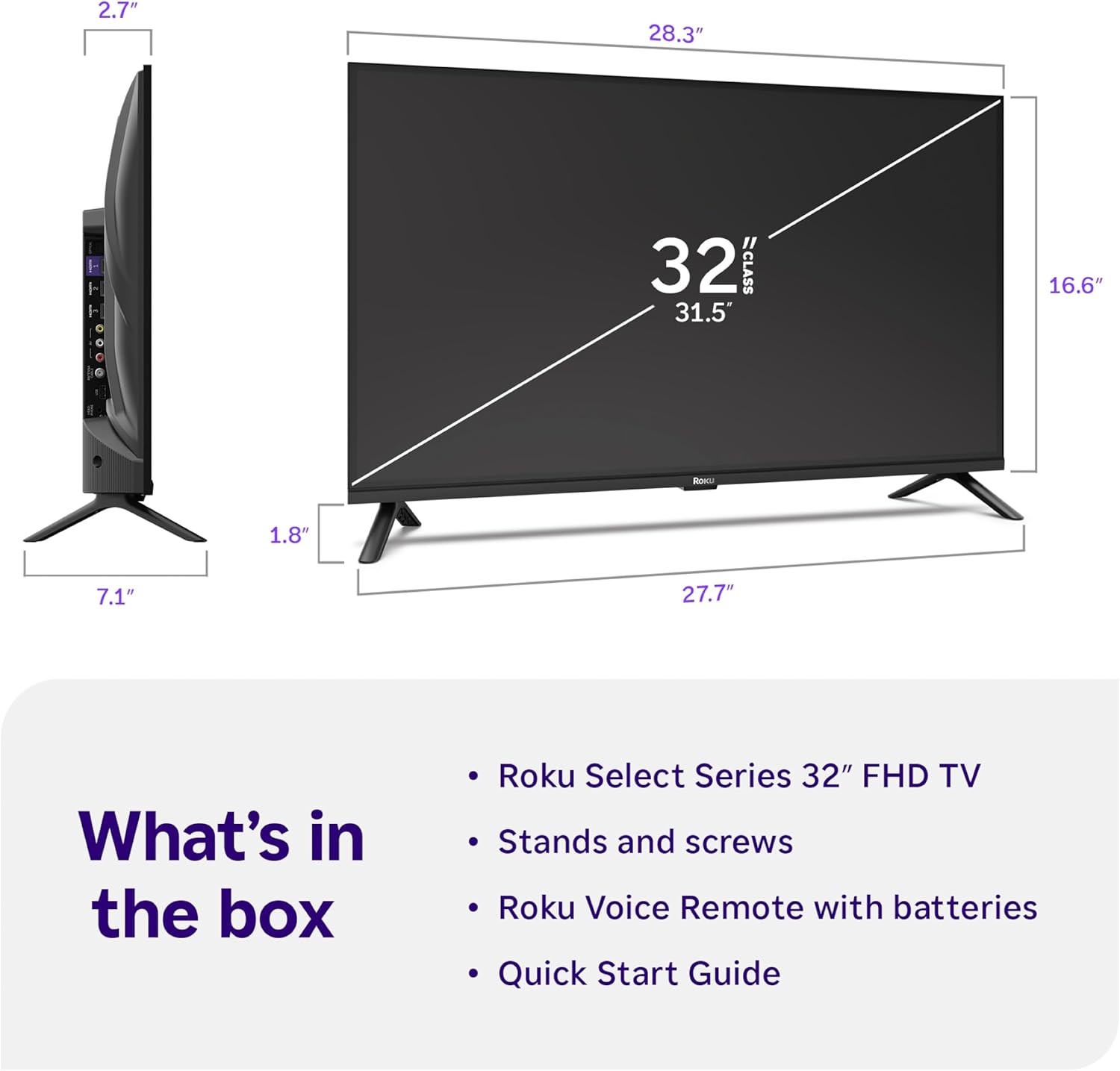
Image: Close-up of the Roku Voice Remote, highlighting buttons for TV power, volume, mute, voice search, instant replay, options, and dedicated app shortcuts.
3. Streaming Apps and Live TV
Access thousands of streaming channels, including Netflix, Disney+, Hulu, Prime Video, and Apple TV+. The Roku Channel also offers free live TV and on-demand content.

Image: A vibrant Roku TV home screen displaying a selection of popular streaming applications and recommended shows.
4. הגדרות תמונה
בצע אופטימיזציה שלך viewניסיון עם הגדרות תמונה שונות:
- Roku Smart Picture: Automatically adjusts picture mode for optimal viewing.
- מצבי תמונה: Choose from presets like Movie, Sports, Vivid, Standard, or Low Power.
- התאמה אישית: Adjust brightness, contrast, sharpness, color, and tint for a personalized picture.
5. הגדרות צליל
שפר את חוויית האודיו שלך:
- Dolby Audio: Enjoy clear speech and louder sound.
- מצבי סאונד: Select from Standard, Dialogue, Movie, Music, or Night mode.
- Bluetooth Headphone Mode: Connect your wireless headphones to listen without disturbing others.

Image: A child wearing wireless headphones while watching the Roku TV, demonstrating the Bluetooth Headphone Mode.
6. שילוב בית חכם
Your Roku TV is compatible with various smart home ecosystems:
- שליטה קולית: Use Roku Voice, Siri, Alexa, or Google Assistant for hands-free control.
- אפל אי-פליי: Effortlessly share videos, photos, and music from your Apple devices.
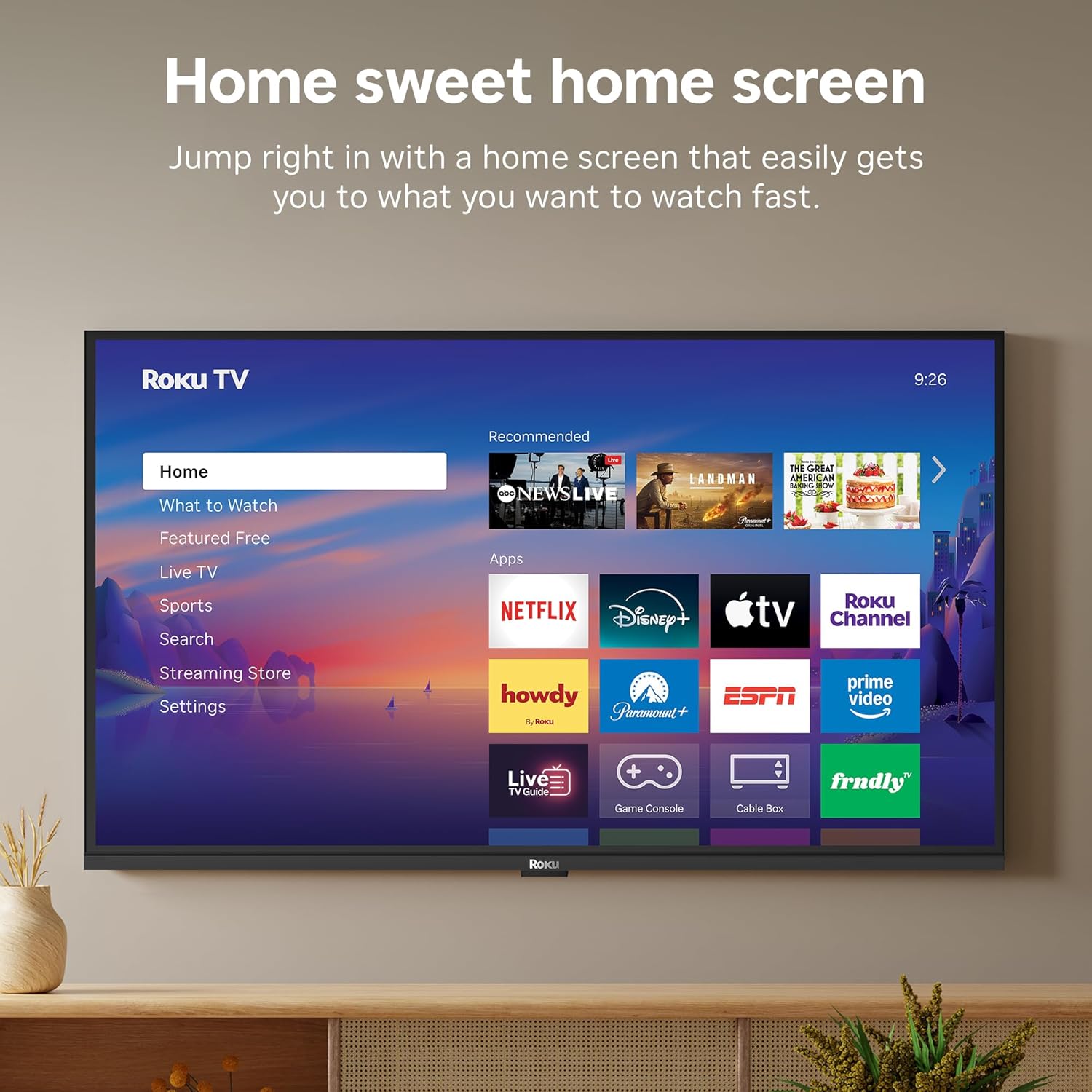
Image: The Roku TV screen displaying smart home compatibility logos for Roku Smart Home, Apple AirPlay, Apple Home, Alexa, and Google Home, with a smart speaker nearby.
7. בקרת הורים
Manage content access with built-in parental controls, including V-Chip technology, to ensure a safe viewסביבה לילדים.
סרטון מוצר רשמי
וידאו: אוברview of the Roku TV OS, demonstrating its user-friendly interface, app selection, and smart features. This video is provided by Roku, Inc.
מפרטים
- גודל מסך:
- 32 אינץ'
- הַחְלָטָה:
- 1080p HD מלא
- טכנולוגיית תצוגה:
- LED
- קצב רענון:
- 60 הרץ
- מאפיינים מיוחדים:
- Bluetooth Headphone Mode, Dolby Audio, Voice Remote, Roku Smart Picture
- טכנולוגיית קישוריות:
- בלוטות ', Wi-Fi
- ממשק חומרה:
- 3 HDMI Ports, 1 USB Port, S/PDIF (Optical Audio Out)
- מַעֲרֶכֶת הַפעָלָה:
- Roku OS
- מידות המוצר (עומק x רוחב x גובה):
- 7.1" D x 28.3" W x 18.4" H
- משקל פריט:
- 7.7 פאונד (עם מעמד)
- תקן VESA Mount:
- 200 x 200 מ"מ
- מספר דגם:
- 32R3E5
- UPC:
- 829610009469
פתרון בעיות
If you encounter issues with your Roku TV, please refer to the following common solutions:
- אין כוח: ודא שכבל החשמל מחובר היטב הן לטלוויזיה והן לשקע חשמלי תקין. נסה שקע אחר.
- אין תמונה/קול: Verify that the correct input source is selected on your TV. Check all cable connections (HDMI, AV, etc.) for looseness.
- שלט לא מגיב: Replace the batteries in your remote control. Ensure there are no obstructions between the remote and the TV.
- בעיות חיבור לרשת: Restart your Wi-Fi router and modem. Go to the TV's Settings > Network > Check connection to diagnose and reconnect.
- App Not Loading: Restart the app. If the issue persists, try removing and reinstalling the app from the Roku Channel Store.
For more detailed troubleshooting, visit the official Roku support webאֲתַר.
תַחזוּקָה
To ensure the longevity and optimal performance of your Roku TV, follow these maintenance guidelines:
- ניקוי המסך: נגבו בעדינות את המסך בעזרת מטלית מיקרופייבר רכה ויבשה. עבור כתמים עקשניים, נגבו קלותampשטפו את המטלית במים או בתמיסת ניקוי מסך המיועדת במיוחד למכשירי אלקטרוניקה. אין לרסס נוזל ישירות על המסך.
- ניקוי גוף הטלוויזיה: השתמשו במטלית רכה ויבשה כדי לנגב את החלק החיצוני של הטלוויזיה. הימנעו מחומרי ניקוי שוחקים או ממסים.
- אוורור: ודאו שפתחי האוורור של הטלוויזיה אינם חסומים כדי למנוע התחממות יתר. שמרו על מרווח מספיק סביב הטלוויזיה לזרימת אוויר.
- עדכוני תוכנה: Your Roku TV automatically receives software updates. Ensure your TV is connected to the internet to receive the latest features and performance improvements.
- ניהול צריכת חשמל: נתקו את הטלוויזיה משקע החשמל במהלך סופות ברקים או כאשר היא תישאר ללא השגחה למשך תקופות ארוכות.
אחריות ותמיכה
מידע על אחריות
Roku warrants the hardware of this device against defects in materials and workmanship under normal use for a period of one (1) year from the date of purchase ("Warranty Period"). If Roku determines that the device’s hardware is defective during the Warranty Period, Roku’s sole obligation, and your exclusive remedy, will be to either repair or replace the unit with either a new or rebuilt device, at its option. This warranty applies if the device is used in accordance with the provided documentation.
Important information about warranty returns and replacements is available on the Roku support site. You may also return a device for any reason, subject to the terms of the applicable return policy: 1) Within thirty (30) days from the date of purchase from Roku; or 2) within the applicable return period if purchased from an authorized reseller or distributor. Additional details regarding product returns can be found on the Roku support site.
תמיכת לקוחות
For further assistance, technical support, or to access the full range of support resources, please visit the official Roku support webאתר. תוכלו למצוא שם שאלות נפוצות, מדריכים לפתרון בעיות ופרטי קשר של שירות לקוחות.