
1. הקדמה
The Skyking WORKZONE 36TRMS Digital Clamp Meter is a portable, stable, and versatile instrument designed for accurate electrical measurements. Featuring a 6000-count LCD display, auto-ranging capabilities, and overload protection, this meter is suitable for a wide range of applications, from home electrical needs to professional use. It can measure AC/DC Voltage, AC/DC Current, Resistance, Capacitance, Frequency, Duty Cycle, Temperature, and includes Non-Contact AC Voltage (NCV) detection, diode, and continuity test functions.
2. מידע בטיחות
Always adhere to safety precautions when using electrical testing equipment. Failure to do so may result in electric shock, injury, or damage to the meter or equipment under test.
- ודא שהמדד במצב תקין לפני השימוש.
- אין לחרוג מערכי הקלט המרביים עבור אף טווח.
- Use appropriate personal protective equipment (PPE), such as safety glasses and insulated gloves.
- Disconnect power to the circuit before making resistance, capacitance, or continuity measurements.
- Be cautious when working with live circuits. Avoid contact with bare conductors.
- אין להשתמש במד הסוכר אם הוא נראה פגום או אם מכסה הסוללה אינו סגור כראוי.
3. תכולת החבילה
ודא שכל הפריטים נמצאים בחבילה:
- WORKZONE 36TRMS Digital Clamp מֶטֶר
- חוטי בדיקה (אדום ושחור)
- בדיקת טמפרטורה
- AAA Batteries (Pre-installed or separate)
- מדריך למשתמש (מסמך זה)

This image displays the Skyking WORKZONE 36TRMS Digital Clamp Meter along with its included test leads (red and black) and a white temperature probe. The clamp meter itself is red and black, showing the rotary dial, LCD screen, and input jacks.
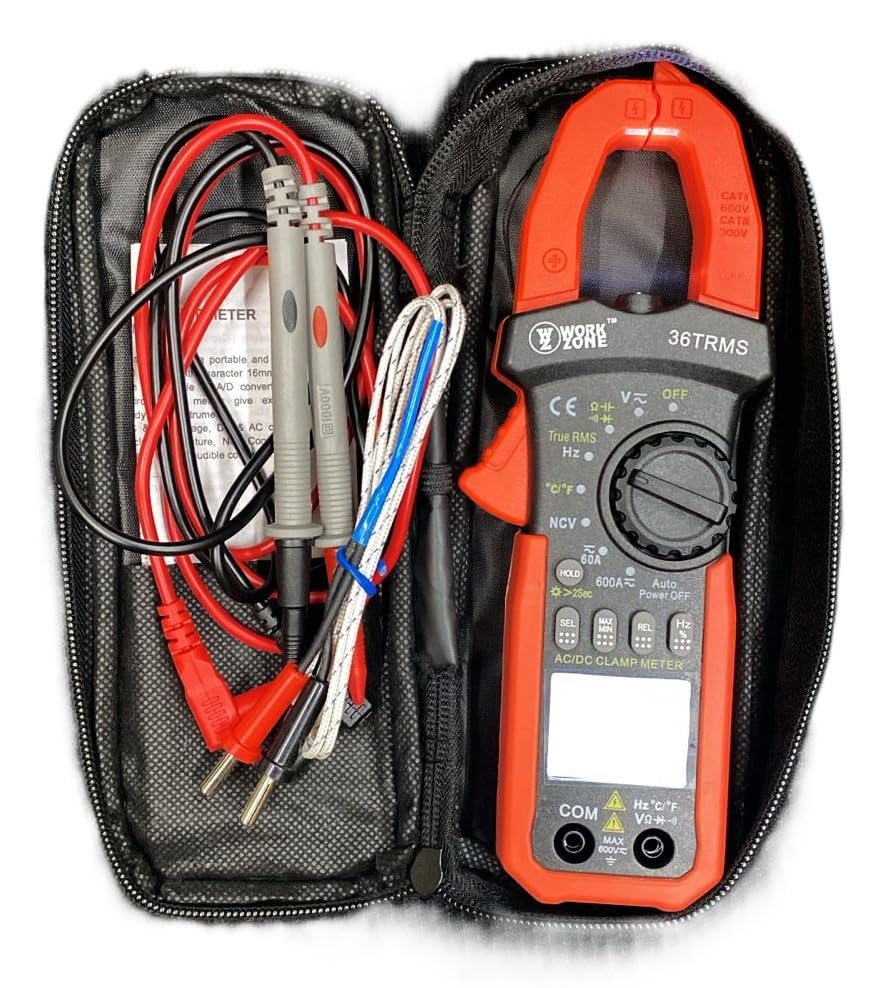
The Skyking WORKZONE 36TRMS Digital Clamp Meter, test leads, and temperature probe neatly organized within a black zippered carrying case. This illustrates how the product and its accessories are stored and transported.
4. המוצר נגמרview
The WORKZONE 36TRMS Digital Clamp ה-Meter מציע מגוון תכונות לבדיקות חשמליות מקיפות:
- 6000 counts digit LCD monitor with 16mm character height.
- Auto-range and auto power-off function (after 15 minutes of inactivity).
- Clamp opening size: 26mm for non-invasive current measurement.
- מודד DC Voltage (600mV~600V) and AC Voltage (6V~600V).
- Measures DC Current (60A~600A) and AC Current (True RMS) (60A~600A).
- Measures Resistance (600Ω~60MΩ) and Capacitance (6nF~60mF).
- Measures Frequency (9.999Hz~9.999MHz) and Duty Cycle (0.1%~99.9%).
- Temperature measurement: -20~1000°C / -4~1832°F.
- ללא מגע AC Voltage (NCV) detection for safety.
- Diode and audible continuity test functions.
- Data hold function to freeze readings.
- Backlight for easy reading in dark environments.
- Relative measurement (REL) function for zeroing readings.

A detailed close-up of the Skyking WORKZONE 36TRMS Digital Clamp Meter. The image highlights the rotary switch with various measurement functions, the LCD display showing '0.000', function buttons (HOLD, SEL, MAX/MIN, REL, Hz), and the input jacks at the bottom.
5. התקנה
5.1 התקנת סוללה
- The meter requires 2x 1.5V 'AAA' batteries.
- אתר את מכסה תא הסוללה בגב המונה.
- Open the cover, insert the batteries observing correct polarity (+ and - markings).
- סגור היטב את מכסה תא הסוללות.
5.2 הפעלה/כיבוי
- To power on the meter, rotate the rotary switch from the 'OFF' position to any desired measurement function.
- To power off, rotate the switch back to the 'OFF' position.
- The meter features an auto power-off function after approximately 15 minutes of inactivity to conserve battery life.
5.3 חיבור חוט בדיקה
- עבור כרךtage, resistance, capacitance, frequency, duty cycle, diode, and continuity measurements, insert the red test lead into the 'VΩHz°C' input jack.
- Insert the black test lead into the 'COM' input jack.
- ודא שחוטי הבדיקה מוכנסים במלואם ומחוברים היטב.
6. הוראות הפעלה
6.1 DC/AC כרךtagה מדידה
- Rotate the rotary switch to 'V~' for AC Voltage או 'V-' עבור DC Voltage.
- חבר את חוטי הבדיקה במקביל למעגל או לרכיב הנבדק.
- קרא את הכרךtagערך e בתצוגת ה-LCD.
6.2 מדידת זרם AC/DC (Clamp לֶסֶת)
- Rotate the rotary switch to '60A~' or '600A~' for AC Current, or '60A-' or '600A-' for DC Current.
- לחץ על clamp trigger to open the jaws and clamp סביב מוליך יחיד. ודא שהמוליך מרוכז בתוך הלסתות.
- קרא את הערך הנוכחי בצג ה-LCD.
6.3 מדידת התנגדות
- Rotate the rotary switch to 'Ω'.
- ודא שהמעגל או הרכיב מנותקים מאנרגיה לפני המדידה.
- חבר את חוטי הבדיקה על פני הרכיב המיועד למדידה.
- קרא את ערך ההתנגדות על גבי צג ה-LCD.
6.4 מדידת קיבול
- Rotate the rotary switch to 'F'.
- ודא שהקבל פרוק לחלוטין לפני הבדיקה כדי למנוע נזק למד.
- חבר את חוטי הבדיקה בין הדקי הקבל.
- קרא את ערך הקיבול בצג ה-LCD.
6.5 מדידת תדר/מחזור עבודה
- Rotate the rotary switch to 'Hz'.
- חבר את חוטי הבדיקה למקור האות.
- Press the 'Hz' button to toggle between Frequency (Hz) and Duty Cycle (%) display.
6.6 מדידת טמפרטורה
- Rotate the rotary switch to '°C/°F'.
- Connect the temperature probe to the input jacks.
- הנח את קצה הגשוש על האובייקט שאת הטמפרטורה שלו אתה רוצה למדוד.
- Press the '°C/°F' button to switch between Celsius and Fahrenheit units.
6.7 בדיקת דיודה
- Rotate the rotary switch to 'Diode/Continuity'.
- חבר את חוט הבדיקה האדום לאנודה ואת חוט הבדיקה השחור לקתודה של הדיודה.
- התצוגה תציג את עוצמת הקול קדימהtage drop. Reverse the leads; the display should show 'OL' for an open circuit.
6.8 מבחן המשכיות
- Rotate the rotary switch to 'Diode/Continuity'.
- חבר את חוטי הבדיקה לרוחב המעגל או הרכיב.
- An audible buzzer will sound if continuity is detected (typically resistance below approximately 50Ω).
6.9 ללא מגע AC Voltagאיתור e (NCV).
- Rotate the rotary switch to 'NCV'.
- Bring the NCV sensor (located at the top of the clamp meter) close to an AC voltagהמקור.
- The meter will emit an audible beep and the NCV indicator light will flash if AC voltage מזוהה.
6.10 פונקציית החזקת נתונים
- Press the 'HOLD' button to freeze the current reading on the display. Press again to release the hold.
- Long press the 'HOLD' button to activate the backlight for improved visibility in low-light conditions.
6.11 מדידה יחסית (REL)
- In a measurement mode, press the 'REL' button to zero the current reading. Subsequent measurements will be displayed relative to this zero point.
- Press the 'REL' button again to exit relative mode.
7. תחזוקה
7.1 ניקוי
- נגב את המונה גasinז עם רך, דamp בַּד.
- Do not use abrasive cleaners, solvents, or harsh chemicals, as these may damage the casing או תצוגה.
7.2 החלפת סוללה
- When the low battery indicator appears on the LCD, replace the batteries promptly to ensure accurate readings.
- בצע את שלבי התקנת הסוללה המפורטים בסעיף 5.1.
- השלך סוללות משומשות בהתאם לתקנות המקומיות.
7.3 אחסון
- When not in use for extended periods, store the meter in a cool, dry place.
- הימנעו מאור שמש ישיר, טמפרטורות קיצוניות ולחות גבוהה.
- It is recommended to remove batteries if storing for a very long time to prevent leakage.
8. פתרון תקלות
- אין תצוגה או תצוגה חלשה: Check battery installation. If the low battery indicator is on, replace the batteries.
- קריאות שגויות: Ensure the correct function is selected for the measurement. Verify test lead connections are secure and in the correct input jacks. For resistance or capacitance, ensure the circuit is de-energized. For current, ensure only a single conductor is clamped within the jaws.
- תצוגה "OL": This indicates an over-range condition or an open circuit. If measuring resistance, it means the resistance is too high or the circuit is open. If measuring voltage or current, the value exceeds the selected range; switch to a higher range if available.
- אין צפצוף המשכיות: The resistance of the circuit or component is too high, or there is an open circuit.
9. מפרטים
| פָּרָמֶטֶר | עֵרֶך |
|---|---|
| מותג | Skyking |
| מספר דגם | Workzone 36 TRMS |
| סוג מדידה | Cl דיגיטליamp מֶטֶר |
| לְהַצִיג | 6000 counts digit LCD |
| Clamp גודל פתיחה | 26 מ"מ |
| DC כרךtagטווח | 600mV ~ 600V |
| AC כרךtagטווח | 6V ~ 600V |
| טווח זרם DC | 60A ~ 600A |
| AC Current Range (True RMS) | 60A ~ 600A |
| טווח התנגדות | 600Ω ~ 60MΩ |
| טווח קיבול | 6nF ~ 60mF |
| טווח תדרים | 9.999Hz ~ 9.999MHz |
| מחזור חובה | 0.1% ~ 99.9% |
| טווח טמפרטורה | -20°C ~ 1000°C / -4°F ~ 1832°F |
| אינדיקציה בטווח יתר | "OL" |
| אינדיקציה של קוטביות שלילית | Automatic "-" display |
| חיווי סוללה חלשה | כֵּן |
| כיבוי אוטומטי | כ. 15 דקות |
| ספק כוח | 2 x 1.5V "AAA" batteries |
| טמפרטורת הפעלה | 0°C ~ 40°C (relative humidity <85%) |
| טמפרטורת אחסון | -10°C ~ 50°C (relative humidity <85%) |
| Guaranteed Precision Temp. | 23±5°C (relative humidity <70%) |
| מידות (H x W x D) | 207 x 75 x 37 מ"מ |
| מִשׁקָל | משוער. 280 גרם (כולל סוללה) |
| דירוג בטיחות | CAT II 600V or CAT III 300V |
10. אחריות ותמיכה
For warranty information or technical support regarding your Skyking WORKZONE 36TRMS Digital Clamp Meter, please contact Skyking Instruments directly. Refer to your purchase documentation or the manufacturer's official website for specific warranty terms, conditions, and contact details.