
מָבוֹא
This manual provides essential information for setting up, operating, and maintaining your TCL 32S5K 32-inch HD QLED Google Smart TV. Please read this manual thoroughly before using your television to ensure safe and optimal performance. Keep this manual for future reference.
מידע בטיחות
יש להקפיד תמיד על אמצעי זהירות בסיסיים בעת שימוש בטלוויזיה זו כדי להפחית את הסיכון לשריפה, התחשמלות ופציעה. אין לחשוף את הטלוויזיה לגשם או לחות. אין לפתוח את הטלוויזיה.asing; refer all servicing to qualified personnel. Ensure proper ventilation and avoid placing the TV near heat sources. Use only the power cord and accessories specified by the manufacturer.
תוכן החבילה
ודא שכל הפריטים נמצאים בחבילה:
- TCL 32S5K 32-inch HD QLED Google Smart TV
- שְׁלַט רָחוֹק
- כבל חשמל
- מעמד טלוויזיה (2 יחידות) וברגים
- מדריך להתחלה מהירה
- תעודת אחריות
הגדרה
התקנה פיזית
התקנת מעמד: Place the TV screen-down on a soft, flat surface. Attach the two stand pieces to the designated slots on the bottom of the TV using the provided screws. Ensure the stand is securely fastened.
הרכבה על הקיר: If wall-mounting, ensure you use a VESA-compatible wall mount (not included) and follow the wall mount manufacturer's instructions. Disconnect the power cord before mounting.
חיבור התקנים
Connect your external devices to the appropriate ports on the TV. Refer to the image below for port locations and types.

Figure 1: Rear and Side Connectivity Ports. This image illustrates the various input and output ports available on the TCL 32S5K Smart TV, including USB 2.0, LAN, Antenna/Cable In, Digital Audio Out (Optical), HDMI 1, HDMI 2, and AV In adapter.
- HDMI Ports (1, 2): חבר נגני Blu-ray, קונסולות משחקים, ממיר כבלים/לוויין או מכשירים אחרים התומכים ב-HDMI.
- יציאת USB 2.0: חבר התקני אחסון USB להפעלת מדיה.
- יציאת LAN: חבר כבל Ethernet לחיבור אינטרנט קווי.
- כניסת אנטנה/כבל: חבר אנטנה או אות טלוויזיה בכבלים.
- יציאת שמע דיגיטלית (אופטי): Connect to an external audio receiver or soundbar for digital audio.
- מתאם כניסת AV: Use the provided adapter to connect older devices with composite video and stereo audio outputs.
הפעלה ראשונית והגדרת Google TV
After connecting all necessary cables, plug the power cord into an electrical outlet. Press the power button on the remote control or on the TV. Follow the on-screen instructions to complete the initial setup, which includes selecting your language, connecting to a Wi-Fi network, and signing in to your Google account to access Google TV features.
פועל
פונקציות שלט רחוק
The remote control allows you to navigate the Google TV interface, adjust volume, change channels, access apps, and control playback. Familiarize yourself with the button layout for easy operation.
ממשק גוגל טיוי
Google TV organizes your favorite movies, shows, and live TV from across your apps and subscriptions. Use the remote to browse recommendations, search for content, and manage your watch list. Access the Google Play Store to download additional applications.
תכונות קישוריות
- Wi-Fi: Connects your TV to your home wireless network for internet access and streaming.
- בלוטות': Pair Bluetooth-enabled devices such as headphones or game controllers for a personalized experience.
- Googlecast (Chromecast built-in): Cast content from your compatible mobile devices or computer directly to your TV screen.
הגדרות תמונה וקול
Your TCL 32S5K TV features QLED technology, Full HD resolution, HDR10 support, and Dolby Audio for an enhanced viewing and listening experience. Adjust picture modes (e.g., Standard, Vivid, Movie) and sound modes (e.g., Standard, Music, Movie) through the TV settings menu to suit your preferences.

Figure 2: Image Quality Features. This image highlights the key display technologies of the TCL 32S5K Smart TV, including QLED for vibrant colors, FHD (Full High Definition) for clear resolution, and HDR10 for enhanced contrast and brightness.
תַחזוּקָה
ניקוי הטלוויזיה שלך
תמיד נתקו את הטלוויזיה מהחשמל לפני ניקוי. השתמשו במטלית רכה ויבשה כדי לנגב את המסך והמארז. במקרה של סימנים עקשניים, נגבו קלותampen the cloth with water or a mild, non-abrasive screen cleaner. Never spray cleaner directly onto the screen or allow liquids to enter the TV's openings.
עדכוני תוכנה
Your Google TV may receive automatic software updates. Ensure your TV is connected to the internet to receive these updates, which can improve performance and add new features. You can also manually check for updates in the TV's settings menu.
פתרון בעיות
אם נתקלת בבעיות עם הטלוויזיה שלך, עיין בפתרונות הנפוצים הבאים:
- אין כוח: בדוק אם כבל החשמל מחובר היטב גם לטלוויזיה וגם לשקע החשמל. נסה שקע אחר.
- אין תמונה/תמונה גרועה: Ensure all cables are correctly connected. Check the input source. Adjust picture settings. If using an antenna, check signal strength.
- אין צליל/צליל חלש: Check volume levels and mute settings. Ensure external audio devices are properly connected and selected as the audio output.
- השלט הרחוק לא עובד: החלף את הסוללות. ודא שאין חסימות בין השלט לחיישן ה-IR של הטלוויזיה.
- בעיות חיבור לרשת: הפעל מחדש את הנתב והמודם. התחבר מחדש לרשת ה-Wi-Fi בהגדרות הטלוויזיה. עבור חיבורים קוויים, ודא שכבל ה-Ethernet מחובר כראוי.
- Google TV Slow/Unresponsive: Restart the TV by unplugging it for a few minutes and plugging it back in. Clear cache for problematic apps in settings.
עבור בעיות מתמשכות, פנו לתמיכה של TCL webאתר או צור קשר עם שירות הלקוחות.
מפרטים
Below are the technical specifications for the TCL 32S5K Smart TV:
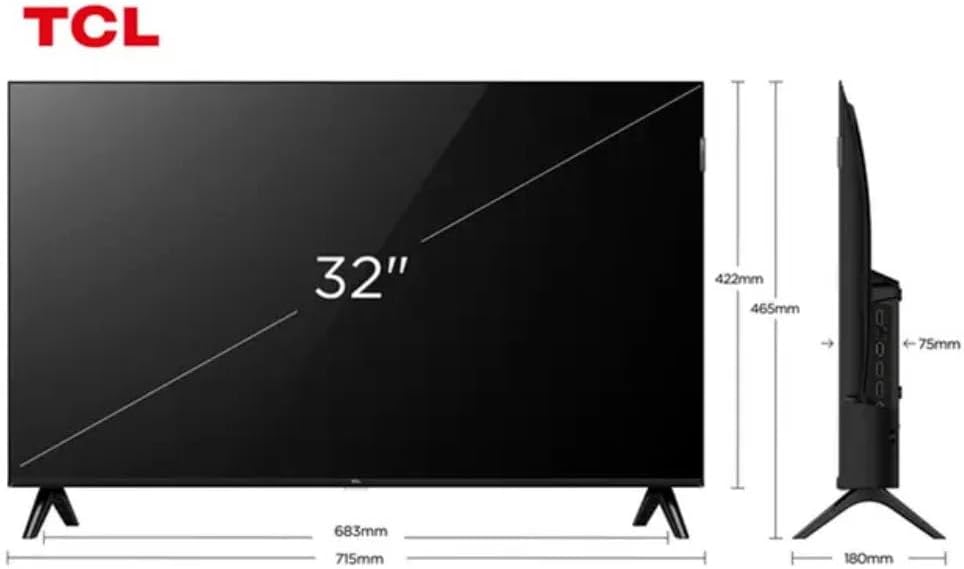
Figure 3: TV Dimensions. This image provides a detailed diagram of the TCL 32S5K Smart TV's physical dimensions, including screen size (32 inches), width (715mm), height (422mm without stand, 465mm with stand), and depth (75mm).
| תכונה | תֵאוּר |
|---|---|
| שם הדגם | 32S5K |
| גודל מסך | 32 אינץ' |
| טכנולוגיית תצוגה | QLED |
| הַחְלָטָה | 1080p (HD מלא) |
| קצב רענון | 60 הרץ |
| קישוריות | בלוטות', אתרנט, HDMI, USB, Wi-Fi |
| סך כל יציאות HDMI | 2 |
| תכונות מיוחדות | Integrated Speaker, Google TV, Googlecast Integrated, HDR10, Dolby Audio |
| מידות המוצר (D x W x H) | 7.6P x 71.6L x 42.3A centimeters (approx. 3 x 28.2 x 16.7 inches) |
| יַצרָן | TCL |
| ארץ מוצא | בְּרָזִיל |
אחריות ותמיכה
מידע על אחריות
The TCL 32S5K Smart TV comes with a אחריות יצרן לשנה. This warranty covers defects in materials and workmanship under normal use. Please retain your proof of purchase for warranty claims. For specific terms and conditions, refer to the warranty card included in your package or visit the official TCL webאֲתַר.
תמיכת לקוחות
If you require technical assistance, have questions about your product, or need to initiate a warranty claim, please contact TCL customer support. You can typically find contact information on the TCL official webבאתר או בתיעוד המוצר שלך.
Before contacting support, please have your TV model number (32S5K) and serial number ready, along with a detailed description of the issue.