
מָבוֹא
This manual provides detailed instructions for the installation, operation, and maintenance of your Gawfolk GF490D 49-inch Ultra-Wide Curved Gaming Monitor. Please read this manual thoroughly before using the product to ensure proper setup and optimal performance. Keep this manual for future reference.
מידע בטיחות
Always follow these basic safety precautions when using your monitor:
- אין להניח את הצג על עגלה, מעמד או שולחן לא יציבים.
- אל תחסום פתחי אוורור.
- Do not use near water or sources of heat.
- השתמשו רק בכבל החשמל ובמתאם המסופקים על ידי היצרן.
- הפנה כל טיפול לצוות שירות מוסמך.
- נתק את הצג מהחשמל במהלך סופות ברקים או כאשר אינו בשימוש למשך תקופות ארוכות.
תוכן החבילה
ודא שכל הרכיבים נמצאים בחבילה:
- Gawfolk GF490D Monitor
- Monitor Stand Components (Base, Neck)
- מתאם חשמל וכבל
- כבל HDMI
- כבל DisplayPort
- מדריך למשתמש
הגדרה
1. הרכבת המעמד
- הוציאו בזהירות את הצג מאריזתו, והניחו אותו על משטח רך.
- חבר את צוואר המעמד לפאנל הצג.
- אבטחו את בסיס המעמד לצוואר באמצעות הברגים המצורפים.

איור 1: Illustration of monitor ergonomic adjustments, including height adjustment (0-160mm), wall bracket compatibility (75x75mm), and tilt adjustment (-5° to 15°).
2. התחברות למכשירים
The monitor is equipped with multiple input ports for various devices:
- Power Connector (DC): Connect the power adapter to this port and then to a power outlet.
- יציאות HDMI 2.1 (x2): Connect to devices such as PCs, game consoles (PS5/Xbox Series X), or laptops using an HDMI cable.
- DisplayPort 1.4 Ports (x2): Connect to PCs or other compatible devices using a DisplayPort cable for high-resolution and high-refresh-rate signals.
- ממשק פלט שמע: חבר רמקולים חיצוניים או אוזניות.

איור 2: אֲחוֹרִי view of the monitor showing the available input ports: DC power connector, two DisplayPort 1.4 interfaces, two HDMI 2.1 interfaces, and an audio output interface.
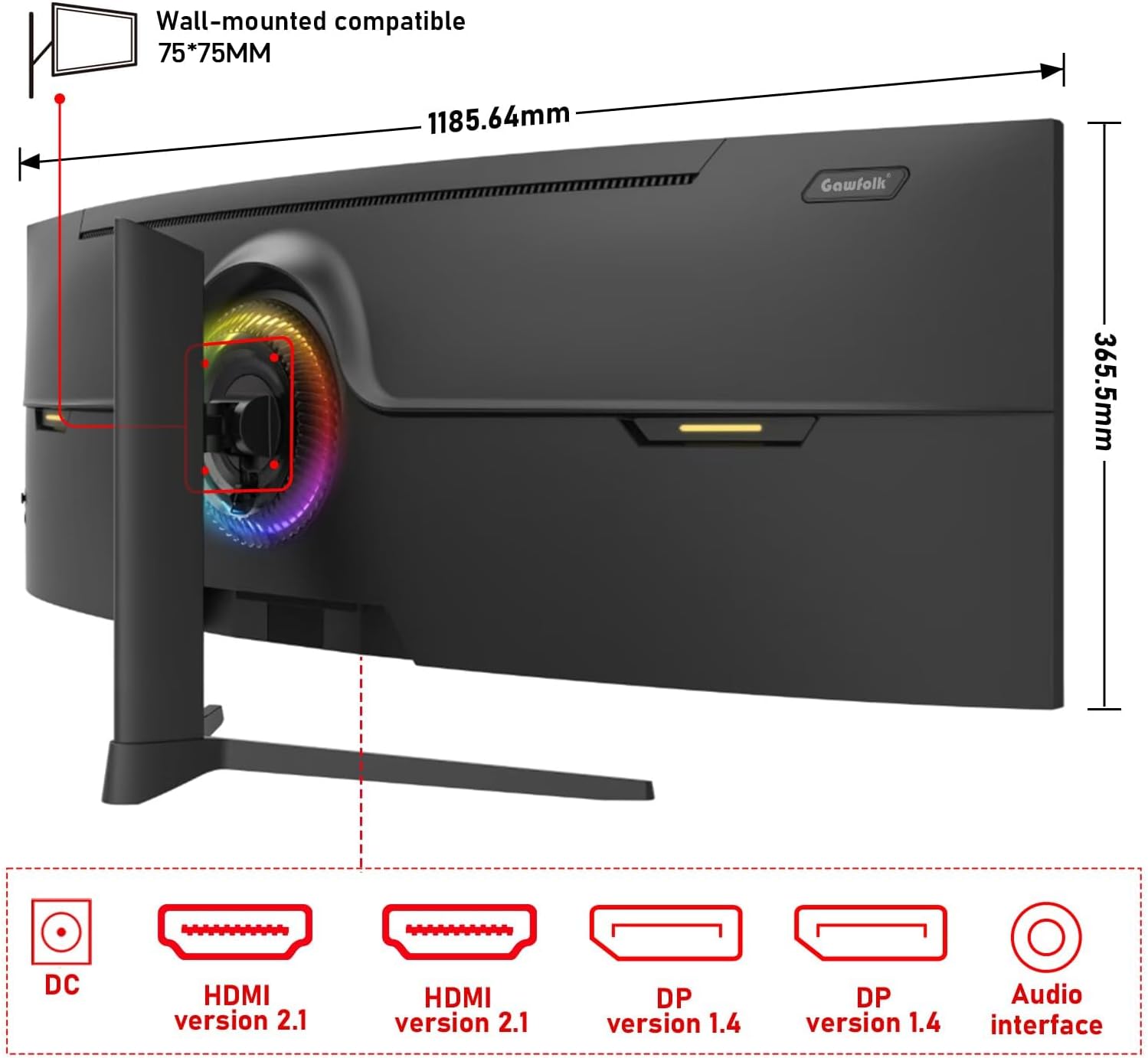
איור 3: אֲחוֹרִי view of the monitor illustrating its approximate dimensions (1185.64mm width, 365.5mm height without stand) and indicating 75x75mm VESA wall-mount compatibility.
3. התקנה על הקיר (אופציונלי)
The monitor supports a 75x75mm VESA wall mount. Ensure the wall mount can support the monitor's weight (7.9 kg) and follow the wall mount manufacturer's instructions for installation.
הוראות הפעלה
1. הפעלה / כיבוי
- Connect the power adapter to the monitor and a power outlet.
- Press the power button (location typically on the rear or bottom-right of the monitor) to turn the monitor on or off.
2. התאמת הגדרות תצוגה
The monitor features an On-Screen Display (OSD) menu for adjusting various settings. Use the joystick or buttons (refer to the physical monitor for exact controls) to navigate the OSD menu.
- מקור קלט: Select between HDMI 1, HDMI 2, DP 1, or DP 2.
- ניגוד בהירות: Adjust image luminance.
- הגדרות צבע: Modify color temperature, gamma, and color gamut (120% sRGB).
- קצב רענון: הצג תומך בקצב רענון של עד 240 הרץ. ודאו שהמכשיר והכבל המחוברים תומכים בקצב רענון זה לקבלת ביצועים מיטביים.
- סנכרון אדפטיבי (FreeSync): Enable this feature in the OSD and your graphics card settings to synchronize the monitor's refresh rate with your GPU's frame rate, reducing screen tearing and stuttering.
- מצב אור כחול נמוך: הפעל כדי להפחית מאמץ בעיניים במהלך שימוש ממושך.

איור 4: The 49-inch 32:9 ultra-wide display with DQHD (5120x1440) resolution, offering an expansive field of view compared to traditional 16:9 QHD (2560x1440) monitors.

איור 5: Visual comparison demonstrating the smoothness of a 240Hz refresh rate versus lower refresh rates (100Hz and 60Hz), highlighting reduced motion blur and stuttering.

איור 6: Illustration of Adaptive Sync (FreeSync) technology, showing how it eliminates screen tearing and input lag for a smoother gaming experience compared to when it is disabled.

איור 7: The 1500R curvature of the screen, designed to provide an immersive viewing experience by conforming to the human eye's natural field of vision.

איור 8: Display characteristics including 120% sRGB color gamut, 8-bit color depth (16.7 million colors), 3000:1 contrast ratio, and 330 cd/m² brightness, ensuring rich and accurate color reproduction.

איור 9: A visual comparison demonstrating the difference between a 1000:1 contrast ratio and the monitor's 3000:1 contrast ratio, showing enhanced detail in dark and bright areas.
3. התאמות פיזיות
מעמד הצג מאפשר התאמות ארגונומיות:
- התאמת גובה: כוונן את גובה המסך עד 160 מ"מ.
- לְהִסְתוֹבֵב: Rotate the monitor left or right by 15 degrees.
- הטיה: כוונן את זווית המסך מ-5- מעלות ל-20 מעלות.
4. תאורת RGB סביבתית
The monitor features customizable RGB ambient lighting on its rear. This can be configured through the OSD menu to match your preferences or gaming setup.
תַחזוּקָה
ניקוי הצג
- נתק תמיד את הצג לפני הניקוי.
- השתמש קלות במטלית רכה נטולת מוך דampנשטפו במים או בחומר ניקוי מסך עדין ולא שוחק.
- אין לרסס חומר ניקוי ישירות על המסך.
- Avoid using benzene, thinner, or any volatile solvents, as they may damage the monitor's surface.
פתרון בעיות
| בְּעָיָה | סיבה אפשרית | פִּתָרוֹן |
|---|---|---|
| אין תמונה על המסך | כבל חשמל מנותק, כבל וידאו מנותק, נבחר מקור קלט שגוי. | בדוק את חיבורי כבל החשמל והווידאו. בחר את מקור הקלט הנכון דרך תפריט המסך. ודא שהמחשב דולק. |
| התמונה מטושטשת או מעוותת | Incorrect resolution or refresh rate settings, faulty video cable. | Set the display resolution to 5120x1440 and refresh rate to 240Hz (or compatible with your GPU). Try a different video cable. |
| קריעת מסך או גמגום | Adaptive Sync (FreeSync) is not enabled or not supported by GPU/game. | Enable FreeSync in the monitor's OSD menu and your graphics card control panel. Ensure your GPU supports FreeSync. |
| פיקסל/ים מתים | פגם בייצור. | Refer to warranty policy. A small number of dead pixels may be considered within acceptable manufacturing tolerances. |
| אין אודיו | Audio cable disconnected, incorrect audio output selected on PC, monitor volume too low. | Check audio cable connection. Ensure the correct audio output device is selected in your computer's sound settings. Adjust monitor volume. |
מפרטים
| תכונה | פְּרָט |
|---|---|
| מספר דגם | GF490D |
| גודל מסך | 49 אינץ' |
| הַחְלָטָה | DQHD (5120x1440 Pixels) |
| יחס גובה-רוחב | 32:9 |
| עַקמוּמִיוּת | 1500R |
| קצב רענון | 240 הרץ |
| זמן תגובה | 1 אלפית שנייה |
| סוג פאנל | VA (LCD Display Technology) |
| בְּהִירוּת | 350 קנדלה (cd/m²) |
| יחס ניגודיות | 3000:1 |
| סולם צבעים | 120% sRGB |
| Viewזווית | 178 מעלות |
| סנכרון אדפטיבי | FreeSync |
| כניסות וידאו | 2x HDMI 2.1, 2x DisplayPort 1.4 |
| פלט אודיו | שקע אודיו 3.5mm |
| סוג הרכבה | Wall Mount (75x75mm VESA compatible) |
| מידות המוצר (D x W x H) | 5 x 118.5 x 43 ס"מ (עם מעמד) |
| משקל פריט | 7.9 קילוגרם |
| תכונות נוספות | Blue Light Filter, Curved, Frameless, RGB Ambient Lighting |
אחריות ותמיכה
The Gawfolk GF490D monitor comes with a שירות לאחר מכירה 12 חודשים (1 year manufacturer warranty). If you encounter any issues or have questions regarding your monitor, please contact Gawfolk customer support for assistance.
Manufacturer: Shenzhen Qinghong Zhuoyue Technology Co., Ltd.