
1. הקדמה
This manual provides detailed instructions for the safe and efficient use of your Surfans F20 Pro Android Hi-Res Music Player. Please read this manual thoroughly before operating the device and retain it for future reference.
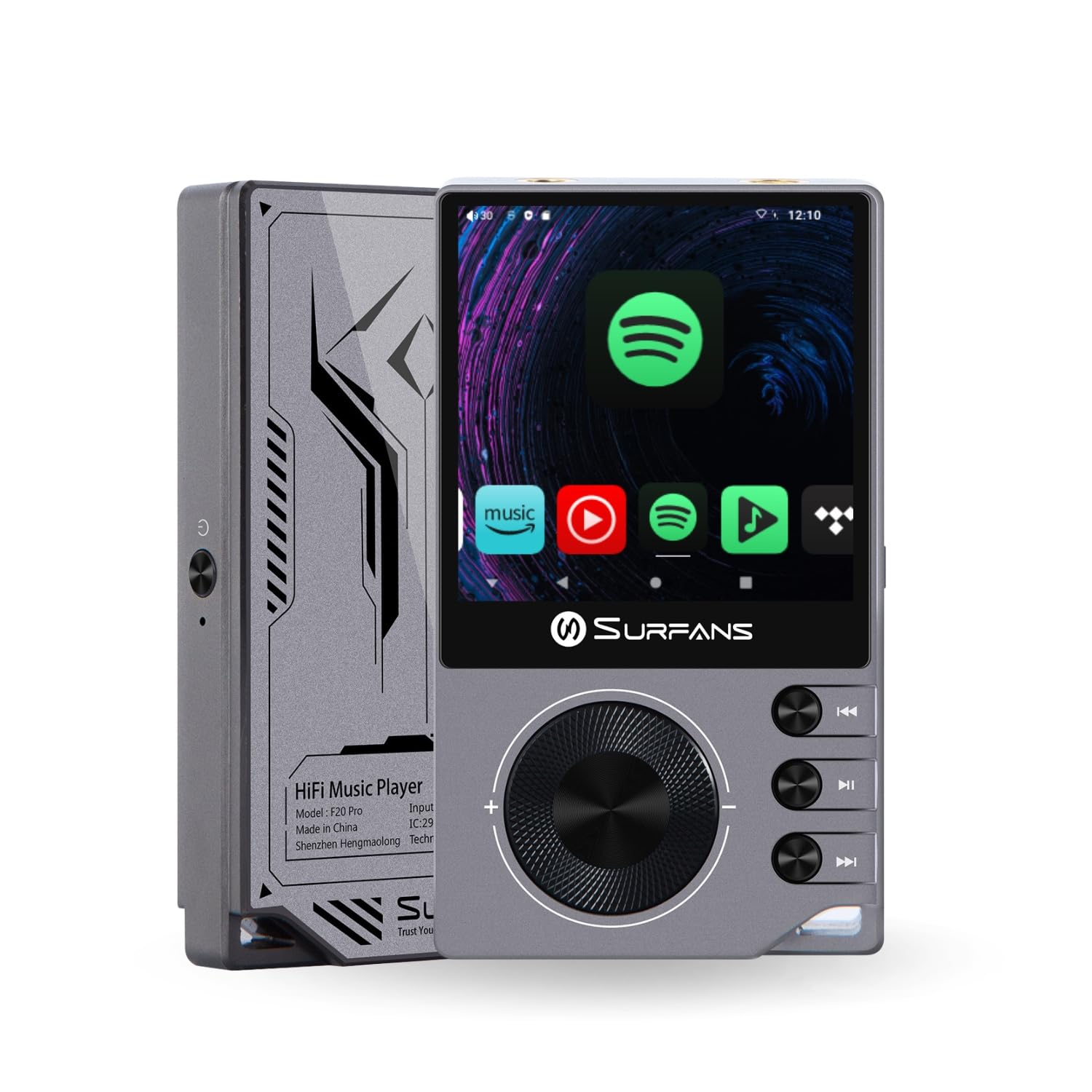
The Surfans F20 Pro Hi-Res Music Player, showcasinהעיצוב הקומפקטי וממשק המגע שלו.
2. תכולת החבילה
ודא שכל הפריטים נמצאים בחבילה:
- Surfans F20 Pro Hi-Res Music Player
- כבל USB מסוג C
- 32 GB MicroSD Memory Card (pre-installed or separate)
- תיק מגן
- מדריך למשתמש (מסמך זה)
3. המכשיר נגמרview
Familiarize yourself with the physical components and ports of your F20 Pro player.

מלפנים ומאחור view of the Surfans F20 Pro, highlighting its robust CNC metal chassis and button layout.
3.1. תכונות עיקריות
- Dual ESS9018Q2M DACs: For high-fidelity audio processing.
- Octa-Core Android 12 System: Enables streaming app compatibility and smooth operation.
- 3.5mm Single-Ended & 4.4mm Balanced Outputs: Versatile headphone connectivity.
- בלוטות' 5.0 עם LDAC: High-quality wireless audio transmission.
- Dual-Band Wi-Fi (2.4GHz & 5GHz): For stable internet connectivity.
- אחסון ניתן להרחבה: Supports up to 1TB via MicroSD card.
- מסך מגע בגודל 2.7 אינץ': ממשק משתמש אינטואיטיבי.
4. התקנה
4.1. טעינת ההתקן
Before first use, fully charge the F20 Pro. Connect the included USB Type-C cable to the device's charging port and a compatible USB power adapter (not included) or computer USB port. The charging indicator will show the charging status.
4.2. הכנסת כרטיס MicroSD
The F20 Pro supports MicroSD cards up to 1TB for expanded storage. Locate the MicroSD card slot on the side of the device. Gently insert the card until it clicks into place. To remove, push the card in again until it springs out.
4.3. הפעלה ראשונית
לחץ והחזק את לחצן ההפעלה עד שהמסך יידלק. פעל לפי ההנחיות שעל המסך כדי להשלים את ההגדרה הראשונית, כולל בחירת שפה וחיבור Wi-Fi.
4.4. התחברות ל-Wi-Fi
נווט אל הגדרות > רשת ואינטרנט > Wi-Fi. Select your desired network and enter the password if prompted. The F20 Pro supports both 2.4GHz and 5GHz Wi-Fi bands.

The Surfans F20 Pro demonstrating its dual-band Wi-Fi capability for fast and stable connections.
4.5. זיווג Bluetooth
To connect Bluetooth headphones or speakers:
- ודא שמכשיר ה-Bluetooth שלך נמצא במצב צימוד.
- On the F20 Pro, go to הגדרות > מכשירים מחוברים > התאמת מכשיר חדש.
- Select your device from the list and confirm pairing.

An illustration of the Bluetooth 5.0 chip, indicating support for high-resolution wireless audio codecs like LDAC.
5. הפעלת ההתקן
5.1. ניווט בסיסי
The F20 Pro features a 2.7-inch touchscreen for navigation. Swipe to scroll, tap to select, and use the physical buttons for quick controls:
- לחצן הפעלה: Power on/off, screen on/off.
- גלגל נפח: כוונון עוצמת פלט השמע.
- לחצני בקרת השמעה: הפעלה/השהיה, רצועה הבאה, רצועה קודמת.
5.2. השמעת מוזיקה
The F20 Pro supports various audio formats including DSD512, 192kHz/24bit, FLAC, WAV, WMA, M4A, MP3, MP2, and AAC.
5.2.1. מקומי Files
העברת מוזיקה files to the device's internal storage or MicroSD card via USB connection to a computer. Use the pre-installed music player application to browse and play your library.
5.2.2. יישומי סטרימינג
The Android 12 operating system allows installation of streaming apps like Spotify, Apple Music, Tidal, or YouTube. Connect to Wi-Fi and download apps from the Google Play Store or other compatible sources.

The Surfans F20 Pro's screen showing various streaming application icons, demonstrating its Android capabilities.
5.3. Headphone Connections
The device offers both single-ended and balanced audio outputs.
- יציאה חד-צדדית של 3.5 מ"מ: Standard headphone jack (125mW/32Ω).
- פלט מאוזן 4.4 מ"מ: For enhanced audio performance with compatible headphones (500mW/32Ω).

תקריב view of the 3.5mm single-ended and 4.4mm balanced audio output ports on the Surfans F20 Pro.
6. תחזוקה
6.1. ניקיון
Use a soft, dry, lint-free cloth to clean the device. Avoid using abrasive cleaners or solvents, which may damage the surface.
6.2. עדכוני תוכנה
Periodically check for software updates to ensure optimal performance and access to new features. Updates can typically be found in הגדרות > מערכת > עדכון מערכת.
6.3. טיפול בסוללה
כדי להאריך את חיי הסוללה, הימנעו מפריקה מלאה של המכשיר לעתים קרובות. אחסנו את המכשיר במקום קריר ויבש כאשר אינו בשימוש למשך תקופות ממושכות.

פנימית view of battery cells, representing the long-lasting battery capacity of the F20 Pro.
7. פתרון תקלות
If you encounter issues with your F20 Pro, refer to the following common problems and solutions:
| בְּעָיָה | סיבה אפשרית | פִּתָרוֹן |
|---|---|---|
| המכשיר לא נדלק | סוללה חלשה; קריסת מערכת | Charge the device; Press and hold the power button for 10-15 seconds to force restart. |
| אין פלט קול | Volume too low; Incorrect output selected; Faulty headphones | Increase volume; Check headphone connection; Test with different headphones. |
| לא ניתן להתחבר ל-Wi-Fi | סיסמה שגויה; מחוץ לטווח; בעיית נתב | Verify password; Move closer to router; Restart router. |
| Slow performance/App crashes | יותר מדי אפליקציות פועלות; שטח אחסון נמוך; תוכנה מיושנת | Close background apps; Free up storage; Check for system updates. |
8. מפרטים
Detailed technical specifications for the Surfans F20 Pro:
| תכונה | פְּרָט |
|---|---|
| מותג | סרפנים |
| שם הדגם | F20 PRO |
| שבבי DAC | Dual ESS9018Q2M |
| אופ-Amps | Dual OPA1612 |
| מַעֲרֶכֶת הַפעָלָה | אנדרואיד 12 |
| אַיִל | 3GB |
| אחסון פנימי | 32GB |
| אחסון ניתן להרחבה | עד 1TB באמצעות כרטיס MicroSD |
| גודל מסך | 2.73 אינץ' |
| קישוריות | Aux, Bluetooth 5.0 (LDAC), USB Type-C, Wi-Fi (2.4GHz & 5GHz) |
| יציאות שמע | 3.5mm Single-Ended (125mW/32Ω), 4.4mm Balanced (500mW/32Ω) |
| פורמטי שמע נתמכים | DSD512, 192kHz/24bit, FLAC, WAV, WMA, M4A, MP3, MP2, AAC |
| צֶבַע | אָפוֹר |

An illustration of the dual ESS9018K2M DAC chips, central to the F20 Pro's high-resolution audio capabilities.
9. מידע על אחריות
The Surfans F20 Pro comes with a אחריות לשנה ממועד הרכישה. אחריות זו מכסה פגמי ייצור וביצוע תחת שימוש רגיל. היא אינה מכסה נזק שנגרם כתוצאה משימוש לרעה, תאונות, שינויים לא מורשים או בלאי רגיל. אנא שמור את הוכחת הרכישה שלך לצורך תביעות אחריות.
10. תמיכת לקוחות
For further assistance, technical support, or warranty inquiries, please contact Surfans customer service through the official website or your retailer. You may also find additional resources and FAQs online.