
1. הקדמה
The AJAZZ AKP03 Macro Keypad Stream Controller is a versatile device designed to enhance productivity and streamline workflows for gamers, streamers, and professionals. Featuring six programmable keys with LCD displays, three physical knobs, and three toggle switches, it offers extensive customization options for various tasks.
This manual provides detailed instructions for setting up, operating, and maintaining your AKP03 device, ensuring optimal performance and user experience.
2. תכונות מוצר
- Six Programmable Macro Keys: Customizable LCD displays for single or continuous actions.
- Three Physical Knobs: For precise control over various functions.
- Three Toggle Switches: Additional control options.
- פעולה בלחיצה אחת: Instant execution of macro commands, text input, application launches, and media control.
- Intuitive Driver Software: Drag-and-drop functionality for easy key assignment and property configuration.
- תאימות רחבה: Seamless integration with platforms like Streamlabs, Twitch, YouTube, and various software applications on Windows and Mac.
- Removable 40° Stand: Provides an ergonomic viewing angle and stable placement.

איור 2.1: מעלview of the AJAZZ AKP03 Macro Keypad, highlighting its programmable buttons, toggle switches, and scroll wheels.
3. תכולת החבילה
ודא שכל הפריטים נמצאים בחבילה שלך:
- AJAZZ AKP03 Macro Keypad Stream Controller
- כבל USB-C ל-USB-A
- Removable 40° Stand
- מדריך למשתמש (מסמך זה)
4. התקנה
4.1 חיבור פיזי
- Attach the removable 40° stand to the bottom of the AKP03 for an ergonomic angle, if desired.
- Connect the provided USB-C cable to the USB-C port on the AKP03.
- Connect the USB-A end of the cable to an available USB port on your computer (PC or Mac).
- המכשיר יידלק אוטומטית.

Figure 4.1: Attaching the removable 40° stand to the AKP03.
4.2 התקנת תוכנה
To unlock the full customization capabilities of your AKP03, you must install the dedicated driver software.
- פתח את שלך web browser and navigate to the official AJAZZ webאֲתַר: www.a-jazz.com.
- Locate the 'Driver Download' section.
- חפש 'AKP03' or browse for the corresponding driver for your model.
- Download the driver software compatible with your operating system (Windows or macOS).
- הפעל את תוכנית ההתקנה ופעל לפי ההוראות שעל המסך כדי להשלים את ההתקנה.
- הפעל מחדש את המחשב אם תתבקש.
Video 4.1: Demonstrates the software installation process and initial setup for the AJAZZ Macro Keypad.
5. הוראות הפעלה
5.1 Customizing Keys and Knobs
The AKP03's driver software provides a user-friendly interface for customization:
- Launch the 'Stream Dock AJAZZ' software from your desktop or applications folder.
- The software will display a visual representation of your AKP03.
- To assign an action, drag and drop a desired function (e.g., launch application, media control, macro command) from the software's library onto one of the six programmable keys.
- For knobs, select the knob in the software and assign functions such as volume control, scrolling, or zooming.
- You can configure properties for each assigned action, including specific file שבילים, web URLs, or macro sequences.
- The LCD displays on the keys will update to show the assigned icon or text.
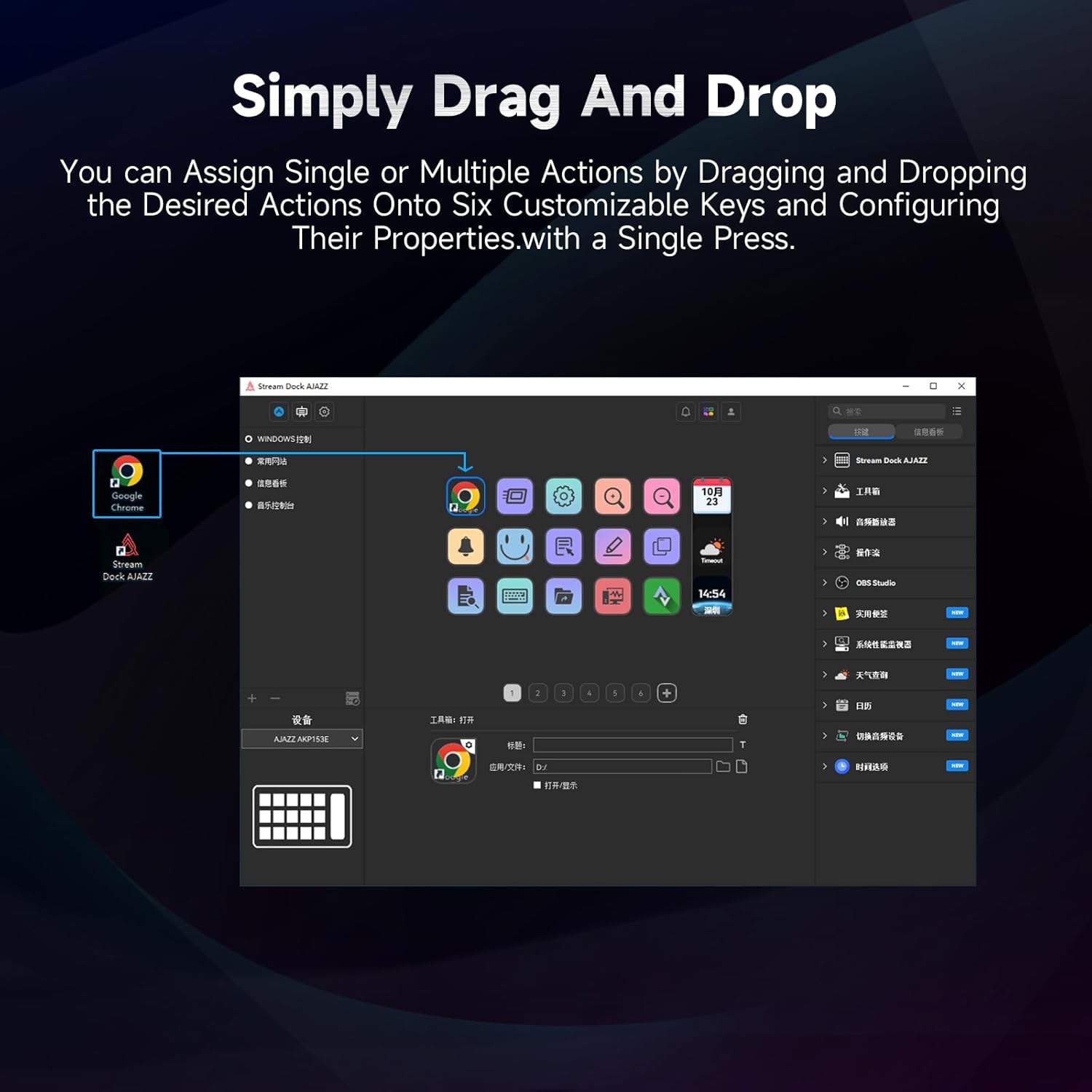
Figure 5.1: Customizing keys using the drag-and-drop interface in the AJAZZ software.
Video 5.1: Demonstration of assigning actions to keys for launching web pages and software with a single click.
5.2 Using Profiles and Pages
The software supports multiple profiles and pages, allowing you to switch between different sets of key assignments for various applications or tasks.
- צור מקצוען חדשfiles for specific games, editing software, or streaming setups.
- בתוך כל מקצועןfile, you can create multiple pages of key assignments, accessible by navigating through the device's buttons or software interface.
- The AKP03 automatically switches to the relevant profile when a linked application is in focus.
Video 5.2: Illustrates the multi-functional capabilities and profile switching of the AKP03 for various tasks.
6. תחזוקה
To ensure the longevity and optimal performance of your AJAZZ AKP03, follow these maintenance guidelines:
- ניקוי: Use a soft, dry cloth to wipe the surface of the device. Avoid abrasive cleaners or solvents.
- אִחסוּן: יש לאחסן את המכשיר במקום קריר ויבש, הרחק מאור שמש ישיר וטמפרטורות קיצוניות.
- טיפול בכבלים: הימנעו מכיפוף או פיתול יתר על המידה של כבל ה-USB כדי למנוע נזק.
- עדכוני תוכנה: Regularly check the AJAZZ website for software and firmware updates to ensure compatibility and access to new features.
7. פתרון תקלות
If you encounter issues with your AKP03, refer to the following common troubleshooting steps:
- התקן לא מזוהה:
- Ensure the USB cable is securely connected to both the AKP03 and your computer.
- נסה לחבר ליציאת USB אחרת.
- הפעל מחדש את המחשב.
- Verify that the driver software is correctly installed and up to date.
- מקשים לא מגיבים:
- Check the software to ensure keys are properly assigned and the correct profile הוא פעיל.
- Ensure the driver software is running in the background.
- בעיות תוכנה:
- התקן מחדש את תוכנת הדרייבר.
- Check for software updates on the AJAZZ webאֲתַר.
8. מפרטים
| תכונה | פְּרָט |
|---|---|
| מותג | AJAZ |
| שם הדגם | AKP03 |
| מכשירים תואמים | מחשב, מחשב נייד |
| סוג בקר | מִקלֶדֶת |
| טכנולוגיית קישוריות | USB-C |
| כמות הכפתורים | 6 Programmable Keys (with LCD displays), 3 Physical Knobs, 3 Toggle Switches |
| משקל פריט | 0.32 קילוגרם |
| מידות פריט (L x W x H) | 5 x 3 x 2 אינץ' |
| מקור כוח | חשמלי עם כבלים |
9. אחריות ותמיכה
9.1 מידע אחריות
The AJAZZ AKP03 Macro Keypad Stream Controller comes with a אחריות מוגבלת ל-1 שנים מתאריך הרכישה. אחריות זו מכסה פגמי ייצור ותקלות בשימוש רגיל. היא אינה מכסה נזק שנגרם כתוצאה משימוש לרעה, תאונות, שינויים לא מורשים או התקנה לא נכונה.
אנא שמור את הוכחת הרכישה שלך עבור תביעות אחריות.
9.2 תמיכת לקוחות
For technical assistance, troubleshooting, or warranty inquiries, please contact AJAZZ customer support:
- Webאֲתַר: www.a-jazz.com (Refer to the 'Support' or 'Contact Us' section)
- אֶלֶקטרוֹנִי: [Insert Customer Support Email, if available]
- טֵלֵפוֹן: [Insert Customer Support Phone Number, if available]
צוות התמיכה שלנו זמין לסייע לך בכל שאלה או חשש בנוגע למוצר שלך.