
מָבוֹא
The ASUS RT-BE58 Go is a dual-band WiFi 7 portable travel router designed for versatile connectivity. It offers high-speed wireless performance, advanced security features, and multiple operating modes suitable for various environments, including travel, home, and office use. This manual provides instructions for setting up, operating, and maintaining your device.

Image: The ASUS RT-BE58 Go Portable Travel Router, a compact white device with foldable antennas, shown in a typical product view.
מה יש בקופסה
ודא שכל הפריטים נמצאים בחבילה:
- RT-BE58 Go Travel router
- 1M RJ-45 Cable
- מתאם מתח
- מדריך להתחלה מהירה
- תעודת אחריות
תכונות המוצר
- Next-Gen WiFi 7 Speeds: Experience blazing-fast dual-band WiFi 7 speeds of up to 3600 Mbps with Multi-Link Operation (MLO) and 4K-QAM for low-latency connections.
- אבטחה משופרת: Protect sensitive data with comprehensive VPN features and commercial-grade security. Create a private hotspot over public WiFi (WISP mode) for privacy.
- יכולת נקודה חמה ניידת: Transform your smartphone or mobile dongle into a powerful, shareable network using 4G LTE and 5G mobile tethering.
- אספקת חשמל USB-C: Power the router anywhere with universal USB-C Power Delivery 18W, using common chargers.
- AiMesh Technology: Create a reliable and extendable AiMesh network for seamless, whole-home coverage with rich security and networking features.
- ניהול קל: Set up the router in minutes with a simple 3-step process and manage it via the ASUS Router mobile app. Use Guest Network Pro for functional subnetworks or guest portals.
- יציאות קישוריות: Includes 1x 1G LAN port, 1x 2.5G WAN port, and 1x USB 3.0 port.
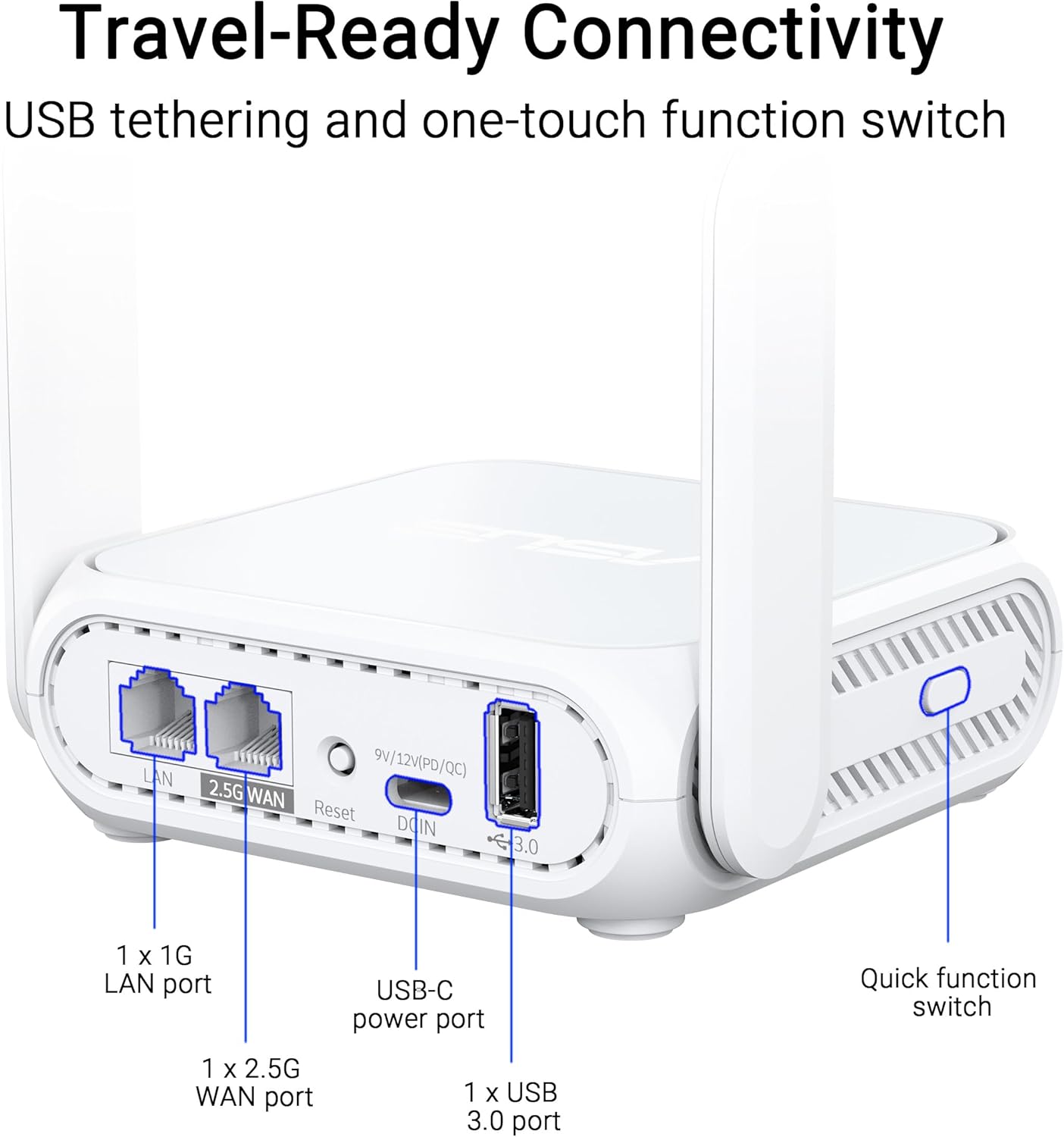
תמונה: תקריב view of the ASUS RT-BE58 Go router's rear panel, showing the 1G LAN port, 2.5G WAN port, USB-C power port, USB 3.0 port, and the quick function switch.
הגדרה
שלבי הגדרה ראשוניים:
- חבר חשמל: Plug the provided power adapter into the USB-C power port on the router and then into a power outlet.
- התחברות למקור האינטרנט:
- For wired internet: Connect an Ethernet cable from your modem or existing network to the 2.5G WAN port on the RT-BE58 Go.
- For public WiFi (WISP mode): Power on the router. You will configure WISP mode later via the app or web מִמְשָׁק.
- For mobile tethering: Connect your smartphone or mobile dongle to the USB 3.0 port.
- התחבר לנתב:
- אַלחוּט: חפש the default Wi-Fi network name (SSID) printed on the bottom of the router and connect using the default password.
- קווית: Connect a device (e.g., laptop) to the 1G LAN port using an Ethernet cable.
- ממשק הגדרת גישה: פתח א web דפדפן ונווט אל http://router.asus.com or download the ASUS Router mobile app. Follow the on-screen instructions for initial configuration, including setting up your Wi-Fi name and password.
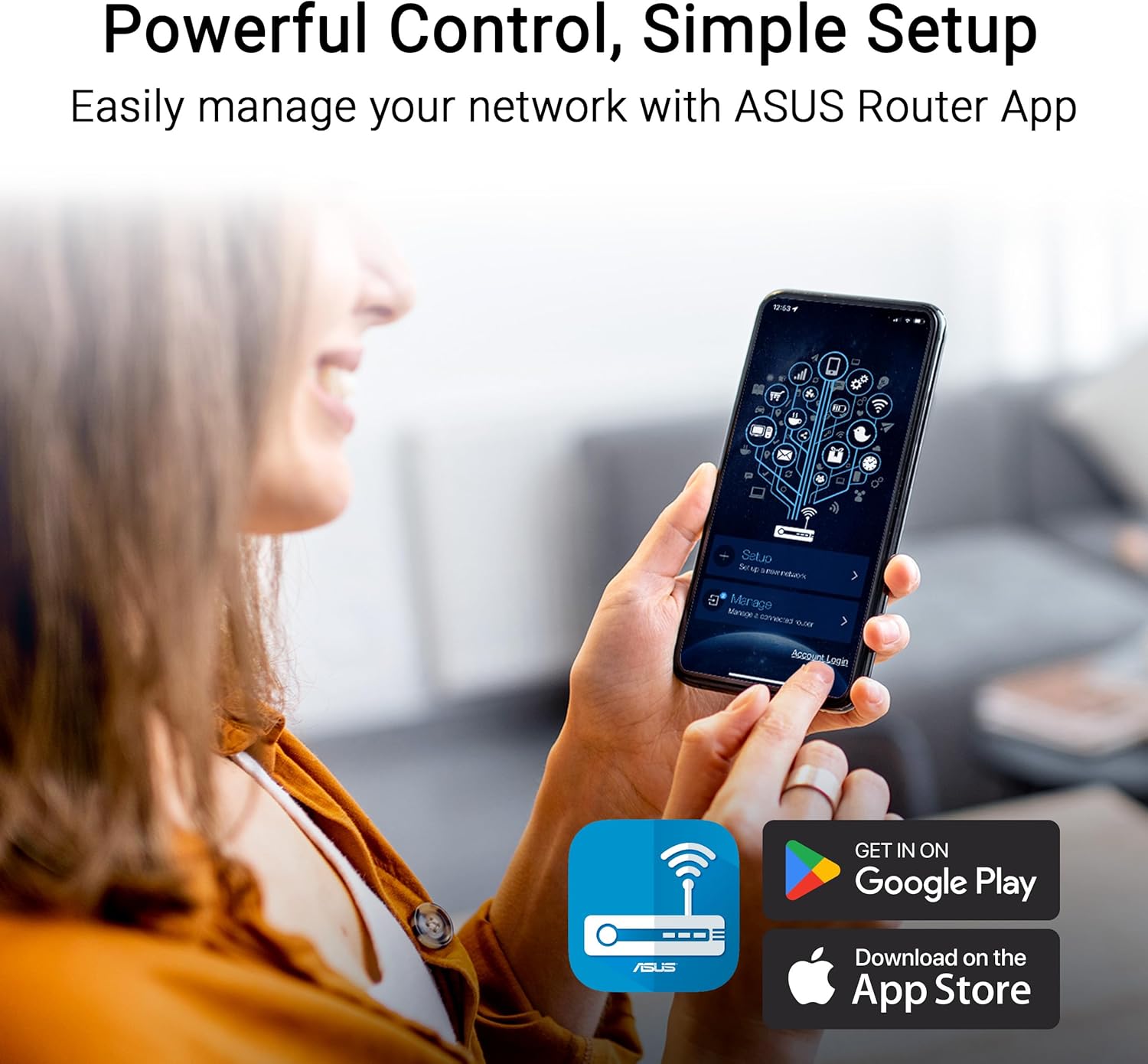
Image: A user interacting with the ASUS Router mobile app on a smartphone, demonstrating the ease of network management and setup.
מצבי הפעלה
The RT-BE58 Go supports multiple operating modes to suit different network requirements:
- מצב נתב אלחוטי: The standard mode where the device acts as your primary Wi-Fi router, connecting to an internet source (modem) and broadcasting a Wi-Fi network.
- AiMesh Node Mode: Integrates into an existing ASUS AiMesh system to extend Wi-Fi coverage.
- מצב מאריך טווח: מרחיב את הכיסוי של רשת Wi-Fi קיימת.
- מצב נקודת גישה (AP): Connects to a wired network and broadcasts a Wi-Fi signal, converting a wired network into a wireless one.
- Media Bridge Mode: Allows wired devices to connect to a Wi-Fi network.
- מצב חוזר: Repeats an existing Wi-Fi signal to extend its range.
- Public WiFi (WISP) Mode: Connects to a public Wi-Fi network (e.g., hotel, cafe) and creates a private, secure Wi-Fi network for your devices. This mode is ideal for travel security.

Image: A woman serving coffee to a customer using a laptop, illustrating a scenario where Public WiFi (WISP) mode can be used for secure internet access in a public setting.
ניהול רשת ואבטחה
The ASUS RT-BE58 Go provides robust tools for managing your network and ensuring security:
- אפליקציית הנתב של ASUS: Manage all router settings, monitor network traffic, and control connected devices from your smartphone.
- רשת אורחים מקצועית: Create separate subnetworks for guests or IoT devices. This isolates these devices from your main network for enhanced security and control.
- תמיכת VPN: The router includes comprehensive VPN features, allowing you to establish secure connections. It supports various VPN protocols and can be configured as a VPN client or server.
- AiProtection: Commercial-grade network security features to protect against online threats.

Image: A screenshot of the ASUS Router app interface showing options for Guest Network Pro, VPN, and other security settings, with various VPN service logos (NordVPN, Surfshark, CyberGhost VPN) displayed.
הגדרת AiMesh
The RT-BE58 Go can be integrated into an ASUS AiMesh system to create a seamless whole-home Wi-Fi network. This allows you to extend your network coverage and eliminate Wi-Fi dead zones.
Steps to Add as an AiMesh Node:
- Ensure your existing ASUS router supports AiMesh and is running the latest firmware.
- Place the RT-BE58 Go within range of your AiMesh router.
- Power on the RT-BE58 Go.
- Access your main AiMesh router's web ממשק או אפליקציית הנתב של ASUS.
- Navigate to the AiMesh section and select "Add AiMesh Node."
- The system will search for available AiMesh nodes. Select the RT-BE58 Go when it appears and follow the prompts to complete the setup.

Image: A diagram illustrating an ASUS AiMesh network, showing the RT-BE58 Go router extending Wi-Fi coverage from a main AiMesh router to cover a larger home area.
תַחזוּקָה
תחזוקה שוטפת מבטיחה ביצועים אופטימליים ואורך חיים של הנתב שלך:
- עדכוני קושחה: בדוק באופן קבוע אם קיימים עדכוני קושחה והתקן אותם באמצעות אפליקציית הנתב של ASUS או web ממשק. עדכוני קושחה כוללים לעתים קרובות שיפורי ביצועים, תיקוני אבטחה ותכונות חדשות.
- מיקום: Position the router in an open area, away from obstructions and sources of interference (e.g., microwaves, cordless phones). For optimal signal, avoid placing it inside cabinets or near large metal objects.
- ניקוי: שמרו על ניקיון הנתב וללא אבק. השתמשו במטלית רכה ויבשה לניגוב החלק החיצוני. אין להשתמש בחומרי ניקוי נוזליים או בתרסיסים.
- הפעלה מחדש: הפעל מחדש את הנתב מעת לעת (נתק מהחשמל למשך 10 שניות, ולאחר מכן חבר שוב) כדי לרענן את החיבור ולפתור בעיות זמניות.
פתרון בעיות
If you encounter issues with your RT-BE58 Go, try the following troubleshooting steps:
- אין חיבור אינטרנט:
- Check if your modem or internet source is working correctly.
- ודא שכל הכבלים מחוברים היטב.
- Restart both your modem and the RT-BE58 Go router.
- Check the WAN connection status in the ASUS Router app or web מִמְשָׁק.
- מהירות Wi-Fi איטית:
- ודא שהראוטר ממוקם בצורה אופטימלית, הרחק מהפרעות.
- בדוק אם קיימים עדכוני קושחה.
- צמצם את מספר המכשירים המחוברים או פעילויות עתירות רוחב פס.
- Try changing Wi-Fi channels in the router settings to avoid congestion.
- לא ניתן לגשת להגדרות הנתב:
- Ensure your device is connected to the router's Wi-Fi or LAN port.
- ודא שאתה משתמש בכתובת ה-IP הנכונה (http://router.asus.com) or the ASUS Router app.
- נקה את המטמון והקובצי Cookie של הדפדפן שלך, או נסה דפדפן אחר.
- אם שכחת את פרטי ההתחברות שלך, ייתכן שתצטרך לבצע איפוס להגדרות היצרן (עיין במדריך ההתחלה המהירה לקבלת הוראות).
- אות ה-Wi-Fi נופל לעתים קרובות:
- כוונן את מיקומי האנטנה.
- בדוק אם יש חסימות פיזיות.
- Consider adding an AiMesh node if coverage is insufficient.
מפרטים
| תכונה | פְּרָט |
|---|---|
| שם הדגם | RT-BE58 GO |
| תקן רשת | IEEE 802.11a/b/g, WiFi 4 (802.11n), WiFi 5 (802.11ac), WiFi 6 (802.11ax), WiFi 6E (802.11ax), WiFi 7 (802.11be), IPv4, IPv6 |
| קצב נתונים | WiFi 7 (2.4GHz): up to 688 Mbps; WiFi 7 (5GHz): up to 2882 Mbps (Total 3600 Mbps) |
| אַנטֶנָה | External foldable antennas |
| זֵכֶר | DDR4 RAM 1GB; Flash 256MB |
| נמלים | 1x 1G LAN, 1x 2.5G WAN, 1x USB 3.0, 1x USB-C Power Delivery |
| מצבי הפעלה | Wireless router, AiMesh Node, Range Extender, Access Point, Media Bridge, Repeater, Public Wifi Mode |
| מידות | 4.4 x 3.9 x 1.4 אינץ' |
| משקל פריט | 8 אונקיות |
| ספק כוח | אספקת חשמל USB-C 18W |
| תכונות מיוחדות | Dual-band WiFi 7, AiMesh, Advanced VPN, Guest Network Pro |
אחריות ותמיכה
אַחֲרָיוּת: The ASUS RT-BE58 Go comes with a 3-year manufacturer warranty. Please retain your proof of purchase for warranty claims.
תמיכה טכנית: For further assistance, troubleshooting, or detailed product information, please visit the official ASUS support website. You can find drivers, manuals, FAQs, and contact information for technical support there.
משאבים מקוונים:
- הרשמי של ASUS Webאֲתַר: https://www.asus.com
- תמיכת ASUS: https://www.asus.com/support/