1. נגמרview
The YIYEIE Digital Torque Adapter (Model Y0096) is a precision tool designed for accurate torque measurement in various applications, including automotive, mechanical, and pipeline work. It converts any standard ratchet or breaker bar into a digital torque wrench, offering advanced features such as smart alerts, multiple measurement units, preset torque values, and data storage capabilities. Crafted from durable Chrome Vanadium Steel, this adapter ensures reliability and precision for critical fastening tasks.
2. תכולת החבילה
החבילה כוללת את הפריטים הבאים:
- Digital Torque Adapter (Model Y0096)
- מתאם 1/2" עד 1/4"
- מתאם 1/2" עד 3/8"
- מדריך הוראות
- מארז אחסון
- סוללות (2x AAA)

Image: Digital Torque Adapter, storage case, adapters, and instruction manual.
3. תכונות מוצר
- Intuitive Display with Smart Alerts: Features a 1.4-inch LCD color screen with adjustable backlight (green, blue, red). The screen color and buzzer alerts change at 80%, 90%, and 100% of the preset torque value to prevent over-torquing.
- 30 Preset & Data Management: Allows users to set and switch between 30 different preset torque values. Stores up to 500 data sets for review and deletion, aiding in quality control.
- Easy Operation & Storage: Supports multiple functions (Peak, Track, Preset Modes) and 5 units (N·m, lb·ft, lb·in, kg·cm, kg·m). Includes a 3-minute auto-shutdown feature for power saving and comes with a portable carrying case.
- Precision & Robust Construction: Offers ±1% clockwise and ±2% counterclockwise accuracy. Constructed from Chrome Vanadium Steel for enhanced rust and corrosion resistance. Calibrated to ASME & DIN-ISO traceable standards with an included calibration certificate.
- Versatile Compatibility & Universal Fit: Equipped with a 1/2" drive head and includes 1/4" and 3/8" adapters for compatibility with various tools and torque wrenches.

Image: Key features of the Digital Torque Adapter.
4. התקנה
4.1. התקנת סוללה
The device requires two AAA batteries. Use the provided screwdriver to open the battery compartment on the back of the unit. Insert the batteries according to the polarity markings, then close the compartment and secure it with the screw.
4.2. הפעלה/כיבוי
- כדי להפעיל: הקש על C button. The device will beep, and the screen will display three colors in sequence before entering the work interface.
- To Manually Shut Down: לחץ והחזק את C לחצן למשך 3 שניות.
- כיבוי אוטומטי: The digital torque adapter will automatically shut down after 120 seconds (2 minutes) of inactivity when no force is applied.

תמונה: מעלview of the adapter's display and button functions.
4.3. החלפת יחידות
To switch between torque units (N·m, lb·ft, lb·in, kg·cm, kg·m), press the U כפתור. התצוגה תעבור בין היחידות הזמינות.

Image: Display showing selectable torque units.
4.4. Mode Switching (Peak/Track)
הקש על PT button to switch between Peak Mode and Track Mode:
- מצב שיא: Displays the maximum torque value applied. The value remains on the screen until reset or a new force is applied.
- מצב מעקב: Displays the torque value in real-time as force is applied.

Image: Comparison of Peak Mode and Track Mode displays.
4.5. Setting Torque Value (Preset)
The device can store up to 30 sets of common torque values. To set a preset value:
- הקש על Up or לְמַטָה arrow buttons to activate the torque setting data interface.
- השתמש ב- Up or לְמַטָה arrow buttons to increase or decrease the preset value.
- הקש על C button to confirm the torque value.
- To check previous or next preset values, use the M (הקודם) ו PT (next) buttons.

Image: Display illustrating preset torque values and data storage.
5. הוראות הפעלה
5.1. Attaching the Adapter
Attach the YIYEIE Digital Torque Adapter to your 1/2" drive ratchet or breaker bar. Use the included 1/4" or 3/8" adapters if your tool has a different drive size. Ensure the adapter is securely seated.
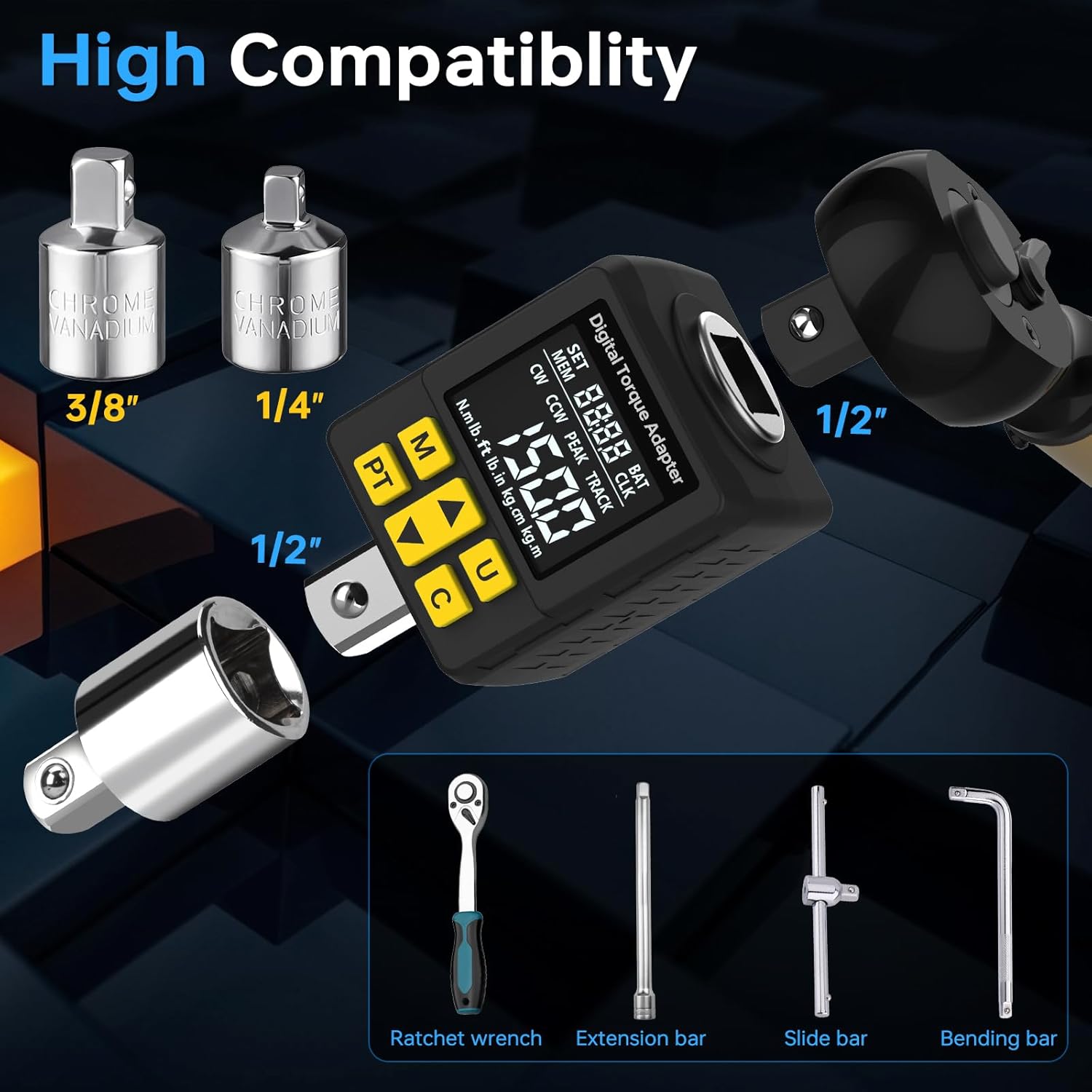
Image: Adapter connected to a ratchet, showing compatibility with different drive sizes and tools.
5.2. Applying Torque with Smart Alerts
Once the desired torque value is set (or a preset is selected) and the mode (Peak or Track) is chosen, begin applying force to your fastener. The LCD screen will provide visual and audible alerts:
- 80% Target Torque: Screen turns יָרוֹק with an intermittent beep.
- 90% Target Torque: Screen turns כְּחוֹל with a quicker beep.
- 100% Target Torque: Screen turns אָדוֹם with a constant beep.
These alerts help prevent over-torquing and ensure precise fastening.

Image: Visual and audible alerts during torque application.
5.3. Data Storage (Memory)
The adapter can store up to 500 sets of torque data. To save a torque value (typically in Peak Mode), press the M button. The stored data can be reviewed later by pressing and holding the M button to enter the data checking interface, then using the arrow buttons to navigate.
6. תחזוקה
- ניקוי: Clean the device with a dry, soft cloth. Do not use organic solvents (e.g., alcohol, paint thinner) or immerse in water.
- אִחסוּן: Store the adapter in its portable carrying case in a dry, cool place, away from high temperatures, humidity, or direct sunlight. Avoid placing near magnetic objects.
- כיול מחדש: Re-calibration is recommended once a year to maintain accuracy.
7. פתרון תקלות
- המכשיר לא מופעל: בדוק את התקנת הסוללה וודא שהסוללות אינן ריקות. החלף במידת הצורך.
- קריאות לא מדויקות: Ensure the device is properly calibrated. Avoid applying force to the LCD display screen.
- אין התראות: Verify that the preset torque value is correctly set and the device is in the appropriate mode (Peak or Track).
8. מפרטים
| תְכוּנָה | עֵרֶך |
|---|
| דֶגֶם | Y0096 |
| טווח מומנט | 7.5-150 Ft-lb / 10-203 Nm |
| דִיוּק | ±1% Clockwise, ±2% Counterclockwise |
| גודל כונן | 1/2-Inch (with 1/4" and 3/8" adapters) |
| חוֹמֶר | פלדת כרום ונדיום |
| לְהַצִיג | מסך LCD צבעוני בגודל 1.4 אינץ' |
| יחידות | N·m, lb·ft, lb·in, kg·cm, kg·m |
| Preset Groups | 30 |
| אחסון נתונים | עד 500 סטים |
| כיבוי אוטומטי | 3 minutes (120 seconds of inactivity) |
| מקור כוח | 2x AAA Alkaline Batteries (Included) |
| משקל פריט | 1.1 פאונד |
| מידות חבילה | 6.18 x 5.12 x 2.6 אינץ' |
9. אחריות ותמיכה
For warranty information, technical support, or inquiries, please refer to the contact details provided in your product packaging or the official YIYEIE website. Ensure to keep your purchase receipt for any warranty claims.
Contact information found in the manual (from video 2):
- נציג בריטניה: YH Consulting Limited, C/O YH Consulting Limited Office, 147 Centurion House, London Road, Staines-upon-Thames, Surrey, TW18 4AX. Tel: +44 07514 - 677868. Info: H2YHUK@gmail.com
- נציג האיחוד האירופי: Apex CE Specialists GmbH, Habichtweg 1 41468 Neuss Germany. Tel: +353212066339. Info: info@apex-ce.com