
1. הקדמה
This document serves as an instruction manual for the Generic HP Pavilion 22-3 and 23-r All-in-One (AIO) PC motherboard, specifically models 793298-601 and 793298-001. This motherboard features IPSHB-AT architecture, supports the 1150 UMA interface, and is designed for 4th generation DDR3 memory. It is intended as a replacement part for compatible HP AIO systems.
2. תאימות
The motherboard models 793298-601 and 793298-001 are specifically designed for the following All-in-One systems:
- HP Pavilion 22-3 AIO PC
- HP Pavilion 23-r AIO PC
This component supports the UMA 1150 interface and is designed to accommodate 4th generation DDR3 memory, providing enhanced speed and reliability for compatible systems.
3. התקנה והתקנה
Installation of a motherboard requires technical expertise. It is recommended that this procedure be performed by a qualified professional to ensure proper functionality and to prevent damage to the component or the system. If you are an experienced DIY enthusiast, follow these general guidelines:
- הֲכָנָה: Ensure the computer is powered off and disconnected from the main power supply. Discharge any static electricity from your body before handling components.
- גִישָׁה: Carefully open the AIO PC casing to access the internal components. Refer to your specific HP Pavilion 22-3 or 23-r service manual for detailed instructions on opening the chassis.
- Removal of Old Motherboard: Disconnect all cables (power, data, display, peripherals) from the old motherboard. Unscrew and carefully remove the old motherboard from the chassis.
- Installation of New Motherboard: Position the new motherboard (models 793298-601 or 793298-001) into the chassis, aligning it with the standoffs. Secure it with the appropriate screws.
- העברת רכיבים: Transfer the CPU, RAM modules, and any other necessary components from the old motherboard to the new one. Ensure proper seating and thermal paste application for the CPU.
- חיבור כבל: Reconnect all power, data, and peripheral cables to their respective ports on the new motherboard. Double-check all connections for security.
- בּוֹחֵן: Before fully reassembling the AIO PC, perform a preliminary power-on test to ensure the system boots correctly.
- הרכבה מחדש: Once functionality is confirmed, carefully reassemble the AIO PC casing.
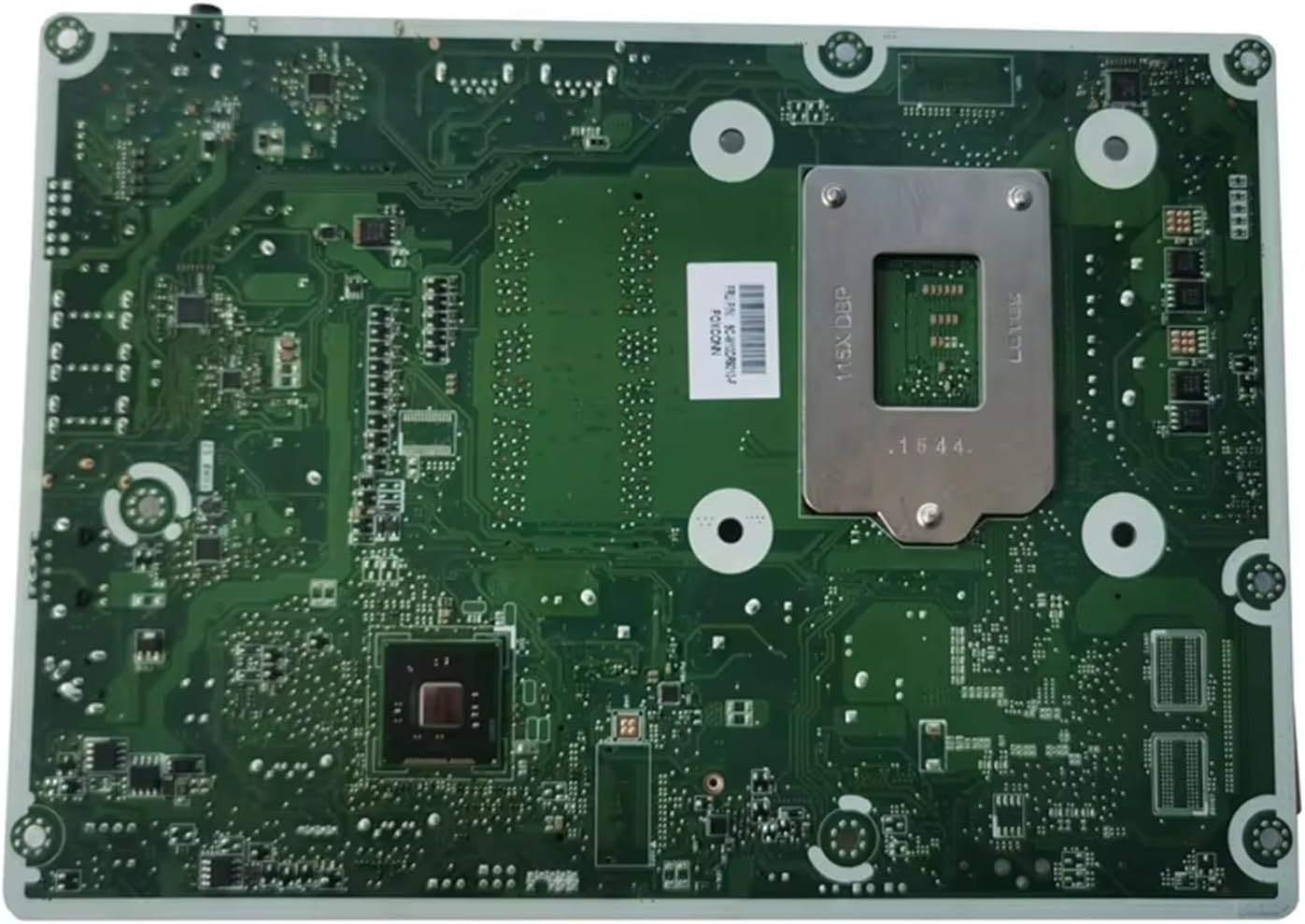
תמונה 1: למעלה view of the motherboard, highlighting various ports and component layouts. This side typically faces upwards in the AIO chassis.

תמונה 2: תחתית view of the motherboard, featuring the CPU socket and other surface-mounted components. This side typically rests against the chassis.

Image 3: Detail of the motherboard label, confirming the part numbers 793298-001 and 793298-601, along with other manufacturing details. The link PERRA0F0Z9V36F is visible on the label.

תמונה 4: תקריב view of the IPSHB-AT chipset area, showing the architecture designation and revision number.
4. הפעלה
Once installed, the motherboard functions as the central hub for your HP Pavilion 22-3 or 23-r AIO PC. Its operation is integrated with the system's other components (CPU, RAM, storage, etc.) and managed by the operating system. No direct user interaction with the motherboard itself is typically required during normal operation.
Ensure all drivers for the motherboard's integrated components (e.g., network, audio, chipset) are correctly installed for optimal performance. These drivers are usually provided by HP or can be downloaded from their official support website for your specific AIO model.
5. תחזוקה
Proper maintenance can extend the lifespan of your motherboard and overall system:
- הסרת אבק: Periodically clean the interior of your AIO PC to prevent dust buildup on the motherboard and other components. Use compressed air and ensure the system is powered off and unplugged.
- ניהול טמפרטורה: Ensure adequate airflow within the AIO chassis. Overheating can degrade component performance and lifespan.
- עדכוני BIOS/UEFI: Keep the system's BIOS/UEFI firmware updated. Check the official HP support website for your specific AIO model for available updates and instructions.
- עדכוני דרייבר: Regularly update drivers for integrated components to ensure stability and performance.
6. פתרון תקלות
If you encounter issues after motherboard installation or during system operation, consider the following troubleshooting steps:
- אין חשמל/אין אתחול:
- Verify all power connections to the motherboard and components.
- ודא שהמעבד וה-RAM ממוקמים כהלכה.
- Test with minimal components (CPU, one RAM stick) to isolate the issue.
- בעיות תצוגה:
- בדוק את חיבורי כבל התצוגה.
- Ensure integrated graphics drivers are installed or updated.
- Peripheral Malfunctions:
- Verify USB, audio, and network connections.
- התקן או עדכן מנהלי התקנים רלוונטיים.
- חוסר יציבות/קריסות מערכת:
- בדוק אם יש התחממות יתר.
- הפעל כלי אבחון זיכרון.
- Ensure BIOS/UEFI is up to date.
For persistent issues, consult the official HP support resources for your specific AIO model or seek assistance from a professional technician.
7. מפרטים
| תכונה | פְּרָט |
|---|---|
| מספרי דגם | 793298-601, 793298-001 |
| מערכות תואמות | HP Pavilion 22-3 AIO, HP Pavilion 23-r AIO |
| Motherboard Architecture | IPSHB-AT |
| שקע מעבד | BGA 1023 (UMA 1150 Interface) |
| סוג מעבד | Alpha (as per product data) |
| טכנולוגיית זיכרון RAM | DDR3 (4th Generation) |
| Maximum RAM Size | 1 GB (as per product data, typically higher for DDR3 motherboards, this might be an error in source data or refers to a specific configuration) |
| Available Memory Slots | 1 (as per product data) |
| מספר דגם המוצר | KKPKAPKDJ |
| יַצרָן | כְּלָלִי |
| מידות חבילה | 1 x 1 x 1 ס"מ |
| משקל פריט | 50 גרם |
| ארץ מוצא | סִין |
Note: The listed maximum RAM size of 1 GB and 1 available memory slot may be specific to certain configurations or an error in the provided data. Please refer to your HP Pavilion 22-3 or 23-r AIO PC's official documentation for exact memory specifications.
8. אחריות ותמיכה
Specific warranty details for this Generic replacement part are not provided in the product information. Please refer to the seller's return policy or contact the seller directly for warranty inquiries.
For technical support related to your HP Pavilion 22-3 or 23-r AIO PC, including driver downloads and system-specific troubleshooting, please visit the official HP support webאֲתַר.