הוראות בטיחות חשובות
בעת שימוש במכשירים חשמליים, יש להקפיד תמיד על אמצעי זהירות בסיסיים, כולל הדברים הבאים:
- קרא את כל ההוראות לפני הפעלת הטוסטר.
- אל תיגע במשטחים חמים. השתמש בידיות או ידיות.
- כדי להגן מפני התחשמלות, אין לטבול כבל, תקע או טוסטר במים או בנוזל אחר.
- יש צורך בהשגחה צמודה כאשר כל מכשיר נמצא בשימוש על ידי ילדים או בקרבתו.
- נתק מהשקע כאשר אינו בשימוש ולפני ניקוי. מניחים להתקרר לפני ששמים או מורידים חלקים.
- אין להפעיל כל מכשיר עם כבל או תקע פגומים, או לאחר שהמכשיר פגום או ניזוק בכל דרך שהיא.
- אל תתנו לכבל לתלות מעל קצה השולחן או השיש, או לגעת במשטחים חמים.
- אין להניח על או ליד מבער גז או חשמלי חם, או בתנור מחומם.
- אל תשתמש במכשיר לשימוש אחר מהשימוש המיועד.
- אין להכניס לטוסטר מזונות גדולים מדי, אריזות נייר אלומיניום או כלי אוכל, מכיוון שהם עלולים לגרום לשריפה או סכנת התחשמלות.
- שריפה עלולה להתרחש אם טוסטרים מכוסים או נוגעים בחומר דליק, לרבות וילונות, וילונות, קירות וכדומה, כאשר הם פועלים.
- אל תנסה לעקור מזון כאשר הטוסטר מחובר לחשמל.
- אל תפעל ללא השגחה.
המוצר נגמרview
The WHALLULTRA Touchscreen Toaster is a 2-slice appliance designed for efficient and versatile toasting. It features a modern touchscreen interface, durable stainless steel construction, wide slots to accommodate various bread types, and an integrated warming rack. This toaster offers multiple functions including Bagel, Defrost, Reheat, and Cancel, along with adjustable shade settings.
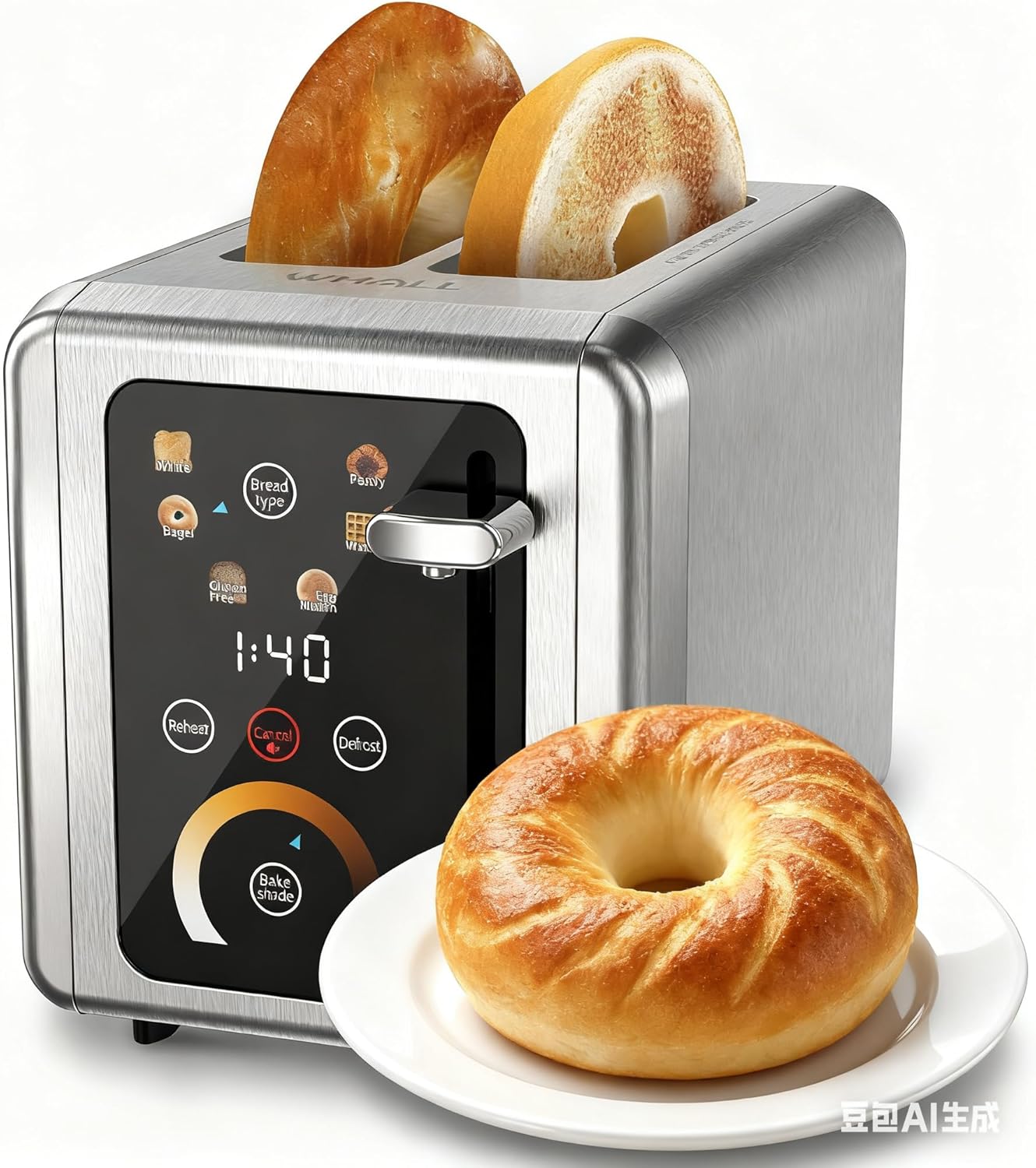
Image: The WHALLULTRA Touchscreen Toaster, showcasing its stainless steel finish and touchscreen control panel, with two toasted bagel halves emerging from the slots and a fresh bagel on a plate beside it.
הגדרה
- לִפְרוֹק: הוציאו בזהירות את הטוסטר ואת כל חומרי האריזה. שמרו את האריזה לאחסון או הובלה עתידיים.
- מיקום: הניחו את הטוסטר על משטח יציב, שטוח ועמיד בחום, הרחק מחומרים דליקים. ודאו אוורור נאות סביב הטוסטר.
- שימוש ראשון (שריפה): Before first use, operate the toaster without bread on the highest shade setting to burn off any manufacturing residues. A slight odor or smoke may be present; this is normal. Ensure the area is well-ventilated.
- חבר חשמל: חבר את כבל החשמל לשקע חשמל רגיל.
הוראות הפעלה
פעולה בסיסית
- שלב 1: הכנס פרוסות לחם לתוך חריצי הטוסטר.
- שלב 2: Use the touchscreen to select the desired bread type (e.g., White, Bagel, Gluten Free, Eng Muffin, Pastry, Waffle) and adjust the toast shade level. Press 'Defrost' or 'Reheat' if needed.
- שלב 3: דחוף את ידית הטוסט כלפי מטה עד שתינעל במקומה. מחזור הטוסט יתחיל.
- שלב 4: Once the countdown ends, the toasted bread will automatically pop up.

Image: A visual guide illustrating the four basic steps of operating the toaster: inserting bread, selecting settings on the touchscreen, pushing down the lever, and the bread popping up when done.
פונקציות לוח הבקרה

תמונה: מפורט view of the toaster's touchscreen control panel, highlighting the 'Bread Type', 'Cancel', 'Defrost', and 'Reheat' buttons with their respective functions explained.
- Bread Type: Press this button to cycle through different bread types (White, Bagel, Gluten Free, Eng Muffin, Pastry, Waffle) for optimized toasting.
- לְבַטֵל: Press to stop the current toasting cycle immediately. A long press for 2 seconds will mute the toaster's sound.
- לְהַפְשִׁיר: Activates a longer toasting cycle (approximately 20% longer) suitable for toasting frozen bread.
- לחמם מחדש: Reheats bread for 30 seconds after a cycle has finished, without further browning.
בחירת גוון טוסט

Image: A graphic demonstrating various toast shade levels, from light to dark, with approximate toasting times ranging from 70 seconds to 230 seconds, indicating the toaster's adjustable shade control.
The toaster offers a range of shade settings, allowing you to customize your toast from lightly golden to dark and crispy. Use the 'Bake Shade' control on the touchscreen to select your preferred level. The display will show the remaining time for the selected shade.
בחירת סוגי לחם

Image: The WHALLULTRA Touchscreen Toaster centrally placed, with an arc of different bread types around it, including bagels, white bread, gluten-free bread, English muffins, waffles, and pastries, illustrating its versatility.
The 'Bread Type' function optimizes toasting for specific items. Select the appropriate type for best results:
- לָבָן: Standard setting for white bread.
- כַּעַך: קולה את הצד החתוך של הבייגל תוך חימום עדין של הצד החיצוני.
- ללא גלוטן: Optimized for gluten-free bread, which often requires a different toasting profile.
- Eng Muffin: Suitable for English muffins.
- מַאֲפֶה: Ideal for pastries and thicker items.
- וַפל: For toasting waffles.
תחזוקה וניקיון
ניקוי קבוע מבטיח ביצועים אופטימליים ומאריך את חיי הטוסטר שלכם.
- תמיד נתקו את הטוסטר מהחשמל ולתת לו להתקרר לחלוטין לפני הניקוי.
- מגש פירורים: Pull out the crumb tray located at the bottom of the toaster. Dispose of crumbs and wipe the tray clean with a damp cloth. Ensure the tray is completely dry before reinserting. Clean the crumb tray regularly to prevent crumb buildup, which can be a fire hazard.
- חִיצוֹנִי: נגבו את החלק החיצוני של הטוסטר בעזרת מטלית רכהamp מטלית. אין להשתמש בחומרי ניקוי שוחקים או בכריות קרצוף מתכתיות, מכיוון שהן עלולות לשרוט את המשטח.
- פְּנִים: Never insert any objects into the toaster slots to clean. If food becomes lodged, unplug the toaster and carefully invert it to shake out the food.
- אין לטבול את הטוסטר במים או בכל נוזל אחר.
פתרון בעיות
אם נתקלתם בבעיות עם הטוסטר שלכם, עיינו בבעיות הנפוצות ובפתרונות הבאים:
| בְּעָיָה | סיבה אפשרית | פִּתָרוֹן |
|---|---|---|
| הטוסטר לא נדלק. | לא מחובר לחשמל; בעיה בשקע החשמל; מפסק החשמל הופעל. | ודא שהטוסטר מחובר היטב לשקע תקין. בדוק את מפסק החשמל הביתי. |
| המנוף לא נשאר למטה. | הטוסטר לא מחובר לחשמל; בעיה במנגנון הפנימי. | ודא שהטוסטר מחובר לשקע חשמל פעיל. אם הבעיה נמשכת, פנה לתמיכת הלקוחות. |
| הלחם קלוי בצורה לא אחידה. | עובי לחם לא אחיד; הצטברות פירורים. | Ensure bread slices are of uniform thickness. Clean the crumb tray and check for any obstructions in the slots. |
| ריח עשן או שרוף. | Crumb buildup; food lodged in slots; first use burn-off. | Immediately unplug the toaster. Clean the crumb tray. If food is lodged, carefully remove it after the toaster has cooled. Ensure adequate ventilation during first use. |
מפרטים
- דֶגֶם: WHALLULTRA Touchscreen Toaster 2 Slice
- כּוֹחַ: 850W
- פרוסות: 2
- חוֹמֶר: נירוסטה
- פונקציות: Bagel, Defrost, Reheat, Cancel, Adjustable Shade Control, Multiple Bread Types
- לִשְׁלוֹט: ממשק מסך מגע
אחריות ותמיכה
Your WHALLULTRA Touchscreen Toaster is covered by a manufacturer's warranty against defects in material and workmanship under normal household use. Please refer to the warranty card included with your purchase for specific terms and conditions, including the warranty period and how to make a claim.
For technical support, troubleshooting assistance, or warranty inquiries, please contact WHALLULTRA customer service. Contact information can typically be found on the product packaging or the official WHALLULTRA webאֲתַר.