
1. המוצר נגמרview
The darkFlash DB330M MESH is a Micro-ATX PC case designed for high heat dissipation and optimal airflow. It features a full mesh front panel and comes with three pre-installed PWM ARGB fans to ensure efficient cooling and dynamic lighting effects. This case supports various components, offering a user-friendly experience for PC builders.
2. תכונות עיקריות
- High Airflow Mesh Front Panel: Provides superior intake and lower temperatures compared to panoramic cases.
- Pre-installed 3x DR08 PWM ARGB Fans: Ensures powerful cooling and vibrant RGB effects right out of the box.
- Vertical Airflow Cooling: Two fan positions above the power supply direct airflow to the graphics card for improved cooling.
- עיצוב מתחשב: Includes magnetic dust filters on the top and panel to keep components clean.
- התקנה קלה: User-friendly design facilitates hassle-free cable management and component access.
3. מפרטים
| תכונה | פְּרָט |
|---|---|
| מותג | כהה פלאש |
| שם הדגם | DB330 MESH |
| תאימות לוח אם | מיקרו ATX |
| סוג מקרה | מגדל מידי |
| צֶבַע | שָׁחוֹר |
| חוֹמֶר | פלסטיק, זכוכית מחוסמת |
| מידות המוצר (D x W x H) | 8.58 אינץ' x 13.11 אינץ' x 15.75 אינץ' |
| סוג הרכבה של ספק כוח | הר תחתון |
| שיטת קירור | אוויר, מים |
| Total USB 3.0 Ports | 1 |
| תכונות מיוחדות | Built-In Fan, Dust Filter, RGB Lighting |
| Internal Bays Quantity | 3 |
| אורך GPU מקסימלי | 305 מ"מ |
| מקסימום גובה מצנן מעבד | 180 מ"מ |
| תמיכת רדיאטור | Up to 240mm on top |
4. התקנה והתקנה
This section provides a general guide for installing components into your darkFlash DB330M MESH PC case. Always refer to your component manuals for specific installation instructions.
4.1 הכנת התיק
Before installing components, ensure the case is placed on a stable, flat surface. Remove the side panels and any protective films.

Figure 4.1: The darkFlash DB330M MESH PC Case with side panels and front mesh removed, illustrating the ease of access for component installation.
4.2 Component Compatibility and Placement
- לוח אם: Supports Micro ATX and ITX motherboards. Install the motherboard onto the standoffs provided.
- כרטיס מסך: Maximum length of 305mm. Ensure your GPU fits within this specification.
- מצנן מעבד: Maximum height of 180mm for air coolers.
- ספק כוח (PSU): Supports standard size PSUs with a maximum length of 180mm, mounted at the bottom.
- רַדִיאָטוֹר: Up to 240mm AIO liquid cooling systems can be installed on the top panel.
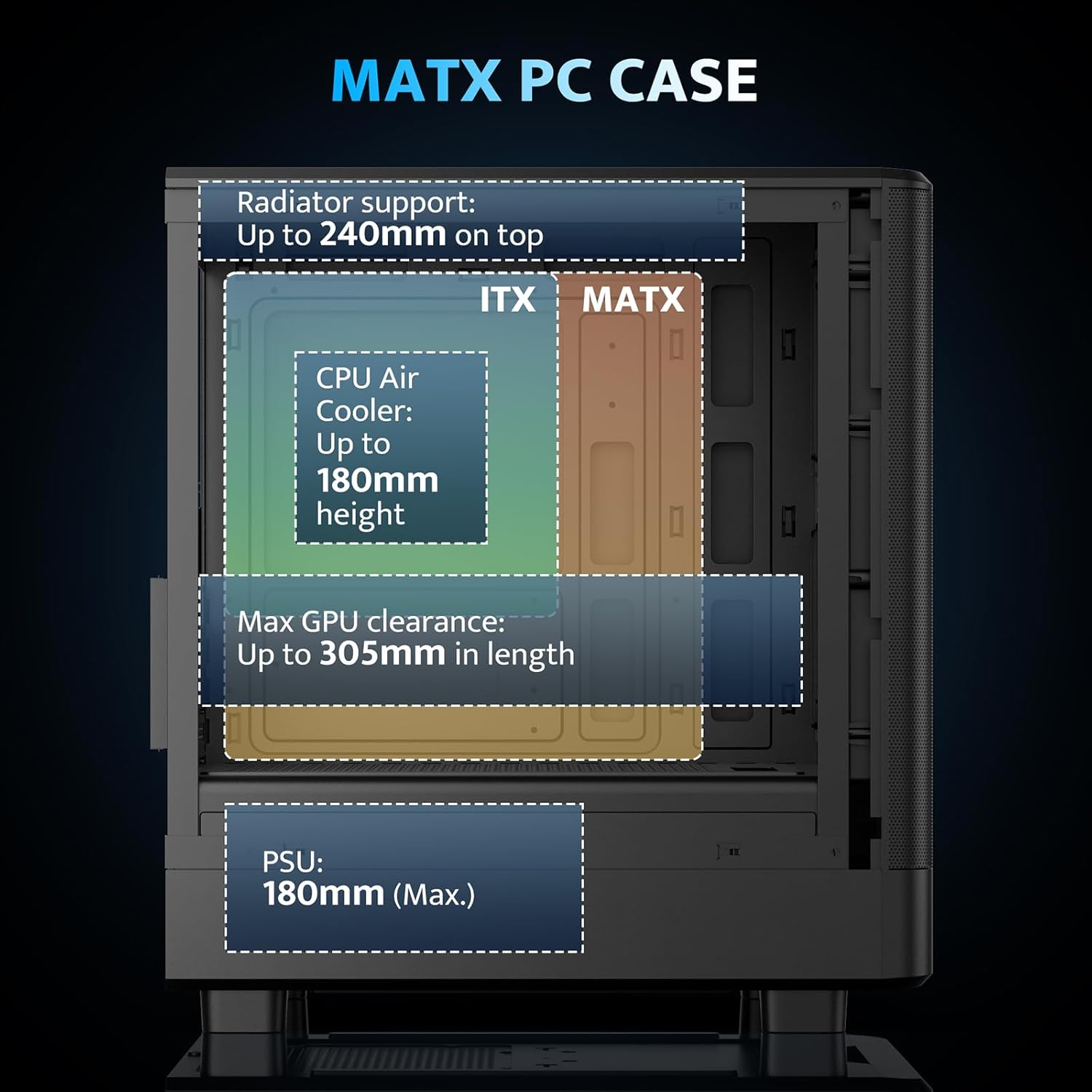
Figure 4.2: Internal layout and maximum dimensions for motherboard (ITX, MATX), CPU air cooler, GPU, and PSU.
4.3 Fan Configuration
The case comes with three pre-installed 120mm PWM ARGB fans. Two are located at the front for intake, and one at the rear for exhaust. Additional fan positions are available at the top (up to 2x 120mm/140mm) and bottom (up to 2x 120mm) for enhanced cooling.

Figure 4.3: Illustration of the pre-installed 120mm PWM ARGB fans and their placement within the case.

Figure 4.4: Optimized airflow channels demonstrating natural vertical air ducts for efficient heat dissipation.
5. הוראות הפעלה
5.1 פונקציות לוח קלט/פלט
לוח הקלט/פלט הקדמי מספק גישה נוחה ליציאות ובקרות חיוניות:
- לחצן הפעלה: כדי להפעיל או לכבות את המערכת.
- HD Audio Ports: לחיבור אוזניות ומיקרופונים.
- יציאות USB 2.0: לחיבור ציוד היקפי.
- יציאת USB 3.0: להעברת נתונים במהירות גבוהה.
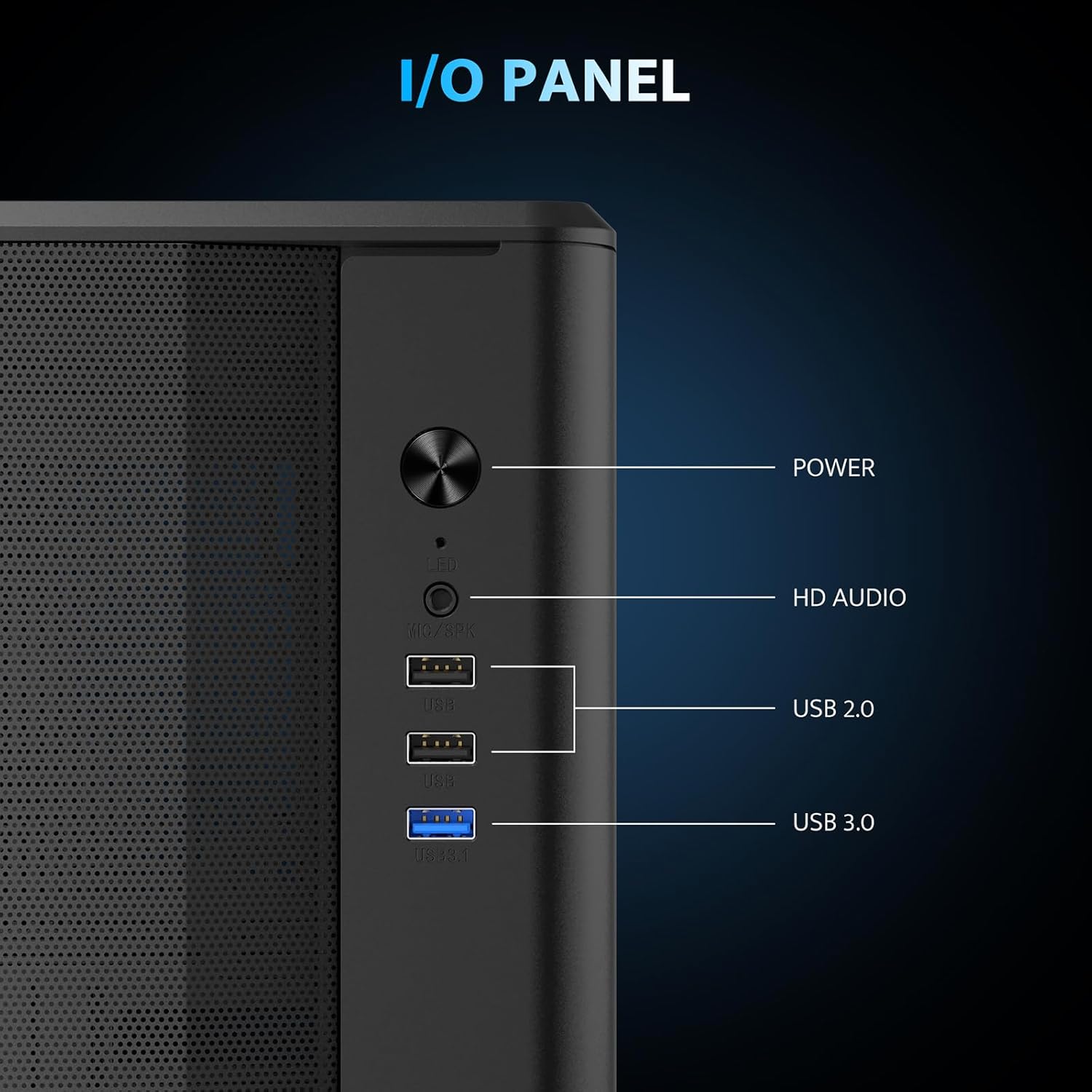
איור 5.1: מפורט view of the I/O panel and its functionalities.
5.2 בקרת מאוורר ARGB
The pre-installed fans are PWM ARGB fans. Their lighting effects can be controlled via your motherboard's ARGB software if your motherboard supports it. Please note that an ARGB Hub Controller is not included with the case.
6. תחזוקה
6.1 ניקוי מסנן האבק
The darkFlash DB330M MESH PC case is equipped with magnetic dust filters on the top and a panel dust filter to prevent dust accumulation. Regularly clean these filters to maintain optimal airflow and cooling performance.
- To clean the top dust filter, gently lift and detach the magnetic filter.
- Use a soft brush or compressed air to remove accumulated dust.
- Reattach the filter once clean.

Figure 6.1: Top panel with magnetic dust filter and large cooling holes for AIO support.

Figure 6.2: High-airflow dustproof mesh front panel, which also acts as a dust filter.
6.2 ניקיון כללי
Use a soft, dry cloth to wipe down the exterior of the case. Avoid using harsh chemicals or abrasive materials that could damage the finish.
7. פתרון תקלות
אם נתקלת בבעיות בבניית המחשב שלך, שקול את שלבי פתרון הבעיות הכלליים הבאים:
- אין כוח: Ensure all power cables (PSU to wall, PSU to motherboard, CPU, GPU) are securely connected. Check the power button connection to the motherboard.
- מאווררים לא מסתובבים/אין RGB: Verify fan power connections to the motherboard or fan controller. Check ARGB connections for lighting issues. Ensure your motherboard's BIOS/UEFI settings or software are configured correctly for fan control and RGB.
- התחממות יתר: Confirm all fans are spinning in the correct direction for optimal airflow. Ensure dust filters are clean and not obstructing airflow. Check CPU cooler and GPU cooler installations.
- יציאות USB לא עובדות: בדוק את חיבורי ראש ה-USB מלוח הקלט/פלט הקדמי ללוח האם.
For more specific issues, consult the manuals for your individual components (motherboard, GPU, PSU, etc.) or seek assistance from a qualified technician.
8. אחריות ותמיכה
The darkFlash DB330M MESH PC Case comes with a אחריות לשנה. For warranty claims or technical support, please contact darkFlash customer service through their official webהאתר או הקמעונאי בו נרכש המוצר. שמור את הוכחת הרכישה שלך לצורך אימות האחריות.