1. הקדמה
The LAUNCH CRP123I V3.0 Elite OBD2 Scanner is an advanced diagnostic tool designed for comprehensive vehicle system analysis. This device offers enhanced diagnostic capabilities for engine, anti-lock braking system (ABS), supplemental restraint system (SRS), and transmission systems, alongside a suite of reset functions and full OBD2 modes. It features a new processor, Android 8.1 operating system, a 5-inch touchscreen, and a 6000mAh rechargeable battery for efficient and reliable performance.

תמונה 1.1: נגמרview of the LAUNCH CRP123I V3.0 Elite OBD2 Scanner's key features, including 4 system diagnostics and 7 special functions.
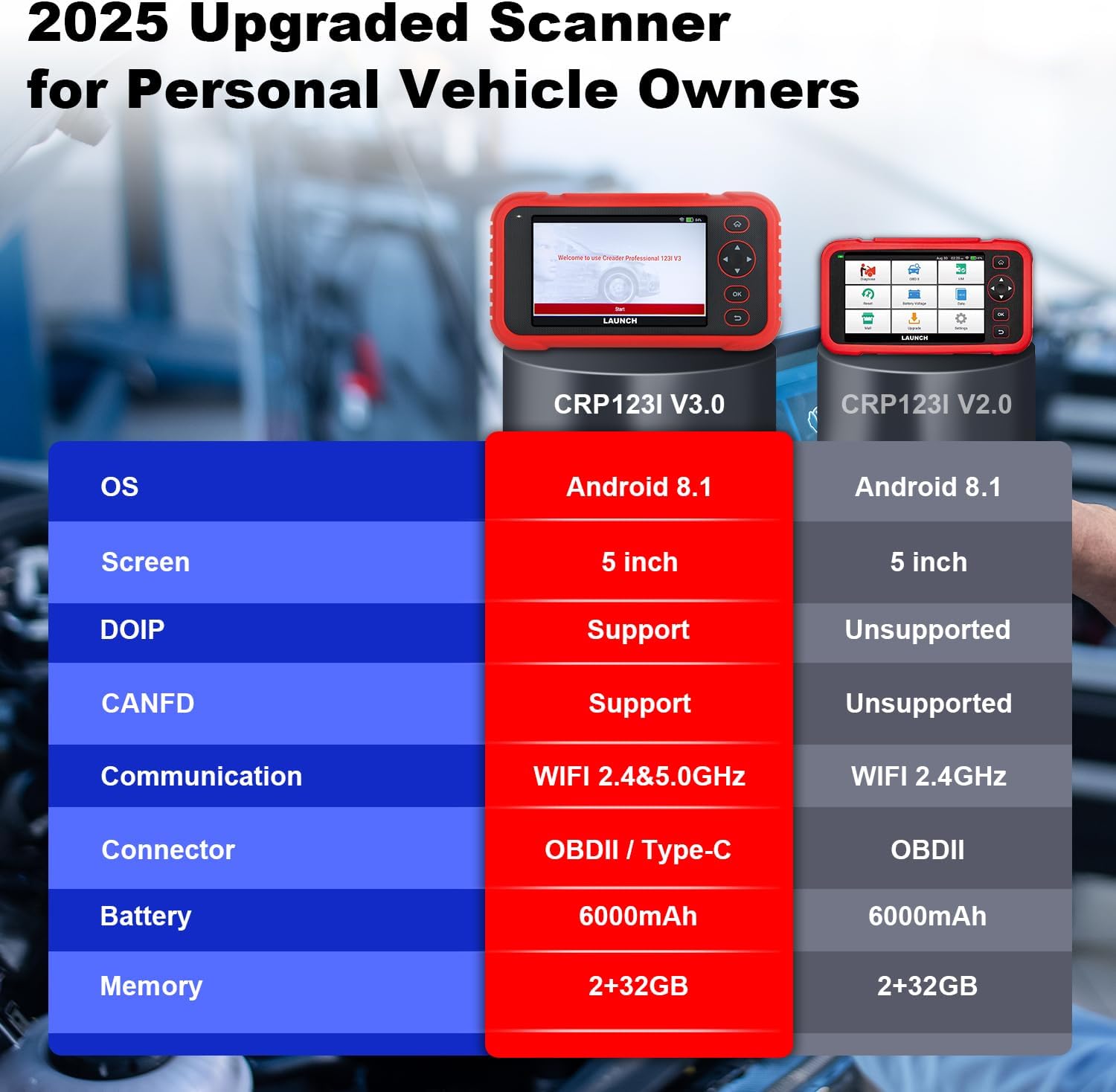
Image 1.2: Feature comparison between the CRP123I V3.0 and its predecessor, highlighting upgrades such as DOIP, CANFD, and dual-band WiFi.
2. תכולת החבילה
לאחר פתיחת האריזה, יש לוודא שכל הרכיבים נמצאים:
- CRP123I V3.0 Scan Tool
- כבל אבחון OBDII
- כבל USB
- מדריך למשתמש
- תיק נשיאה

Image 2.1: The complete package contents, including the scan tool, cables, user manual, and carrying case.
3. התקנה
בצע את השלבים הבאים להגדרה ראשונית וחיבור:
- הפעלה: Ensure the device is charged. The CRP123I V3.0 features a 6000mAh rechargeable battery.
- התחבר לרכב: Locate your vehicle's OBDII port, typically under the dashboard on the driver's side. Connect the diagnostic cable from the scanner to the vehicle's OBDII port. The device supports OBDII and Type-C connections.
- אתחול ראשוני: The scanner will power on automatically or prompt you to press the power button. The 5-inch touchscreen will display the LAUNCH logo and then the main interface.
- חיבור רשת: For updates and online features, connect the device to a Wi-Fi network. The CRP123I V3.0 supports 2.4GHz and 5GHz dual Wi-Fi. Navigate to 'Settings' > 'Wi-Fi' to connect.
- עדכון תוכנה: It is recommended to perform a software update upon first use to ensure you have the latest features and vehicle coverage. Access the 'Upgrade' menu for one-touch lifetime free updates.
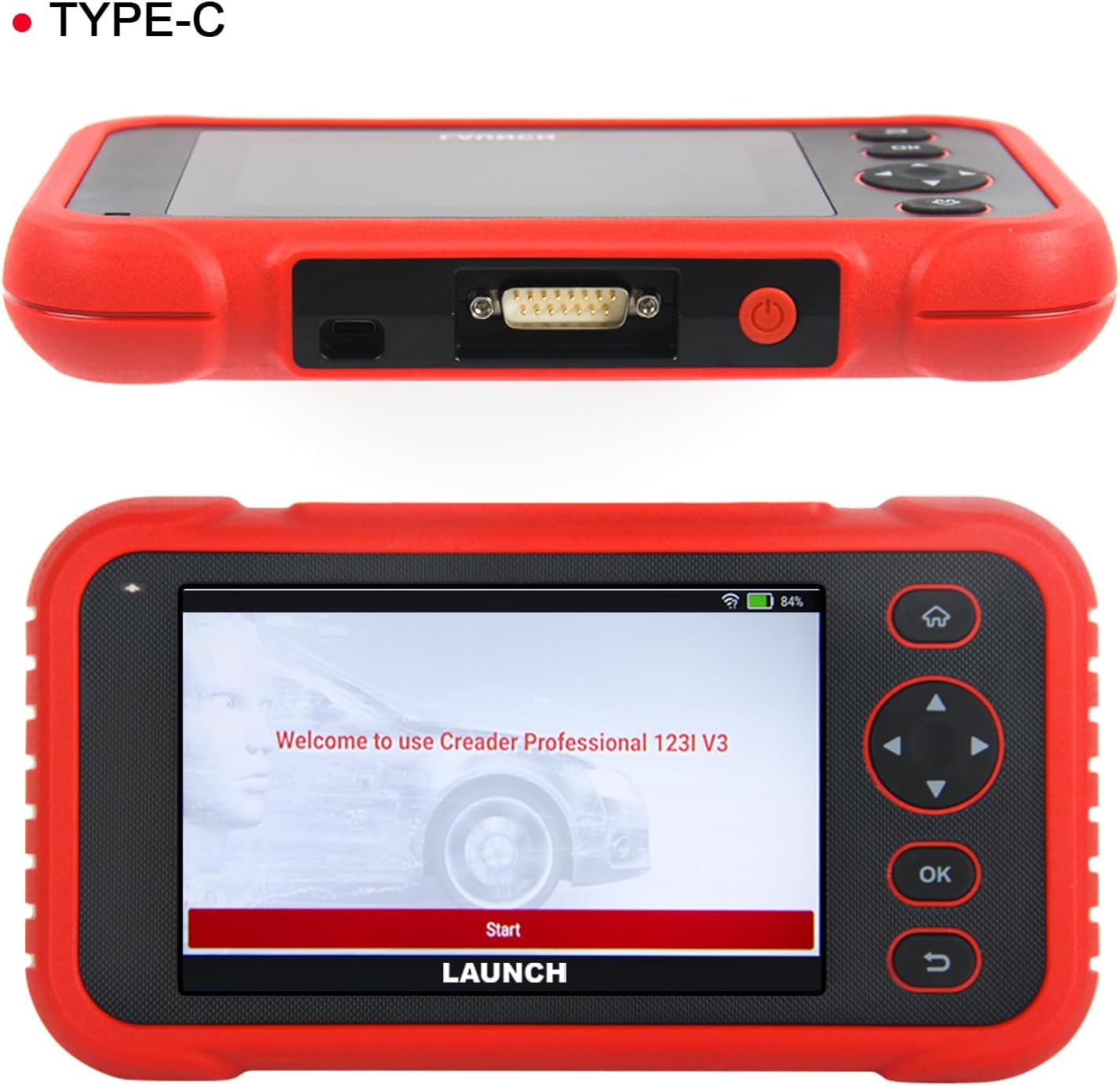
תמונה 3.1: למעלה view of the scanner showing the OBDII connector, and front view displaying the initial welcome screen.
4. הוראות הפעלה
4.1. 4-אבחון מערכת
The CRP123I V3.0 allows for in-depth diagnostics of four major vehicle systems:
- מערכת מנוע: קורא ומנקה קודי תקלה של המנוע, views live data, and turns off the Malfunction Indicator Lamp (מִיל).
- מערכת בלימה נגד נעילה (ABS): Diagnoses ABS issues, reads/clears codes, and monitors live data related to braking performance.
- מערכת ריסון משלימה (SRS/כרית אוויר): Detects and clears airbag system fault codes, ensuring proper functionality of safety components.
- מערכת הילוכים: Analyzes transmission performance, reads/clears codes, and displays live data such as transmission temperature.

Image 4.1: Visual representation of the four OE-level systems (Engine, SRS, Transmission, ABS) that the scanner can diagnose.
3.2.7 פונקציות איפוס
The tool provides 7 frequently used reset functions for common maintenance tasks:
- איפוס שמן: מאפס את מערכת חיי השמן לאחר החלפת שמן.
- Electric Throttle Relearn: לומד מחדש את מיקום גוף המצערת לאחר ניקוי או החלפה.
- איפוס זווית היגוי (SAS): מאפס את חיישן זווית ההיגוי.
- דימום במערכת העצבים המרכזית: מבצע דימום בלמי ABS כדי לשחזר את רגישות הבלמים.
- Battery Matching (BMS Reset): Resets the battery management system after battery replacement.
- איפוס בלמים (EPB): מאפס את רפידות בלם החניה האלקטרוניות לאחר החלפה.
- איפוס DPF: Performs Diesel Particulate Filter regeneration.
Note: The availability of specific service functions may vary by vehicle make, model, and year.

Image 4.2: An illustration of the seven hot reset services available on the CRP123I V3.0.
4.3. פונקציות OBDII מלאות
The CRP123I V3.0 supports all 10 OBDII test modes for comprehensive emissions-related diagnostics:
- קראו את הקודים: מציג קודי תקלות אבחון (DTC).
- קודים ברורים: Erases DTCs and turns off the MIL.
- נתונים חיים: Shows real-time data stream from vehicle sensors.
- מוכנות I/M: Checks the readiness of emission monitors.
- הקפאת מסגרת: Stores a snapshot of vehicle operating conditions when an emission-related fault occurs.
- מבחן חיישן O2: מאחזר תוצאות בדיקת ניטור חיישן חמצן.
- בדיקת צג מובנה: מאחזר תוצאות עבור רכיבים ומערכות מערכת הנעה הקשורים לפליטות.
- בדיקת אידוי: Initiates a test of the Evaporative Emission System.
- מידע על הרכב: Retrieves vehicle identification information (VIN, CID, CVN).
- חיפוש קוד DTC: מספק הגדרות לקודים גנריים וקודים ספציפיים ליצרן.

Image 4.3: A comprehensive display of the professional full OBDII functions supported by the scanner.
4.4. Live Data Streams and Smog Test
Monitor up to 4 real-time data streams simultaneously on one screen. This allows for quick diagnosis and verification of repairs without switching views. The I/M Readiness function helps check emission system status, assisting in preparation for smog tests by identifying potential issues like faulty sensors or catalytic converter problems.

Image 4.4: The 4-in-1 live data graphic display feature, enabling visualization and analysis of multiple data streams.

Image 4.5: A real-time voltage monitor display, useful for assessing battery and charging system health.
4.5. Vehicle Identification and Diagnostic Reports
The scanner supports automatic VIN (Vehicle Identification Number) detection for quick vehicle identification. For vehicles that do not support AUTO VIN, you can manually input the VIN. After diagnosis, the tool can generate and allow you to share or print detailed diagnostic reports.

Image 4.6: The AUTO VIN feature, simplifying vehicle identification.

Image 4.7: The VIN scan function and options for sharing and printing diagnostic reports.
4.6. כיסוי רכב
The CRP123I V3.0 is compatible with all U.S. road vehicles manufactured after 1996 that comply with OBD2/EOBD/JOBD standards. This includes over 10,000 models, covering most gasoline cars, many 12V diesel vehicles, light-duty trucks, and a small range of gasoline-electric hybrid vehicles. It also supports AutoAuth for FCA SGW to access 2018+ FCA SGW-equipped models.

Image 4.8: An illustration of the extensive vehicle coverage across different regions and vehicle types.
5. תחזוקה
To ensure optimal performance and access to the latest features and vehicle compatibility, regularly update the scanner's software. The CRP123I V3.0 offers lifetime free software updates.
- עדכוני תוכנה: Connect the device to Wi-Fi and navigate to the 'Upgrade' section on the main menu to download and install available updates.
- ניקוי: השתמשו במטלית רכה ויבשה לניקוי המכשיר. הימנעו מחומרי ניקוי שוחקים או ממסים.
- אִחסוּן: Store the scanner in its carrying case in a cool, dry place when not in use.

Image 5.1: The 'Lifetime Free Updated' feature ensures the scanner remains current with the latest vehicle data and functions.
6. פתרון תקלות
If you encounter issues with the CRP123I V3.0, consider the following:
- המכשיר לא מופעל: Ensure the battery is charged or the device is properly connected to the vehicle's OBDII port.
- בעיות חיבור: Verify the OBDII cable is securely connected to both the scanner and the vehicle. Ensure the vehicle's ignition is on.
- אין תקשורת עם הרכב: Check if your vehicle is OBDII compliant (generally 1996 and newer for U.S. vehicles). Ensure the vehicle's battery has sufficient voltage.
- פונקציה לא עובדת: Some functions are vehicle-specific. Confirm compatibility for your vehicle's make, model, and year.
- ביצועים איטיים: Ensure the device has sufficient memory. Perform regular software updates.
For specific fault code definitions, use the built-in DTC Library or the Fault Codes Google Search feature.

Image 6.1: The DTC Search function, providing quick access to fault code explanations via Google.
7. מפרטים
| יַצרָן | לְהַשִׁיק |
| דֶגֶם | CRP123I |
| מַעֲרֶכֶת הַפעָלָה | אנדרואיד 8.1 |
| גודל מסך | 5 Inches (720P) |
| זֵכֶר | 32GB |
| סוֹלְלָה | סוללת ליתיום-יון 6000mAh (כלולה) |
| קישוריות | 2.4 & 5GHz Dual WiFi, OBDII / Type-C |
| פרוטוקולים נתמכים | CANFD & DoIP, OBD2/EOBD/JOBD |
| משקל פריט | 2.27 פאונד |
| מידות חבילה | 9.84 x 7.09 x 2.76 אינץ' |
| סוג התאמה לרכב | Universal Fit |
8. אחריות ותמיכה
The LAUNCH CRP123I V3.0 Elite OBD2 Scanner comes with a 5-year warranty. Enjoy lifetime free software updates to keep your diagnostic tool current with the latest features and vehicle compatibility. For any inquiries, technical assistance, or support, please contact our dedicated customer service team.
דוא"ל תמיכת לקוחות: nina@hilson.com.cn
Our 24/7 professional service team is committed to providing one-on-one customer service to ensure your satisfaction.


