
1. הקדמה
This manual provides essential information for the safe operation and maintenance of your 4DRC V31 RC Plane with Camera. Please read this manual thoroughly before operating the aircraft to ensure proper function and to avoid damage or injury. Keep this manual for future reference.

Figure 1: 4DRC V31 RC Plane, designed for beginner-friendly operation.
2. תכולת החבילה
ודא שכל הפריטים המפורטים להלן כלולים בחבילה שלך. אם פריטים חסרים או פגומים, צור קשר עם תמיכת הלקוחות.
- 4DRC V31 RC Plane
- משדר שלט רחוק
- Rechargeable Batteries (2 C batteries included)
- כבל טעינה USB
- מדחפים רזרביים
- מַברֵג
- מדריך למשתמש (מסמך זה)
Note: The charger is included as part of the USB charging cable.
3. תכונות מוצר
- 360° Flip & Aerial Stunts: Perform aerobatic rolls and 360-degree circling.
- מצלמה משולבת: Advanced WiFi-enabled camera for real-time video streaming and capturing flight moments.
- Color LED Lights: Equipped with bright LED lights for visibility and aesthetic appeal during evening flights.
- קל לשימוש: No assembly required. Features one-key takeoff/landing, altitude hold, and three speed options.
- בטיחות ועמידות: Four built-in propellers with protective structure and sturdy EPP material construction for impact resistance.
- מצב ללא ראש: Simplifies control by eliminating the need to adjust the aircraft's position before flight.
- המראה/נחיתה בלחיצה אחת: Simplifies starting and ending flights.
- החזקת גובה: Maintains a consistent altitude for stable hovering.
- שלוש אפשרויות מהירות: Adjustable flight speeds for different skill levels.
4. התקנה
4.1 טעינת הסוללה
- Connect the USB charging cable to the aircraft's battery port.
- Plug the USB end of the cable into a 5V/1A USB power adapter (not included) or a computer's USB port.
- נורית החיווי בכבל ה-USB תידלק במהלך הטעינה ותכבה כאשר המכשיר טעון במלואה.
- זמן הטעינה הוא כ- 60-90 דקות.

Figure 2: The aircraft features a module battery and a low battery alert system. Two batteries provide approximately 40 minutes of flight time.
4.2 התקנת סוללות בשלט רחוק
- פתח את תא הסוללות בגב השלט הרחוק.
- Insert 2 C batteries (included), ensuring correct polarity (+/-).
- סגור היטב את תא הסוללות.
4.3 Pairing the Aircraft with the Remote Control
- Place the aircraft on a flat surface.
- Turn on the aircraft's power switch. The LED lights on the aircraft will flash.
- הפעל את השלט הרחוק.
- לחץ את הג'ויסטיק (מצערת) השמאלי עד הסוף למעלה, ואז עד הסוף למטה. נוריות ה-LED של המטוס יפסיקו להבהב ויישארו דולקות באופן קבוע, מה שמצביע על צימוד מוצלח.
5. הוראות הפעלה
5.1 בקרות טיסה בסיסיות
- המראה: Press the One-Key Takeoff button or push both joysticks outwards and downwards simultaneously to start the propellers, then push the left joystick up to ascend.
- נְחִיתָה: Press the One-Key Landing button or pull the left joystick down to descend.
- עלייה/ירידה: Use the left joystick (throttle) up/down.
- קדימה/אחורה: Use the right joystick up/down.
- פנה שמאלה/ימינה: Use the left joystick left/right.
- Fly Left/Right (Strafe): Use the right joystick left/right.
- התאמת מהירות: Press the speed button on the remote control to cycle through three speed modes (low, medium, high).

Figure 3: Key flight functions including Headless Mode and One-Click Takeoff/Landing.
5.2 מצב ללא ראש
In Headless Mode, the aircraft's orientation is locked to the remote control's orientation at the time of activation. This means pushing the right joystick forward will always make the aircraft fly away from you, regardless of which way the front of the aircraft is facing.
- To activate Headless Mode, press the Headless Mode button on the remote control. The aircraft's lights will flash to indicate activation.
- To exit Headless Mode, press the Headless Mode button again.
5.3 אחיזת גובה
The Altitude Hold function allows the aircraft to maintain a stable altitude without constant throttle input. This makes it easier to control and capture stable photos/videos.

Figure 4: The aircraft's Altitude Hold feature for stable flight and One-Click Quick Stop for emergency landings.
6. פעולת מצלמה ו-FPV
6.1 התחברות לאפליקציה
- Download the "4DRC" app from your smartphone's app store.
- הפעל את המטוס.
- On your smartphone, go to Wi-Fi settings and connect to the Wi-Fi network named "4DRC-V31-XXXX".
- Open the 4DRC app. You should see the live FPV feed from the aircraft's camera.
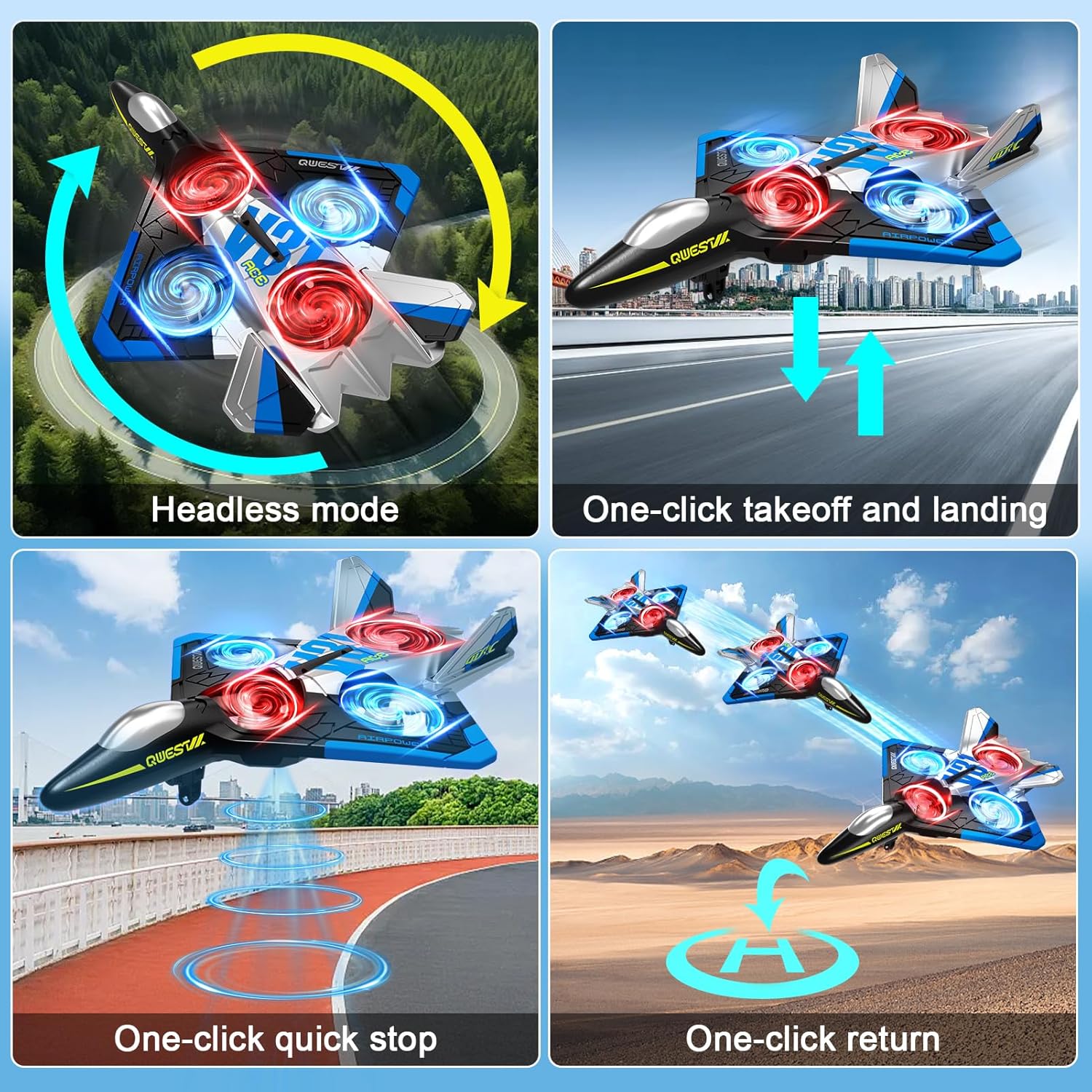
Figure 5: Experience real-time FPV transmission directly to your smartphone.
6.2 צילום תמונות וסרטונים
Once connected to the app, you can use the on-screen controls to capture photos and record videos.
- תַצלוּם: הקש על סמל המצלמה באפליקציה כדי לצלם תמונה.
- וִידֵאוֹ: הקש על סמל הווידאו כדי להתחיל להקליט. הקש שוב כדי לעצור.
- בקרת מחוות: The aircraft supports gesture control for taking photos and videos. Refer to the app interface for specific gesture commands.

Figure 6: Utilize gesture control for hands-free photo and video capture.

Figure 7: The camera captures 1080P Full HD aerial images and videos.
7. Special Flight Modes
7.1 היפוך 360°
To perform a 360° flip:
- Fly the aircraft to a height of at least 3 meters.
- Press the 360° Flip button on the remote control.
- לחץ מיד על הג'ויסטיק הימני בכיוון הרצוי (קדימה, אחורה, שמאלה או ימינה) כדי לבצע את ההיפוך.

Figure 8: The aircraft is capable of performing exciting 3D flips.
7.2 360° Circling
To perform a 360° circling stunt:
- Ensure the aircraft is flying stably at a sufficient height.
- Press the One-Click Circling button on the remote control. The aircraft will automatically perform a 360-degree circle.
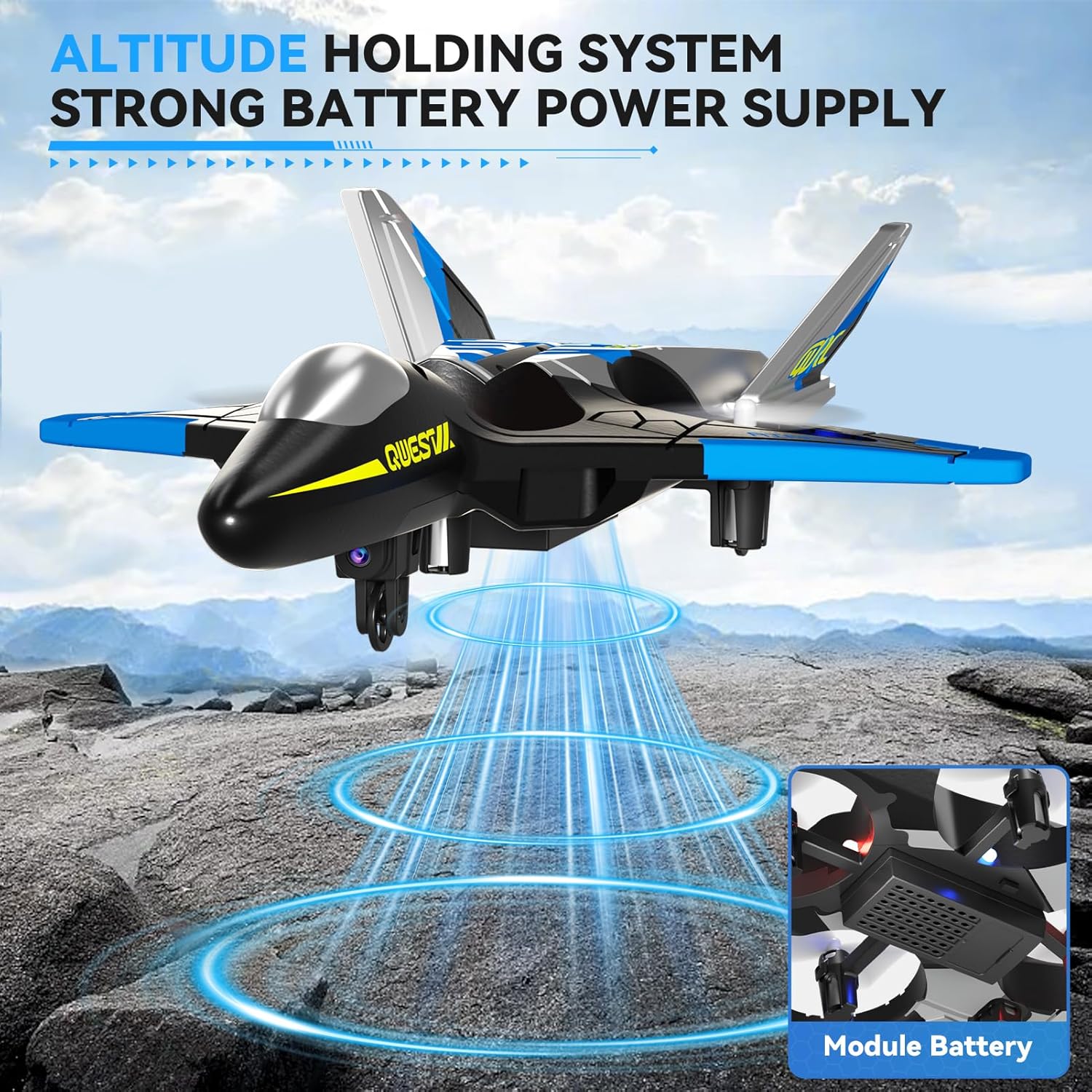
Figure 9: Execute impressive 360° circle flight stunts with ease.
7.3 טיסת מסלול
Using the app, you can draw a flight path on your smartphone screen, and the aircraft will follow it automatically.
- Connect your smartphone to the aircraft's Wi-Fi.
- Open the 4DRC app and enter the flight interface.
- Tap the Trajectory Flight icon.
- Draw your desired flight path on the screen. The aircraft will then fly along the specified route.

Figure 10: Utilize Trajectory Flight and Gesture Control for advanced flight maneuvers.
8. בטיחות ועמידות
The 4DRC V31 RC Plane is designed with safety and durability in mind.
- הגנה על מדחף: Four built-in propellers are protected by the aircraft's frame, reducing the risk of injury from spinning blades.
- EPP Material: Constructed from soft yet sturdy EPP material, allowing the aircraft to withstand minor impacts and tumbles.
- הימנעות ממכשולים רב-כיווניים: The aircraft may feature an omnidirectional obstacle avoidance module to prevent collisions.
Video 1: Demonstrates various flight features including LED lights, one-click taxi takeoff, multi-gear speed adjustment, HD camera, real-time transmission, gesture photography/video, gravity induction, bump-proof design, jettisoning mode, optical flow localization, omnidirectional obstacle avoidance, 360° circling, 360° effect tumbling, trajectory flight, and one-touch landing.
9. תחזוקה
- ניקוי: Wipe the aircraft with a soft, dry cloth after each use. Avoid using water or harsh chemicals.
- בדיקת מדחף: בדקו באופן קבוע את המדחפים לאיתור נזקים (סדקים, כיפופים). החליפו מיד מדחפים פגומים באמצעות חלקי החילוף המסופקים.
- טיפול בסוללה:
- אין לטעון או לפרוק יתר על המידה סוללות.
- אחסן סוללות במקום קריר ויבש הרחק מאור שמש ישיר.
- If not used for an extended period, charge the battery to about 50% before storing.
- אִחסוּן: Store the aircraft and remote control in a dry, cool environment, away from extreme temperatures and direct sunlight.
10. פתרון תקלות
| בְּעָיָה | סיבה אפשרית | פִּתָרוֹן |
|---|---|---|
| כלי הטיס לא מגיב לשלט רחוק. | Not paired; low battery in aircraft or remote. | Re-pair the aircraft and remote. Charge aircraft battery. Replace remote control batteries. |
| כלי טיס טס בצורה לא יציבה או נסחף. | Uncalibrated gyroscope; damaged propeller. | Perform gyroscope calibration (refer to app or remote instructions). Check and replace damaged propellers. |
| Camera feed is not visible on smartphone. | Not connected to aircraft Wi-Fi; app not open. | Ensure smartphone is connected to the aircraft's Wi-Fi network. Open the 4DRC app. |
| זמן טיסה קצר. | הסוללה לא טעונה במלואה; סוללה ישנה. | ודא שהסוללה טעונה במלואה. שקול להחליף סוללות ישנות. |
11. מפרטים
- שם הדגם: 4D-V31-BLUE-WIFI (V31 Series)
- מותג: 4DRC
- סוג חומר: Plastic (EPP Foam)
- מידות פריט: 8 x 3 x 11 אינץ'
- סוג סוללה: ליתיום-יון
- מספר סוללות: 2 סוללות C (כלולות)
- רכיבים כלולים: מטען (כבל USB)
- טווח גילאים: Kid Adults (Manufacturer Minimum Age: 96 months)
- תכונות נוספות: RC plane, RC plane with camera, remote control airplane, 360° Flip, Headless Mode, One-Key Takeoff/Landing, Altitude Hold, Three Speed Options, Color LED Light.
12. אחריות ותמיכה
For warranty information and customer support, please refer to the contact details provided on the product packaging or visit the official 4DRC webאתר. שמור את קבלת הרכישה כהוכחת קנייה.
יַצרָן: 4DRC