
מָבוֹא
תודה על הרכישהasing the Anker Soundcore P31i True Wireless Earbuds. This manual provides detailed instructions on how to set up, operate, and maintain your earbuds to ensure optimal performance and longevity. Please read this manual carefully before use and retain it for future reference.
מה כלול
Your Soundcore P31i package includes the following items:
- Soundcore P31i Earbuds (Left and Right)
- נרתיק טעינה
- Ear Tips (XS, S, M, L - M size pre-installed)
- כבל טעינה USB-C ל- USB-A
- מדריך להתחלה מהירה
- מדריך בטיחות
המוצר נגמרview
The Soundcore P31i earbuds are designed for comfort and high-quality audio. Each earbud features a touch control area and an indicator light. The charging case protects the earbuds and provides additional battery life.
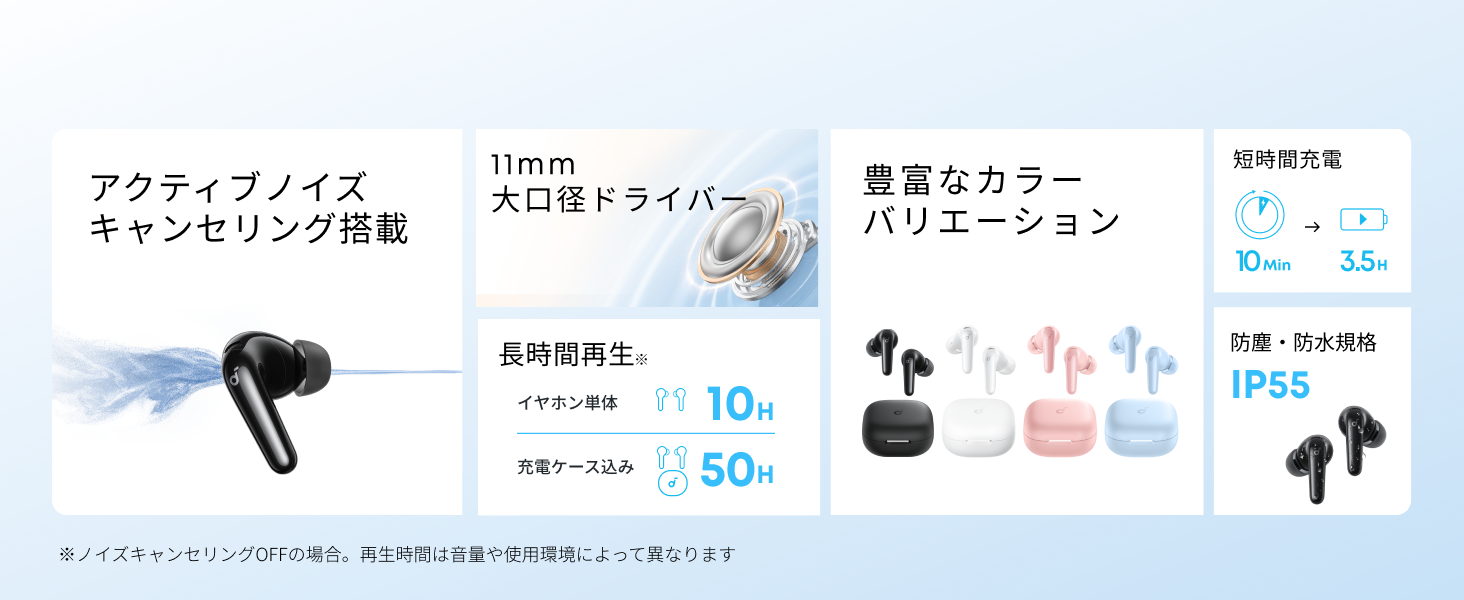
Diagram showing the Soundcore P31i earbuds and charging case with key components labeled.
אוזניות: Each earbud is equipped with an 11mm dynamic driver for powerful bass and clear sound. They feature active noise cancellation and AI noise reduction for calls. The ergonomic design ensures a secure and comfortable fit.
נרתיק טעינה: The compact charging case not only stores and protects your earbuds but also recharges them on the go. It has a USB-C charging port and a strap hole for portability.
טעינת האוזניות והכיסוי שלך
לפני השימוש הראשון, יש לטעון במלואן את האוזניות ואת נרתיק הטעינה.
- טעינת האוזניות: Place the earbuds into the charging case. The indicator lights on the earbuds will show charging status.
- טעינת המארז: Connect the charging case to a power source using the provided USB-C to USB-A cable. A full charge for the case and earbuds takes approximately 3 hours.
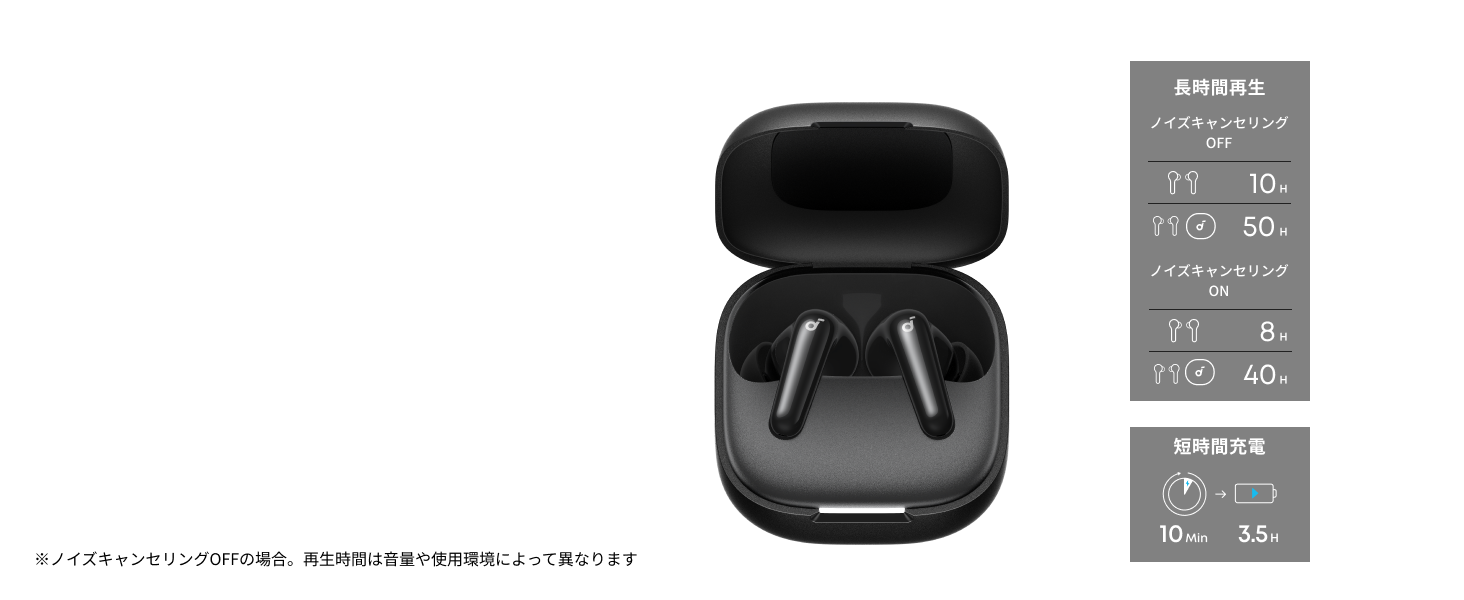
Diagram illustrating charging times and playback duration for Soundcore P31i earbuds.
חיי סוללה:
- Up to 10 hours of playback on a single charge (earbuds only).
- עד 50 שעות של נגינה בסך הכל עם מארז הטעינה.
- A quick 10-minute charge provides up to 3.5 hours of listening time.
Note: Playback time varies depending on volume level and audio content.
עונד את האוזניות שלך
For optimal sound quality and comfort, it is important to wear your earbuds correctly.
- בחרו את טיפי האוזניים הנכונים: Select the ear tips that provide the best seal and comfort for your ears. Experiment with different sizes (XS, S, M, L) to find the perfect fit.
- הכנס את האוזניות: הכניסו בעדינות את האוזניות לתוך תעלות האוזן.
- סובב כדי לאבטח: Twist the earbuds slightly until they fit snugly and securely in your ears.

Image showing a person wearing the Soundcore P31i earbuds correctly.
Bluetooth
Follow these steps to pair your Soundcore P31i earbuds with your device:
- התאמה ראשונה:
- Open the charging case. The earbuds will automatically enter Bluetooth pairing mode. The indicator lights on the earbuds will flash white.
- במכשיר שלך (סמארטפון, טאבלט וכו'), עבור אל הגדרות ה-Bluetooth.
- Select "Soundcore P31i" from the list of available devices.
- Once connected, the indicator lights on the earbuds will turn solid white for 1 second and then turn off.
- התאמה עם מכשיר אחר:
- הניחו את האוזניות במארז הטעינה והשאירו את המכסה פתוח.
- Press and hold the button on the charging case for 3 seconds until the earbud indicator lights flash white rapidly.
- Repeat steps 2 and 3 from "First-Time Pairing" on your new device.
בקרות
The Soundcore P31i earbuds feature touch controls for managing playback, calls, and other functions. Specific control configurations can often be customized via the Soundcore app.
General Touch Controls (Default):
- הפעל/השהה: הקש פעם אחת על אוזניות האוזניים.
- הרצועה הבאה: הקש פעמיים על האוזניה הימנית.
- רצועה קודמת: הקש פעמיים על האוזנייה השמאלית.
- מענה/סיום שיחה: הקש פעם אחת על אוזניות האוזניים.
- דחה שיחה: לחץ והחזק את אחת האוזניות למשך 2 שניות.
- הפעל את Assistant Voice: Triple-tap either earbud (may vary).
- החלפת מצב ANC/שקיפות: Press and hold the right earbud for 2 seconds (may vary).
For detailed and customizable controls, please refer to the Soundcore app or the included Quick Start Guide.
ביטול רעשים פעיל (ANC)
The Soundcore P31i earbuds feature Active Noise Cancelling technology to minimize ambient noise, allowing for an immersive listening experience.

Illustration demonstrating the active noise cancelling feature of the Soundcore P31i earbuds.
ANC detects and reduces various types of noise, such as engine hum on trains or buses, and chatter in cafes. This allows you to enjoy your music or podcasts with greater clarity and fewer distractions.
To switch between ANC, Normal, and Transparency modes, use the touch controls on the earbuds or adjust settings within the Soundcore app.
איכות סאונד
The Soundcore P31i earbuds are engineered to deliver a rich audio experience.

Diagram illustrating the 11mm dynamic driver responsible for the audio output.
- דרייברים דינמיים בגודל 11 מ"מ: Equipped with large 11mm drivers, these earbuds produce a wide frequency range and detailed sound.
- BassUp™ Technology: Anker's proprietary BassUp™ technology enhances low frequencies, delivering powerful and impactful bass.
You can further customize the sound profile using the equalizer settings within the Soundcore app.
איכות שיחה
The Soundcore P31i earbuds ensure clear voice calls and web כנסים.

Illustration depicting AI noise reduction technology for clear voice calls.
הפחתת רעש בינה מלאכותית: Integrated AI noise reduction technology effectively filters out background noise, ensuring your voice is transmitted clearly to the person on the other end of the call, even in noisy environments.
חיבור מרובה נקודות
The Soundcore P31i supports multi-point connection, allowing you to connect to two Bluetooth devices simultaneously.

Illustration showing the Soundcore P31i connected to multiple devices simultaneously.
This feature enables seamless switching between devices. For example, you can listen to music on your laptop and instantly switch to answer a call on your phone without manually re-pairing.
To enable multi-point connection, ensure both devices are paired with your earbuds. The earbuds will automatically connect to the last two paired devices when powered on.
אפליקציית סאונדקור
Download the Soundcore app to enhance your experience with the P31i earbuds. The app offers various features and customization options.

Screenshots of the Soundcore app interface, highlighting customization features.
App Features include:
- בקרות הניתנות להתאמה אישית: Personalize touch controls for playback, calls, and voice assistant.
- הגדרות אקולייזר: התאם Audio Profiles to your preference or choose from preset EQs.
- ANC/Transparency Mode Switching: Easily toggle between noise cancelling and transparency modes.
- עדכוני קושחה: עדכנו את האוזניות שלכם עם התכונות והשיפורים האחרונים.
- AI Translation Function: (Available from Spring 2026, requires Soundcore app ver 4.0.0 or higher).
The Soundcore app is available for download on both iOS and Android devices.
המוצר נגמרview וִידֵאוֹ
סרטון מוצר רשמיasing the key features and design of the Soundcore P31i True Wireless Earbuds, including active noise cancellation, powerful bass, long battery life, and multi-point connectivity.
תחזוקה וטיפול
Proper maintenance ensures the longevity and performance of your Soundcore P31i earbuds.
- ניקוי: יש לנקות באופן קבוע את האוזניות ואת מארז הטעינה בעזרת מטלית רכה, יבשה ונטולת סיבים. אין להשתמש בכימיקלים חזקים או בחומרים שוחקים.
- עצות אוזניים: הסירו את קצוות האוזניים ונקו אותם במים וסבון עדין במידת הצורך. ודאו שהם יבשים לחלוטין לפני חיבורם מחדש.
- טעינת אנשי קשר: שמרו על ניקיון ויבשות של מגעי הטעינה הן באוזניות והן בנרתיק כדי להבטיח טעינה תקינה.
- אִחסוּן: כאשר אינן בשימוש, אחסנו את האוזניות בנרתיק הטעינה שלהן כדי להגן עליהן מפני אבק ונזק.
- עמידות במים: The earbuds are rated IP55 for dust and water resistance. This means they can withstand sweat and light rain, but are not designed for submersion in water. Ensure the earbuds are dry before placing them back in the charging case.

Image showing Soundcore P31i earbuds with water droplets, highlighting their IP55 water resistance.
פתרון בעיות
If you encounter any issues with your Soundcore P31i earbuds, refer to the following common solutions:
- אוזניות לא מותאמות:
- ודא ששתי האוזניות טעונות במלואן.
- Place earbuds in the case, close the lid, then open it again to re-enter pairing mode.
- Forget "Soundcore P31i" from your device's Bluetooth list and try pairing again.
- Reset the earbuds (refer to the Quick Start Guide for specific reset instructions).
- Only One Earbud Playing Audio:
- החזירו את שתי האוזניות למארז הטעינה וסגרו את המכסה למשך 5 שניות, ולאחר מכן פתחו אותו שוב.
- Ensure both earbuds have sufficient battery.
- אפס את האוזניות.
- איכות סאונד ירודה:
- ודאו שאטמי האוזניים מספקים אטימה טובה בתעלת האוזן. נסו גדלים שונים.
- נקו כל פסולת מפיות האוזניות.
- התקרבו למכשיר המחובר כדי למנוע הפרעות.
- בעיות טעינה:
- בדוק את כבל הטעינה והמתאם לאיתור נזקים.
- ודאו שמגעי הטעינה באוזניות ובמארז נקיים.
- נסה כבל טעינה או מקור מתח אחר.
מפרטים
| תכונה | פְּרָט |
|---|---|
| מותג | קור סאונד |
| שם הדגם | P31i |
| מספר דגם | D1202 |
| צֶבַע | Black (This specific variant) |
| גורם צורה | בתוך האוזן |
| טכנולוגיית קישוריות | אלחוטי (בלוטות' 6.1) |
| בקרת רעש | ביטול רעשים אקטיבי |
| גודל דרייבר | דרייברים דינמיים 11 מ"מ |
| זמן נגינה (אוזניות) | עד 10 שעות |
| זמן נגינה כולל (עם כיסוי) | עד 50 שעות |
| טעינה מהירה | 10 דקות טעינה לשעתיים של נגינה |
| זמן טעינה (מלא) | בערך שעתיים |
| עמידות במים | IP55 |
| חיבור מרובה נקודות | נתמך |
| UPC | 194644251543 |
| ארץ מוצא | סִין |
אחריות ותמיכת לקוחות
Soundcore provides a comprehensive warranty for your P31i earbuds.

Image detailing the warranty period and extension for Soundcore P31i.
- אחריות סטנדרטית: An 18-month warranty is provided for products purchased from authorized retailer AnkerDirect.
- אחריות מורחבת: Anker members can extend their warranty up to a maximum of 24 months.
- הערה חשובה: Purchases from unauthorized sellers may not be covered under warranty.
For product inquiries, delivery questions, or technical support, please contact Soundcore customer support. Contact details can typically be found on the official Soundcore webבאתר או במדריך ההתחלה המהירה שלך.
מידע בטיחות
אנא קרא ופעל לפי הנחיות הבטיחות הבאות כדי למנוע נזק למכשיר שלך או פגיעה עצמית:
- אין לפרק או לשנות את האוזניות או את מארז הטעינה.
- הרחק את המכשיר מטמפרטורות קיצוניות, מאור שמש ישיר ולהבות גלויות.
- Avoid exposing the device to excessive moisture or liquids, beyond its IP55 rating.
- Do not use the device at high volume levels for extended periods to prevent hearing damage.
- הרחק מהישג ידם של ילדים וחיות מחמד.
- השלך את המוצר באחריות בהתאם לתקנות המקומיות.