
המוצר נגמרview
The GOOLOO A5 is a versatile 4-in-1 emergency tool designed for automotive use. It integrates a powerful jump starter, a tire inflator, a 20,000mAh power bank for charging devices, and an LED flashlight. This compact and rugged unit is suitable for daily use, road trips, and unexpected emergencies.
- מתנע קפיצה: Delivers up to 4000A peak current to restart most 12V vehicles, including all gas engines and diesel engines up to 10.0L. Features a BOOST function for deeply discharged batteries and operates effectively in temperatures from -4°F to 140°F.
- מנפח צמיגים: Equipped with a 25mm high-efficiency motor, providing up to 160 PSI. It can inflate a 285/70 R17 pickup tire from 30 PSI to 36 PSI in approximately 2 minutes, or a 195/65 R15 sedan tire from 30 PSI to 36 PSI in about 30 seconds. Includes 5 inflation modes and 5 nozzles, with an auto-off feature to prevent over-inflation.
- מקור אנרגיה: Features a 20,000mAh rated capacity. Includes a built-in 45W USB-C output cable for fast charging devices and a standard USB-A output.
- אור LED: A multi-mode LED flashlight provides illumination for various situations.
- לְהַצִיג: Features a color LED display with a rotating status ring for real-time inflation tracking and 2000-nit brightness stays readable in direct sun.
הגדרה ושימוש ראשוני
טעינת המכשיר
Before first use, fully charge the GOOLOO A5 unit. Use the provided USB-C to USB-C cable or USB-A to USB-C cable with a compatible 5V charger. The device supports 18W input charging. The battery level is indicated on the LED display.
Familiarizing with Components
Review the included accessories and identify the main components of the GOOLOO A5 unit.

Image: Diagram illustrating the various ports and buttons on the GOOLOO A5 unit, including the LCD display, USB ports, and control buttons.
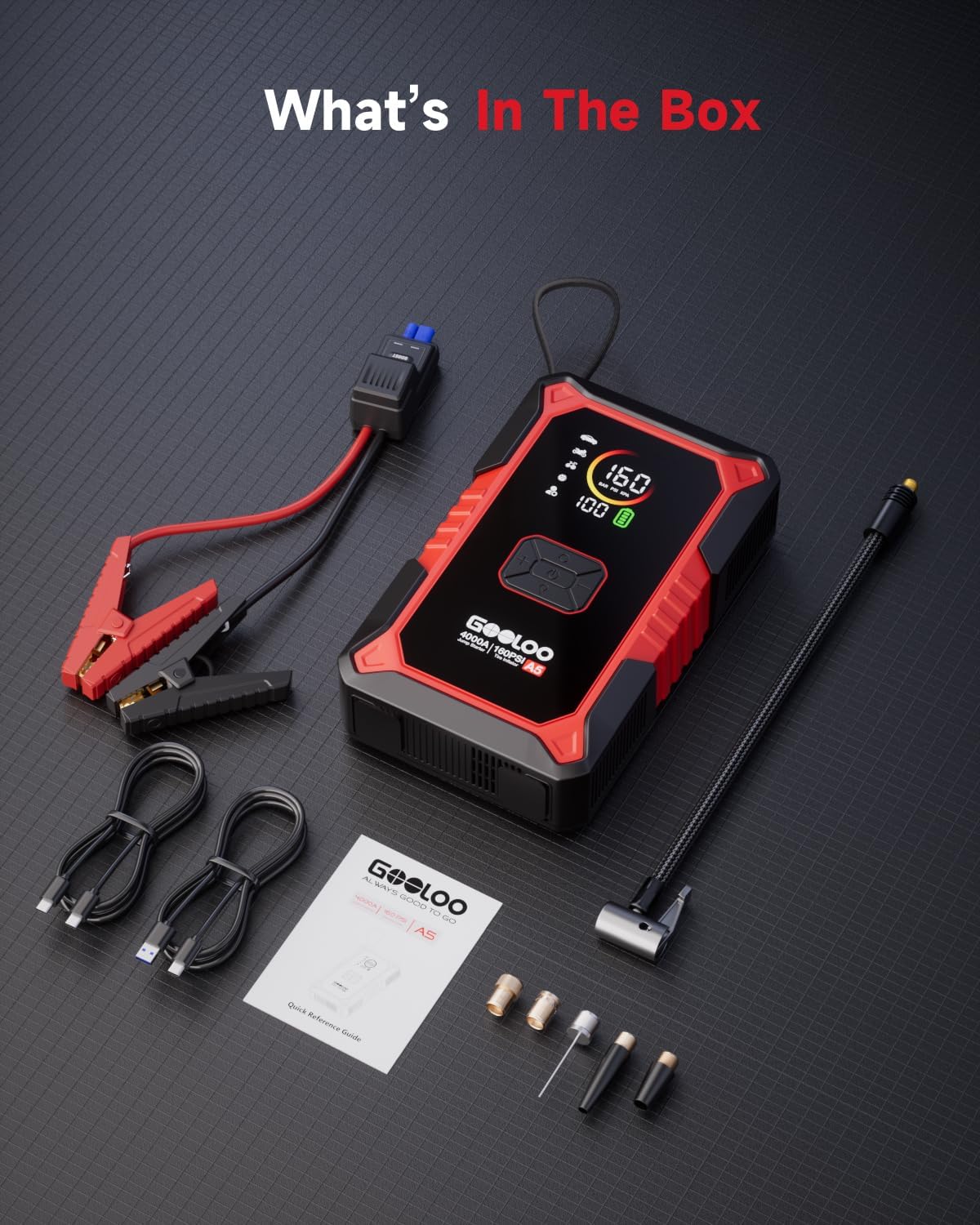
Image: All items included in the GOOLOO A5 package, laid out neatly: the main unit, smart jumper cables, USB-A to USB-C cable, USB-C to USB-C cable, carrying bag, pump tube, various air nozzles, and the user manual.
הוראות הפעלה
1. התנעת רכב באמצעות חיבור לחשמל
- Ensure the GOOLOO A5 unit is sufficiently charged.
- Connect the smart jumper cable to the jump cable socket on the GOOLOO A5.
- צרף את ה-cl האדוםamp לקוטב החיובי (+) של מצבר הרכב ולקוטב השחורamp למסוף השלילי (-).
- Observe the indicator lights on the smart jumper cable. If the "Correct" light is green or flashing green, proceed to start the vehicle. If the "Reverse" light is on, recheck connections.
- If the vehicle battery is deeply discharged or near-dead, press and hold the לְהַגבִּיר button on the smart jumper cable for 3 seconds until the indicator light turns solid green.
- Immediately start the vehicle. Once the vehicle starts, disconnect the smart jumper cable from the GOOLOO A5 unit, then remove the clamps מצבר הרכב.

Image: A person connecting the GOOLOO A5 jump starter to a car battery, with the device displaying its status. This illustrates the initial step of jump-starting a vehicle.

Image: The GOOLOO A5 jump starter connected to a car battery, highlighting the 'BOOST' button on the smart cable for activating boost mode for severely discharged batteries.

Image: A visual guide showing the three steps for jump-starting a vehicle using the GOOLOO A5: attaching the clamps, pressing the BOOST button, and starting the car.
2. ניפוח צמיגים
- Connect the pump tube to the aerated port on the GOOLOO A5.
- Attach the appropriate air nozzle to the pump tube and then to the tire valve.
- Turn on the GOOLOO A5. Use the setting buttons to select the desired inflation mode (Car, Motorcycle, Bicycle, Ball, or Free Mode) and set the target pressure (PSI/BAR/KPA).
- לחץ על כפתור ההתחלה כדי להתחיל בניפוח. המכשיר יעצור אוטומטית כאשר יגיע ללחץ שנקבע מראש.
- Disconnect the pump tube and nozzle from the tire valve.

Image: The GOOLOO A5 connected to a large vehicle tire, actively inflating it. The image emphasizes the device's 160 PSI maximum pressure and its 25mm motor for efficient inflation.

Image: The GOOLOO A5 displaying its auto shut-off feature during tire inflation, ensuring precise pressure and preventing over-inflation.

Image: A three-step visual guide demonstrating how to inflate a tire using the GOOLOO A5: selecting the mode and preset values, connecting the air hose, and initiating inflation.

Image: The GOOLOO A5's display showing the selection of multiple inflation modes, including presets for cars, motorcycles, bicycles, balls, and a customizable free mode.
3. שימוש כסוללת גיבוי
The GOOLOO A5 can charge various electronic devices. Use the built-in 45W USB-C cable or the USB-A output port to connect your devices. The 20,000mAh battery capacity provides ample power עבור טעינות מרובות.

Image: The GOOLOO A5 connected to a smartphone via its integrated 45W USB-C cable, demonstrating its power bank functionality.

Image: The GOOLOO A5 surrounded by various electronic devices (phone, tablet, camera), emphasizing its 20,000mAh battery capacity and ability to charge multiple items.
4. שימוש בפנס הלד
The integrated 400-lumen LED flashlight offers multiple modes for different situations:
- תְאוּרָה: תאורה סטנדרטית.
- SOS: Flashes the international distress signal.
- Strobe: Emits rapid flashes for signaling or self-defense.

Image: The GOOLOO A5's LED flashlight providing illumination in a dark outdoor setting, next to a car tire, demonstrating its utility in low-light conditions.
תַחזוּקָה
- טְעִינָה: טען את המכשיר כל 3-6 חודשים, גם אם אינו בשימוש, כדי לשמור על תקינות הסוללה.
- אִחסוּן: Store the GOOLOO A5 in a cool, dry place, away from direct sunlight and extreme temperatures.
- ניקוי: נגבו את היחידה בעזרת מטלית רכה ויבשה. אין להשתמש בכימיקלים חזקים או בחומרים שוחקים.
- טֶמפֶּרָטוּרָה: Avoid operating or storing the device outside its recommended temperature range (-4°F to 140°F).
פתרון בעיות
Device Not Turning On / Charging Issues
- Ensure the device is fully charged. Connect it to a power source using the provided USB-C cable and a compatible charger.
- Check the charging cables and adapter for any damage.
הרכב לא מתניע
- Verify that the smart jumper cable clampמחוברים היטב להדקים הנכונים של הסוללה (אדום לחיובי, שחור לשלילי).
- Check the indicator lights on the smart jumper cable. A solid green light indicates a correct connection. If the "Reverse" light is on, re-attach the clamps.
- If the battery is deeply discharged, use the לְהַגבִּיר function by pressing and holding the BOOST button on the smart cable until the indicator turns solid green. Attempt to start the vehicle immediately after.
- Ensure the GOOLOO A5 unit has sufficient charge (at least 50% recommended for jump-starting).
Tire Inflator Not Working / Inaccurate Pressure
- Ensure the pump tube is securely connected to both the GOOLOO A5 and the tire valve.
- Check that the correct inflation mode and target pressure are selected on the display.
- Verify the unit has enough battery charge for inflation.
- If pressure readings seem inaccurate, cross-reference with a separate, calibrated tire pressure gauge.
מפרטים
| מותג | GOOLOO |
| מספר דגם | JS-588 |
| זרם פלט שיא | 4000 Amps |
| קיבולת סוללה | 20000 מיליamp שעות |
| כרך ידtage | 12 וולט |
| לחץ ניפוח צמיגים מקסימלי | 160 PSI |
| מידות המוצר (D x W x H) | 8.98 אינץ' x 2.4 אינץ' x 5.55 אינץ' |
| משקל פריט | 3.2 פאונד |
| טמפרטורת הפעלה | -4°F עד 140°F |
| יציאת USB-C | טעינה מהירה של 45W PD |
| יציאת USB-A | 12W |
| סוגי רכב תואמים | Car, Truck, ATV, UTV, Dirt Bike, Snowmobile, SUV, Personal Watercraft, Motorcycle |

Image: The GOOLOO A5 unit with visual indicators for its operating temperature range and safety certifications (CE, FCC, UL), highlighting its robust design.
אחריות ותמיכה
The GOOLOO A5 Jump Starter with Air Compressor comes with an 18-month worry-free warranty. For any product-related inquiries, technical assistance, or warranty claims, please contact GOOLOO customer support.
Refer to the official GOOLOO webבאתר או בפרטי הקשר המופיעים באריזת המוצר לקבלת פרטי התמיכה העדכניים ביותר.
מה יש בקופסה
- 1 x מתנע קפיצה GOOLOO A5 עם מדחס אוויר
- 1 x כבל מגשר חכם
- 1 x כבל USB-A ל-USB-C
- 1 x כבל USB-C ל-USB-C
- 1 x תיק נשיאה
- 1 x צינור משאבה
- 5 x חרירי אוויר
- 1 x מדריך למשתמש