
1. המוצר נגמרview
The Eseecloud Solar Wireless Security Camera System offers comprehensive surveillance with its innovative 4-channel design. It features four high-quality 4MP PTZ cameras equipped with 1/3.2" CMOS sensors, providing clear footage day and night through advanced infrared imaging and 3D digital noise reduction. The system is solar-powered with integrated lithium batteries, ensuring continuous operation without complex wiring. Enhanced with PIR+ intelligent detection, cameras detect motion up to 14 meters with 120° coverage, reducing false alarms and triggering alerts. The system includes a 10-inch wireless NVR monitor with dual Wi-Fi antennas and HDMI output, supporting local storage via SATA HDD (up to 2TB) or SD card (up to 256GB). Remote viewing and playback are available through the Eseecloud App on mobile devices and PC. Additional features include two-way intercom functionality and cloud storage compatibility. This weatherproof system is ideal for securing homes, offices, farms, or warehouses.
תכונות עיקריות:
- Complete Solar Security Kit: Includes 4x 4MP HD PTZ cameras, 4 solar panels, and a 10-inch all-in-one wireless NVR monitor.
- High Definition 4MP Video: 1/3.2” CMOS sensor with 2560x1440 resolution for sharp, detailed footage.
- Smart AI Human Detection: PIR sensor detects motion up to 14m with 120° coverage, minimizing false alarms.
- שמע דו כיווני: Built-in microphone and speaker for real-time voice intercom and synchronized audio/video.
- Solar Powered & Long Standby: Each camera uses solar panels plus 3x18650 lithium batteries for extended, maintenance-free power.
- 10" Portable NVR Display: Integrated screen with Wi-Fi, HDMI output, mouse control, and support for up to 2TB HDD or 256GB SD card.
- ראיית לילה מתקדמת: ICR infrared filter + digital noise reduction ensures clear imaging in low-light conditions.
- מבנה עמיד בפני מזג אוויר: Durable outdoor design, lightning protection IEC61000-4-5 standard, and operating range -20°C to 50°C.
2. מה בקופסה
Your Eseecloud Solar Wireless Security Camera System package includes the following components:
- 10-inch NVR Monitor
- 4 PTZ Cameras
- אנטנות Wi-Fi כפולות
- 4 פאנלים סולאריים

איור 1: מעלview of the Eseecloud Wireless Security Camera System components.

Figure 2: Detailed product components including NVR ports (TF Card, USB, LAN, Power, Speaker) and camera features (Speaker, IR Lights, IR Sensor, White Lights).
3. הוראות התקנה
Follow these steps to set up your Eseecloud Solar Wireless Security Camera System:
- פרק רכיבים: הוציאו בזהירות את כל הפריטים מהאריזה וודאו שכל הרכיבים המפורטים קיימים.
- NVR Monitor Placement: Place the 10-inch NVR monitor in a central location within your home or office, ensuring it is within Wi-Fi range of your cameras and has access to a power outlet.
- Camera and Solar Panel Installation: Mount each PTZ camera and its corresponding solar panel in desired outdoor locations. Ensure the solar panel receives adequate direct sunlight for optimal charging. The cameras connect wirelessly to the NVR.
- הפעלה: Connect the NVR monitor to power. The system will automatically initialize.
- חיבור לאפליקציה: Download the Eseecloud App on your smartphone or PC. Follow the in-app instructions to add your NVR device and cameras.

Figure 3: Easy connection diagram for the wireless security camera system.

Figure 4: Illustration of 100m long-distance transmission capability.
Video 1: Instructions on how to connect your phone to the device for initial setup and configuration.
4. הוראות הפעלה
4.1 Smart AI Human Detection
The cameras utilize a PIR sensor for intelligent human detection, reducing false alarms caused by animals or inanimate objects. When human motion is detected, the system triggers recording and can activate sound/light alerts.

Figure 5: Smart human detection and alarm features in action.
Video 2: Demonstration of the camera's motion detection capabilities, showing how quickly it responds to movement.
4.2 שמע דו-כיווני
Each camera is equipped with a built-in microphone and speaker, enabling real-time two-way voice intercom. This allows you to communicate with visitors or deter intruders directly through the camera via the Eseecloud App.

Figure 6: Illustrates the two-way audio communication feature.
4.3 ראיית לילה מתקדמת
The cameras feature advanced night vision with an ICR infrared filter and digital noise reduction, ensuring clear imaging even in low-light conditions. The system supports both full-color night vision and infrared night vision modes.

Figure 7: Comparison of full-color and infrared night vision modes.
שלט אחד Viewing והשמעה
גישה לעדכונים חיים ופו מוקלטtage from your cameras seamlessly through the Eseecloud App on your mobile device or PC. The app provides full control over camera functions, including pan, tilt, and zoom (PTZ) capabilities.
סרטון 3: נגמרview of the MaxiViz Security Camera system, demonstrating app features, installation, and remote viewיכולות.
5. תחזוקה
5.1 Solar Power Management
Each camera is powered by a solar panel and integrated lithium batteries. Ensure solar panels are positioned to receive maximum direct sunlight daily to maintain battery charge and ensure continuous operation. Regularly clean the solar panels to remove any dust or debris that may obstruct sunlight absorption.
5.2 עיצוב עמיד בפני מזג אוויר
The cameras are designed with a durable, weatherproof build (IP66 rated) to withstand various outdoor conditions, including rain, snow, and dust. They also feature lightning protection (IEC61000-4-5 standard) and operate effectively in temperatures ranging from -20°C to 50°C. Periodically inspect the camera housing and mounting for any signs of wear or damage.
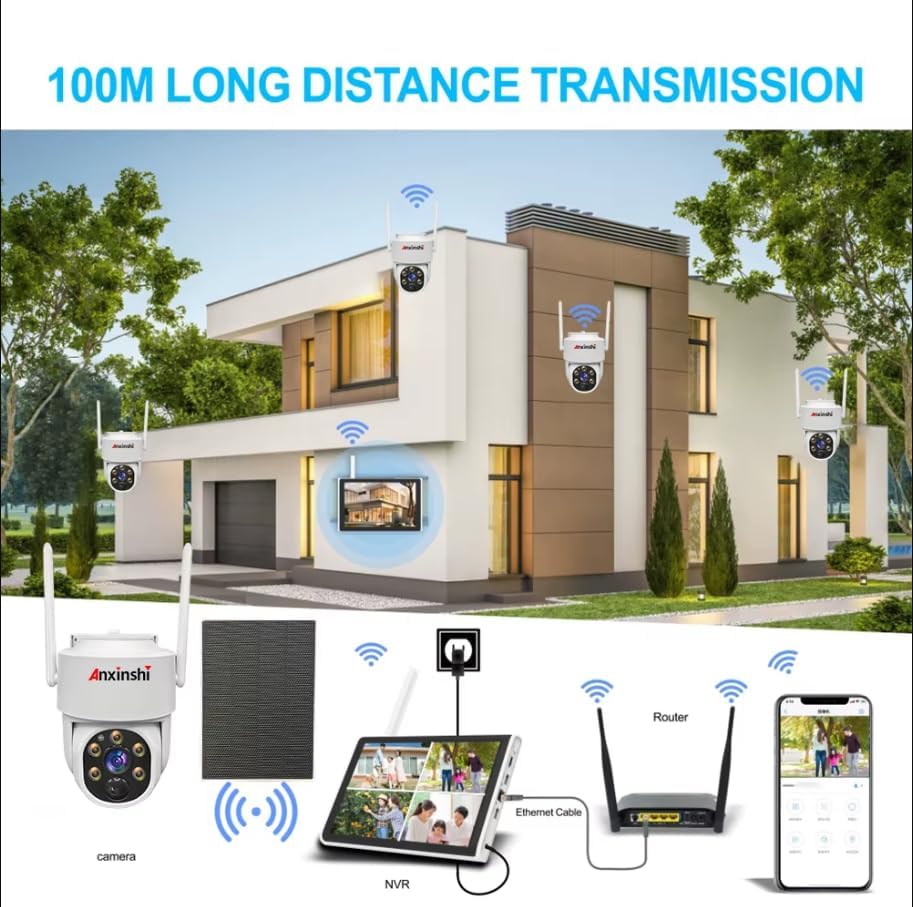
Figure 8: The camera's IP66 waterproof and dustproof capabilities.
6. פתרון תקלות
If you encounter any issues with your Eseecloud Security Camera System, consider the following general troubleshooting steps:
- אין כוח: Ensure the solar panel is clean and receiving direct sunlight. Check all power connections.
- אין הזנת וידאו: Verify that the cameras are properly connected to the NVR and that the NVR is connected to your network. Check Wi-Fi signal strength.
- איכות וידאו ירודה: Ensure camera lenses are clean. Check network stability and bandwidth.
- אזעקות שווא: Adjust motion detection sensitivity settings in the Eseecloud App.
- בעיות קישוריות לאפליקציה: Ensure your smartphone/PC has a stable internet connection. Restart the app and the NVR.
לסיוע נוסף, עיינו במידע התמיכה בסעיף 8.
7. מפרטים
| תכונה | מִפרָט |
|---|---|
| שם הדגם | ASIH20-PT7504SU-M |
| רזולוציית לכידת וידאו | 4 מגה פיקסל (2560x1440) |
| מספר ערוצים | 4 |
| טכנולוגיית קישוריות | Wi-Fi, Wireless, HDMI |
| מקור כוח | Solar Powered (3x Nonstandard Battery batteries included) |
| טווח ראיית לילה | 14 מטר |
| קצב פריימים | 25 פריימים לשנייה, 30 פריימים לשנייה |
| שימוש בפנים/חוץ | בָּחוּץ |
| תכונות מיוחדות | 2 Way Audio, Motion Sensor, Night Vision, Remote Viewing, Solar Powered |
| רמת עמידות במים | Waterproof (IP66) |
| טמפרטורת הפעלה | -20 מעלות צלזיוס עד 50 מעלות צלזיוס |
| אחסון NVR | Up to 2TB HDD or 256GB SD card |
| מידות (L x W x H) | 10.01 x 10.01 x 10.01 ס"מ |
8. אחריות ותמיכה
This Eseecloud Solar Wireless Security Camera System comes with a אחריות יצרן לשנה.
For technical support, product inquiries, or warranty claims, please contact the manufacturer or refer to the Eseecloud App Support resources.
יַצרָן: Shenzhen Anxinshi Technology Co., Ltd.
תְמִיכָה: Eseecloud App Support


