
1. הקדמה
Thank you for choosing the Vaczon 60" Farmhouse Ceiling Fan with Lights. This manual provides essential information for the safe installation, operation, and maintenance of your new ceiling fan. Please read these instructions thoroughly before beginning installation or use, and retain them for future reference.
This ceiling fan features a durable construction, a reversible DC motor for year-round comfort, 6-speed settings, and convenient control via both a remote and the "FanLamp Pro" mobile application. The dual-finish blades allow for customization to match your interior decor.

תמונה: מעלview of the Vaczon 60" Farmhouse Ceiling Fan highlighting key features such as energy efficiency, quiet operation, and reversible motor.
2. מידע בטיחות
אַזהָרָה: כדי להפחית את הסיכון לשריפה, התחשמלות או פגיעה גופנית, יש להקפיד תמיד על אמצעי הזהירות הבסיסיים הבאים:
- קרא את כל ההוראות לפני התקנת המאוורר.
- Ensure the installation site is structurally sound and can support the fan's weight.
- כל החיווט חייב להיות בהתאם לתקנות החשמל הלאומיות והמקומיות. אם אינך בטוח, התייעץ עם חשמלאי מוסמך.
- נתק את החשמל במפסק החשמל או בתיבת הנתיכים לפני תחילת ההתקנה או ביצוע כל תחזוקה.
- Do not operate the fan with damaged wiring or if any parts are missing or damaged.
- הרחיקו ידיים, בגדים וחפצים אחרים מלהבי המאוורר כאשר המאוורר פועל.
3. תכולת החבילה
Verify that all components listed below are included in your package. If any parts are missing or damaged, contact Vaczon customer support immediately.
- בית מנוע מאוורר תקרה
- 5 Dual-Finish Fan Blades (Matte Black / Maple Wood Grain)
- Light Kit with 2 E12 Lamp Holders (bulbs not included)
- שְׁלַט רָחוֹק
- Receiver for Remote Control/APP
- מוטות תמיכה (אפשרויות בגודל 6 אינץ' ו-10 אינץ')
- סוגר הרכבה וחומרה
- מדריך הוראות
4. התקנה והתקנה
סעיף זה מספק סיכום כלליview of the installation process. Refer to the detailed instruction manual included in your package for step-by-step guidance and safety warnings specific to your model.
4.1 שיקולים לפני ההתקנה
- גובה תקרה: Choose the appropriate downrod (6-inch or 10-inch) based on your ceiling height to ensure proper blade clearance.
- סוג תקרה: The fan is suitable for both flat ceilings and sloped ceilings with an angle of up to 15 degrees.
- אספקת חשמל: ודא שהקופסה החשמלית מותקנת היטב ומסוגלת לתמוך במשקל המאוורר.
4.2 שלבי התקנה (מעלview)
- כבה את החשמל במפסק החשמל.
- Install the mounting bracket to the ceiling electrical box.
- Assemble the downrod and hang the fan motor assembly.
- Connect the electrical wiring, including the receiver for remote/APP control.
- חברו את להבי המאוורר לבית המנוע.
- Install the light kit and desired E12 bulbs (not included).
- Secure the canopy and test the fan's operation.

Image: Diagram illustrating the fan's dimensions, available downrod lengths, and suitable ceiling types (flat and sloped up to 15 degrees).
5. הוראות הפעלה
Your Vaczon ceiling fan offers multiple control options for convenience and comfort.
5.1 פעולת שלט רחוק
The included remote control allows you to manage all fan functions from anywhere in the room. Ensure batteries are correctly inserted.

תמונה: מפורט view of the remote control with labels for each button's function, including power, light, fan speed, direction, and timer.
- הפעלה/כיבוי: מדליק או מכבה את המאוורר והתאורה.
- אור הפעלה/כיבוי: שולט על התאורה באופן עצמאי.
- הגדרת מהירות מאוורר: כוונון מהירות המאוורר מ-1 (הנמוך ביותר) ל-6 (הגבוה ביותר).
- קדימה/אחורה (קדימה/אחורה): משנה את כיוון סיבוב הלהב למצב קיץ או חורף.
- הגדרות טיימר (שעה אחת, שעתיים, 4 שעות): מגדיר את המאוורר לכיבוי אוטומטי לאחר שעה, 2 או 4 שעות.
- צליל מופעל/כיבוי: Toggles audible feedback from the fan.
- Fan Stopped: Stops the fan blades.
5.2 "FanLamp Pro" APP Control
Download the "FanLamp Pro" application on your smartphone to control the fan. The app offers similar functionalities to the remote control, including fan speed adjustment, light control, and timer settings. The fan also features a memory function that recalls your last settings upon restart.
5.3 Reversible DC Motor (Summer/Winter Modes)
מנוע DC הפיך מאפשר לך לייעל את זרימת האוויר לעונות שונות:
- מצב קיץ (רוחב אוויר): הלהבים מסתובבים נגד כיוון השעון, דוחפים אוויר קריר כלפי מטה ליצירת בריזה מרעננת.
- מצב חורף (רוחב רוח): הלהבים מסתובבים עם כיוון השעון, מושכים אוויר קריר מעלה לכיוון התקרה ומזרים אוויר חם כלפי מטה, מה שעוזר לפזר את החום בצורה שווה יותר.
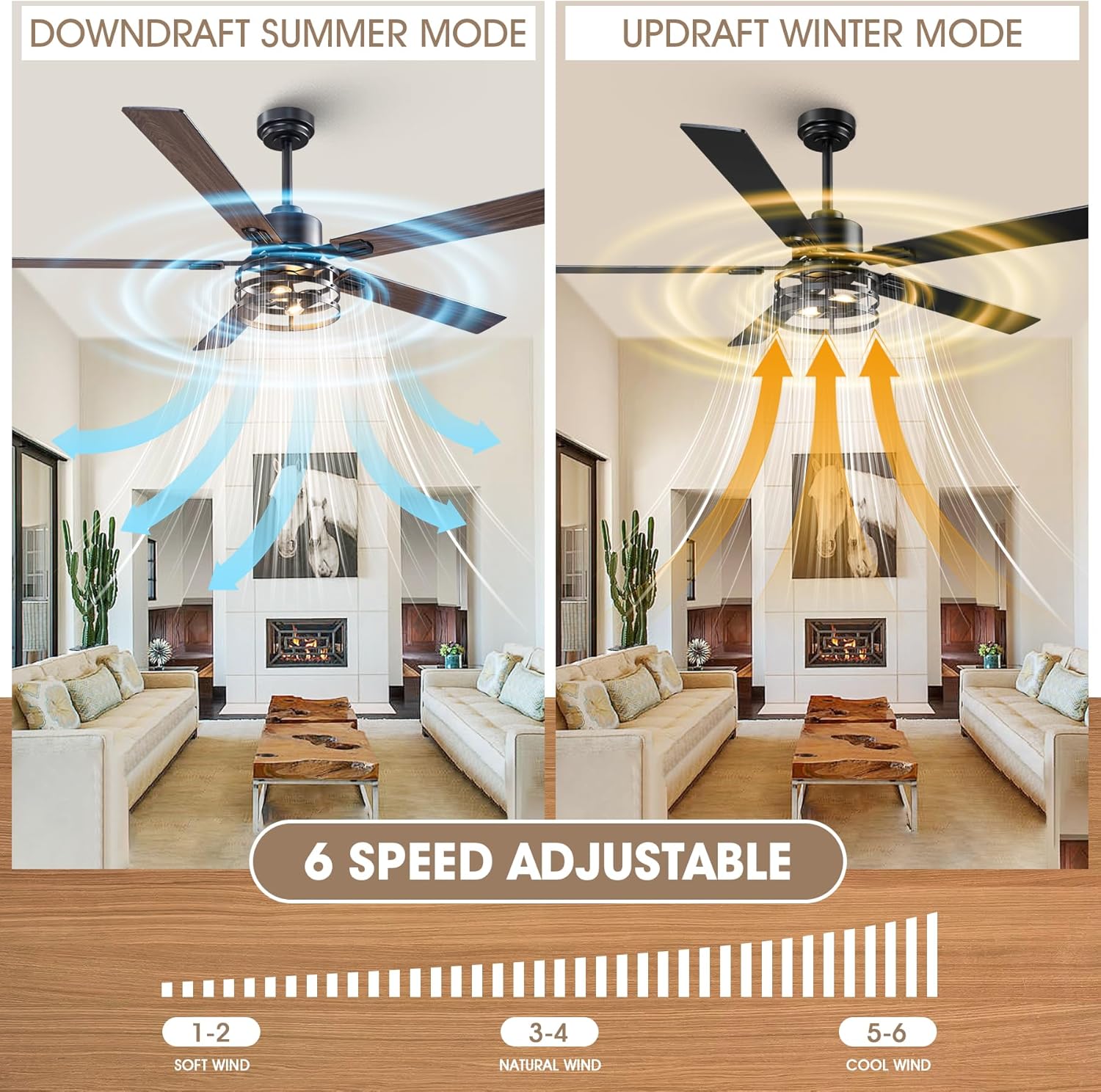
Image: Illustration of the fan's reversible motor function, demonstrating downdraft for summer cooling and updraft for winter heat circulation, along with the 6-speed adjustment scale.
5.4 Dual-Finish Blades
The fan comes with 5 dual-finish blades, featuring matte black on one side and maple wood grain on the other. You can choose the side that best complements your room's aesthetic during installation.

תמונה: תקריב view of the dual-sided fan blades, showcasing the maple wood and matte black finishes.
6. תחזוקה
תחזוקה שוטפת מבטיחה ביצועים אופטימליים ומאריכה את תוחלת החיים של מאוורר התקרה שלכם.
- ניקוי: יש לנקות מעת לעת את להבי המאוורר ואת בית המנוע בעזרת מטלית רכהamp מטלית. אין להשתמש בחומרי ניקוי שוחקים או ממסים. יש לוודא שהחשמל כבוי לפני הניקוי.
- מחברי הידוק: בדקו את כל הברגים והחיבורים מדי שנה כדי לוודא שהם מאובטחים. חיבורים רופפים עלולים לגרום לרעש ולרעד.
- נורה: Replace E12 bulbs as needed. Always turn off power before changing bulbs.
7. פתרון תקלות
If you encounter issues with your fan, refer to the following common problems and solutions. For persistent issues, contact customer support.
| בְּעָיָה | סיבה אפשרית | פִּתָרוֹן |
|---|---|---|
| המאוורר לא מופעל | No power supply; Loose wiring; Remote control battery dead; Receiver not paired. | Check circuit breaker; Verify all wire connections; Replace remote battery; Re-pair remote/receiver (refer to detailed manual). |
| מאוורר מתנדנד | להבים רופפים או חומרת הרכבה; להבים לא מאוזנים. | Ensure all blade screws and mounting screws are tight; Use a blade balancing kit (if included or purchased separately). |
| האור לא עובד | Bulbs faulty or loose; Wiring issue; Light switch on remote/app off. | Check/replace bulbs; Verify light kit wiring; Ensure light is turned on via remote/app. |
| השלט רחוק לא עובד | Dead battery; Obstruction; Receiver issue. | Replace remote battery; Ensure clear line of sight to fan; Check receiver connections. |
8. מפרטים
| מותג | ואזון |
| מספר דגם | VCZ099BK |
| מידות המוצר | 60" D x 60" W x 18.9" H |
| צֶבַע | Black/Maple |
| חוֹמֶר | Iron, Aluminum, Copper, MDF (Blades: Plastic) |
| מקור כוח | DC |
| מהtage | 21 וואט |
| מספר להבים | 5 |
| מספר מהירויות | 6 |
| קיבולת זרימת אוויר | 3726 רגל מעוקב לדקה |
| שיטת בקרה | Remote, App ("FanLamp Pro") |
| סוג אור | LED (E12 lamp holders, bulbs not included) |
| שימוש בפנים/חוץ | מקורה |
9. אחריות ותמיכה
For warranty information and customer support, please refer to the documentation included with your product or visit the official Vaczon website. Typically, warranty details cover manufacturing defects for a specified period from the date of purchase.
If you require assistance with installation, operation, or troubleshooting that is not covered in this manual, please contact Vaczon customer service. Have your model number (VCZ099BK) and purchase date ready when contacting support.