
GUSTARD R30
מדריך למשתמש של ממיר DAC רשת R2R דיסקרטי לחלוטין של GUSTARD R30
דגם: R30
מָבוֹא
This manual provides detailed instructions for the setup, operation, and maintenance of your GUSTARD R30 Fully-Discrete R2R Network Streamer DAC. Please read this manual thoroughly before using the device to ensure optimal performance and longevity.
רשימת אריזה
עם פתיחת החבילה, אנא ודא שכל הפריטים הבאים כלולים:
- GUSTARD R30 Mainframe
- כבל חשמל
- כבל USB
- שְׁלַט רָחוֹק
- תעודת אחריות

הלוח הקדמי מעלview
The front panel of the GUSTARD R30 features essential controls and a display for real-time status and operations.
- לחצן הפעלה: Toggles between standby and active states. The R30 can remain in standby mode when the rear power switch is ON.
- אזור תצוגה: Shows the current input channel, encoding format, and sampling rate. Displays menu items when in the setup menu.
- תצוגת עוצמת הקול: Indicates the current volume level, ranging from -63.5dB to 0dB. 'FIXED' indicates bypass mode. Displays menu options during configuration.
- כפתור '-': Normally decreases volume. Cycles through options in the menu.
- לחצן הילוכים: Short press switches inputs. Long press enters/exits the menu. Short press navigates items in the menu.
- כפתור '+': Normally increases volume. Cycles through options in the menu.

הלוח האחורי מעלview
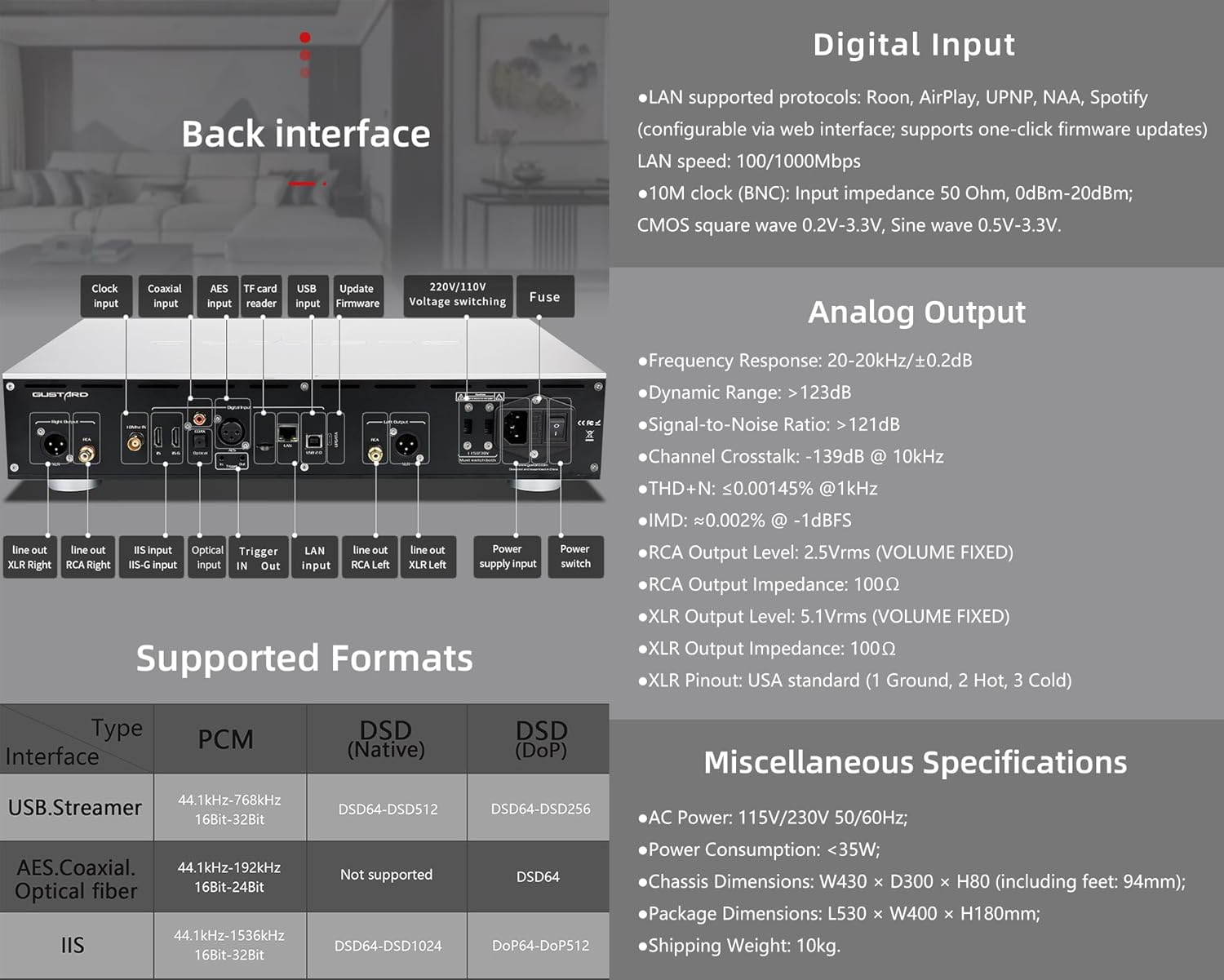
The rear panel provides various input and output connections for the GUSTARD R30.
- קלט שעון: For external 10MHz clock synchronization.
- קלט קואקסיאלי: קלט אודיו דיגיטלי.
- קלט AES: קלט אודיו דיגיטלי.
- כניסת USB: לחיבור למחשב או למקור שמע USB אחר.
- קלט LAN: For network streaming functionality.
- קורא כרטיסי TF: לעדכוני קושחה.
- עדכון קושחה: יציאת USB לעדכוני קושחה.
- 220V/110V כרךtagמיתוג: Selector for power voltage.
- נתיך: נתיך כוח.
- Line Out XLR Right/Left: Balanced analog audio outputs.
- Line Out RCA Right/Left: Unbalanced analog audio outputs.
- IIS Input (IIS-G): Digital audio input with Gustard pinout.
- קלט אופטי: קלט אודיו דיגיטלי.
- הפעל כניסה/יציאה: For 12V trigger control.
- כניסת אספקת חשמל: חיבור לחשמל AC.
- מתג הפעלה: מתג הפעלה ראשי.
Important: Ensure both voltagהמתגים e מוגדרים לאותה עוצמהtagבעת הפעלת מתח 220V/110Vtage switch, otherwise, it may damage the internal transformer upon powering on.
בקרות תצוגה ולוח
The R30 utilizes a large OLED display for real-time status monitoring and functional operations. The diagram below illustrates the main interface display states.
1. תצוגת OLED
The display shows the input channel, external clock indication, encoding format, sampling rate, and volume.
2. Input Channel Selection
ל-R30 יש 7 ערוצי קלט. בממשק הראשי, כל לחיצה על כפתור ההילוכים עוברת בין הערוצים הזמינים ברצף זה: COAX → AES → OPT → USB → STREAMER → IIS(G) → IIS(M*).
***Note: IIS(G) is for fixed Gustard pinout configuration and cannot be adjusted. IIS(M*) supports adjustable pinout configuration.
3. התאמת עוצמת הקול
- When the main interface is displayed, pressing the "+" or "-" buttons directly adjusts the analog volume attenuation function of the passive preampהנחתה נעה בין 0dB ל- -63.5dB (סה"כ הנחתה של 63.5dB).
- Pressing "+" at 0dB activates Fixed Output mode (bypassing attenuation circuit), displaying 'FIXED' indicator.
- When 'FIXED' is displayed, pressing "-" first exits bypass mode before controlling the attenuation level.

תפריט הגדרות
On the main screen, long press the Gear Button to enter the settings menu (hereinafter referred to as the menu button). In this state, the menu button can sequentially switch the menu items to be modified. "+" and "-" buttons are used to adjust the currently selected menu options. When the screen is in the settings menu, long press the menu button again to return to the main screen.
מבנה תפריט:
- מסנן PCM
- מסנן DSD
- מצב NOS
- REF CLOCK
- IIS MODE
- שלב
- TRIGGER CH.
- TRIGGER VOL.
- לְהַצִיג

פונקציות תפריט
גש לתפריט על ידי לחיצה על כפתור התפריט בממשק הראשי. כל אפשרות בתפריט מפורטת להלן.
1. PCM FILTER (PCM Digital Filter Adjustment)
ה-R30 משתמש במנגנון PCM בעל ביצועים גבוהים שפותח על ידי עצמו.ampמודול סינון דיגיטלי של לינג עם שלושה סוגי סינון:
- VIVID (Default): Similar to the FAST roll-off type of traditional digital filter, but with better ringing characteristics, very small pre-ringing, and fast convergence post-ringing. It aims for a broad soundstage and sound restoration. Recommended for most music styles.
- GENTLE: Similar to the SLOW roll-off type of traditional digital filter, offering a soft listening experience.
- מרוכבים: A hybrid digital filter, balancing characteristics between Vivid and Gentle for a good listening experience.
2. DSD FILTER (DSD Digital Filter Adjustment)
The DSD filter has 4 built-in bandwidth options: 47K (Default), 50K, 60K, 70K.
3. מצב NOS (ללא אוברס)ampling Filter Mode)
When enabled, the PCM signal bypasses the oversampling filter entirely, decoded straight through the R-2R decoder module. This preserves micro-details and timing integrity. When enabled, there may be a slight clicking sound when the playback data format switches between PCM and DSD.
- DISABLE (Default)
- לְאַפשֵׁר
4. REF CLOCK (Reference Clock Selection)
The GUSTARD-K2, low-noise clock synthesizer, achieves ultra-low jitter performance. The R30 offers two clock options:
- INTERNAL (Default): Uses the built-in OCXO internal reference.
- EXT. 10MHz: Selects an external 10MHz reference source. It is recommended to connect to GUSTARD C16 or C18 reference 10M master clocks.
If the external clock is lost, powered off, or its frequency deviation is greater than +/-150ppm, "EXT ERR" will be displayed and flash.
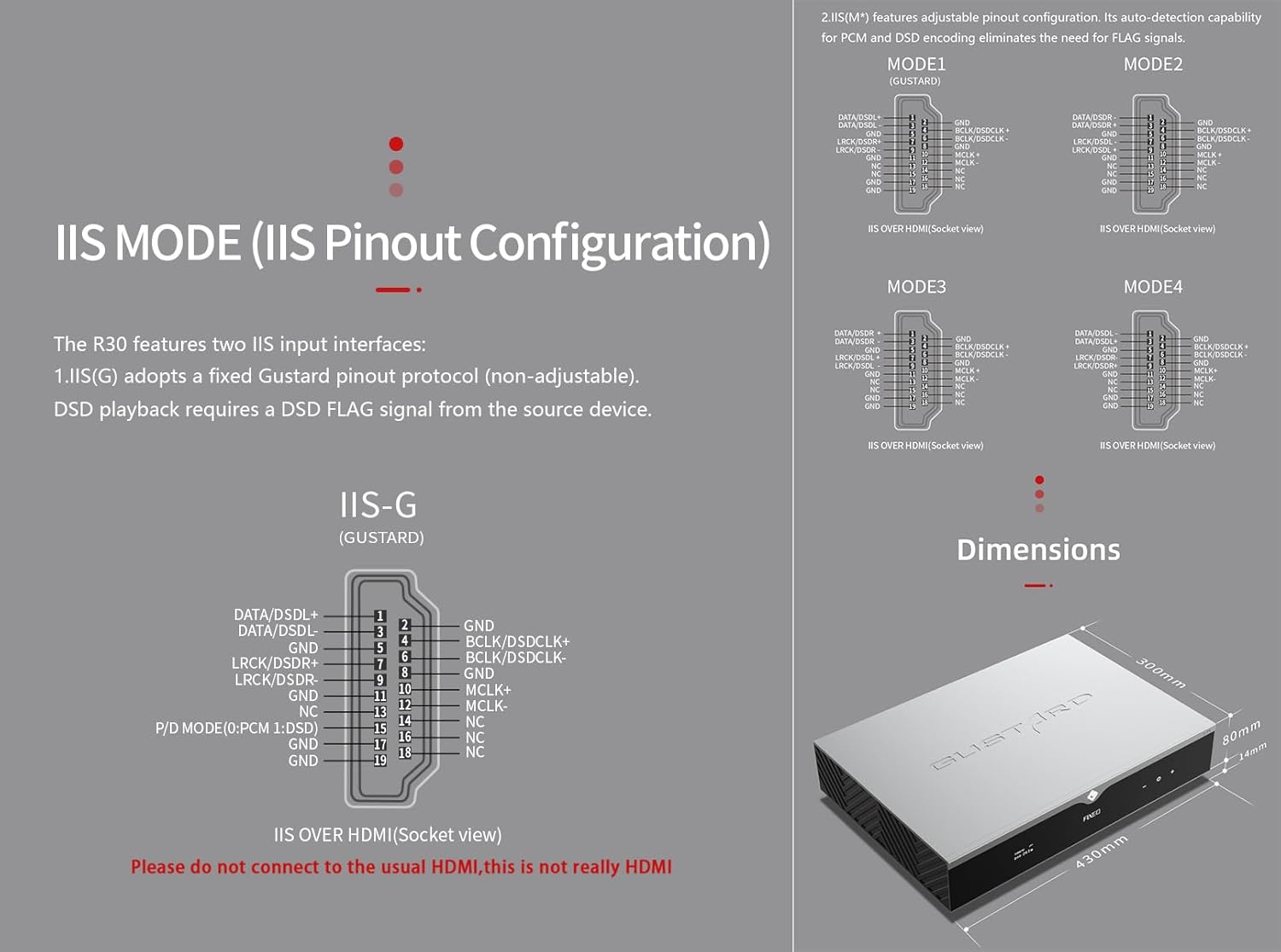
5. IIS MODE (IIS Pinout Mode Selection)
ל-R30 שני ממשקי קלט של IIS:
- IIS(G): Fixed Gustard pinout protocol (non-adjustable). DSD playback requires a DSD FLAG signal from the source device.
- IIS(M*): Features adjustable pinout configuration. Its auto-detection capability for PCM and DSD encoding eliminates the need for FLAG signals.
IIS(M*) adjustable Pinout mode IIS input has four Pinouts: MODE1 (Default), MODE2, MODE3, MODE4. MODE1 is compatible with the GUSTARD mode. If you are connecting to a GUSTARD front end such as U12, U16, U18, S16, S26, etc., you can match them with MODE1, which is the former works in the Gustard output mode.
Please do not connect to the usual HDMI, this is not really HDMI.
6. PHASE (Phase Setting)
פונקציה זו מציעה שתי אפשרויות:
- NON-inverted (Default): When non-inverted, the RCA output of R30 is normal phase, and the XLR balanced output is American standard polarity output (1 ground, 2 hot, 3 cold).
- הָפוּך: When inverted, only the RCA output is reverse phase, and the XLR balanced output is Japanese/European standard polarity output (1 ground, 2 cold, 3 hot).
7. TRIGGER CH. (Linkage Trigger Start Channel Selection)
The R30 can be triggered by an external 12V linkage signal and automatically turn on from standby mode. When the 12V trigger signal ceases or drops to 0V, automatic standby activation occurs. When the R30 is working, it is switched to the input channel of this setting by the 12V trigger linkage signal.
- LAST (Default): The input channel that was in use before entering standby last time.
- Other options include COAX, AES, OPT, USB, STREAMER, IIS(G), IIS. Selecting any channel activates it upon receiving a 12V trigger signal.
8. TRIGGER VOL. (Link Trigger Boot Volume Selection)
ניתן להפעיל את ה-R30 ממצב המתנה באמצעות אות טריגר חיצוני של 12V ולכוון אותו אוטומטית לרמת העוצמה שנבחרה. לחלופין, במהלך הפעולה, אות טריגר של 12V מעביר את הפלט לעוצמה שנקבעה מראש. אפשרות זו מגדירה את עוצמת הפלט לאחר הפעלת הטריגר.
- LAST (Default): The volume used before entering standby.
- קָבוּעַ: Fixed full-scale output bypassing attenuation.
- -20dB: Output at a volume attenuated to -20dB.
- -30dB: Output at a volume attenuated to -30dB.
- -40dB: Output at a volume attenuated to -40dB.
9. DISPLAY (Screen Brightness Settings)
Long-term high-brightness use of OLED screens can cause screen burn-in or ghosting. Therefore, the R30 is designed to always select automatic screen off, or manually select automatic screen off, which can also reduce interference.
- AUTO (Default): Automatically reduce brightness.
- כיבוי אוטומטי: Automatically turn off the screen.
שלט רחוק אינפרא אדום
בעת הפעלת מוצרי DAC, לחץ והחזק את כפתור ה-DAC למשך יותר מ-3 שניות כדי להיכנס למצב בקרת DAC. AMPמצבי /STREAM שולטים במוצרי Gustard אחרים.
- המתנה: Press once to activate R30 from standby. Press once during operation to enter standby.
- תַפרִיט: Press to access R30's setup menu.
- פד עם 4 מקשי כיוון: Up/Down navigates menu items. Left/Right adjusts selected options. Center press activates/deactivates mute.
- בְּחֲזָרָה: Returns to main interface.
- כרך-: Decreases output volume on main interface.
- כרך+: Increases output volume on main interface.
הערות:
- Operational range varies with angle.
- Obstructions between remote and sensor may cause malfunction.
- Remove batteries if unused for more than 1 month.
- Thoroughly clean battery compartment if leakage occurs.
- May accidentally trigger other IR-controlled devices.

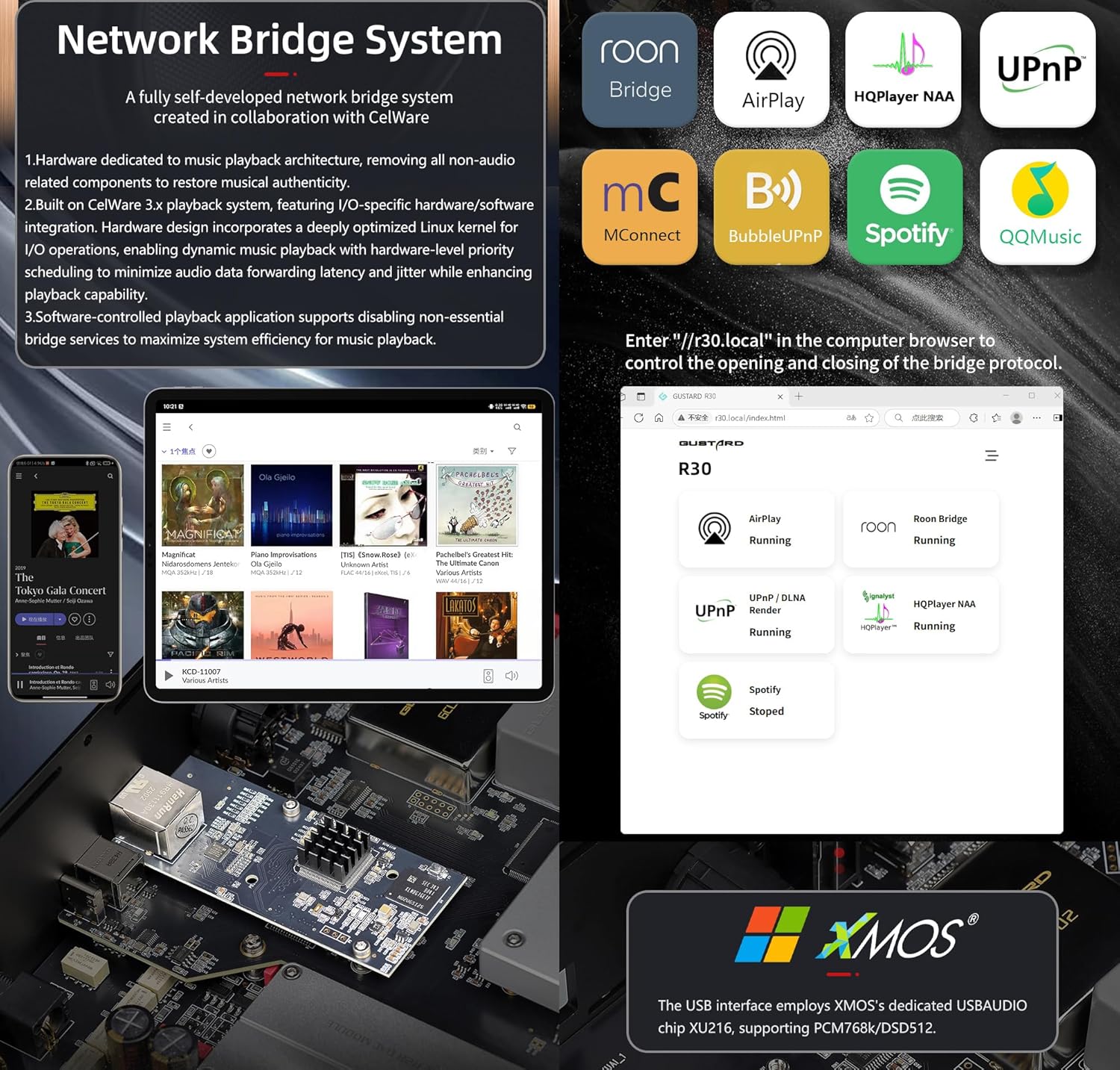
התחלה מהירה של סטרימר גשר רשת
After connecting R30's RJ45 port to your local network:
- Select the STREAMER channel and await system boot (approximately 1 minute, until "DSD 24.5MHz" appears).
- Access R30's configuration page via: http://R30.local (as shown below). Disable unused streaming protocols on the web ממשק כדי למקסם את יעילות המערכת. עדכוני קושחה מבוצעים גם כאן.
(הפעלת מכשירים ניידים/טאבלטים תלויה ועומדת עד להשקת אפליקציה ייעודית)
You can turn off streaming protocols that are not frequently used through the web page to maximize system music playback performance. At the same time, the online upgrade of the Streamer is also operated on the web עַמוּד.
(לאחר הפעלת אפליקציית הסטרימר הייעודית, ניתן לבצע את הפעולות הנ"ל באפליקציה)
Official Product Video: GUSTARD R30 - User Manual
מפרט מוצר
Digital Input Support Formats:
| סוּג | PCM | DSD (מקורי) | DSD (DoP) |
|---|---|---|---|
| USB.Streamer | 44.1kHz-768kHz 16Bit-32Bit | DSD64-DSD512 | DSD64-DSD256 |
| AES.Coaxial.Optical fiber | 44.1kHz-192kHz 16Bit-24Bit | לא נתמך | DSD64 |
| IIS | 44.1kHz-1536kHz 16Bit-32Bit | DSD64-DSD1024 | DoP64-DoP512 |
פלט אנלוגי:
- תגובת תדר: 20-20kHz/±0.2dB
- טווח דינמי:> 123dB
- יחס אות לרעש:> 121dB
- קרוסטוק ערוץ: -139dB @ 10kHz
- THD+N: ≤ 0.00145% @1kHz
- IMD: ≈0.002% @ -1dBFS
- רמת יציאה RCA: 2.5Vrms (עוצמת קול קבועה)
- עכבת פלט RCA: 100Ω
- עוצמת יציאה XLR: 5.1Vrms (עוצמת קול קבועה)
- עכבת פלט XLR: 100Ω
- חיבור XLR: תקן ארה"ב (1 הארקה, 2 חיבורים חמים, 3 חיבורים קרים)
מפרט אחר:
- AC Power: 115V/230V 50/60Hz
- צריכת חשמל: <35W
- Chassis Dimensions: W430 × D300 × H80 (including feet: 92mm)
- Package Dimensions: L530 × W400 × H180mm
- Shipping Weight: 10kg (with package)
- 10MHz BNC Input: Input impedance 50 Ohm, 0dBm-20dBm; CMOS square wave 0.2V-3.3V, Sine wave 0.5V-3.3V.
- Trigger: IN- 12V Typ. OUT- 12V Typ.
תנאי אחריות
Thank you for choosing GUSTARD HIFI products. To safeguard your rights and interests, please read the following warranty terms carefully. You can promptly obtain comprehensive after-sales service provided by GUSTARD.
אחריות למוצר
You will enjoy a 2-year free warranty and lifetime maintenance after the date of purchasing GUSTARD's HIFI product.
* היצרן נושא רק את המטענים מהיבשת הסינית. חלק מההובלה והמס שנוצרו מחו"ל ייפתרו על ידי המשתמש עם המשא ומתן של הסוחר.
שירות אחריות חינם
GUSTARD R30 from the purchasinתאריך g בתקופת האחריות החינמית, המשתמש משתמש במוצר כרגיל, והמוצר נכשל עקב בעיות באיכות הרכיבים או בייצור.
מעבר לשירות האחריות
Belonging to one of the following circumstances, products are no longer provided warranty service:
- מוצרים מתאריך הרכישה חרגו מתקופת אחריות שנקבעה מראש.
- הדגם, הברקודים ותאריך הרכישה אינם תואמים למוצר ולתעודת האחריות בפועל.
- Without GUSTARD technician permission, unauthorized modifications to the circuit, components or self-repaired product.
- נזק שנגרם על ידי כוחות טבע שאי אפשר לעמוד בפניהם.
- מעבר לשימוש המותר בנזק סביבתי.
- נזק עקב שימוש לא נכון או אחסון לא תקין. כולל אך לא רק: הכרךtage גבוה מכדי לשרוף את המעגלים או הרכיבים; חבטות וכתוצאה מכך פגיעה בקליפה או הפנימית; פגיעה עקב מים, שמן, נוזלים ואבק מוגזם; חמצון או קורוזיה של המוצר וכו'.
- מעבר לתקופת האחריות, כגון נזק לרכיב בודד, הופעה כתוצאה מנזק אנושי, שינויי קושחה מובילים לאי-יכולת לעבוד על ידי משתמשים לא מורשים. GUSTARD מתחייב לגבות דמי תחזוקה סבירים (למעט רכיבים בשטח גדול או לוח מעגלים שנשרפים ללא תיקון). עלויות הובלה ותחזוקה, עלויות חומר נדרשות מהמשתמש לשאת.
מידע ליצירת קשר
יַצרָן: Shenzhen Goshide Technology Co., LTD
כְּתוֹבֶת: Room 302, Building 1, No. 28, Huimin 1st Road, Guanlan Sub-district, Longhua District, Shenzhen City, Guangdong Province
טל: +86-18682080102
Webאֲתַר: http://www.gustard.com
אֶלֶקטרוֹנִי: service@gustard.com
Ask a question about this manual
Ask about setup, troubleshooting, compatibility, parts, safety, or missing instructions. Manuals+ will review the question and use this page’s manual context to help answer it.