
1. הקדמה
Thank you for choosing the T-Wolf T61 60% Wired Mechanical Gaming Keyboard. This manual provides detailed instructions for setting up, operating, and maintaining your keyboard to ensure optimal performance and longevity. Please read this manual carefully before using the product.
2. המוצר נגמרview
2.1 תכונות עיקריות
- מתגים מכניים: Delivers precise tactile feedback and long-lasting performance.
- חיבור USB קווי: Stable USB 2.0 plug-and-play interface; no drivers required.
- פריסה קומפקטית של 60%: Functional design that saves space while maintaining key usability.
- Multi-Key Rollover: Supports simultaneous key presses without input errors, ensuring precise performance during intense typing or gaming sessions.
- תאורת RGB אחורית: Customizable vibrant RGB backlighting for enhanced aesthetics.
- פעולה ברעש נמוך: Moderate sound level suitable for various environments.
- עיצוב עמיד בפני שפכים: Helps protect against light spills (not waterproof).
2.2 תכולת החבילה
- 1 x T-Wolf T61 60% Wired Mechanical Gaming Keyboard
- מדריך למשתמש אחד (מסמך זה)
2.3 תרשים מקלדת
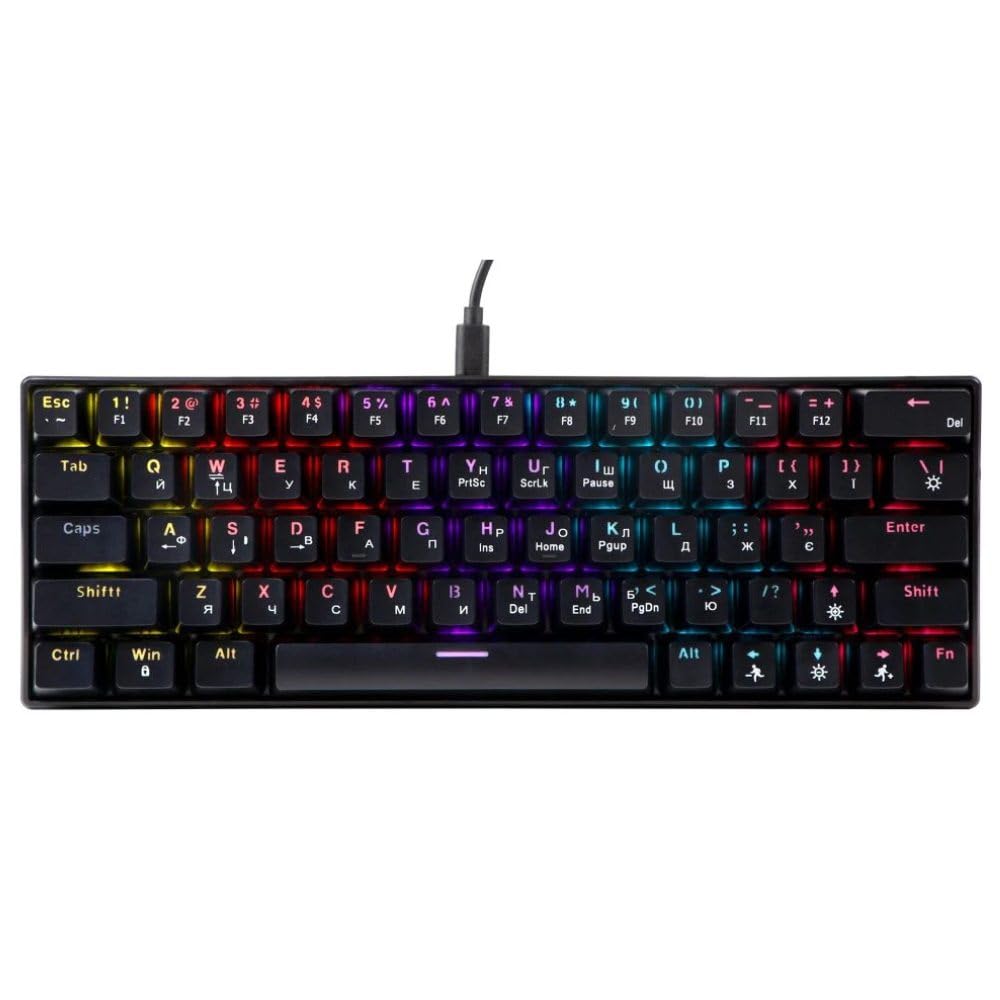
An image showing the T-Wolf T61 60% Wired Mechanical Gaming Keyboard, highlighting its compact layout and design.
3. התקנה
- פרק את המקלדת: הוציאו בזהירות את המקלדת ואת כל האביזרים מהאריזה.
- התחבר למכשיר שלך: Locate an available USB port on your computer (PC, laptop) or gaming console. Insert the USB connector of the T-Wolf T61 keyboard into the USB port.
- התקנה אוטומטית של מנהל התקן: The keyboard is plug-and-play. Your operating system will automatically detect and install the necessary drivers. This process may take a few moments.
- מוכן לשימוש: לאחר התקנת הדרייברים, המקלדת מוכנה לשימוש מיידי.
4. הוראות הפעלה
The T-Wolf T61 keyboard functions as a standard QWERTY layout keyboard. Its 60% compact design means some functions are accessed via key combinations.
4.1 בקרת תאורת רקע RGB
The keyboard features customizable RGB backlighting. Specific key combinations are used to change lighting modes and effects. Refer to the keyboard's function layer markings for exact controls, typically involving the Fn key combined with other keys (e.g., Fn + \| for mode changes, Fn + [{ or Fn +]} for brightness/speed adjustments).
- שינוי מצבי תאורה: לִלְחוֹץ Fn + \| to cycle through various RGB lighting effects.
- התאמת בהירות: לְהִשְׁתַמֵשׁ Fn + [{ כדי להפחית את הבהירות ו Fn +]} כדי להגביר את הבהירות.
- התאמת מהירות: לְהִשְׁתַמֵשׁ Fn +; כדי להפחית את מהירות האפקט ו Fn + '" כדי להגביר את מהירות האפקט.
4.2 Multi-Key Rollover
The T61 keyboard supports multi-key rollover, allowing multiple keys to be pressed simultaneously without ghosting or missed inputs. This feature is particularly beneficial for fast typing and complex gaming commands.
5. תחזוקה
תחזוקה נכונה מבטיחה את אורך החיים והביצועים של המקלדת שלכם.
- ניקוי: Use a soft, dry cloth to wipe the surface of the keyboard. For deeper cleaning, use a can of compressed air to remove dust and debris from between the keycaps. For stubborn dirt, a slightly damp ניתן להשתמש במטלית עם תמיסת ניקוי עדינה, תוך הקפדה על כך שנוזלים לא ייכנסו למקלדת.
- עיצוב עמיד בפני שפכים: While the keyboard features a spill-resistant design to protect against light spills, it is לא עמיד למים. In case of a spill, immediately disconnect the keyboard from your device, gently wipe away any liquid, and allow it to air dry completely before reconnecting.
- אִחסוּן: יש לאחסן את המקלדת במקום קריר ויבש, הרחק מאור שמש ישיר וטמפרטורות קיצוניות.
6. פתרון תקלות
If you encounter issues with your T-Wolf T61 keyboard, please refer to the following common solutions:
- המקלדת לא מגיבה:
- ודא שכבל ה-USB מחובר היטב הן למקלדת והן למכשיר שלך.
- נסה לחבר את המקלדת ליציאת USB אחרת.
- Test the keyboard on another computer to rule out a device-specific issue.
- הפעל מחדש את המחשב.
- RGB Backlighting Not Working/Incorrect:
- ודא שהמקלדת מופעלת כראוי.
- Cycle through the RGB modes using the designated key combinations (e.g., Fn + \|).
- Adjust brightness settings (e.g., Fn + [{ / Fn +]}).
- מקשים לא נרשמים או מקלידים פעמיים:
- Clean the affected keycap and switch area using compressed air to remove any debris.
- Ensure no software conflicts are present (e.g., other keyboard drivers or utilities).
אם הבעיה נמשכת לאחר שניסית את השלבים הבאים, אנא צור קשר עם תמיכת הלקוחות.
7. מפרטים
| תכונה | תֵאוּר |
|---|---|
| מותג | T-WOLF |
| דֶגֶם | T61 |
| טכנולוגיית קישוריות | USB קווי |
| תיאור מקלדת | מֵכָנִי |
| מספר מפתחות | 65 |
| פריסת מקלדת | QWERTY |
| תכונות מיוחדות | RGB Backlit, Multi-Key Rollover, Low-Noise Operation, Spill-Resistant Design |
| מכשירים תואמים | PC, laptop, gaming consoles |
| חוֹמֶר | מתכת, פלסטיק |
| צֶבַע | שָׁחוֹר |
| ארץ מוצא | סִין |
8. אחריות ותמיכה
The T-Wolf T61 keyboard comes with a standard manufacturer's warranty. Please refer to the warranty card included with your purchase or contact your retailer for specific warranty terms and conditions.
For technical support, troubleshooting assistance, or warranty claims, please contact the retailer where you purchased the product or visit the official T-Wolf webאתר למשאבי תמיכה.