
1. הקדמה
The M-Vave SMK-37 Pro is a versatile musical instrument that combines the functionality of a modern MIDI controller with the sound capabilities of a classic FM synthesizer. Designed for both studio and mobile musicians, this device features 37 velocity-sensitive keys and a comprehensive set of controls, offering flexibility through wireless or USB connectivity.
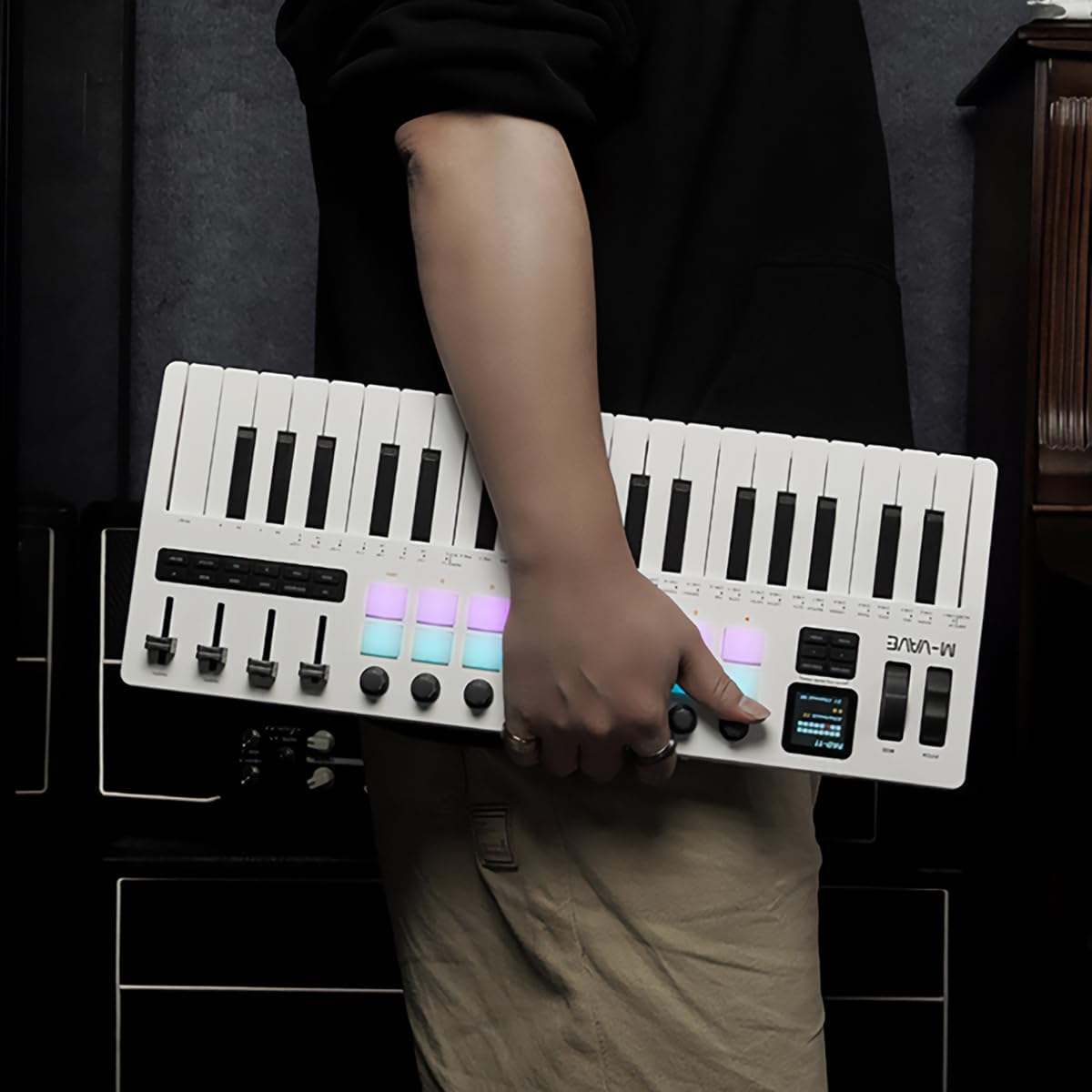
Figure 1.1: The M-Vave SMK-37 Pro is designed for portability, allowing musicians to create on the go.
2. המוצר נגמרview
The SMK-37 Pro is engineered to provide extensive control and sound generation capabilities. Below is an overview של התכונות והמרכיבים העיקריים שלה.
2.1 תכונות עיקריות
- 37 velocity-sensitive keys (3 octaves) for expressive play.
- Built-in FM synthesizer engine, inspired by the Yamaha DX7.
- 16 RGB illuminated drum pads for beat making and sampמפעיל.
- 8 assignable rotary knobs and 4 assignable faders for real-time control.
- USB-C connectivity for power and data, alongside Bluetooth 5.0 and 2.4G wireless MIDI.
- Integrated 2000mAh rechargeable battery for up to 8 hours of portable use.
- 1.54-inch color display for clear parameter feedback.
- Pitch bend and modulation wheels for dynamic performance.
- Octave transform and Smart Chord functions.
2.2 זיהוי רכיבים

איור 2.1: חזית view of the SMK-37 Pro, highlighting the keyboard, pads, and control surface.
- מִקלֶדֶת: 37 מקשים רגישים למהירות.
- רפידות: 16 RGB illuminated drum pads.
- ידיות: 8 assignable rotary encoders.
- פאדרים: 4 assignable faders.
- לְהַצִיג: 1.54-inch color screen for parameter visualization.
- Pitch/Mod Wheels: For expressive control.

Figure 2.2: Rear panel of the SMK-37 Pro, showing connectivity options.
- יציאת USB-C: For charging and USB MIDI connection.
- לחצן הפעלה: להפעלה/כיבוי של המכשיר.
- פלט שמע: For monitoring the built-in FM synthesizer.
3. התקנה
Follow these steps to set up your M-Vave SMK-37 Pro.
3.1 טעינת המכשיר
- Connect the included USB-C cable to the USB-C port on the rear of the SMK-37 Pro.
- חבר את הקצה השני של כבל ה-USB-C לספק כוח USB תואם (לא כלול) או ליציאת USB של מחשב.
- The device will begin charging. A full charge provides up to 8 hours of operation.
3.2 הפעלה/כיבוי
- To power on, press and hold the Power button on the rear panel until the display illuminates.
- To power off, press and hold the Power button until the display turns off.
3.3 אפשרויות קישוריות
The SMK-37 Pro offers multiple ways to connect to your devices.
3.3.1 USB MIDI Connection
- Connect the SMK-37 Pro to your computer using the USB-C cable.
- The device will be recognized as a standard MIDI input/output device by your operating system (Windows, macOS, iOS, Android).
- For Windows users, ensure you have Bluetooth 5.0 and an appropriate BLE MIDI driver installed for wireless functionality.
3.3.2 Wireless MIDI Connection (Bluetooth 5.0 / 2.4G)

Figure 3.1: Wireless connection guide for the SMK-37 Pro.
- Ensure the SMK-37 Pro is powered on.
- Activate Bluetooth on your Windows, macOS, iOS, or Android device.
- חפש available Bluetooth devices and select "SMK-37 Pro" from the list.
- For 2.4G wireless MIDI, a compatible 2.4G receiver (sold separately) may be required. Refer to the receiver's instructions for pairing.
4. הוראות הפעלה
This section details how to use the M-Vave SMK-37 Pro as both a MIDI controller and a standalone FM synthesizer.

Figure 4.1: The SMK-37 Pro in use, showcasing its interactive controls.
4.1 MIDI Controller Mode
The SMK-37 Pro functions as a universal MIDI controller, compatible with various Digital Audio Workstations (DAWs) and software instruments.
- Connecting to DAWs: Once connected via USB or wirelessly, select "SMK-37 Pro" as a MIDI input device in your DAW's preferences (e.g., Ableton Live, FL Studio, Logic Pro, GarageBand).
- Assigning Controls: The 16 RGB pads, 8 knobs, and 4 faders can be assigned to control parameters within your DAW or VST instruments. Refer to your DAW's manual for MIDI mapping instructions.
- Keys and Wheels: The 37 velocity-sensitive keys, pitch bend, and modulation wheels transmit standard MIDI messages for expressive performance.
4.2 Built-in FM Synthesizer Mode
The SMK-37 Pro features an integrated FM synthesizer engine, allowing you to create and play sounds directly from the device without external software.

Figure 4.2: The SMK-37 Pro's internal sound source can be monitored via headphones or external speakers.
- Sound Generation: The FM synth engine is inspired by the legendary Yamaha DX7, supporting DX7 patches.
- Parameter Control: Use the onboard knobs and faders to edit synthesizer parameters such as algorithms, filters, envelopes, and effects. The 1.54-inch color display provides visual feedback on parameter values.
- ניהול תיקונים: Sounds can be played, edited, and stored directly on the device. Consult the on-screen menu for patch selection and saving procedures.
- פלט שמע: Connect headphones or external speakers to the audio output jack on the rear panel to monitor the synthesizer's sound.
4.3 תצוגה וניווט

Figure 4.3: The 1.54-inch display provides clear feedback on settings and parameters.
The 1.54-inch color display is your primary interface for navigating menus, adjusting parameters, and viewing patch information. Use the dedicated navigation buttons and rotary encoders near the display to browse options and confirm selections.
4.4 פונקציות מיוחדות
- טרנספורמציה אוקטבית: Use the dedicated octave buttons to shift the keyboard's range up or down.
- פונקציית אקורד חכמה: This feature assists in playing chords with single key presses. Refer to the on-screen menu for activation and configuration.
- Arpeggiator: The built-in arpeggiator can generate rhythmic patterns from held notes. Settings for mode, octave, swing, tempo, and latch can be adjusted via the display.
5. תחזוקה
Proper care will ensure the longevity and optimal performance of your SMK-37 Pro.
- ניקוי: השתמשו במטלית רכה ויבשה כדי לנגב את פני השטח של המכשיר. במקרה של לכלוך עיקש, נגבו מעטamp ניתן להשתמש במטלית ולאחר מכן במטלית יבשה. יש להימנע מחומרי ניקוי שוחקים או ממסים.
- אִחסוּן: יש לאחסן את המכשיר במקום קריר ויבש, הרחק מאור שמש ישיר, טמפרטורות קיצוניות ולחות גבוהה.
- טיפול: הימנעו מהפלת המכשיר או מחשיפתו לפגיעות חזקות. אין להניח עליו חפצים כבדים.
- טיפול בסוללה: להשגת חיי סוללה אופטימליים, הימנעו מפריקה מלאה של הסוללה לעתים קרובות. אם מאחסנים אותה לפרקי זמן ממושכים, טען את הסוללה לכ-50% כל כמה חודשים.
6. פתרון תקלות
If you encounter issues with your M-Vave SMK-37 Pro, refer to the following common solutions.
| בְּעָיָה | סיבה אפשרית | פִּתָרוֹן |
|---|---|---|
| המכשיר לא נדלק. | Low battery or power cable not connected. | Charge the device using the USB-C cable. Ensure the power button is pressed and held correctly. |
| No sound from the built-in synth. | Volume too low, headphones/speakers not connected, or incorrect patch selected. | Check the volume level on the device and connected audio equipment. Ensure headphones or speakers are properly connected to the audio output. Select a different patch. |
| MIDI not recognized by computer/DAW. | Incorrect connection, driver issues (Windows), or DAW settings. | Ensure USB-C cable is securely connected or Bluetooth is paired. For Windows, verify Bluetooth 5.0 and BLE MIDI driver installation. Check your DAW's MIDI input settings to ensure SMK-37 Pro is enabled. |
| חיבור אלחוטי לא יציב. | הפרעות, מרחק או סוללה חלשה. | Move the device closer to your host device. Ensure no other wireless devices are causing interference. Charge the SMK-37 Pro. |
| Pads or keys are unresponsive. | Software issue or device malfunction. | Restart the device. If the issue persists, perform a factory reset (refer to advanced settings in the display menu). Contact support if the problem continues. |
7. מפרטים
Detailed technical specifications for the M-Vave SMK-37 Pro.
- שם הדגם: M-Vave SMK-37 Midikeyboard w/built-in Synth
- מספר דגם: MVA-SMK37 Pro
- מפתחות: 37 velocity-sensitive keys (3 octaves)
- רפידות: 16 RGB illuminated drum pads
- בקרות: 8 rotary knobs, 4 faders, Pitch bend, Modulation wheel
- לְהַצִיג: תצוגת צבע 1.54 אינץ '
- קישוריות: USB-C, Bluetooth 5.0, 2.4G wireless MIDI
- סוֹלְלָה: סוללה נטענת מובנית 2000mAh
- חיי סוללה: עד 8 שעות (בקירוב)
- סינתיסייזר: Built-in FM synthesizer (DX7-based)
- תְאִימוּת: Windows, macOS, iOS, Android
- תוכנה נתמכת: Ableton Live, FL Studio, Logic Pro, GarageBand, Carl Martin Studio (and other DAWs)
- רכיבים כלולים: כבל USB
- משקל פריט: 1 קילוגרם
8. אחריות ותמיכה
For warranty information and technical support, please contact M-VAVE customer service through their official webהאתר או הקמעונאי שלך. שמור את קבלת הרכישה כהוכחת קנייה.
- תמיכה מקוונת: Visit the M-VAVE official webאתר לשאלות נפוצות, הורדות מנהלי התקנים ופרטי יצירת קשר.
- רישום המוצר: רשום את המוצר שלך באינטרנט כדי לקבל עדכונים ותמיכה.