
1. המוצר נגמרview
The FNIRSI 2C53T is a versatile 3-in-1 handheld device combining the functionalities of a dual-channel digital oscilloscope, a 4.5-digit 19999-count multimeter, and a DDS signal generator. This compact instrument is designed for professionals, students, and hobbyists requiring a portable solution for electronic testing and waveform analysis.
תכונות עיקריות:
- אוסצילוסקופ דו-ערוצי: 50 MHz analog bandwidth, 250 MSa/s real-time sampling rate, 1 Kpts record depth, automatic measurement functions, maximum input voltage of 400V, vertical sensitivity from 10 mV/div to 10 V/div. Supports waveform image storage and export.
- 4.5-Digit, 19999-Count Multimeter: Measures AC Voltage (0-750 V), DC Voltage (0-999.9 V), DC/AC Current (0-9.999 A), Resistance (0-19.99 MΩ), and Capacitance (0-99.99 mF). Includes continuity measurement.
- מחולל אותות DDS: Generates 13 types of waveforms with a maximum output frequency of 50 kHz and a 1 Hz interval.
- Data Saving Function: One-click saving and screening of data. Connects to PC via Type-C for saved image upload. Allows comparison of reference and measured waveforms on the same screen.
- עיצוב חזק: Features an FPGA+MCU+ADC hardware architecture, integrated high-voltage protection module, 2.8-inch LCD display, and a built-in 3000 mAh lithium-ion battery providing up to 6 hours of standby time. Type-C interface supports 5V/1A charging.

Image 1.1: The FNIRSI 2C53T device showcasing its 3-in-1 capabilities as an oscilloscope, multimeter, and signal generator.
2. מידע בטיחות
Please read all safety information carefully before using the device to prevent electric shock, injury, or damage to the instrument. Keep this manual for future reference.
- השתמש תמיד במסופי הקלט, בפונקציה ובטווח הנכונים למדידות.
- אין ליישם כרךtage or current that exceeds the maximum rated values specified for the device.
- Inspect test leads for damage before each use. Do not use if insulation is damaged or bare metal is exposed.
- אין להפעיל את המכשיר בסביבה רטובה או בידיים רטובות.
- Ensure the device is turned off and disconnected from any circuits before changing functions or connecting/disconnecting test leads.
- Refer to the specifications section for maximum input ratings for each function.
- אל תנסה לתקן או לשנות את המכשיר. פנה לצוות מוסמך לצורך טיפול ותחזוקה.
3. רכיבי המוצר
The FNIRSI 2C53T package typically includes the following items:
- FNIRSI 2C53T 3-in-1 Device
- Oscilloscope Probes (x2)
- Multimeter Test Leads (Red and Black)
- כבל USB מסוג C
- מדריך למשתמש (מסמך זה)
- תיק נשיאה (עשוי להשתנות בהתאם לחבילה)
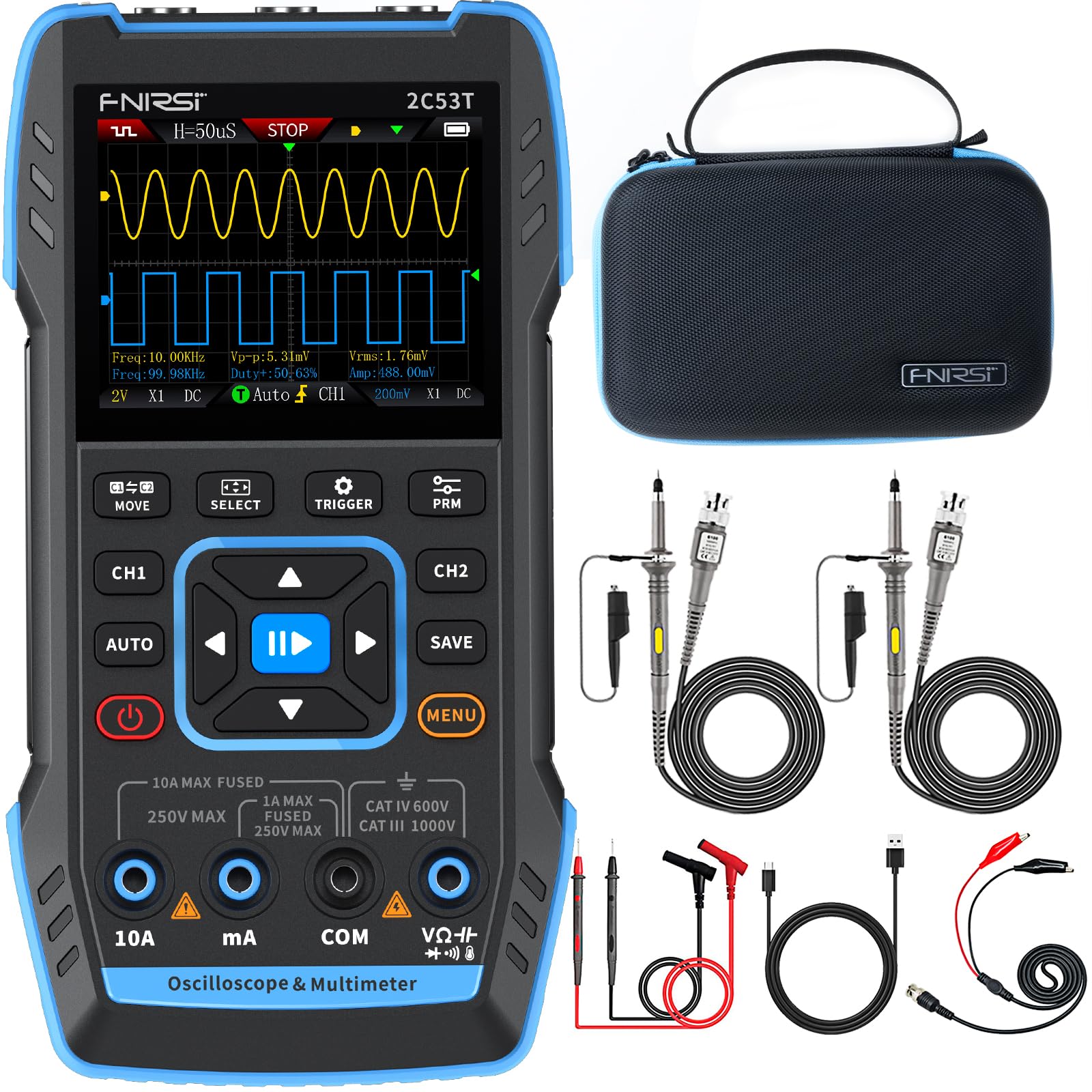
Image 3.1: The FNIRSI 2C53T device along with its standard accessories, including oscilloscope probes and multimeter test leads.
4. התקנה ושימוש ראשוני
4.1 טעינת המכשיר
Before first use, fully charge the internal lithium-ion battery. Connect the supplied Type-C USB cable to the device's Type-C port and to a 5V/1A USB power adapter (not included). The charging indicator on the screen will show the charging status.
4.2 הפעלה/כיבוי
Press and hold the power button (usually marked with a power symbol) for a few seconds to turn the device ON or OFF.
4.3 Connecting Probes and Test Leads
The device features dedicated input ports for oscilloscope channels (CH1, CH2) and the signal generator (DDS), as well as multimeter input jacks (10A, mA, COM, VΩ+). Ensure correct connections for the desired function.

תמונה 4.1: תקריב view of the FNIRSI 2C53T's input ports, including CH1, CH2 for oscilloscope, and DDS for signal generator output.
5. הוראות הפעלה
The FNIRSI 2C53T features a user-friendly interface with a central navigation pad and dedicated function buttons (MOVE, SELECT, TRIGGER, PRM, AUTO, SAVE, MENU, CH1, CH2).
5.1 מצב אוסצילוסקופ
To enter Oscilloscope mode, ensure the device is powered on. The default screen often displays the oscilloscope interface. Use the CH1 and CH2 buttons to enable or disable channels.
- התאמת פרמטרים: Use the navigation pad (up/down/left/right) to select and adjust parameters like vertical sensitivity (V/div), horizontal time base (s/div), and trigger level. The 'SELECT' button confirms selections.
- הגדרות טריגר: Press the 'TRIGGER' button to access trigger settings, including trigger mode (Auto, Normal, Single), trigger type (Edge, Pulse, Video), and source.
- מדידה אוטומטית: Press 'AUTO' for automatic waveform scaling and measurement display.
- ניתוח צורת גל: The device supports various analysis functions. Access these through the 'MENU' button or dedicated options. These include Math Operations, Cursor Functions for precise measurements, Infinite Afterglow for observing signal changes over time, X-Y Mode for phase relationship analysis, and FFT Spectrum for frequency domain analysis.
- שמירת צורות גל: Press the 'SAVE' button to store the current waveform display. Saved images can be transferred to a PC via the Type-C connection.

Image 5.1: The FNIRSI 2C53T displaying various waveform analysis features, including Math Operations, Cursor Functions, Infinite Afterglow, and X-Y Mode.
5.2 מצב רב-מודד
To switch to Multimeter mode, press the 'MENU' button and navigate to the Multimeter option, or use a dedicated button if available. Connect the test leads to the appropriate input jacks (COM and VΩ+ for voltage/resistance/capacitance, 10A or mA for current).
- כרך ידtagמדידה אלקטרונית (AC/DC): Select ACV or DCV. Connect test leads in parallel with the circuit or component.
- מדידת זרם (AC/DC): Select ACA or DCA. Connect test leads in series with the circuit. Ensure the correct current input jack (10A or mA) is used.
- מדידת התנגדות: Select Ω. Connect test leads across the component when the circuit is de-energized.
- מדידת קיבולת: Select F. Connect test leads across the capacitor when the circuit is de-energized.
- מבחן המשכיות: Select the continuity symbol. The device will emit an audible beep if continuity is detected.

Image 5.2: The FNIRSI 2C53T displaying its multimeter interface, showing voltage measurement and input jack labels.
5.3 מצב מחולל אותות
To access the Signal Generator, press the 'MENU' button and select the Signal Generator option. Connect the DDS output to the circuit where the signal is needed.
- בחירת צורת גל: Use the navigation pad to choose from 13 available waveforms (e.g., Sine Wave, Square Wave, Sawtooth Wave).
- התאמת פרמטר: Adjust frequency, amplitude, and duty cycle (for certain waveforms) using the navigation pad and 'SELECT' button.

Image 5.3: The FNIRSI 2C53T displaying the various waveforms available from its DDS signal generator function.
6. תחזוקה
6.1 ניקוי
נגב את המכשיר עם רך, דamp cloth. Do not use abrasive cleaners or solvents. Ensure the device is powered off and disconnected from all circuits before cleaning.
6.2 טיפול בסוללה
כדי להאריך את חיי הסוללה, הימנעו מפריקה מלאה של הסוללה לעתים קרובות. אם אתם מאחסנים את המכשיר למשך זמן ממושך, טען אותו לכ-50% וטען אותו מחדש כל כמה חודשים.
6.3 אחסון
Store the device in a cool, dry place, away from direct sunlight and extreme temperatures. Use the provided carrying case for protection during transport and storage.
7. פתרון תקלות
- המכשיר לא נדלק: Ensure the battery is charged. Connect the Type-C cable to a power source and try again.
- לא מוצגת צורת גל במצב אוסצילוסקופ: Check probe connections. Ensure the trigger settings are appropriate for the signal being measured. Adjust vertical and horizontal scales.
- קריאות שגויות של רב-מודד: Verify test lead connections to the correct input jacks and ensure the correct measurement function is selected. Check if the circuit is de-energized for resistance and capacitance measurements.
- מחולל אותות לא מוציא: Confirm the DDS output is connected correctly and the signal generator function is active with appropriate parameters set.
- המסך קפוא או לא מגיב: נסה להפעיל מחדש את המכשיר על ידי לחיצה ממושכת על לחצן ההפעלה. אם הבעיה נמשכת, צור קשר עם תמיכת הלקוחות.
8. מפרטים
| תכונה | מִפרָט |
|---|---|
| דֶגֶם | FNIRSI 2C53T |
| ערוצי אוסצילוסקופ | 2 |
| רוחב פס אנלוגי | 50 מגה-הרץ |
| Sampשיעור ling | 250 MSa/s |
| Record Depth | 1 Kpts |
| מקסימום קלט כרךtage | 400 וולט |
| רגישות אנכית | 10 מיליוולט/דיו - 10 וולט/דיו |
| Multimeter Digits | 4.5 |
| ספירות רב-מטר | 19999 |
| AC כרךtagטווח | 0-750 וולט |
| DC כרךtagטווח | 0-999.9 וולט |
| טווח זרם DC/AC | 0-9.999 |
| טווח התנגדות | 0-19.99 MΩ |
| טווח קיבול | 0-99.99 mF |
| Signal Generator Max Freq. | 50 קילו-הרץ |
| צורות גל של מחולל אותות | 13 סוגים |
| לְהַצִיג | LCD בגודל 2.8 אינץ' |
| סוֹלְלָה | 3000 mAh Li-ion |
| זמן המתנה | עד 6 שעות |
| ממשק טעינה | Type-C (5V/1A) |
| מידות | 21.3 x 14.1 x 9.9 ס"מ |
| מִשׁקָל | 890 גרם |
9. אחריות ותמיכה
The FNIRSI 2C53T comes with a standard manufacturer's warranty. For warranty claims, technical support, or service inquiries, please contact your point of purchase or the official FNIRSI customer support channels. Keep your purchase receipt as proof of purchase.