
1. הקדמה
Thank you for choosing the MusicMan BT-X63 True Wireless Bluetooth In-Ear Headphones. This manual provides essential information for the safe and efficient use of your device. Please read it carefully before use and retain it for future reference.
2. הוראות בטיחות
- אין לחשוף את המכשיר לטמפרטורות קיצוניות, לאור שמש ישיר או לחות גבוהה.
- הימנע מנפילה או הכפיפה של המכשיר למכות חזקות.
- אל תנסה לפרק, לתקן או לשנות את המכשיר בעצמך. יש לפנות לכל טיפול וטיפול באנשי מקצוע מוסמכים.
- הרחק את המכשיר ממים ומנוזלים אחרים.
- השתמש רק בכבל הטעינה USB-C המצורף או בכבל שווה ערך מאושר.
- יש להשליך סוללות ורכיבים אלקטרוניים בצורה אחראית בהתאם לתקנות המקומיות.
- הימנע מהאזנה ברמות ווליום גבוהות לתקופות ממושכות כדי למנוע נזקי שמיעה.
3. תכולת החבילה
אנא בדקו את החבילה עבור הפריטים הבאים:
- MusicMan BT-X63 True Wireless In-Ear Headphones (Left and Right)
- תיבת טעינה
- כבל טעינה מסוג USB מסוג C
- Silicone Ear Tips (2 different sizes)
- מדריך למשתמש (מסמך זה)
4. המוצר נגמרview
Familiarize yourself with the components of your MusicMan BT-X63 headphones and charging box.

Image: The MusicMan BT-X63 True Wireless Earbuds are shown removed from their open charging case. The white earbuds feature a stem design, and the white charging case has the 'MusicMan Germany' logo on its lid.
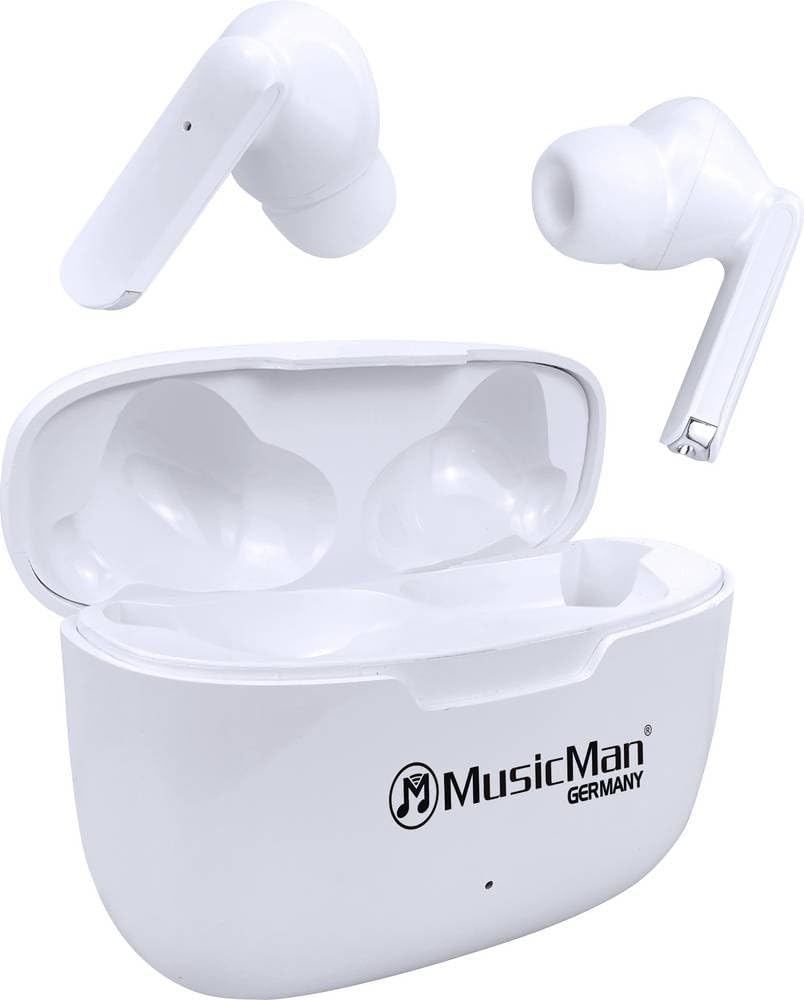
Image: The MusicMan BT-X63 True Wireless Earbuds are placed inside their open charging case. The white earbuds fit snugly into their respective slots, and the 'MusicMan Germany' logo is visible on the case lid.

Image: The MusicMan BT-X63 charging case is shown closed, displaying its compact, white design. The 'MusicMan Germany' logo is prominently featured on the top surface of the case.
5. התקנה
5.1 טעינת המכשיר
- Charging the Charging Box: Connect the provided USB Type-C cable to the charging port on the charging box and the other end to a USB power adapter (not included) or a computer's USB port. The indicator light on the charging box will show charging status. A full charge takes approximately 2 hours.
- טעינת האוזניות: Place the earbuds into their respective slots in the charging box. Ensure they are correctly seated. The earbuds will automatically begin charging. The charging box can provide up to 4 full charges for the earbuds.
5.2 הפעלה/כיבוי
- הפעלה: The earbuds will automatically power on when removed from the charging box.
- כיבוי: The earbuds will automatically power off and begin charging when placed back into the charging box and the lid is closed.
5.3 זיווג בלוטות '
- ודא שהאוזניות טעונות.
- Remove both earbuds from the charging box. They will automatically enter pairing mode, indicated by a flashing LED on one of the earbuds.
- בטלפון החכם, בטאבלט או במחשב הנייד שלך, הפעל את Bluetooth וחפש מכשירים זמינים.
- בחר "MusicMan BT-X63" מרשימת המכשירים.
- Once connected, a voice prompt will confirm successful pairing, and the LED indicator on the earbuds will turn off or flash slowly.
- The earbuds will automatically reconnect to the last paired device when removed from the charging box, if Bluetooth is enabled on the device.
6. הוראות הפעלה
The MusicMan BT-X63 features intuitive touch controls on both earbuds.
6.1 השמעת מוזיקה
- הפעל/השהה: הקשה אחת על אחת האוזניות.
- הרצועה הבאה: הקש פעמיים על האוזניה הימנית.
- רצועה קודמת: הקש פעמיים על האוזניה השמאלית.
- הגבר קול: הקש שלוש פעמים על האוזניה הימנית.
- להנמיך קול: הקש שלוש פעמים על האוזניה השמאלית.
6.2 שיחות טלפון
- תשובה לשיחה: הקשה אחת על אחת האוזניות.
- סיום שיחה: נגיעה אחת על כל אחת מהאוזניות במהלך שיחה.
- דחה שיחה: לחץ והחזק את אחת האוזניות למשך 2 שניות.
6.3 עוזר קולי
- הפעל את Assistant Voice: לחץ והחזק את כל אחת מהאוזניות למשך 3 שניות (כאשר אינך בשיחה).
7. תחזוקה
7.1 ניקוי
- Wipe the earbuds and charging box with a soft, dry, lint-free cloth.
- אין להשתמש בחומרי ניקוי שוחקים, אלכוהול או ממסים כימיים.
- ודא שמגעי הטעינה נקיים וחופשיים מלכלוך.
7.2 אחסון
- יש לאחסן את המכשיר במקום קריר ויבש, הרחק מאור שמש ישיר וטמפרטורות קיצוניות.
- If storing for an extended period, charge the device periodically to maintain battery health.
8. פתרון תקלות
If you encounter issues with your MusicMan BT-X63 headphones, refer to the following common solutions:
| בְּעָיָה | פתרון אפשרי |
|---|---|
| אוזניות לא מתאימות |
|
| אין צליל מאוזניה אחת |
|
| בעיות טעינה |
|
| פקדי המגע אינם מגיבים |
|
9. מפרטים
| תכונה | מִפרָט |
|---|---|
| מותג | איש מוזיקה |
| שם הדגם | BT-X63 |
| מספר דגם של פריט | 5098 |
| טכנולוגיית קישוריות | אלחוטי (בלוטות' 5.3) |
| הרכב תא הסוללה | ליתיום פולימר |
| זמן טעינה (תיבת טעינה) | כ. 2 שעות |
| Operating Time (Earbuds per charge) | כ. 4 שעות |
| Total Runtime (with Charging Box) | עד 16 שעות |
| זמן המתנה | עד 300 שעות |
| משקל (לכל אוזניה) | כ. 7 גרם |
| Product Dimensions (Charging Box) | 6.12 x 4.62 x 2.41 ס"מ |
| חוֹמֶר | פּלָסטִי |
| מִיקרוֹפוֹן | כֵּן |
| בקרת מגע | כֵּן |
10. אחריות ותמיכה
MusicMan products are designed for reliability and performance. For warranty information, please refer to the warranty card included with your purchase or visit the official MusicMan website. For technical support or further assistance, please contact MusicMan customer service through their official channels.