
1. הקדמה
תודה על הרכישהasing the Adelagnes AI Voice Recorder M3. This device is a revolutionary AI-powered voice recorder designed to enhance your productivity with advanced features such as real-time transcription, multi-language translation, and AI assistance. This manual provides detailed instructions on how to set up, operate, and maintain your device to ensure optimal performance.
אנא קרא מדריך זה בעיון לפני השימוש במוצר ושמור אותו לעיון עתידי.
2. המוצר נגמרview
2.1 תכונות עיקריות
- תמלול מופעל על ידי בינה מלאכותית: Real-time audio-to-text conversion with speaker identification, available both online and offline.
- Multi-Language Translation: Supports 15 languages offline and 134 languages online for voice translation. OCR text translation supports 12 languages offline and 71 languages online.
- Integrated AI Tools: Includes AI Q&A, AI Voice Assistant for hands-free operation, AI Writing for automatic document creation, and an AI Character for interactive learning.
- אחסון בעל קיבולת גדולה: 2+16GB internal memory with a built-in 64GB TF memory card, allowing hundreds of hours of offline recording. Cloud storage is also supported.
- ממשק ידידותי למשתמש: 4-inch high-definition touch screen displays real-time transcription for easy content verification.
- ביטול רעשים: Advanced noise reduction for clear audio capture up to 10 meters.
- אבטחת מידע: Encryption chip and startup password protection for personal information.
2.2 תכולת החבילה
- Adelagnes AI Voice Recorder M3 Main Unit
- כבל טעינה מסוג C
- נרתיק אחסון
- מדריך הוראות (יפנית)

Image: Adelagnes AI Voice Recorder M3 package contents, showing the main unit, a Type-C charging cable, a grey storage pouch, and the instruction manual.
3. התקנה
3.1 טעינת המכשיר
- חבר את כבל הטעינה מסוג C המצורף לשקע הטעינה של המכשיר.
- חבר את הקצה השני של הכבל לספק כוח USB (לא כלול) או ליציאת USB של מחשב.
- The battery indicator on the screen will show the charging status. A full charge typically takes approximately 2-3 hours.
The device has a 1500mAh rechargeable battery, providing 5-7 hours of continuous operation.
3.2 הפעלה/כיבוי
- כדי להפעיל: לחץ והחזק את כפתור ההפעלה (בדרך כלל בצד) עד שהמסך יידלק.
- כדי לכבות: Press and hold the power button until the power-off options appear on the screen, then select "Power Off".
3.3 הגדרה ראשונית וחיבור רשת
- Upon first power-on, follow the on-screen prompts to select your preferred language and region.
- To access online features (e.g., 134-language translation, cloud storage), connect the device to a Wi-Fi network via the settings menu.
- Set a startup password for enhanced data security, similar to a smartphone.
4. הוראות הפעלה
4.1 הקלטת אודיו
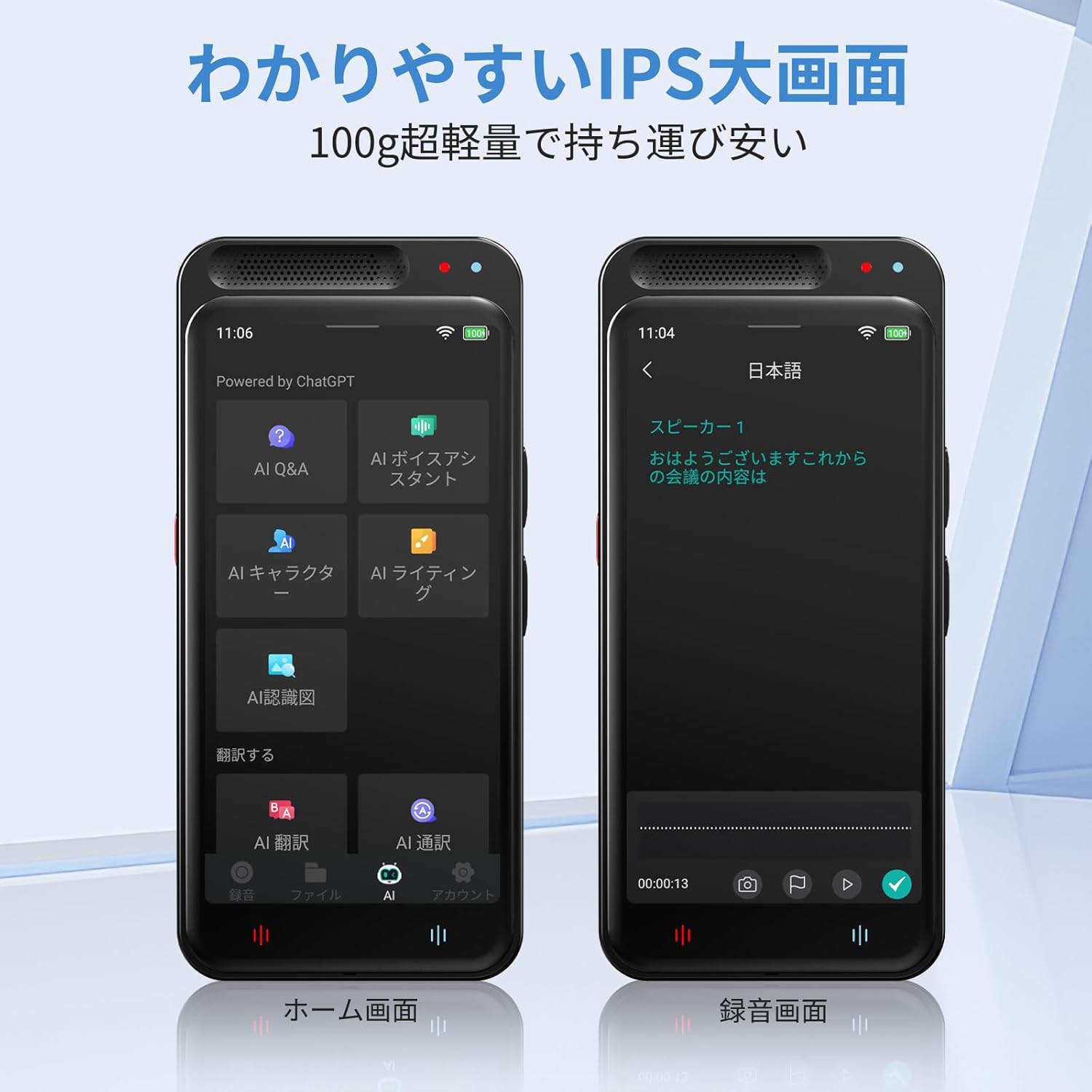
Image: The Adelagnes AI Voice Recorder M3 displaying its home screen on the left and a recording interface on the right, showing real-time transcription.
- From the home screen, tap the "Record" icon.
- To start recording, tap the red record button. The device will begin capturing audio and displaying real-time transcription on the 4-inch screen.
- To pause recording, tap the pause button. To resume, tap it again.
- To stop recording, tap the stop button. The recording will be saved automatically.
The device features high-sensitivity microphones with 360-degree pickup and noise canceling, effective up to 10 meters, ensuring clear recordings for meetings, lectures, and interviews.

Image: A person holding the Adelagnes AI Voice Recorder M3 during a business meeting, with text overlays indicating a 10-meter recording range and 360-degree sound pickup with noise cancellation.
4.2 Transcription and Speaker Identification

Image: The Adelagnes AI Voice Recorder M3 showing a transcribed conversation with distinct speaker labels, demonstrating its speaker identification feature. Two individuals are visible in the background, engaged in a discussion.
The device automatically transcribes recorded audio in real-time. After recording, the transcription can be reviewed and edited. The high-precision speech recognition technology can separate voices by speaker, making it ideal for creating meeting minutes or lecture notes.
Transcription is available for free, both online and offline.
4.3 פונקציות תרגום
4.3.1 תרגום קולי
- Access the "Translation" function from the home screen.
- בחר את שפת המקור והיעד.
- Speak into the microphone, and the device will provide a real-time translation.
Offline voice translation supports 15 languages, while online translation supports 134 languages.
4.3.2 OCR Text Translation
- The device features a 5-megapixel camera.
- Use the OCR function to scan text from documents, menus, or signs.
- The device will convert the scanned text and provide a translation in your chosen language.
Offline OCR supports 12 languages, and online OCR supports 71 languages.
4.4 AI Tools

Image: The Adelagnes AI Voice Recorder M3 showcasing its AI tools interface, including AI Q&A, AI Voice Assistant, AI Writing, and AI Character functions, designed to support daily tasks.
- AI Q&A: Ask questions and receive instant answers from the built-in AI, available 24/7.
- עוזר קול בינה מלאכותית: Use voice commands to manage meeting records, schedules, and send messages hands-free.
- כתיבה בבינה מלאכותית: Automatically generate and proofread reports, emails, and blogs at an accelerated pace.
- AI Character: Engage with a learning conversational engine that evolves daily.
4.5 File Management and Data Transfer
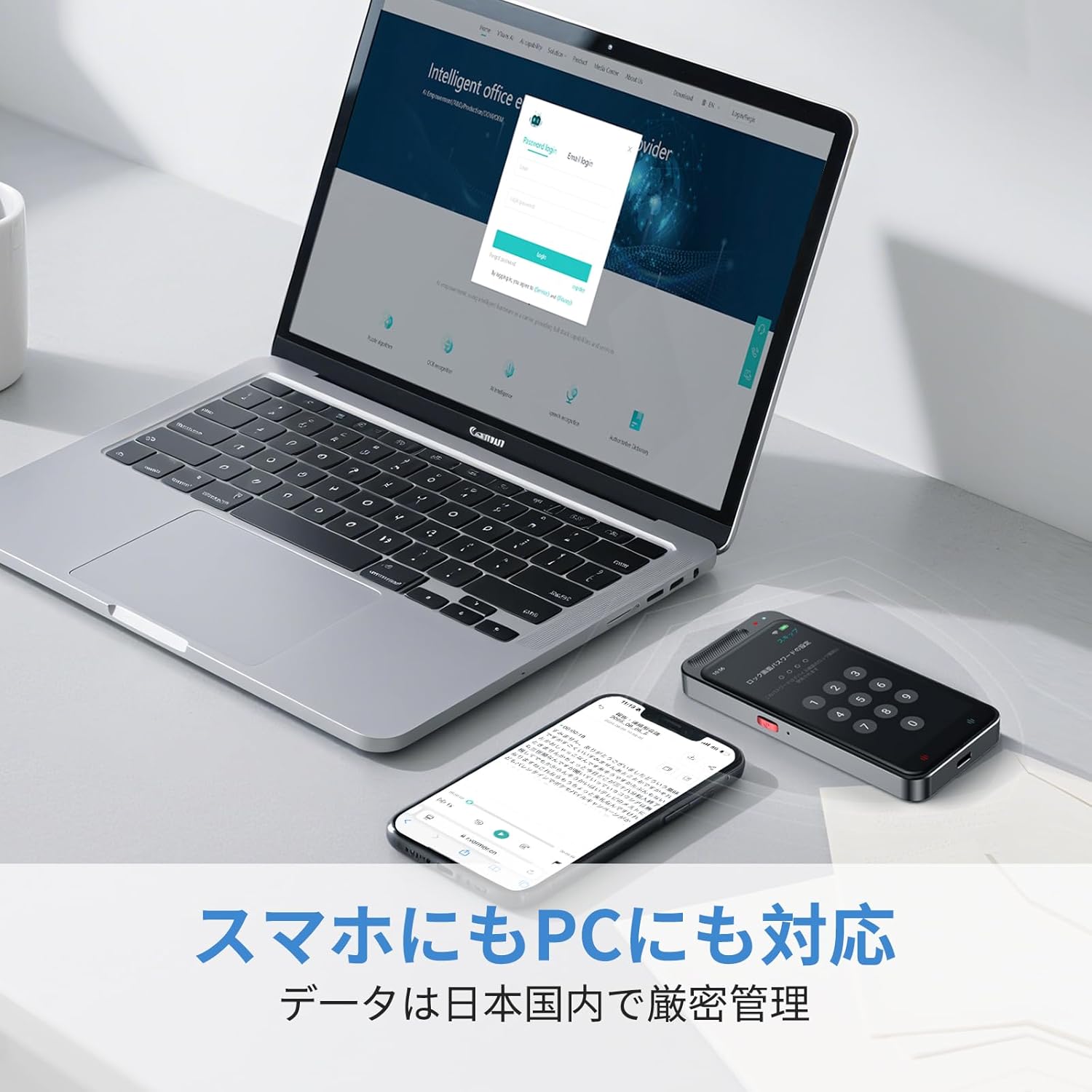
Image: The Adelagnes AI Voice Recorder M3 and a smartphone placed next to a laptop, illustrating the device's compatibility with PCs and smartphones for data transfer.
- אחסון מקומי: Recordings are saved to the device's internal memory (2+16GB) or the 64GB TF memory card.
- אחסון בענן: The device supports cloud storage for real-time data transfer to PCs and smartphones.
- העברת USB: Connect the device to a computer using the Type-C cable to transfer audio files and transcription texts. The device is recognized without special driver installation on Windows 11.
- מחיקת נתונים: Data can be permanently deleted with a single touch. All data transmission and storage require user permission.
5. תחזוקה
- ניקוי: השתמשו במטלית רכה ויבשה לניקוי המכשיר. הימנעו משימוש בחומרי ניקוי נוזליים או בחומרים שוחקים.
- אִחסוּן: יש לאחסן את המכשיר במקום קריר ויבש, הרחק מאור שמש ישיר וטמפרטורות קיצוניות.
- טיפול בסוללה: כדי להאריך את חיי הסוללה, הימנעו מפריקה מלאה של הסוללה לעתים קרובות. טען את המכשיר באופן קבוע, גם אם אינו בשימוש למשך פרקי זמן ממושכים.
- עדכוני תוכנה: Check for available software updates periodically to ensure optimal performance and access to new features.
6. פתרון תקלות
| בְּעָיָה | סיבה אפשרית | פִּתָרוֹן |
|---|---|---|
| המכשיר לא נדלק. | סוללה חלשה; המכשיר קפוא. | Charge the device for at least 30 minutes. If still unresponsive, perform a hard reset (refer to manual for specific reset instructions if available, or hold power button for 10-15 seconds). |
| איכות הקלטה ירודה. | Microphone obstructed; excessive background noise; device too far from sound source. | Ensure microphone is clear. Reduce background noise. Place the device closer to the speaker (within 10 meters). |
| Transcription errors. | Unclear audio; strong accents; specialized terminology; offline mode limitations. | Ensure clear audio input. Connect to Wi-Fi for higher accuracy online transcription. Manually edit the transcription if necessary. |
| התרגום לא עובד. | No internet connection (for online translation); incorrect language selection. | Verify Wi-Fi connection for online translation. Check selected source and target languages. Ensure clear speech for voice translation. |
| לא ניתן להעביר files למחשב. | כבל USB פגום; מצב חיבור שגוי. | Try a different Type-C cable. Ensure the device is connected in data transfer mode (if prompted). |
7. מפרטים
| תכונה | מִפרָט |
|---|---|
| מספר דגם | M3 |
| גודל מסך | 4 אינץ' |
| זמן שימוש רצוף | 7 שעות |
| מכשירים תואמים | טלפונים חכמים, מחשבים אישיים |
| קיבולת סוללה | 1500mAh (נטענת) |
| זיכרון פנימי | 2+16GB |
| אחסון חיצוני | 64GB TF Memory Card (built-in) |
| מִיקרוֹפוֹן | Built-in, 360-degree pickup, 10m range |
| פורמט הקלטה | WAV |
| מַצלֵמָה | 5 Megapixels (for OCR) |
| מידות המוצר | 11 x 5 x 1 ס"מ |
| משקל המוצר | 100 גרם |
8. אחריות ותמיכה
For warranty information and customer support, please refer to the contact details provided with your purchase or visit the official Adelagnes webאתר. שמור את הוכחת הרכישה שלך לצורך תביעות אחריות.
If you encounter any issues not covered in this manual, please contact our customer support team for assistance.