
1. הוראות בטיחות חשובות
Please read all instructions carefully before using this appliance and retain them for future reference. Failure to follow these instructions may result in electric shock, fire, or serious personal injury.
- ודא את אספקת החשמל כרךtage תואם לתווית הדירוג שעל המכשיר.
- אין להפעיל את המאוורר עם כבל או תקע פגומים. אם הכבל פגום, יש להחליפו על ידי היצרן, נציג השירות שלו או גורמים מוסמכים אחרים כדי למנוע סכנה.
- יש לנתק תמיד את המאוורר משקע החשמל לפני ניקויו, טיפולו או הזזתו.
- אין להכניס אצבעות או חפצים אחרים לתוך סורג המאוורר בזמן שהוא פועל.
- הרחק את המאוורר ממים או נוזלים אחרים. אין להשתמש בו במקום רטוב או יבש.amp סביבות.
- מכשיר זה מיועד לשימוש מקורה בלבד. אין להשתמש בחוץ.
- Do not place the fan near heat sources such as radiators, heat registers, stoves, or other appliances that produce heat.
- השגחו על ילדים כדי לוודא שהם לא משחקים במכשיר.
- Do not use the fan in areas where gasoline, paint, or flammable liquids are stored.
2. המוצר נגמרview
The Altus AL 40 TFB is a sleek and efficient tower air cooler designed for indoor use. It features a compact design, multiple speed settings, and easy-to-use push-button controls.
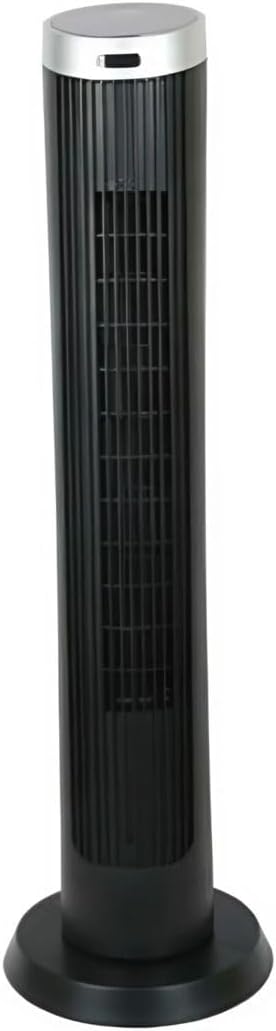
איור 2.1: חֲזִית view of the Altus AL 40 TFB Tower Air Cooler. This image shows the tall, slender black body of the fan with its air outlet grille and a stable round base.
רכיבים:
- לוּחַ בַּקָרָה: Located on the top of the unit for easy access to all functions.
- סורג יציאת אוויר: Vertical grille on the front for air dispersion.
- בָּסִיס: Stable round base for secure placement.
- כבל חשמל: ממוקם בחלק האחורי של היחידה.

איור 2.2: מְפוֹרָט view of the control panel on top of the Altus AL 40 TFB Tower Air Cooler. The panel features a digital display showing '28' and several push buttons for various functions.
3. התקנה
Follow these steps to set up your Altus AL 40 TFB Tower Air Cooler:
- לִפְרוֹק: הוצא בזהירות את המאוורר מאריזתו. שמור את האריזה לאחסון או הובלה עתידיים.
- הרכבת בסיס (במידת הצורך): Some models may require minor base assembly. If your unit's base is detached, align the base sections and secure them according to the diagrams in the packaging. Ensure it is firmly attached.
- מיקום: Place the fan on a firm, level surface. Ensure there is adequate space around the fan for proper airflow, at least 30 cm (12 inches) from walls or furniture. This appliance is designed for indoor use only.
- חיבור חשמל: Plug the power cord into a standard electrical outlet. Ensure the outlet meets the voltagהדרישות המפורטות על תווית המוצר.
4. הוראות הפעלה
Your Altus AL 40 TFB Tower Air Cooler is equipped with user-friendly push-button controls on the top panel.
פונקציות לוח הבקרה:
- כפתור הפעלה (⏻): Press once to turn the fan ON, press again to turn it OFF.
- כפתור מהירות (💨): Press repeatedly to cycle through the 3 available fan speeds: Low, Medium, and High. The current speed setting may be indicated on the digital display.
- כפתור מצב (M): If available, press to select different operating modes (e.g., Normal, Natural, Sleep). Refer to the digital display for the active mode.
- כפתור תנודה (↔): Press to activate or deactivate the oscillation function, which allows the fan to rotate from side to side to distribute air over a wider area.
- כפתור טיימר (🕒): If available, press to set an automatic shut-off timer. Each press typically increases the timer duration by a set increment (e.g., 1 hour).
תפעול כללי:
- חבר את המאוורר לשקע חשמל מתאים.
- לחץ על לחצן ההפעלה (⏻) to turn on the fan.
- Select your desired fan speed using the Speed Button (💨).
- Activate oscillation if desired by pressing the Oscillation Button (↔).
- To turn off the fan, press the Power Button (⏻) שוב.
5. תחזוקה
Regular maintenance ensures optimal performance and extends the lifespan of your Altus AL 40 TFB Tower Air Cooler.
ניקוי:
- נתק תמיד את המאוורר לפני הניקוי.
- ניקוי חיצוני: נגבו את המשטחים החיצוניים של המאוורר בעזרת מטלית רכהamp מטלית. אין להשתמש בחומרי ניקוי שוחקים, שעווה או פוליש מכיוון שהם עלולים לפגוע בגימור.
- סורגי כניסת/יציאת אוויר: Use a vacuum cleaner with a brush attachment to gently remove dust and debris from the air inlet and outlet grilles. Do not attempt to disassemble the fan for cleaning.
- ודא שהמאוורר יבש לחלוטין לפני חיבורו מחדש לחשמל והפעלתו.
אִחסוּן:
כאשר אינו בשימוש למשך תקופות ממושכות, יש לאחסן את המאוורר במקום קריר ויבש. מומלץ לאחסן אותו באריזתו המקורית כדי להגן עליו מפני אבק ונזק.
6. פתרון תקלות
If you encounter any issues with your Altus AL 40 TFB Tower Air Cooler, please refer to the following common problems and solutions:
- המאוורר לא נדלק:
- בדוק אם כבל החשמל מחובר היטב לשקע חשמלי תקין.
- Ensure the power button on the control panel has been pressed.
- Verify that the household circuit breaker or fuse has not tripped.
- זרימת אוויר חלשה:
- Check if the fan speed is set to a higher setting.
- Ensure the air inlet and outlet grilles are not blocked by dust or obstructions. Clean them if necessary.
- רעש יוצא דופן:
- ודאו שהמאוורר ממוקם על משטח יציב ומאוזן.
- Check for any foreign objects that might have fallen into the fan grilles.
- אם הרעש נמשך, הפסק את השימוש ופנה לתמיכת הלקוחות.
If the problem cannot be resolved using the above steps, please contact Altus customer support.
7. מפרטים
Detailed technical specifications for the Altus AL 40 TFB Tower Air Cooler:
| תכונה | מִפרָט |
|---|---|
| מותג | אלטוס |
| שם הדגם | AL 40 TFB |
| צֶבַע | שָׁחוֹר |
| עיצוב מאוורר חשמלי | Floor Fan (Tower Type) |
| מקור כוח | חשמלי עם כבלים |
| מידות המוצר (D x W x H) | 29D x 29W x 101H ס"מ |
| סוג הרכבה | הר קומה |
| סוג גימור | צָבוּעַ |
| שימוש פנימי/חיצוני | מקורה |
| שיטת בקרה | כפתור לחיצה |
| מספר רמות הספק | 3 |
| אַלחוּט | לֹא |
8. אחריות ותמיכה
Altus provides comprehensive support for its products. For any assistance or warranty-related inquiries, please contact our customer service.

איור 8.1: Altus customer service and warranty information. The image displays the Altus logo, a message about service availability, and a contact number for support.
Our services are always available for your Altus products. You can benefit from our door-to-door service by calling our support line for any assistance you may need.
Arçelik Service Warranty: For products under warranty, our home product pickup service is provided free of charge.
Customer Support Line: 0850 210 0 888
Please have your product model number (AL 40 TFB) and purchase details ready when contacting support.