
1. הקדמה
Thank you for choosing the THOMSON WS902DUO Cosy Bookshelf Speakers. These active stereo speakers deliver a powerful 150W audio experience with deep bass from two 10 cm woofers. They offer versatile connectivity options including Bluetooth 5.3, Optical, HDMI (ARC), RCA, and USB playback. The included remote control and side panel adjustments provide precise control over your audio. Please read this manual carefully before use to ensure proper operation and to maximize your listening experience.

Image 1.1: THOMSON WS902DUO Bookshelf Speakers in a living space, showcasing their elegant wood finish.
2. הוראות בטיחות חשובות
- קרא הוראות אלה בעיון לפני הפעלת המוצר.
- שמור הוראות אלה לעיון עתידי.
- שימו לב לכל האזהרות על המוצר ובהוראות ההפעלה.
- בצע את כל ההוראות.
- אין להשתמש במכשיר זה ליד מים.
- נקה רק עם מטלית יבשה.
- אין לחסום פתחי אוורור. יש להתקין בהתאם להוראות היצרן.
- אין להתקין ליד מקורות חום כלשהם כגון רדיאטורים, אוגרי חום, תנורים או מכשירים אחרים (כולל ampמחצבים) המייצרים חום.
- אל תביס את מטרת הבטיחות של התקע המקוטב או הארקה. לתקע מקוטב יש שני להבים כאשר אחד רחב יותר מהשני. לתקע מסוג הארקה יש שני להבים וחוד הארקה שלישי. הלהב הרחב או החוד השלישי מסופקים לבטיחותך. אם התקע שסופק לא מתאים לשקע שלך, התייעץ עם חשמלאי להחלפת השקע המיושן.
- הגן על כבל החשמל מפני הליכה או צביטה, במיוחד בתקעים, בשקעי נוחות ובנקודה שבה הם יוצאים מהמכשיר.
- השתמש רק בתוספות/אביזרים שצוינו על ידי היצרן.
- השתמש רק עם העגלה, המעמד, החצובה, התושבת או השולחן שצוינו על ידי היצרן, או נמכרים עם המכשיר. כאשר משתמשים בעגלה, היזהר בעת הזזת שילוב העגלה/מכשיר כדי למנוע פציעה כתוצאה מהתהפכות.
- נתק את המכשיר מהחשמל במהלך סופות ברקים או כאשר אינו בשימוש לפרקי זמן ארוכים.
- הפנה כל טיפול לצוות שירות מוסמך. שירות נדרש כאשר המכשיר ניזוק בכל דרך שהיא, כגון כבל או תקע חשמל פגומים, נוזל נשפך או חפצים נפלו לתוך המכשיר, המכשיר נחשף לגשם או לחות, אינו פועל כרגיל , או הושמט.
3. תכולת החבילה
אנא ודאו שכל הפריטים המפורטים להלן כלולים בחבילה שלכם:
- THOMSON WS902DUO Bookshelf Speakers (2 units)
- שְׁלַט רָחוֹק
- כבל חשמל
- כבל חיבור רמקול
- 3.5mm Jack to RCA Adapter Cable
- מדריך למשתמש (מסמך זה)

Image 3.1: Packaging of the THOMSON WS902DUO Bookshelf Speakers.
4. המוצר נגמרview
4.1. Side Control Panel (Active Speaker)
The active speaker features a side control panel for easy access to essential functions.

Image 4.1: Side control panel.
- בקרת בס: מכוונן את פלט התדרים הנמוכים.
- בקרת טרבל: מכוונן את פלט התדר הגבוה.
- בקרת עוצמת הקול: מכוונן את עוצמת הקול הכוללת.
- מתג הפעלה: מדליק או מכבה את הרמקולים.
- מחוון LED: Shows the current status or selected input.
4.2. פאנל אחורי (רמקול אקטיבי)
The rear panel of the active speaker provides all necessary input and output connections.
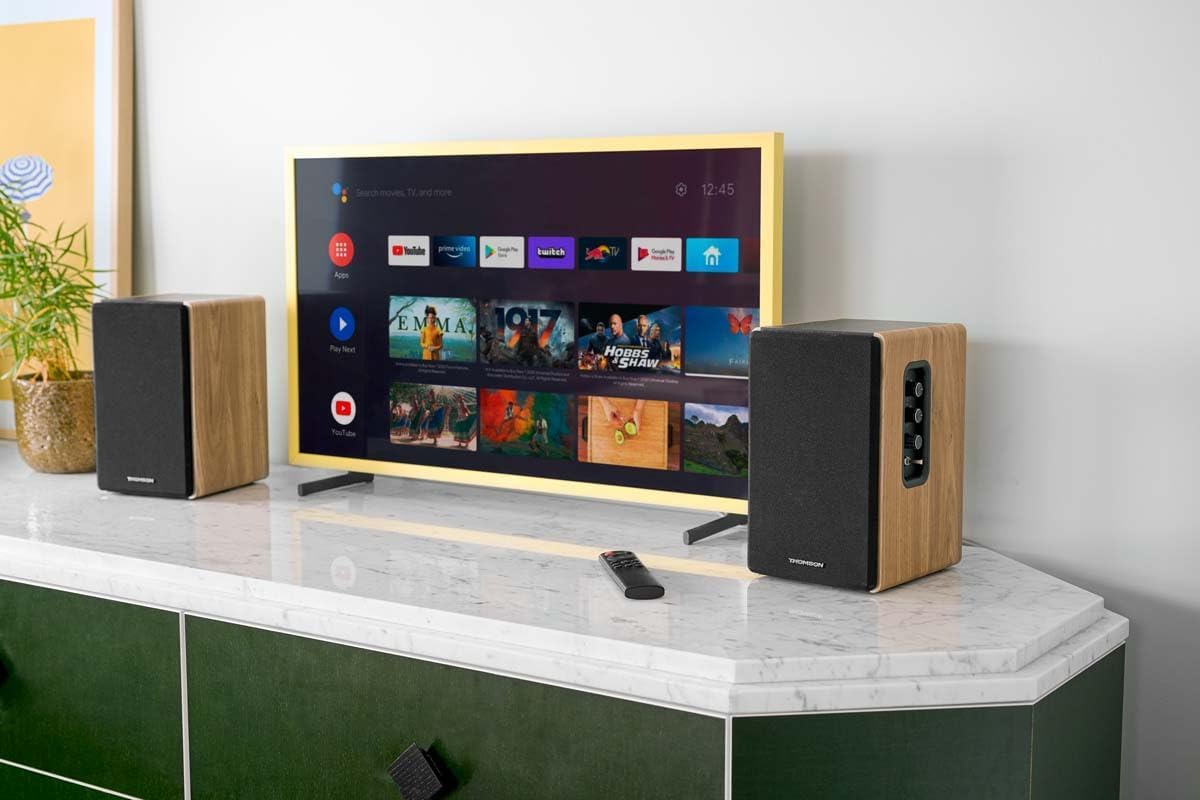
Image 4.2: Rear panel connections.
- קלט אופטי: For connecting digital audio sources like TVs, game consoles, or Blu-ray players.
- כניסת AUX (RCA): For connecting analog audio sources such as turntables, CD players, or PCs. A 3.5mm jack adapter is provided.
- TV Audio (HDMI ARC): For connecting to a TV's HDMI ARC port, allowing TV remote control of the speaker volume.
- הפעלת USB: להשמעת MP3 files ישירות מכונן הבזק מסוג USB.
- Sub Out: For connecting an external active subwoofer for enhanced bass.
- פלט רמקול: מתחבר לרמקול הפסיבי.
- קלט כוח: מתחבר לאספקת החשמל הראשית.
4.3. שלט רחוק
The remote control provides convenient access to all speaker functions from a distance.

Image 4.3: Remote control.
- לחצן הפעלה: Turns the speakers on/off.
- כפתור השתק: השתקה/ביטול השתקה של הצליל.
- נפח +/-: מכוונן את עוצמת הקול.
- בקרות הפעלה (הפעלה/השהיה, דילוג): For USB playback.
- Source Selection Buttons (OPT, BT, ARC, USB, LINE): בוחר את מקור קלט השמע.
- EQ Mode Buttons (MOVIE, MUSIC, DIALOG): Selects preset equalization modes.
5. התקנה
5.1. מיקום רמקול
Place the speakers on a stable, flat surface such as a bookshelf, desk, or speaker stands. For optimal stereo imaging, position the speakers equidistant from your listening position and at ear level. Ensure there is adequate space around the speakers for ventilation.
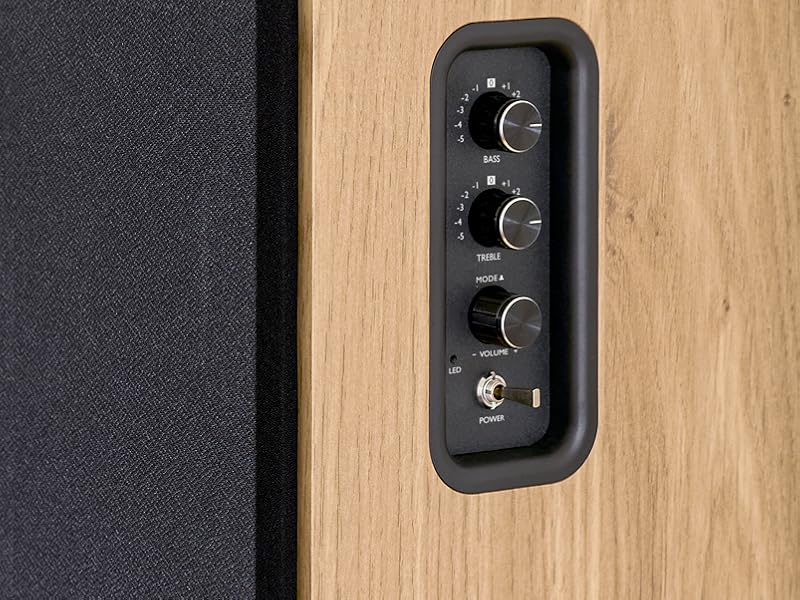
Image 5.1: Recommended speaker placement on a desk.
5.2. חיבור הרמקולים
- זהה את הרמקול האקטיבי (עם פקדים וכניסות) ואת הרמקול הפסיבי.
- Connect the included speaker cable from the speaker output terminals on the active speaker to the input terminals on the passive speaker. Ensure correct polarity (+ to + and - to -).
5.3. חיבור מקורות שמע
Connect your desired audio sources to the active speaker using the appropriate cables.
- קלט אופטי: Use an optical cable to connect your TV, game console, or Blu-ray player to the OPTICAL IN port.
- כניסת HDMI (ARC): Use an HDMI cable to connect your TV's HDMI ARC port to the TV AUDIO (HDMI) port on the speaker. This allows your TV remote to control the speaker volume.
- כניסת RCA (AUX): Use an RCA cable (or the provided 3.5mm jack to RCA adapter) to connect devices like a turntable, CD player, or PC to the AUX IN (RCA) ports.
- כניסת USB: הכנס כונן הבזק מסוג USB המכיל MP3 files into the USB PLAY port.

Image 5.2: Speakers connected to a television via HDMI ARC.
5.4. זיווג Bluetooth
- ודא שהרמקולים דולקים.
- Press the 'BT' button on the remote control or the side panel to select Bluetooth input. The LED indicator will flash, indicating pairing mode.
- בטלפון החכם, בטאבלט או במחשב שלך, הפעל את Bluetooth וחפש מכשירים זמינים.
- Select "THOMSON WS902DUO" from the list of devices.
- Once paired, the LED indicator will stop flashing and remain solid. You can now stream audio wirelessly.
5.5. חיבור סאב וופר (אופציונלי)
If you wish to enhance bass further, connect an active subwoofer to the 'Sub Out' port on the rear panel of the active speaker using an RCA cable.
6. הוראות הפעלה
6.1. הפעלה/כיבוי
Use the power switch on the side control panel or the power button on the remote control to turn the speakers on or off.
6.2. בחירת מקור
Press the corresponding source button on the remote control (OPT, BT, ARC, USB, LINE) to switch between connected audio inputs. The LED indicator will change to reflect the selected source.
6.3. בקרת עוצמת הקול
Adjust the volume using the 'Volume' knob on the side control panel or the 'VOL+/-' buttons on the remote control.
6.4. התאמות שמע
Fine-tune the sound to your preference:
- בס/טרבל: Use the 'Bass' and 'Treble' knobs on the side control panel to adjust the low and high frequencies.
- מצבי EQ: Press the 'MOVIE', 'MUSIC', or 'DIALOG' buttons on the remote control to select preset equalization settings optimized for different content types.
6.5. השמעת USB
When a USB flash drive with MP3 files is inserted and USB source is selected, the speakers will automatically begin playing. Use the playback control buttons on the remote control (Play/Pause, Skip) to manage your music.
6.6. הפעלת בלוטות '
After successful pairing (see Section 5.4), you can stream audio from your Bluetooth device. Use your device's controls or the speaker's remote control for playback and volume adjustments.
7. תחזוקה
תחזוקה נכונה מבטיחה את אורך החיים והביצועים של הרמקולים שלכם.
- ניקוי: Wipe the speaker surfaces with a soft, dry cloth. Do not use liquid cleaners or abrasive materials.
- אוורור: ודא שפתחי האוורור אינם חסומים כדי למנוע התחממות יתר.
- אִחסוּן: אם מאחסנים את הרמקולים לתקופה ממושכת, נתקו אותם משקע החשמל ואחסנו אותם במקום קריר ויבש.
- הימנע מלחות: Keep the speakers away from water and high humidity.
8. פתרון תקלות
אם אתה נתקל בבעיות כלשהן, עיין במדריך הבא לפתרון בעיות:
| בְּעָיָה | סיבה אפשרית | פִּתָרוֹן |
|---|---|---|
| אין כוח | Power cable not connected; Power switch off; Wall outlet not working. | Ensure power cable is securely connected. Turn on the power switch. Test the wall outlet with another device. |
| אין קול | Incorrect input source selected; Volume too low; Mute function active; Audio cable not connected properly. | Select the correct input source. Increase volume. Press Mute button on remote. Check all audio cable connections. |
| צימוד Bluetooth נכשל | Speakers not in pairing mode; Device too far; Bluetooth disabled on source device. | Ensure speakers are in Bluetooth pairing mode (flashing LED). Move device closer to speakers. Enable Bluetooth on your source device. |
| השמעת USB לא עובדת | USB drive not formatted correctly; Files not MP3; USB drive not inserted properly. | Ensure USB drive is FAT32 formatted. Verify files are in MP3 format. Re-insert USB drive firmly. |
| עיוות קול | Volume too high; Source audio quality poor; Bass/Treble settings too extreme. | Lower the volume. Test with a different audio source. Adjust Bass and Treble controls. |
9. מפרטים
| תכונה | מִפרָט |
|---|---|
| מותג | תומסון |
| מספר דגם | WS902DUO |
| עוצמת פלט מקסימלית של הרמקול | 150 וואט |
| תגובת תדר | 60 הרץ |
| טכנולוגיית קישוריות | Bluetooth, HDMI (ARC), Optical, RCA, USB |
| גרסת בלוטות' | 5.3 |
| מצב פלט שמע | סטריאו (2.0 ערוצים) |
| קלט כרךtage | 230 וולט (AC) |
| סוג הרכבה | מדף הר |
| סוג רמקול | Multimedia Bookshelf |
| תכונות מיוחדות | Stereo Pairing, USB Port, Sub-Out, Remote Control, EQ Modes |
| שימושים מומלצים | Smartphone, Tablet, PC, TV, Game Console, DVD Player, Turntable |
| צֶבַע | גימור עץ טבעי |
| שיטת בקרה | שלט רחוק, כפתורי פאנל צדדיים |
| גודל וופר | 10 סנטימטרים |
| מידות (H x W x D) | 28 ס"מ x 24 ס"מ x 47 ס"מ (בקירוב, לכל רמקול) |
| מִשׁקָל | 5048 Grams (total for pair) |
| מספר פריטים | 2 |
| ארץ מוצא | סִין |
10. מידע על אחריות
This THOMSON WS902DUO product comes with a אחריות מוגבלת לשנה ממועד הרכישה. אחריות זו מכסה פגמי ייצור וביצוע תחת שימוש רגיל. היא אינה מכסה נזק שנגרם כתוצאה משימוש לרעה, תאונות, שינויים לא מורשים או בלאי רגיל. אנא שמור את הוכחת הרכישה שלך לצורך תביעות אחריות.
11. תמיכת לקוחות
For technical assistance, warranty claims, or any questions regarding your THOMSON WS902DUO speakers, please contact your retailer or visit the official THOMSON support website. Please have your model number (WS902DUO) and proof of purchase ready when contacting support.
תמיכה מקוונת: www.thomsonconsumer.com (אנא בדקו את פרטי הקשר לתמיכה אזורית)