
מָבוֹא
Thank you for choosing the Greadio CD03P Portable Bluetooth CD Player. This manual provides essential information for the safe and efficient operation of your device. Please read it thoroughly before use and retain it for future reference.
The Greadio CD03P is a versatile audio device featuring CD playback, Bluetooth 5.3 connectivity, dual wireless karaoke microphones, dynamic LED lights, and multiple input options including USB, TF card, and AUX. It is powered by a 4000mAh rechargeable battery, offering portability for various environments.
המוצר נגמרview
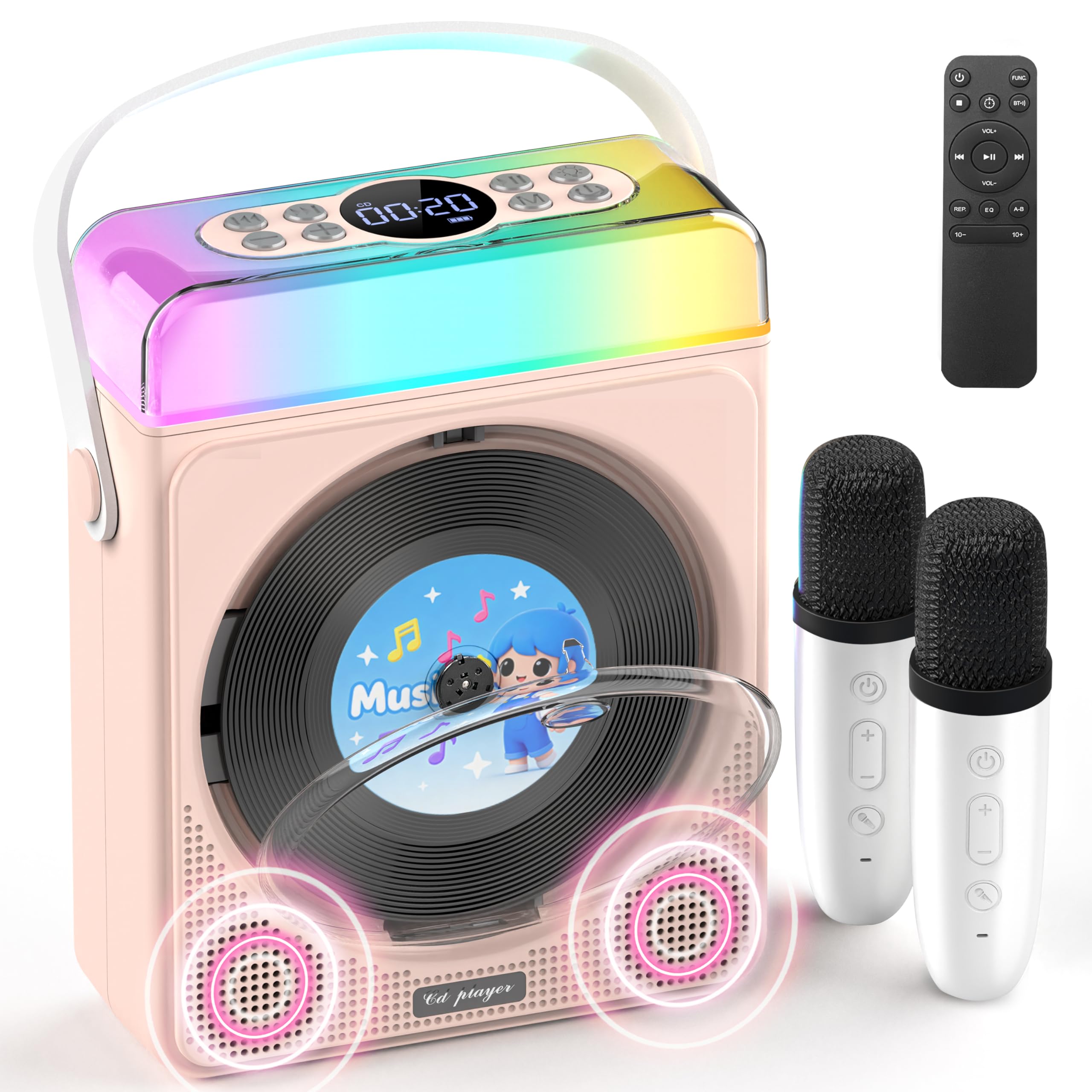
איור 1: Greadio CD03P Portable Bluetooth CD Player with two microphones and LED lights.

איור 2: רֹאשׁ view of the CD03P showing control buttons and LED light bar.
תכולת החבילה:
- Portable CD Player x 1
- מיקרופון קריוקי x 2
- כבל טעינה מסוג C x 1
- שלט רחוק x 1
- כבל AUX x 1
הגדרה
טעינת המכשיר:
Before first use, fully charge the CD player using the provided Type-C charging cable. Connect the cable to the Type-C port on the device and a compatible 5V/2A power adapter (not included). The battery indicator on the display will show charging status.
Charging the Microphones:
The two wireless microphones are rechargeable. Connect them to a power source using their respective charging cables (if provided, or compatible USB cables). Each microphone offers over 30 hours of playtime on a full charge.
הוראות הפעלה
1. הפעלה/כיבוי:
Long press the Power button (⏻) on the device or remote control to turn the unit on or off.
2. בחירת מצב:
הקש על M (Mode) button on the device or the FUNC. button on the remote control to cycle through available modes: CD, Bluetooth, USB, TF Card, and AUX.
3. השמעת תקליטורים:
- Press the release button to open the CD compartment cover.
- Carefully insert a CD (compatible with CD/CD-R/CD-RW/MP3/WMA formats) with the label side facing up.
- סגור את מכסה תא התקליטורים היטב.
- Select "CD" mode using the Mode/FUNC. button. The device will begin loading and playing the CD.
- השתמש ב- |< ו >| buttons for track navigation (short press) or fast forward/rewind (long press).
- הקש על ▶|| לחצן כדי לנגן או להשהות.
תיאור הסרטון: This video demonstrates how to play CDs, USB, and TF cards on the Greadio CD03P. It shows inserting a CD, selecting the CD mode, and using playback controls.
4. Bluetooth Connectivity (Receiving Mode):
- הקש על M (Mode) button until "Bluetooth" mode is selected. The display will show "BLUE" and a blinking Bluetooth icon.
- On your mobile device, enable Bluetooth and search for "CD03P".
- Select "CD03P" to pair. A confirmation tone will sound upon successful connection.
- Play audio from your mobile device, and it will stream through the Greadio CD03P speakers.
תיאור הסרטון: This video illustrates the Bluetooth receiving mode, showing how to connect a mobile phone to the Greadio CD03P for audio playback.
5. Bluetooth Connectivity (Transmitting Mode):
The CD03P can transmit audio to external Bluetooth speakers or headphones when in CD, USB, TF, or AUX mode (not in Bluetooth receiving mode).
- Ensure the CD03P is in CD, USB, TF, or AUX mode.
- לחץ קצר על BT button on the remote control. The Bluetooth icon on the display will blink.
- העבירו את רמקול ה-Bluetooth החיצוני או אוזניות ה-Bluetooth שלכם למצב צימוד.
- Once connected, the Bluetooth icon on the CD03P will stop blinking. Audio will now play through the external Bluetooth device.
- To disconnect, short press the BT כפתור שוב.
תיאור הסרטון: This video demonstrates the Bluetooth transmitting mode, showing how to connect the Greadio CD03P to external Bluetooth speakers or headphones.
6. השמעת כרטיס USB/TF:
- Insert a USB flash drive into the USB port or a TF card into the TF card slot on the back of the device.
- הקש על M (מצב) לחצן או FUNC. button on the remote to select "USB" or "TF" mode.
- The device will automatically detect and play compatible audio files (MP3/WMA/WAV/APE/FLAC).
- השתמש ב- |< ו >| buttons for track navigation (short press) or fast forward/rewind (long press).
- הקש על ▶|| לחצן כדי לנגן או להשהות.
Note: For best performance with USB/TF cards, use 64GB or less. Reformat 128GB cards to FAT32 if needed.
7. כניסת AUX:
- Connect an external audio device (e.g., smartphone, MP3 player) to the AUX port on the back of the CD03P using the provided AUX cable.
- הקש על M (מצב) לחצן או FUNC. button on the remote to select "AUX" mode.
- Play audio from your external device. The sound will be output through the CD03P speakers.
8. Karaoke Microphones:
- Turn on the microphones by pressing their power buttons. They will automatically connect to the CD03P.
- השתמש ב- +/- buttons on the microphone to adjust microphone volume.
- הקש על MIC button on the microphone to cycle through five voice effects: Female, Monster, Baby, Original, and KTV mode.
- הקש על כּוֹחַ button on the microphone to switch between microphone modes (e.g., adjust background music, microphone volume, reverb).
תיאור הסרטון: This video demonstrates how to connect and use the wireless microphones with the Greadio CD03P, including switching voice effects and adjusting settings.
9. נורות LED:
- The RGB light (LED1) turns on automatically when the device is powered on.
- לחץ קצר על אוֹר button on the device or remote to cycle through various light effects: breathing light (red, purple, blue, cyan, green, yellow, orange) and solid colors.
- לחץ לחיצה ארוכה על אוֹר כפתור כדי לכבות את נורות ה-LED.
תיאור הסרטון: This video showcases the dynamic LED light features of the Greadio CD03P, demonstrating how to cycle through different light modes and colors.
10. בקרת עוצמת הקול:
השתמש ב- VOL+ ו כרך- buttons on the device or remote control to adjust the main speaker volume.
11. מצבי EQ:
לחץ קצר על EQ button on the remote control to switch between different equalizer modes (e.g., Pop, Jazz, Classic, Bass, Flat, Rock).
12. טיימר שינה:
The CD03P can function as a night light with a sleep timer. Refer to the full user manual for detailed instructions on setting the sleep timer.
תַחזוּקָה
- הרחק את המכשיר ממים ולחות.
- נקו את המכשיר בעזרת מטלית רכה ויבשה. אין להשתמש בחומרי ניקוי שוחקים או ממסים.
- הימנע מחשיפת המכשיר לטמפרטורות קיצוניות או לאור שמש ישיר.
- Do not press the CD base directly.
- כאשר המכשיר אינו בשימוש למשך תקופות ממושכות, יש לאחסן אותו במקום קריר ויבש.
פתרון בעיות
| בְּעָיָה | סיבה אפשרית | פִּתָרוֹן |
|---|---|---|
| המכשיר לא נדלק. | סוללה חלשה או בעיית חשמל. | טען את המכשיר במלואו. ודא שכבל הטעינה מחובר כראוי. |
| הדיסק לא מתנגן או מדלג. | התקליטור מלוכלך, שרוט או הוכנס בצורה שגויה. | Clean the CD with a soft cloth. Ensure the CD is inserted correctly with the label side up. Try a different CD. |
| התאמת Bluetooth נכשלה. | Device is not in Bluetooth mode or too far from the paired device. | Ensure the CD03P is in Bluetooth receiving mode. Move devices closer. Disconnect from other Bluetooth devices. |
| המיקרופון לא עובד. | Microphone is off, uncharged, or out of range. | Turn on the microphone. Charge the microphone. Ensure it is within range of the CD03P. |
| אין קול. | עוצמת הקול נמוכה מדי או מושתקת. נבחר מצב שגוי. | Increase volume. Check if the device is muted. Ensure the correct input mode (CD, Bluetooth, USB, TF, AUX) is selected. |
| המכשיר לא מגיב. | תקלת תוכנה זמנית. | Use a thin object to press the אִתחוּל כפתור בגב המכשיר. |
מפרטים
| תכונה | פְּרָט |
|---|---|
| מספר דגם | CD03P |
| מידות המוצר | 6.81 x 2.52 x 8.15 אינץ' |
| משקל פריט | 1.97 פאונד |
| קיבולת סוללה | 4000mAh (נטענת) |
| קישוריות | בלוטות' 5.3, USB, כרטיס TF, AUX |
| תאימות CD | CD/CD-R/CD-RW/MP3/WMA |
| רכיבים כלולים | Portable CD Player, 2 Karaoke Microphones, Type-C Charging Cable, Remote Control, AUX Cable |
אחריות ותמיכה
Greadio products come with a full year of coverage. For any issues or support needs, please contact Greadio customer service. Refer to the official Greadio webבאתר או במסמכי הרכישה שלך לקבלת פרטי יצירת קשר.
Note: This device is designed for personal and recreational use. Any unauthorized modifications or misuse may void the warranty.