
1. הקדמה
The NZXT H2 Flow (CI-H21FB-01) is a compact vertical Mini-ITX PC case designed to maximize airflow and save space while accommodating high-performance components. It features smart cable management, tool-less access, and includes dual top fans and a premium PCIe 5.0 riser cable for a streamlined building experience.
תכונות עיקריות:
- Hybrid Glass-and-Mesh Side Panel: Showcases your build while supporting up to a 280 mm radiator for efficient cooling.
- עיצוב קומפקטי: A 20.7 L volume fits most GPUs up to 331 mm, offering high-end power in a small footprint.
- High Airflow Panels: Ultra-fine mesh panels on multiple sides maximize fresh air intake and filter dust, keeping components cooler and cleaner.
- Effortless Building: Tool-less panels, integrated cable routing Velcro straps, and intuitive wire management channels simplify installation.
- Pre-Installed Performance: Includes a premium PCIe 5.0 riser cable for vertical GPU mounting and dual F120Q CV fans for immediate exhaust cooling.
2. מידע בטיחות
WARNING: Always disconnect power from your PC before performing any installation, maintenance, or troubleshooting. Failure to do so may result in personal injury or damage to components.
- קרא בעיון את כל ההוראות לפני ההתקנה.
- ענדו רצועת כף יד אנטי-סטטית או געו לעתים קרובות בחפץ מתכת מוארק כדי למנוע נזק לרכיבים כתוצאה מפריקה אלקטרוסטטית (ESD).
- Handle components with care. Avoid touching pins or exposed circuitry.
- הרחיקו חלקים קטנים וחומרי אריזה מהישג ידם של ילדים.
- ודא אוורור נאות סביב מארז המחשב כדי למנוע התחממות יתר.
3. תכולת החבילה
Verify that all items are present in your NZXT H2 Flow package:
- NZXT H2 Flow Mini-ITX PC Case
- 2 x 120mm F120Q CV Top Fans (pre-installed)
- Premium PCIe 5.0 Riser Cable (pre-installed)
- קופסת אביזרים (המכילה ברגים, אזיקוני כבלים וחלקים קטנים אחרים)
4. תאימות רכיבים
The NZXT H2 Flow case is designed to accommodate specific component sizes for optimal performance and fit:
- לוח אם: מיני ITX
- כרטיס מסך (GPU): Up to 331 mm in length
- רַדִיאָטוֹר: Up to 280 mm (for liquid cooling solutions)
- ספק כוח (PSU): SFX/SFXL form factor is recommended for best compatibility and cable management.
- מעריצים: Includes 2 x 120mm top fans. Additional fan mounting options may be available depending on other component choices.
5. התקנה והתקנה
Follow these steps to assemble your PC within the NZXT H2 Flow case. Refer to your individual component manuals for specific installation details.
5.1. סיום התיקview ומידות
The NZXT H2 Flow is a compact vertical Mini-ITX case. Understanding its dimensions is crucial for planning your build.

5.2. Accessing the Case Interior
The H2 Flow features tool-less panels for easy access to the interior.

5.3. Motherboard and CPU Installation
Install your Mini-ITX motherboard and CPU (with cooler) before placing it into the chassis.
5.4. התקנת יחידת ספק כוח (PSU)
The case supports SFX/SFXL power supplies. Mount the PSU in its designated area, typically at the bottom of the case.

5.5. ניהול כבלים
Utilize the integrated cable routing channels and Velcro straps for a clean and organized interior.
5.6. התקנת כרטיס מסך (GPU)
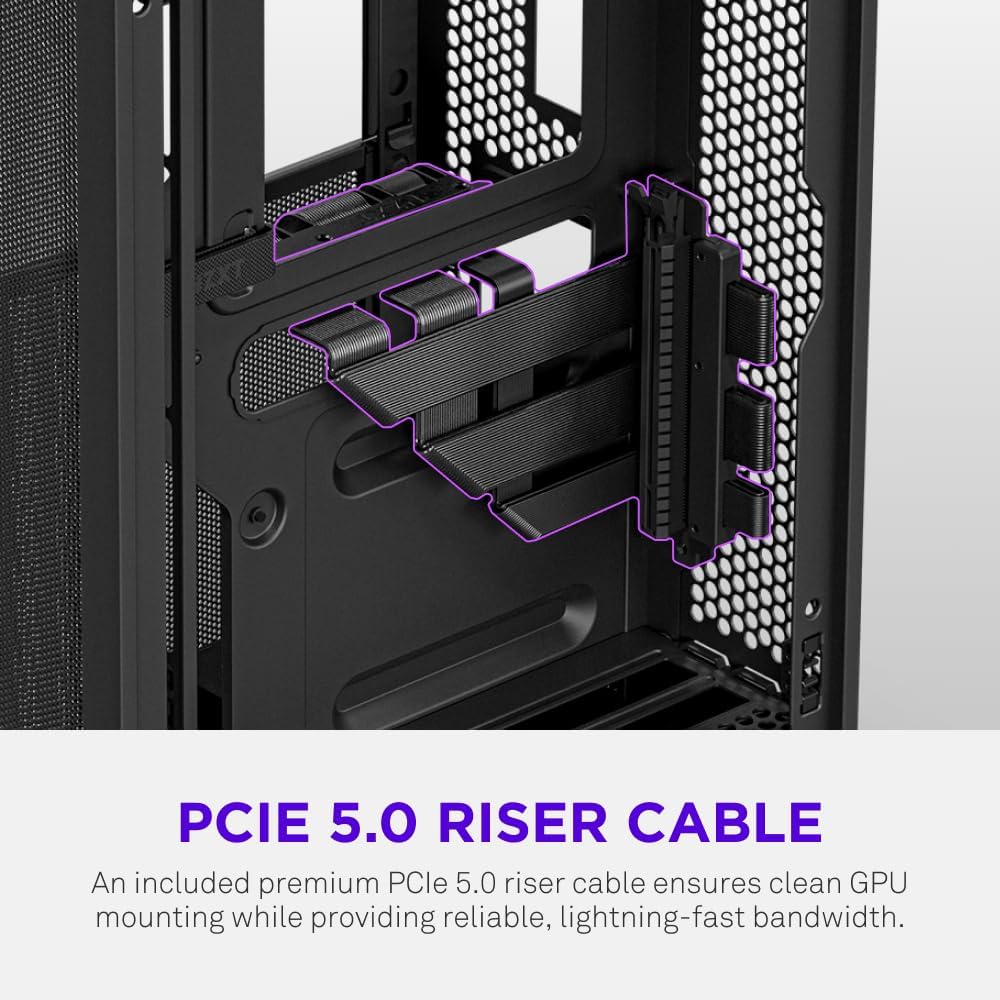
The H2 Flow supports GPUs up to 331 mm in length and includes a premium PCIe 5.0 riser cable for vertical mounting.

5.7. מערכת קירור
The case comes with two pre-installed 120mm F120Q CV fans at the top for exhaust. It also supports up to a 280mm radiator for liquid cooling.


5.8. המוצר נגמרview וִידֵאוֹ
צפו בסרטון הרשמי הזה לקבלת הצצה חזותיתview of the NZXT H2 Flow Mini-ITX PC Gaming Case.
6. הוראות הפעלה
6.1. הפעלה/כיבוי
Press the power button located on the front I/O panel to turn your PC on or off.
6.2. יציאות קלט/פלט קדמיות
לוח הקלט/פלט הקדמי מספק גישה נוחה ל:
- יציאות USB 3.0
- יציאת USB-C
- Audio Jack (if applicable)
Connect your peripherals such as keyboards, mice, and headsets to these ports.
7. תחזוקה
7.1. ניקוי מסנני אבק
The NZXT H2 Flow features ultra-fine mesh panels that act as dust filters. Regularly clean these panels to maintain optimal airflow and prevent dust buildup inside your PC.
- Gently remove the mesh panels from the case.
- Use compressed air or a soft brush to remove accumulated dust.
- Reattach the panels securely.
7.2. ניקיון כללי
השתמש רך, דamp cloth to wipe down the exterior of the case. Avoid abrasive cleaners or solvents.
8. פתרון תקלות
אם אתם נתקלים בבעיות בבניית המחשב שלכם, שקלו את השלבים הנפוצים הבאים לפתרון בעיות:
- אין כוח: ודא שכל כבלי החשמל (ספק הכוח לקיר, ספק הכוח ללוח האם, מעבד, כרטיס מסך) מחוברים היטב. בדוק את מתג ההפעלה בספק הכוח.
- אין תצוגה: Verify that your monitor is connected to the graphics card (not the motherboard I/O unless using integrated graphics) and that the GPU has proper power connections. Reseat the GPU and RAM.
- התחממות יתר: Check fan connections and orientation. Ensure mesh panels are clean and not obstructed. Verify CPU cooler installation and thermal paste application.
- רכיב לא זוהה: Reseat the component (GPU, RAM, storage drives). Check power and data connections.
For more complex issues, consult your individual component manuals or NZXT customer support.
9. מפרטים
| תכונה | פְּרָט |
|---|---|
| מותג | NZXT |
| שם הדגם | NZXT H2 Flow |
| סוג מקרה | מיני-מגדל |
| תאימות לוח אם | מיני ITX |
| תמיכה באורך ה-GPU | עד 331 מ"מ |
| תמיכת רדיאטור | עד 280 מ"מ |
| מאווררים כלולים | 2 x 120mm F120Q CV Top Fans |
| כבל Riser כלול | Premium PCIe 5.0 |
| סוג הרכבה של ספק כוח | Bottom Mount (SFX/SFXL recommended) |
| שיטת קירור | אוויר, נוזל |
| צֶבַע | שָׁחוֹר |
| חוֹמֶר | זכוכית, מתכת |
| משקל פריט | 4.55 קילוגרם |
| Total USB 3.0 Ports | 1 |
| Other Special Features | Tool-less Installation, Integrated Cable Management |
10. אחריות ותמיכה
10.1. מידע על אחריות
The NZXT H2 Flow Mini-ITX PC Case comes with a 2 שנות אחריות יצרןאנא שמור את הוכחת הרכישה שלך לצורך תביעות אחריות.
10.2. תמיכת לקוחות
For technical assistance, troubleshooting, or warranty inquiries, please visit the official NZXT support webאתר או צור קשר עם צוות שירות הלקוחות שלהם.
NZXT Store: בקרו בחנות NZXT באמזון