
1. הקדמה
Thank you for choosing the Schneider 43A1 4K UHD LED TV. This television combines advanced display technology with smart features to provide an immersive viewing experience. Featuring a 4K Ultra High Definition display, QLED-LCD technology with Direct LED backlighting, and the VIDAA Smart TV platform, your new TV offers vibrant colors, deep blacks, and access to a wide range of entertainment.
This manual provides essential information for the safe and efficient use of your television. Please read it thoroughly before operating the device and retain it for future reference.
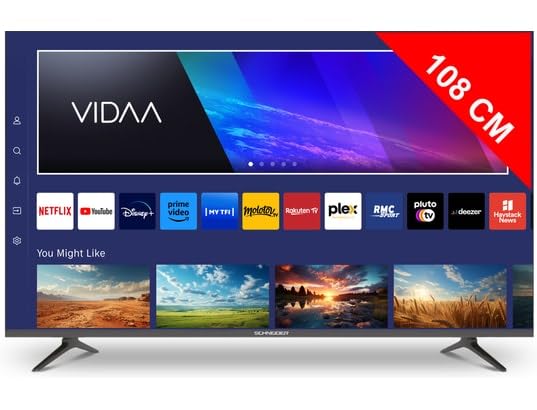
תמונה 1.1: חזית view of the Schneider 43A1 TV with VIDAA interface.
2. מידע בטיחות
כדי להבטיח פעולה בטוחה ולמנוע נזק, אנא הקפידו על אמצעי הזהירות הבאים:
- מיקום: Position the TV on a stable, level surface. Avoid placing it in direct sunlight, near heat sources, or in environments with high humidity or dust.
- אוורור: Ensure adequate ventilation around the TV. Do not block ventilation openings. Maintain a minimum distance of 10 cm from walls or other objects.
- ספק כוח: השתמש רק בספק הכוח שצוין כרךtage. Ensure the power cord is not pinched or walked on. Disconnect the power plug during lightning storms or when unused for extended periods.
- ניקוי: נתקו את הטלוויזיה מהחשמל לפני הניקוי. השתמשו במטלית רכה ויבשה. אין להשתמש בחומרי ניקוי נוזליים או בתרסיס.
- נוזלים: אין לחשוף את הטלוויזיה לנוזלים מטפטפים או מתיזים. אין להניח חפצים מלאים בנוזלים, כגון אגרטלים, על הטלוויזיה.
- יְלָדִים: יש לפקח על ילדים כדי לוודא שהם לא מטפסים על הטלוויזיה או על הרהיטים.
- הרכבה על הקיר: If wall-mounting, use a VESA compatible bracket (200 x 200 mm) and ensure proper installation by qualified personnel to prevent injury.
3. תכולת החבילה
אנא בדקו שכל הפריטים נמצאים ובמצב תקין:
- Schneider 43A1 4K UHD LED TV
- שְׁלַט רָחוֹק
- כבל חשמל
- מעמד טלוויזיה (2 יחידות)
- ברגים למעמד טלוויזיה
- מדריך למשתמש (מסמך זה)
4. התקנה
4.1 פירוק
Carefully remove the TV from its packaging. It is recommended to keep the original packaging for potential future transport or service needs.
4.2 התקנת מעמד
If you are not wall-mounting the TV, attach the included stand pieces to the bottom of the TV using the provided screws. Ensure the stand is securely fastened before placing the TV upright.
4.3 התקנה על הקיר (אופציונלי)
The Schneider 43A1 is compatible with VESA 200 x 200 mm wall mounts. For safe installation, it is highly recommended to use a professional installer. Refer to your wall mount's instructions for specific details.
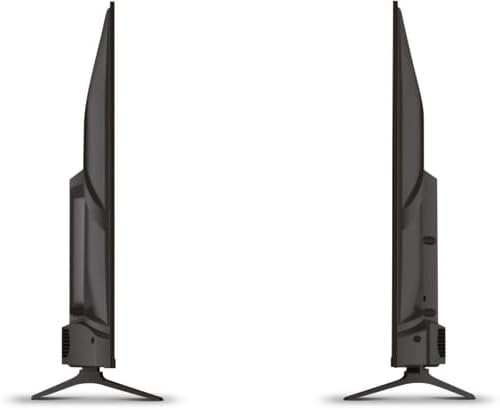
תמונה 4.1: צד view of the Schneider 43A1 TV, illustrating its profile for placement or wall mounting.
4.4 חיבור התקנים חיצוניים
הטלוויזיה שלך מציעה מגוון אפשרויות קישוריות:
- HDMI: חבר עד שלושה התקני HDMI 2.0 (למשל, נגן Blu-ray, קונסולת משחקים, ממיר) ליציאות ה-HDMI.
- USB: Two USB ports are available for connecting USB storage devices to play media.
- AV/Audio Input: For older devices requiring composite video and stereo audio.
- פלט קואקסיאלי: לחיבור למערכת שמע חיצונית.
- כניסת אנטנה/כבל: חברו את האנטנה או אות הטלוויזיה בכבלים שלכם לקליטת DVB-T/T2/C/S2.
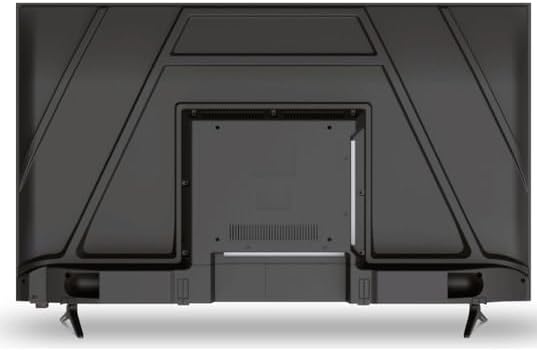
תמונה 4.2: אחורי view of the Schneider 43A1 TV, highlighting connection ports.
4.5 חיבור חשמל
Plug the power cable into the TV's power input, then into a suitable wall outlet.
4.6 אשף ההתקנה הראשונית
Upon first power-on, the TV will guide you through an initial setup process. This includes selecting your language, connecting to a Wi-Fi network, and scanning for available channels (DVB-T/T2/C/S2).
5. הפעלה
5.1 פונקציות שלט רחוק
The remote control allows you to navigate the TV's features:
- לחצן הפעלה: מפעיל או מכבה את הטלוויזיה.
- עוצמת הקול מעלה/הנמכת: מתאים את רמת הקול.
- ערוץ למעלה/למטה: משנה ערוצי טלוויזיה.
- קלט/מקור: Selects the input source (HDMI, USB, TV Tuner).
- לחצני ניווט: לניווט בתפריטים.
- כפתורי טלוויזיה חכמה: Direct access to popular apps like Netflix, Prime Video, YouTube.
5.2 Smart TV (VIDAA)
The integrated VIDAA Smart TV platform provides access to a variety of applications and streaming services. Connect your TV to the internet via Wi-Fi to enjoy features like Netflix, Prime Video, and YouTube. Bluetooth connectivity allows for wireless connection to compatible audio devices.

תמונה 5.1: חזית בזווית view of the Schneider 43A1 TV, displaying the VIDAA Smart TV interface.
5.3 בחירת קלט
Press the 'Input' or 'Source' button on your remote control to switch between connected devices (HDMI 1, HDMI 2, HDMI 3, USB, AV, TV Tuner).
5.4 הגדרות תמונה וקול
Access the TV's menu to adjust picture and sound settings. The 4K UHD resolution, QLED-LCD technology, and Direct LED backlighting ensure a high-quality visual experience. The TV also features upscaling to enhance lower-resolution content. Audio is delivered via 2 x 8 W RMS stereo speakers with Dolby Audio support.
5.5 PC Monitor Mode
The TV can be used as a PC monitor by connecting your computer via an HDMI cable. This mode optimizes the display for computer use.
6. תחזוקה
6.1 ניקוי הטלוויזיה
Before cleaning, ensure the TV is unplugged from the power outlet.
- מָסָך: נגבו בעדינות את המסך בעזרת מטלית רכה ונטולת סיבים. במקרה של סימנים עקשניים, נגבו קלותampיש לשטוף את המטלית במים או בחומר ניקוי מיוחד למסכים (אין לרסס ישירות על המסך).
- חִיצוֹנִי: השתמשו במטלית רכה ויבשה כדי לנגב את הטלוויזיה.asinז. הימנעו מחומרי ניקוי שוחקים או ממסים.
6.2 עדכוני תוכנה
ייתכן שהטלוויזיה שלך תקבל עדכוני תוכנה כדי לשפר את הביצועים ולהוסיף תכונות חדשות. ודא שהטלוויזיה שלך מחוברת לאינטרנט כדי לקבל עדכונים אלה באופן אוטומטי או בדוק אותם ידנית דרך תפריט ההגדרות.
7. פתרון תקלות
אם נתקלת בבעיות עם הטלוויזיה שלך, עיין בבעיות הנפוצות ובפתרונות הבאים:
- אין כוח:
- בדוק אם כבל החשמל מחובר היטב לטלוויזיה ולשקע בקיר.
- ודא ששקע הקיר תקין (בדוק עם מכשיר אחר).
- לחץ על כפתור ההפעלה בשלט רחוק או על הטלוויזיה עצמה.
- אין תמונה/קול:
- ודא שמקור הקלט הנכון נבחר (לדוגמה, HDMI 1, טלוויזיה).
- בדוק את כל חיבורי הכבלים בין הטלוויזיה למכשירים חיצוניים.
- ודא שהעוצמה אינה מושתקת או מוגדרת למינימום.
- אם משתמשים באנטנה, בדקו את חיבור האנטנה ובצעו סריקת ערוצים.
- השלט הרחוק לא עובד:
- החלף את הסוללות בשלט הרחוק.
- ודא שאין חסימות בין השלט לחיישן ה-IR של הטלוויזיה.
- Smart TV/Network Issues:
- בדוק את נתב ה-Wi-Fi ואת חיבור האינטרנט שלך.
- Go to the TV's network settings to re-connect to your Wi-Fi network.
- הפעל מחדש את הטלוויזיה ואת הנתב שלך.
אם הבעיה נמשכת לאחר ניסיון פתרונות אלה, אנא צור קשר עם תמיכת הלקוחות.
8. מפרטים
| תכונה | מִפרָט |
|---|---|
| דֶגֶם | Schneider 43A1 |
| גודל תצוגה | 109 ס"מ (43 אינץ') |
| הַחְלָטָה | 4K Ultra HD (3840 x 2160 פיקסלים) |
| טכנולוגיית תצוגה | QLED-LCD with Direct LED Backlight |
| יחס ניגודיות | 1100:1 |
| בְּהִירוּת | 200 תקליטורים/מ"ר |
| פלט אודיו | 2 x 8 W RMS Stereo |
| טכנולוגיית אודיו | Dolby Audio |
| יציאות HDMI | 3 (HDMI 2.0) |
| יציאות USB | 2 |
| תשומות אחרות | AV/Audio Input |
| פלטים | תפוקה קואקסיאלית |
| כַּונָן | DVB-T/T2/C/S2 |
| פלטפורמת טלוויזיה חכמה | VIDAA (Netflix, Prime Video, YouTube) |
| קישוריות אלחוטית | Wi-Fi, בלוטות' |
| תאימות VESA | 200 x 200 מ"מ |
| מִשׁקָל | 7.5 קילוגרם |