
Uzoli EM3566
Uzoli EM3566 Wireless Weather Station User Manual
דגם: EM3566
Brand: Uzoli
מָבוֹא
This manual provides detailed instructions for the setup, operation, and maintenance of your Uzoli EM3566 Wireless Weather Station. This device offers comprehensive environmental monitoring, including indoor and outdoor temperature and humidity, weather forecasts, an atomic clock, and alarm functions. Please read this manual thoroughly before use to ensure optimal performance and longevity of your device.
תוכן החבילה
- Base station (Main Unit) x 1
- חיישן מרחוק x 1
- Power adapter for base station x 1
- מדריך למשתמש x 1
המוצר נגמרview
The Uzoli EM3566 Weather Station consists of a main display unit and a wireless remote sensor. The main unit features a 7.4-inch color LCD for clear display of all data, while the remote sensor collects outdoor environmental data.

The main display unit and the accompanying wireless remote sensor.

מעלview of the weather station's 7.4-inch color display, highlighting its multiple data points including indoor/outdoor temperature, humidity, weather forecast, and atomic clock.
הוראות התקנה
1. הפעלת המכשירים
The main unit can be powered by the included AC adapter or by 2xAAA batteries (not included) for backup. The remote sensor requires 2xAA batteries (not included).
- יחידה ראשית: Insert 2xAAA batteries into the battery compartment. For continuous backlight and full functionality, connect the power adapter to the main unit and plug it into a power outlet.
- חיישן מרחוק: Insert 2xAA batteries into the remote sensor's battery compartment.

Illustration of the five adjustable brightness levels for the display backlight, and how power is supplied via adapter or AAA batteries.
2. Initial Synchronization and Calibration
Upon first power-on, place the base station and the remote sensor together for 48 hours. This allows the thermo-hygrometer to adapt to local conditions and ensure accurate readings.
In the third minute after the initial switch-on, the weather station will automatically enter a 7-minute RCC (Radio Controlled Clock) reception mode. During this period, the backlight and other functions will temporarily turn off to ensure a successful time synchronization. Do not interrupt this process.
3. Remote Sensor Placement
Place the remote sensor in your desired outdoor location. For optimal performance, ensure it is within 197 feet (60m) of the main unit in open areas, free from major obstructions. The weather station supports connection with up to 3 remote sensors (one sensor is included).

Demonstration of the remote sensor's placement outdoors and its ability to connect to the main unit over a distance of up to 197 feet (60m) in open areas, supporting up to three sensors.
הוראות הפעלה
1. תצוגה ותאורה אחורית
The 7.4-inch color screen provides an intuitively partitioned interface for easy reading. When powered by the AC adapter, you can choose from 5 brightness levels or enable auto-dimming based on ambient light. When operating on battery power only, the backlight will illuminate for 15 seconds per screen tap to conserve energy.
2. Atomic Clock and Time Setting
The weather station can automatically synchronize with the US WWVB signal, ensuring precise timekeeping and automatic adjustment for Daylight Saving Time (DST). The station attempts to calibrate at 1:00 AM, 2:00 AM, 3:00 AM, and 4:00 AM (e.g., from 1:00-1:07 AM). You can also set the time manually if desired.
3. ניטור טמפרטורה ולחות
The device tracks real-time temperature and humidity for both indoor and outdoor environments. It records daily minimum and maximum values, allowing you to observe trends. The system supports up to three remote sensors for monitoring different areas.
4. תחזית מזג האוויר
The weather station provides a 12-hour weather forecast for your local area using 6 distinct icons, based on barometric pressure trends. A barometric bar graph illustrates pressure changes over the past 24 hours, aiding in understanding local weather patterns.

Visual representation of the weather forecast icons (sunny, cloudy, rainy, snowy) and the barometric pressure trend graph for the next 8 hours.
5. Customizable Weather Alerts
Set personalized high/low alerts for both indoor and outdoor temperature and humidity. An audible alarm will sound when values exceed your preset thresholds. A preset frost alert for outdoors flashes an icon on the screen when the threshold is reached, requiring no additional settings.
6. Alarm Clocks and Other Functions
The weather station includes dual alarm clocks with a snooze mode, allowing for different settings for weekdays and weekends. Additional features include an indoor/outdoor comfort indicator, an indoor mold risk level display, moon phase information, and a calendar with three selectable languages.
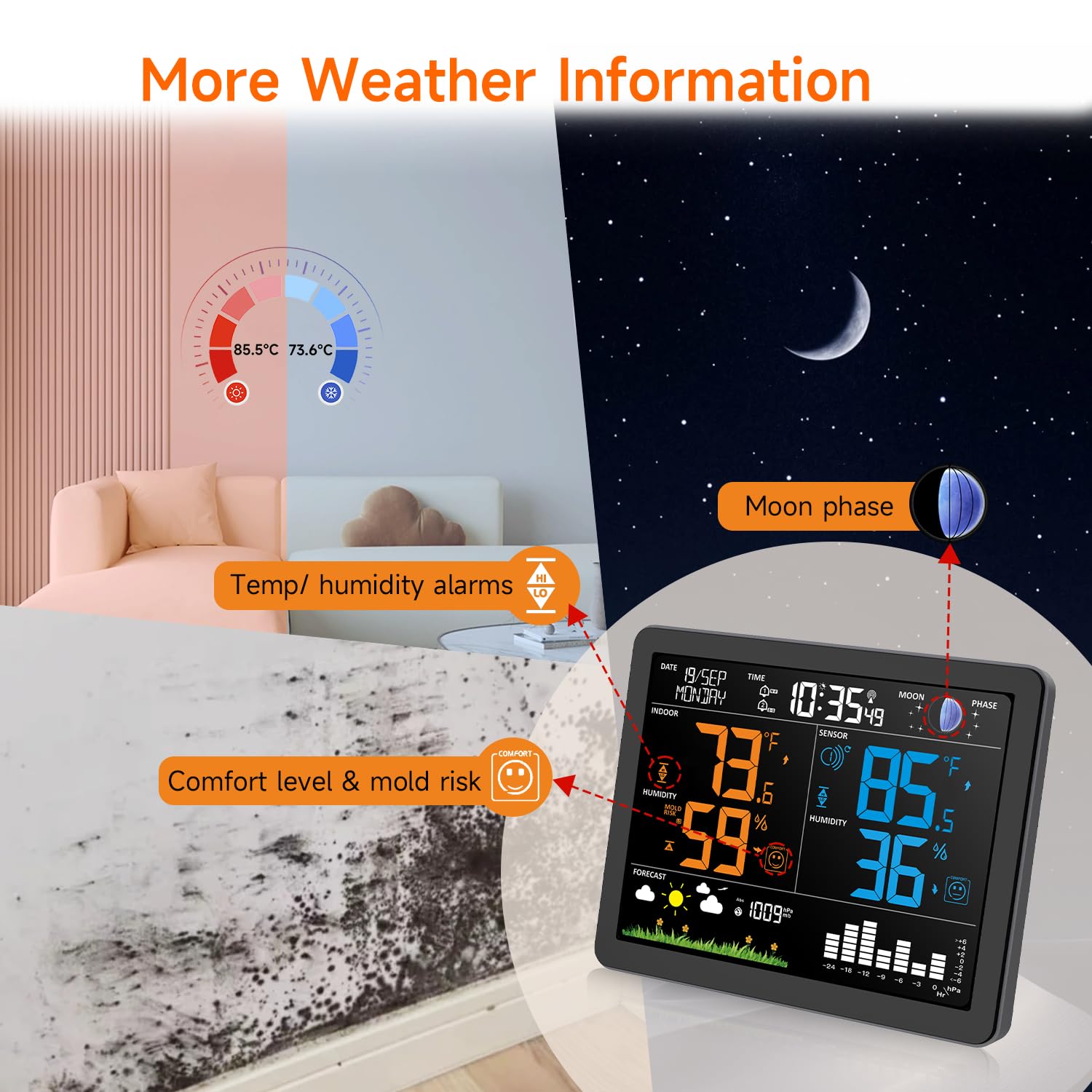
Details on additional features such as the indoor/outdoor comfort indicator, mold risk level, and moon phase display.
תַחזוּקָה
To ensure the longevity and accuracy of your Uzoli EM3566 Weather Station, follow these maintenance guidelines:
- ניקוי: Wipe the display and unit surfaces with a soft, dry cloth. Avoid abrasive cleaners or solvents.
- החלפת סוללה: החליפו את הסוללות הן ביחידה הראשית והן בחיישן השלט הרחוק כאשר מחוון הסוללה החלשה מופיע על הצג. ודאו כי הקוטביות נכונה.
- מיקום חיישן: Periodically check the remote sensor's outdoor placement to ensure it remains protected from direct heavy rain or snow, while still allowing for accurate environmental readings.
פתרון בעיות
| בְּעָיָה | סיבה אפשרית | פִּתָרוֹן |
|---|---|---|
| אין קריאת טמפרטורה/לחות חיצונית | Remote sensor out of range, low battery, or interference. | Ensure sensor is within 197ft (60m) of the main unit. Replace sensor batteries. Relocate sensor to minimize interference. |
| קריאות לא מדויקות | Initial calibration not complete, or sensor/unit exposed to direct sunlight/heat sources. | Allow 48 hours for initial adaptation. Ensure sensor is in a shaded, well-ventilated area. |
| שעון אטומי לא מסתנכרן | Weak WWVB signal, interference, or unit not in reception mode. | Place the main unit near a window, away from electronic devices. Ensure the unit is powered by AC adapter during calibration times (1-4 AM). You may need to manually set the time if the signal is consistently weak in your area. |
| Display backlight not working or dim | Unit running on batteries, or brightness level set too low. | Connect the AC adapter for continuous backlight. Adjust brightness levels using the appropriate controls. On battery power, backlight is temporary. |
מפרטים
- מספר דגם: EM3566
- מידות המוצר: 1.18 x 6.69 x 5.51 אינץ'
- משקל פריט: 500 גרם (1.1 פאונד)
- חוֹמֶר: אקרילוניטריל בוטאדיאן סטירן (ABS)
- מקור כוח: Main Unit: AC Adapter (included) or 2xAAA Batteries (not included); Remote Sensor: 2xAA Batteries (not included)
- טווח אלחוטי: עד 60 מטר (197 רגל) בשטחים פתוחים
- מאפיינים מיוחדים: Adjustable Brightness, Alarm, Customizable Alerts, Large Display, Wireless, Atomic Clock, Moon Phase, Weather Forecast
אחריות ותמיכה
For warranty information and technical support, please refer to the contact details provided with your purchase or visit the official Uzoli webאֲתַר. שמור את קבלה הרכישה שלך לתביעות אחריות.