
1. הקדמה
This manual provides comprehensive instructions for the setup, operation, maintenance, and troubleshooting of your Eversolo Remote-V16 BLE Bluetooth & Infrared Control. This remote is designed to enhance your experience with compatible Eversolo DMP-A10, DMP-A8, and Eversolo DMP/Play series devices, offering both Bluetooth and infrared control capabilities.

Image: The Eversolo Remote-V16 BLE remote control shown alongside its matching silver charging case.
2. מידע בטיחות
אנא קראו והבינו את כל הוראות הבטיחות לפני השימוש במוצר זה. שמרו מדריך זה לעיון עתידי.
- Do not expose the remote control to water, moisture, or extreme temperatures.
- Avoid dropping or subjecting the remote to severe impacts.
- Do not attempt to disassemble, repair, or modify the remote control. This will void the warranty and may cause damage.
- Use only the specified charging method (USB-C) and compatible power sources.
- Keep the remote control out of reach of children and pets.
- Dispose of the remote control and its battery responsibly according to local regulations.
3. תכולת החבילה
ודא שכל הפריטים נמצאים בחבילה:
- Eversolo Remote-V16 BLE Remote Control
- USB-C Charging Cable (may be included, check packaging)
- מדריך למשתמש (מסמך זה)
4. המוצר נגמרview
The Eversolo Remote-V16 BLE is a versatile remote control designed for seamless interaction with your Eversolo audio devices. It features both Bluetooth Low Energy (BLE) for stable, long-term connection and infrared (IR) for power control, ensuring reliable operation.

תמונה: למעלה view of the Eversolo Remote-V16 BLE, highlighting its ergonomic design and button arrangement.

תמונה: פרו צדדיfile of the Eversolo Remote-V16 BLE, illustrating its slim and comfortable grip.
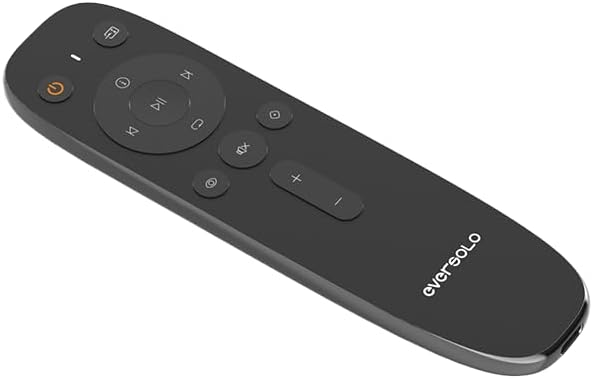
תמונה: בזווית view of the Eversolo Remote-V16 BLE, providing a clear look at the button layout and Eversolo branding.
5. התקנה
5.1 טעינת השלט
The Remote-V16 BLE features a long-lasting battery and is charged via a USB-C port. Connect the provided USB-C cable to the remote and a compatible USB power source (e.g., a computer USB port or a USB wall adapter). The indicator light on the remote will show charging status.
5.2 תאימות
This remote control is specifically designed for use with the following Eversolo devices:
- Eversolo DMP-A10
- Eversolo DMP-A8
- Eversolo DMP-A6 Gen 2
- Eversolo DMP-A6 Master Gen 2
- Eversolo Play series devices
חָשׁוּב: Please ensure the antenna on your Eversolo DMP device is correctly installed before attempting to use the remote control.
5.3 צימוד (מצב בלוטות')
To pair the Remote-V16 BLE with your Eversolo device via Bluetooth:
- Ensure your Eversolo device is powered on and within range.
- On the Remote-V16 BLE, press and hold the [Next Track] ו [Volume Down] לחצנים בו זמנית למשך 3 שניות.
- The indicator light on the remote will begin to flash, indicating it has entered pairing mode.
- Your Eversolo player will automatically recognize and connect to the remote.
- Once successfully paired, the indicator light on the remote will turn off.
- If pairing fails, the indicator light will turn off after 30 seconds, and the remote will exit pairing mode. Repeat the steps if necessary.
6. הוראות הפעלה
6.1 Dual Mode Operation (Bluetooth & Infrared)
The Remote-V16 BLE operates in two modes: Bluetooth and Infrared. Bluetooth provides a stable, long-term connection for most functions, while the power key specifically utilizes infrared (IR) for reliable power control of your Eversolo device.
6.2 פונקציות כפתורים
Familiarize yourself with the functions of each button on your Remote-V16 BLE:
| לַחְצָן | פוּנקצִיָה |
|---|---|
| כפתור הפעלה (⑂) | Turns the Eversolo device on or off (operates via IR). |
| הפעל/השהה (⏸) | Plays or pauses current audio playback. |
| הרצועה הבאה (⏭) | Skips to the next track or chapter. |
| רצועה קודמת (⏮) | Skips to the previous track or restarts the current track. |
| הגברת עוצמת הקול (+) | מגביר את עוצמת הקול. |
| הנמכת עוצמת הקול (-) | מוריד את עוצמת הקול. |
| השתק (🔇) | השתקה או ביטול השתקה של פלט השמע. |
| בית (⌂) | חוזר למסך הבית הראשי של המכשיר. |
| חזור (↶) | חוזר לתפריט או למסך הקודם. |
| בחירת קלט (⎌) | עובר בין מקורות הקלט הזמינים. |
| הגדרות (⚙) | גישה לתפריט ההגדרות של המכשיר. |
6.3 Smart Standby Mode
The Remote-V16 BLE incorporates an eco-friendly smart standby design to conserve battery life:
- In מצב אינפרא אדום, the remote control automatically enters standby mode after 6 seconds of inactivity.
- In מצב Bluetooth, the remote maintains a long-term connection while intelligently managing power consumption.
This smart standby feature effectively extends the battery life of your remote, contributing to energy efficiency.
7. תחזוקה
תחזוקה נאותה מבטיחה את אורך החיים והביצועים האופטימליים של השלט רחוק שלך.
- ניקוי: Use a soft, dry, lint-free cloth to clean the surface of the remote. Do not use abrasive cleaners, solvents, or chemical sprays.
- אִחסוּן: כאשר השלט אינו בשימוש למשך תקופות ממושכות, יש לאחסן אותו במקום קריר ויבש, הרחק מאור שמש ישיר וטמפרטורות קיצוניות.
- טיפול בסוללה: To maintain battery health, avoid fully discharging the remote frequently. Charge it regularly, especially if it will be stored for a long time.
8. פתרון תקלות
If you encounter issues with your Eversolo Remote-V16 BLE, refer to the following common problems and solutions:
- שלט לא מגיב:
- Ensure the remote is charged. Connect it to a USB-C power source.
- Verify that the Eversolo device is powered on and within range.
- Check if the remote is in Bluetooth mode (for most functions) or if you are using the IR power button correctly.
- Try re-pairing the remote with your Eversolo device (refer to Section 5.3).
- בעיות זיווג:
- Ensure no other Bluetooth devices are interfering during the pairing process.
- Make sure the remote is fully charged.
- Confirm that the antenna on your Eversolo DMP device is properly installed.
- Try restarting both the remote (by letting it enter standby) and your Eversolo device.
- חיי סוללה קצרים:
- Ensure the remote is fully charged before use.
- The smart standby mode helps conserve battery; ensure it's functioning as described in Section 6.3.
- אם הבעיה נמשכת, צור קשר עם תמיכת הלקוחות.
9. מפרטים
Key technical specifications for the Eversolo Remote-V16 BLE:
- מספר דגם: Eversolo Remote-V16 BLE
- מותג: EVERSOLO
- קישוריות: Bluetooth Low Energy (BLE) & Infrared (IR)
- תכונה מיוחדת: Smart Standby Mode
- צֶבַע: כסף ושחור
- מספר מרבי של מכשירים נתמכים: 1
- מכשירים תואמים: EVERSOLO DMP Series (DMP-A10, DMP-A8, DMP-A6 Gen 2, DMP-A6 Master Gen 2), EVERSOLO Play Series
- משקל פריט: 3.84 אונקיות
- מידות חבילה: 6.61 x 1.89 x 0.75 אינץ'
10. מידע על אחריות
Eversolo products are designed for quality and reliability. A 12-month after-sales service is promised for this product. For detailed warranty terms and conditions, please refer to the official Eversolo webאתר או צור קשר עם תמיכת הלקוחות. שמור את הוכחת הרכישה שלך לצורך תביעות אחריות.
11. תמיכת לקוחות
For further assistance, technical support, or inquiries regarding your Eversolo Remote-V16 BLE, please utilize the official Eversolo service channels:
- Visit the official Eversolo website forum.
- Contact Eversolo via their official Facebook or Instagram pages.
- Send an email to Eversolo customer support.
Expect a prompt response from the support team. For the latest information and firmware updates, please visit the Eversolo official webאֲתַר.