1. הקדמה
Thank you for choosing the Skyworth H30P Smart 360° Pan & Tilt Indoor Wi-Fi Security Camera. This camera is designed to provide comprehensive surveillance for your indoor spaces, offering advanced features like 360° pan and tilt, two-way audio, and remote viewing via a mobile app. Please read this manual carefully before use to ensure proper installation and operation.
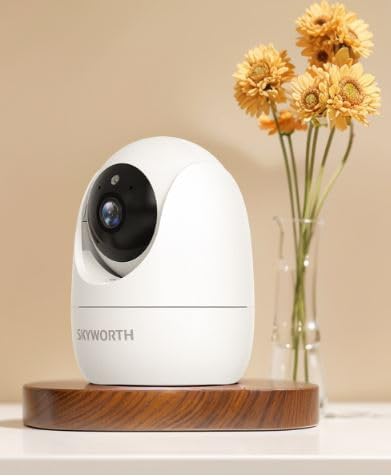
Figure 1: Skyworth H30P Smart Wi-Fi Camera
2. מידע בטיחות
- Ensure the camera is used indoors only. It is not water-resistant (IP20 rating).
- השתמש רק במתאם החשמל שסופק עם המכשיר.
- Keep the camera away from direct sunlight, heat sources, and moisture.
- אל תנסה לפרק או לשנות את המצלמה. פעולה זו תגרום לביטול האחריות.
- הרחק מהישג ידם של ילדים וחיות מחמד.
- ודא קישוריות Wi-Fi יציבה לקבלת ביצועים אופטימליים.
3. תכולת החבילה
אנא בדקו את תוכן החבילה בעת הפתיחה. אם חסרים פריטים או פריטים פגומים, צרו קשר עם תמיכת הלקוחות.
- Skyworth H30P Smart Wi-Fi Camera (1 unit)
- מתאם חשמל (יחידה אחת)
- אביזרי הרכבה (ברגים, תקעים לקיר)
- מדריך למשתמש (מסמך זה)
4. המוצר נגמרview
The Skyworth H30P camera features a compact dome shape with pan and tilt functionality, allowing for a 360-degree viewing angle. It includes a high-quality CMOS image sensor, infrared LEDs for night vision, and a built-in microphone and speaker for two-way audio communication.
תכונות עיקריות:
- סיבוב והטיה של 360°: Full room coverage with no blind spots.
- רזולוציית 2K: מספק סרטון וידאו ברור ומפורטtage.
- קישוריות Wi-Fi: Easy remote access and control via smartphone app.
- ראיית לילה בצבע מלא: Enhanced visibility in low-light conditions up to 10 meters.
- שמע דו כיווני: Communicate with people or pets through the camera.
- זיהוי תנועה: Receive alerts for detected movement.
- תמיכה בכרטיסי מיקרו SD: Up to 128GB for local storage (Micro SD card not included).
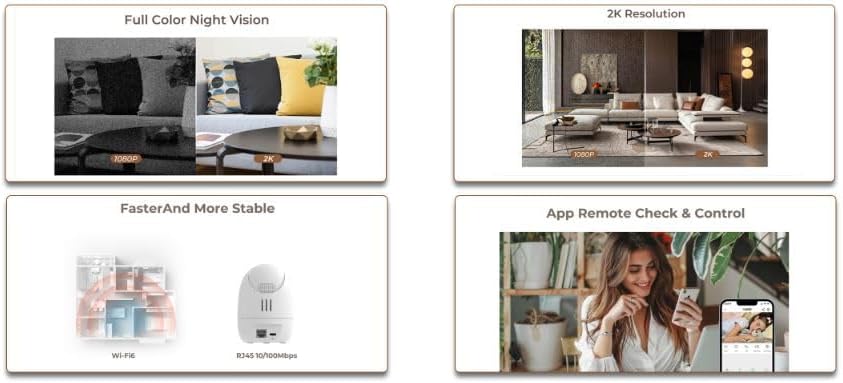
Figure 2: Demonstrates 2K resolution and full color night vision capabilities.
This image illustrates the camera's ability to capture clear images with 2K resolution and its full color night vision feature, which provides visibility even in dark environments.
5. התקנה
5.1 הפעלה
- חבר את ספק הכוח לשקע החשמל של המצלמה.
- חבר את מתאם החשמל לשקע חשמל AC סטנדרטי.
- The camera will power on, and its indicator light will begin to flash, indicating it is ready for setup.
5.2 התקנת אפליקציה ויצירת חשבון
- Download the dedicated mobile application from your smartphone's app store (e.g., App Store for iOS, Google Play Store for Android). חפש "Skyworth Smart Home" or refer to the QR code on the packaging.
- פתחו את האפליקציה ופעל לפי ההוראות שעל המסך כדי ליצור חשבון חדש או להתחבר אם כבר יש לכם אחד.
5.3 התחברות ל-Wi-Fi
- In the app, tap on "Add Device" or the "+" icon.
- Select "Security Camera" or the specific model (H30P) from the list of devices.
- Follow the in-app prompts to connect the camera to your 2.4GHz Wi-Fi network. Ensure your Wi-Fi password is correct.
- The app may ask you to scan a QR code displayed on your phone screen with the camera lens, or to listen for an audible pairing tone.
- Once connected, the camera's indicator light will turn solid, and you will receive a confirmation in the app.

Figure 3: Illustrates Wi-Fi connectivity and remote control via mobile app.
This image shows the camera's wireless connectivity and how it can be controlled and monitored remotely using a smartphone application.
5.4 הרכבת המצלמה
The H30P camera can be placed on a flat surface like a shelf or table, or mounted on a wall.
מיקום שולחן/מדף:
- Place the camera on a stable, flat surface within Wi-Fi range.
- ודא שהמצלמה נמצאת בקו ראייה ברור לאזור שברצונך לנטר.
הרכבה על הקיר:
- Choose a suitable location on the wall, ensuring it is within Wi-Fi range and has a power outlet nearby.
- Use the provided mounting template (if available) or mark the screw positions on the wall.
- קדחו חורי פיילוט והכניסו תקעים לקיר במידת הצורך.
- Secure the mounting bracket (if included) to the wall using the screws.
- חבר את המצלמה לתושבת ההרכבה.
6. הפעלת המצלמה
6.1 בשידור חי View
- Open the mobile app and select your H30P camera from the device list.
- You will see the live video feed from the camera.
6.2 בקרת סיבוב והטיה
- בשידור חי view screen in the app, use the directional controls (usually a joystick or arrows) to remotely adjust the camera's viewזווית ing.
- The camera supports 360° horizontal rotation and vertical tilt.
6.3 שמע דו-כיווני
- To speak through the camera, tap the microphone icon in the app and hold it while speaking. Release to listen.
- To listen to audio from the camera's environment, ensure the speaker icon in the app is enabled.
6.4 זיהוי תנועה והתראות
- Access the camera settings in the app to configure motion detection sensitivity and alert preferences.
- You can set up push notifications to your smartphone when motion is detected.
6.5 הקלטה ואחסון
- The camera supports continuous recording or event-triggered recording (e.g., motion detection).
- Insert a Micro SD card (up to 128GB, not included) into the camera's Micro SD card slot for local storage.
- פו מוקלטtagניתן לגשת אליו ולחזור אליוviewed through the mobile app.
7. תחזוקה
- ניקוי: נגבו בעדינות את עדשת המצלמה ואת גוף המצלמה בעזרת מטלית רכה ויבשה. אין להשתמש בחומרי ניקוי נוזליים או בחומרים שוחקים.
- עדכוני קושחה: בדוק באופן קבוע את האפליקציה לנייד עבור עדכוני קושחה זמינים כדי להבטיח ביצועים ואבטחה אופטימליים.
- ניהול אחסון: אם משתמשים בכרטיס Micro SD, יש לעדכן אותו מעת לעתview ולמחוק את ה-foo הישןtage to free up space, or enable loop recording if supported.
8. פתרון תקלות
| בְּעָיָה | סיבה אפשרית | פִּתָרוֹן |
|---|---|---|
| המצלמה לא נדלקת | מתאם החשמל אינו מחובר או פגום; בעיה בשקע החשמל. | בדוק את חיבורי החשמל. נסה שקע חשמל אחר. ודא שמתאם החשמל פועל. |
| לא ניתן להתחבר ל-Wi-Fi | Incorrect Wi-Fi password; camera too far from router; 5GHz Wi-Fi network used. | Verify Wi-Fi password. Move camera closer to router. Ensure you are connecting to a 2.4GHz Wi-Fi network. Reset camera and try again. |
| אין שידור וידאו חי | Poor Wi-Fi signal; camera offline; app issue. | Check Wi-Fi signal strength. Restart the camera and router. Close and reopen the app. |
| אודיו דו-כיווני לא עובד | Microphone/speaker muted in app; volume too low; network latency. | Check app settings for audio controls. Adjust volume. Ensure stable network connection. |
| התראות תנועה לא התקבלו | Motion detection disabled; incorrect sensitivity settings; app notifications blocked. | Enable motion detection in app settings. Adjust sensitivity. Check phone notification settings for the app. |
9. מפרטים
| תכונה | פְּרָט |
|---|---|
| מספר דגם | H30P |
| מידות | 8.5 x 8.5 x 12 ס"מ |
| מִשׁקָל | 164 גרם |
| צֶבַע | לָבָן |
| קישוריות | Wi-Fi (2.4GHz) |
| הַחְלָטָה | 2 Megapixels (2K effective video resolution) |
| קצב פריימים | 30 פריימים לשנייה |
| Viewזווית | 360 מעלות (סיבוב והטיה) |
| טווח ראיית לילה | Up to 10 meters (Full Color Night Vision with Infrared LEDs) |
| אִחסוּן | כרטיס Micro SD (עד 128GB, לא כלול) |
| מקור כוח | AC (5 Watts) |
| תכונות מיוחדות | Pan/Tilt, Full Color Night Vision, Two-Way Audio, Remote Viewחיישן תנועה |
| שימוש פנימי/חיצוני | Indoor only (IP20) |
| מכשירים תואמים | Smartphone, Tablet, Smart Displays |
10. אחריות ותמיכה
For warranty information and customer support, please refer to the warranty card included in your product packaging or visit the official Skyworth webאתר. ניתן גם ליצור קשר עם הקמעונאי שלך לקבלת סיוע.
יַצרָן: סקייוורת'
ארץ מוצא: סִין