
1. מידע בטיחות חשוב
Please read this manual thoroughly before operating the device. Improper installation or use may cause damage to the unit or your vehicle. Ensure all connections are secure and correctly installed to prevent electrical shorts or malfunctions. Always prioritize safe driving. Do not operate the device in a manner that distracts you from the road.
2. המוצר נגמרview
The Uckazy 12.3 Inch Android 14 Car Radio is designed to upgrade your BMW X1 F48's infotainment system. It features a high-definition IPS touch screen, Android 14 operating system, and supports wireless CarPlay and Android Auto. This unit integrates seamlessly with your vehicle's existing systems, including iDrive control and original car functions.
תכונות עיקריות:
- 12.3-inch HD (1920*720) IN-CELL Screen: Enhanced clarity and reduced reflection.
- מערכת הפעלה אנדרואיד 14: Powered by a MediaTek Octa-core processor (4*Cortex A72 2.2GHz + 4*Cortex A51 1.8GHz) with 4GB RAM and 64GB ROM.
- CarPlay אלחוטי ואנדרואיד אוטו: Access navigation, music, and messaging via voice commands (Siri/Google Voice Assistant).
- DSP מובנה: 16 EQ segments for detailed audio tuning and sound quality enhancement.
- OEM System Retention: Maintains original iDrive control, steering wheel controls, OEM reversing camera, and other factory functions.

3. תאימות
This car radio is specifically designed for BMW X1 F48 models from 2018 to 2020 that are equipped with the NBT EVO System. It is crucial to verify your vehicle's system type before installation. If you are uncertain about your car's system, please consult a professional or the product support.

4. מדריך התקנה
The Uckazy car radio is designed for plug-and-play installation. However, professional installation is recommended to ensure correct wiring and functionality. Always disconnect the vehicle's battery before beginning any electrical work.
4.1 Fiber Optic Cable Transfer
If your vehicle uses fiber optic cables for audio, you may need to transfer them to the new power harness. Follow these steps carefully:
- Locate the original power connector.
- Carefully cock the snap on the original connector and pull out the fiber optic cable.
- Locate the corresponding slot on the new power cord provided with the unit.
- Plug the fiber optic cable into the correct interface on the new power cord. Ensure it snaps securely into place.
- Finally, connect the new power cable to the original power cable harness in your vehicle.
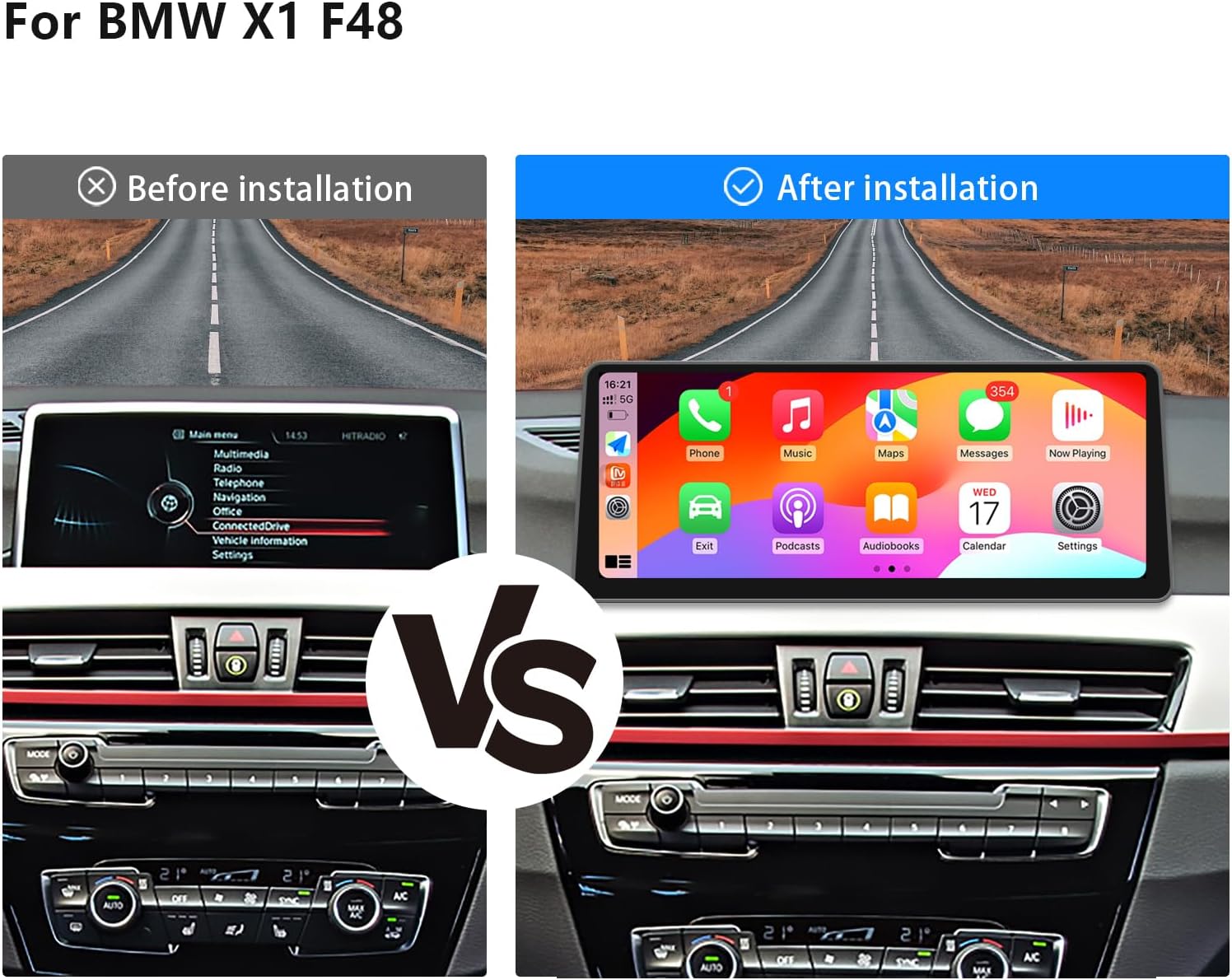
4.2 מראה לאחר ההתקנה
The new 12.3-inch display integrates smoothly into the BMW X1 F48 dashboard, providing a modern and enhanced visual experience.
5. הוראות הפעלה
5.1 CarPlay אלחוטי ואנדרואיד אוטו
The unit supports wireless CarPlay and Android Auto, allowing seamless integration with your smartphone for navigation, music, and communication.
- Ensure Bluetooth is enabled on your smartphone and the car radio.
- On the car radio, navigate to the Bluetooth settings and search for your phone.
- Pair your phone with the car radio.
- For CarPlay, ensure Siri is enabled on your iPhone. For Android Auto, ensure the Android Auto app is installed and configured on your Android device.
- Once connected, you can access various applications directly on the car radio screen.

5.2 Voice Control with Siri/Google Assistant
Utilize voice commands for hands-free operation of navigation, music playback, and messaging, enhancing driving safety.

מעבד סאונד דיגיטלי 5.3 (DSP)
The integrated DSP features 16 EQ segments, allowing for precise audio customization. Adjust the sound to your preference, including speaker positioning and overall sound quality, to create an optimal listening experience.

6. תכונות תצוגה
The 12.3-inch IN-CELL screen boasts a resolution of 1920*720, offering clearer images, higher color brightness, and a wide viewing angle of up to 178 degrees. Full lamination technology minimizes reflection and enhances display transparency.

7. מפרטים
| תכונה | פְּרָט |
|---|---|
| מותג | אוקאזי |
| דֶגֶם | 12.3' EVO 4+64G |
| מַעֲרֶכֶת הַפעָלָה | אנדרואיד 14 |
| מעבד | MediaTek Octa-core (4*Cortex A72 2.2GHz + 4*Cortex A51 1.8GHz) |
| אַיִל | 4GB |
| ROM | 64GB |
| גודל מסך | 12.3 אינץ' |
| רזולוציית מסך | HD 1920 * 720 |
| סוג מסך | IN-CELL IPS Touch Screen with Full Lamination Technology |
| קישוריות | Bluetooth, 2.4G & 5.0G WiFi |
| תכונות מיוחדות | Wireless CarPlay, Wireless Android Auto, Built-in DSP (16 EQ segments), iDrive System Retention |
| מכשירים תואמים | סמארטפון |
8. תחזוקה
To ensure the longevity and optimal performance of your Uckazy car radio, follow these maintenance guidelines:
- ניקוי מסך: השתמשו במטלית רכה ונטולת סיבים כדי לנגב בעדינות את המסך. הימנעו מחומרי ניקוי שוחקים או ממסים.
- עדכוני תוכנה: בדוק מעת לעת אם קיימים עדכוני תוכנה והתקן אותם כדי להבטיח שהמערכת פועלת ביעילות ובבטחה.
- בקרת טמפרטורה: הימנעו מחשיפת היחידה לטמפרטורות קיצוניות למשך תקופות ממושכות.
9. פתרון תקלות
If you encounter issues with your Uckazy car radio, consider the following common troubleshooting steps:
- אין כוח: Check all power connections and ensure the vehicle's battery is properly connected. Verify fuses if necessary.
- אין צליל: Confirm that the fiber optic cables are correctly installed (refer to Section 4.1). Check audio settings, including volume and DSP configurations.
- בעיות חיבור CarPlay/Android Auto: Ensure Bluetooth is on and paired. Restart your smartphone and the car radio. Verify Siri is enabled for CarPlay.
- המסך לא מגיב: Perform a soft reset of the unit (refer to device-specific instructions if available, or disconnect/reconnect power).
- System Lag: Close unnecessary applications. Ensure the system software is up to date.
עבור בעיות מתמשכות, אנא פנו לתמיכת הלקוחות.
10. אחריות ותמיכה
The Uckazy 12.3 Inch Android 14 Car Radio comes with a אחריות יצרן לשנהאחריות זו מכסה פגמים בחומרים ובביצוע בשימוש רגיל. אנא שמור את הוכחת הרכישה שלך לצורך תביעות אחריות.
תמיכת לקוחות:
For technical assistance, warranty inquiries, or further information, please contact Uckazy customer support through the retailer where the product was purchased or visit the official Uckazy webאֲתַר.