
VANTRUE S1 PRO Max
מדריך הוראות למשתמש של מצלמת הרכב Vantrue S1 Pro Max Dual
דֶגֶם: S1 PRO Max | מותג: VANTRUE
המוצר נגמרview
The Vantrue S1 Pro Max is a flagship 4K+4K dual dash camera system designed for comprehensive vehicle surveillance. It features dual Sony STARVIS 2 IMX678 sensors, delivering exceptional clarity day and night. Key functionalities include advanced driver-assistance systems (ADAS/BSD), PlatePix technology for clear license plate capture, HDR Night Vision 4.0, 5GHz Wi-Fi, built-in GPS, and smart voice control. This bundle includes the necessary Hardwire Kit and LTE Module for enhanced parking monitoring and remote access capabilities.

תמונה: מעלview of the Vantrue S1 Pro Max dash camera system, showing the main unit, rear camera, hardwire kit, LTE module, and the mobile application interface.
התקנה והתקנה
1. הרכבת מצלמת הרכב
Mount the front dash camera securely on your vehicle's windshield, ensuring it does not obstruct your view. Position it centrally for optimal recording. The rear camera should be mounted on the rear windshield, providing a clear view של הדרך מאחור.

Image: Illustration of the dual 4K dash cam setup, showing the 155-degree wide-angle coverage for both front and rear cameras, capturing license plates clearly.
2. Hardwire Kit Connection
The included hardwire kit enables continuous power supply for parking monitoring features. Follow the wiring diagram carefully:
- חוט אדום: Connect to a 12V-30V rated power fuse (constant power).
- חוט צהוב: Connect to the ACC fuse slot (switched power, active when ignition is on).
- חוט שחור: Connect to any metal part of the car chassis for ground.
The hardwire kit automatically converts 12V/24V vehicle power to 5V/2A for the dash cam.

Image: Detailed wiring diagram illustrating the connection points for the red, yellow, and black wires of the hardwire kit to the vehicle's fuse box and ground.
3. LTE Module Installation
The LTE module (included) provides remote monitoring capabilities. Connect the LTE module to the dash cam as per the instructions provided with the module. Ensure a valid SIM card (not included) is inserted into the LTE module for cellular connectivity.

Image: Visual representation of the Vantrue LTE module and its associated features, including real-time remote preview, instant notifications, car location tracking, and cloud storage.
4. הכנסת כרטיס ה-SD
Insert a compatible microSD card (up to 1TB, sold separately) into the designated slot on the dash camera. Ensure the card is inserted correctly until it clicks into place. It is recommended to format the SD card within the dash cam's settings before first use and periodically thereafter.
מִבצָע
1. Powering On/Off and Basic Recording
The dash cam will automatically power on and begin recording when your vehicle's ignition is turned on (if connected via ACC fuse). It will power off automatically when the ignition is turned off. Manual power control is also available via the power button.
2. שליטה קולית חכמה
The S1 Pro Max supports hands-free operation using voice commands. This allows you to control essential functions without diverting your attention from the road. Common commands include:
- "התחל להקליט"
- "צלם תמונה"
- "Lock video"
- "הדלקת מסך" / "כבוי מסך"
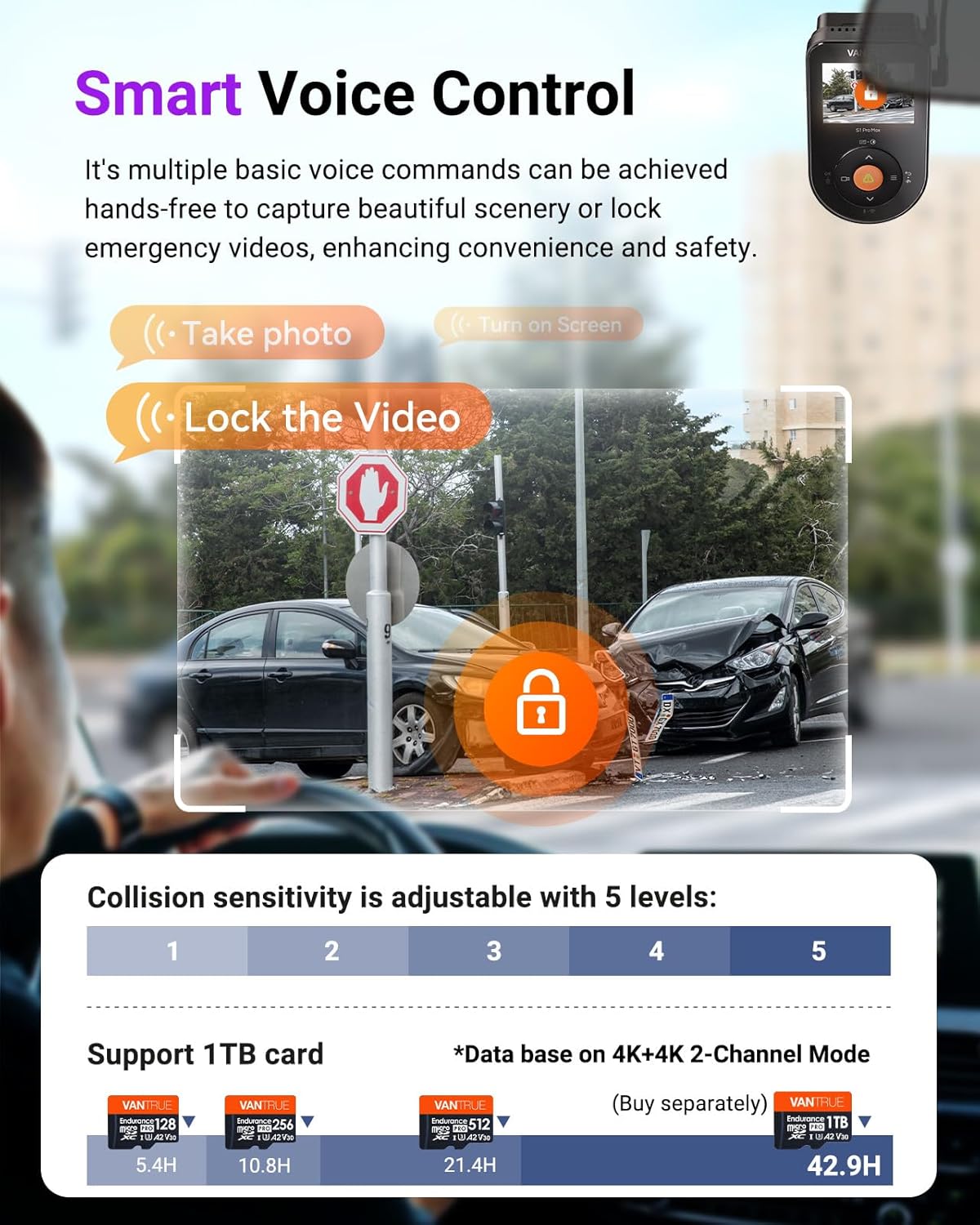
Image: Depiction of voice control commands like "Take photo" and "Lock the Video," alongside an explanation of adjustable collision sensitivity levels and supported SD card capacities.
3. חיבור Wi-Fi ואפליקציה לנייד
The dash cam features 5GHz Wi-Fi for fast connection to the Vantrue Free app on your smartphone. This allows for:
- לִחיוֹת view של הקלטות.
- Reviewing והורדת footagישירות לטלפון שלך.
- כוונון הגדרות המצלמה.
- Over-the-air (OTA) firmware updates.
Download the "Vantrue Free" app from the App Store or Google Play.

Image: Diagram illustrating the faster 5GHz Wi-Fi connectivity, GPS tracking, OTA upgrades, and mileage statistics, with screenshots of the Vantrue app interface.
4. פונקציונליות GPS
The built-in GPS module tracks your driving route and speed. This data can be viewed during video playback on the Vantrue Free app or a dedicated GPS player on your computer. GPS stamps can be embedded into your footage for accurate incident documentation.
5. ADAS and BSD Systems
The S1 Pro Max incorporates AI-powered Advanced Driver-Assistance Systems (ADAS) and Blind Spot Detection (BSD) to enhance driving safety:
- ADAS: Provides real-time voice alerts for potential dangers such as collision warnings, forward collision alerts, lane departure warnings, and pedestrian detection.
- BSD: Includes Lane Change Assist Alarm and Rear Collision Warning to alert you of vehicles in your blind spots or approaching from the rear.
6. Remote Monitoring and Cloud Features
With the LTE module and Vantrue Free app, you can remotely monitor your vehicle's surroundings from anywhere. This includes:
- Real-time Remote Preview: View פו חיtage from your dash cam.
- התראות מיידיות: Receive alerts for detected events.
- Car Location Tracking: Monitor your vehicle's location.
- Smart Cloud Storage: 2GB free storage for data backup, reducing risk of data loss.
- מְרוּחָק Files ניהול: השמעה והורדה של וידאו files stored on your SD card remotely.

Image: Screenshot of the Vantrue app showing remote live preview of the dash cam footage, with options for voice commands like "What are you doing?" and "I'm calling the police."

Image: Illustration of the 2GB free cloud storage feature and remote file management capabilities, allowing users to access and download videos from their SD card via the app.
תַחזוּקָה
1. ניהול כרטיסי SD
To ensure optimal performance and prevent data corruption, it is recommended to format the microSD card regularly (e.g., once a month) using the dash cam's settings menu. This helps maintain the card's health and ensures smooth recording. Replace the SD card if you experience frequent recording errors or data loss.
2. ניקוי המכשיר
Gently wipe the dash cam lenses with a soft, lint-free cloth to remove dust or smudges. Avoid using abrasive cleaners or solvents that could damage the lens coating or device casing. Keep the device free from excessive dust and moisture.
פתרון בעיות
- מצלמת הרכב לא נדלקת: Ensure the power connection (hardwire kit or USB) is secure and providing adequate power. Check vehicle's fuse if using hardwire kit.
- בעיות הקלטה (למשל, קפיאה, פגום fileים): Format the SD card within the camera settings. Try a different, high-quality microSD card (U3 or higher recommended).
- בעיות חיבור Wi-Fi: Ensure the Vantrue Free app is updated. Restart both the dash cam and your smartphone. Check Wi-Fi settings on the dash cam.
- GPS לא עוקב: ודא שלמצלמת הרכב יש תמונה ברורה view of the sky. Allow a few minutes for GPS signal acquisition after powering on.
- בקרת קול לא מגיבה: Speak clearly and ensure the environment is not excessively noisy. Check voice control settings in the dash cam menu.
- Remote monitoring not working: Verify the LTE module has a working SIM card with an active data plan. Ensure the LTE module is properly connected to the dash cam and has signal.
For further assistance or advanced troubleshooting, refer to the Vantrue official webאתר או צור קשר עם תמיכת הלקוחות.
מפרטים
| תכונה | פְּרָט |
|---|---|
| שם הדגם | S1 PRO Max |
| מותג | VANTRUE |
| רזולוציית לכידת וידאו | 4K (3840 x 2160 pixels) Dual |
| חיישן תמונה | מצלמות Sony STARVIS 2 IMX678 כפולות |
| טכנולוגיית קישוריות | Wi-Fi (5GHz), GPS, LTE (via module) |
| תכונות מיוחדות | Night Vision, AI Dash Camera (ADAS/BSD), Fast 5GHz WiFi, Built-in GPS, Smart Voice Control, Remote Monitoring, PlatePix, HDR Night Vision 4.0 |
| הִתמַצְאוּת | קדמי & אחורי |
| סוג הרכבה | Dashboard Mount, Rear Mount |
| רכיבים כלולים | Hardwire Kit, LTE Module |
| Max SD Card Capacity | 1TB (sold separately) |
תמיכה ואחריות
For product support, technical assistance, or warranty information, please visit the official VANTRUE webאתר או צרו קשר עם שירות הלקוחות שלהם. שמרו את קבלת הרכישה כהוכחת קנייה לתביעות אחריות.
Official VANTRUE Store: VANTRUE Amazon Store
Ask a question about this manual
Ask about setup, troubleshooting, compatibility, parts, safety, or missing instructions. Manuals+ will review the question and use this page’s manual context to help answer it.