
1. הקדמה
Thank you for choosing the roborock Q10 S5 Robot Vacuum and Mop Cleaner. This manual provides essential information for setting up, operating, and maintaining your device to ensure optimal performance and longevity. Please read this manual thoroughly before using the product and keep it for future reference.
2. מידע בטיחות
To reduce the risk of injury, electric shock, fire, or damage, please observe the following safety precautions:
- מכשיר זה יכול לשמש ילדים מגיל 8 ומעלה ואנשים עם יכולות פיזיות, חושיות או נפשיות מופחתות או חוסר ניסיון וידע אם קיבלו השגחה או הדרכה לגבי שימוש במכשיר בצורה בטוחה ומבינים את הסכנות הכרוכות בכך. .
- יש לפקח על ילדים כדי להבטיח שהם לא ישחקו עם המכשיר.
- ניקוי ותחזוקת המשתמש לא יבוצעו על ידי ילדים ללא השגחה.
- Do not use the robot in areas with open flames or fragile objects.
- ודא שתחנת הטעינה ממוקמת על משטח ישר הצמוד לקיר.
- השתמשו רק במתאם החשמל המקורי שסופק עם המכשיר.
- Do not expose the robot to direct sunlight or moisture.
- Before cleaning, remove power cords, small objects, and fragile items from the floor.
3. המוצר נגמרview
Familiarize yourself with the components of your roborock Q10 S5 robot vacuum.
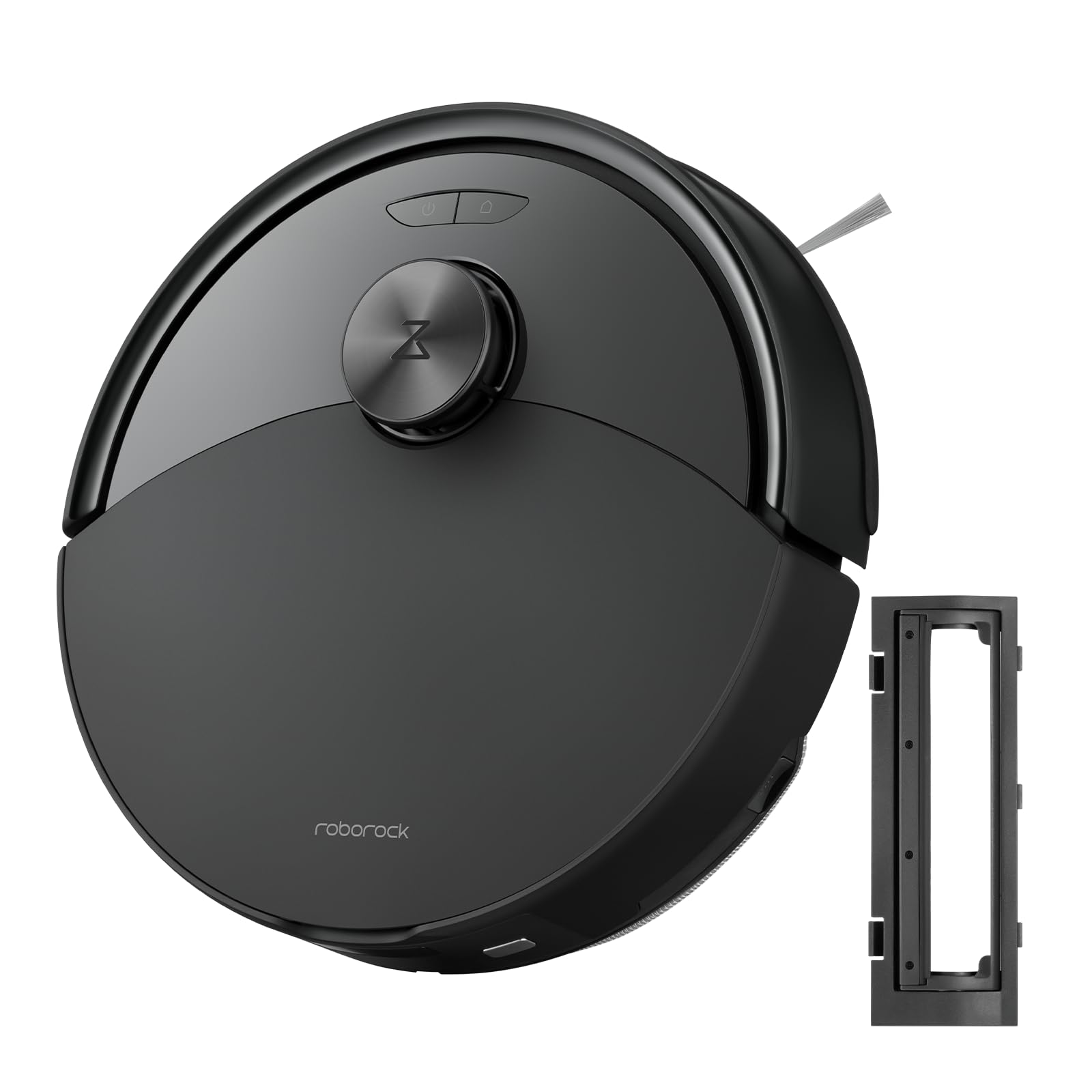
איור 1: The roborock Q10 S5 Robot Vacuum and Mop Cleaner. This image shows the top view of the robot, highlighting its sleek black design and main control buttons.
רכיבי רובוט:
- כיסוי עליון: Lifts to reveal the dustbin and Wi-Fi indicator.
- לחצן הפעלה/ניקוי: Press to start/pause cleaning, hold to turn on/off.
- Dock/Spot Clean Button: Press to send the robot back to the dock, hold for spot cleaning.
- חיישן LDS: לצורך ניווט ומיפוי.
- פָּגוֹשׁ: מזהה מכשולים.
- מברשת צד: מטאטא פסולת מקצוות ופינות.
- מברשת ראשית: Collects dirt and debris from floors. Features a floating design for better contact.
- גלגל רב-כיווני: לתנועה.
- טעינת אנשי קשר: מתחבר לתחנת הטעינה.
- חיישני צוקים: מונע מהרובוט ליפול במדרגות.
- מיכל מים ומשטח סמרטוט: For mopping functionality.
תחנת טעינה:
- Dock Location Beacon: Helps the robot locate the dock.
- טעינת אנשי קשר: מעביר כוח לרובוט.
- יציאת כבל חשמל: מחבר את מתאם החשמל.
4. התקנה
- פרק את הרובוט: Carefully remove the robot and all accessories from the packaging. Remove any protective films or shipping materials.
- התקן את מברשת הצד: Press the side brush onto its post until it clicks into place.
- הנח את תחנת הטעינה:
- הנח את תחנת הטעינה על משטח קשה וישר הצמוד לקיר.
- ודא שיש לפחות 0.5 מטרים (1.6 רגל) של שטח פנוי משני הצדדים ו-1.5 מטרים (4.9 רגל) לפני המזח.
- חבר את כבל החשמל לתחנת הטעינה וחבר אותו לשקע בקיר.
- חיוב ראשוני: Place the robot on the charging dock. The robot will automatically turn on and begin charging. For first-time use, fully charge the robot before operation (approximately 4-6 hours). The power indicator light will breathe white during charging and turn solid white when fully charged.
- הורד את האפליקציה: חפש "Roborock" in the App Store or Google Play Store, or scan the QR code on the packaging to download and install the app.
- התחבר ל-Wi-Fi:
- Open the Roborock app and follow the on-screen instructions to add your device.
- ודא שהטלפון שלך מחובר לרשת Wi-Fi במהירות 2.4 GHz.
- לחץ והחזק את לַעֲגוֹן ו כּוֹחַ buttons simultaneously for 3 seconds until you hear the "Resetting Wi-Fi" voice alert.
- Follow the app's instructions to complete the connection.
5. הוראות הפעלה
התחלת ניקיון:
- מתוך רובוט: הקש על כּוֹחַ button once. The robot will start cleaning.
- מהאפליקציה: Open the Roborock app and tap the "Clean" button.
Pausing/Resuming/Stopping:
- הַפסָקָה: לחצו על כל כפתור ברובוט או הקישו על "השהה" באפליקציה.
- קוֹרוֹת חַיִים: הקש על כּוֹחַ button or tap "Resume" in the app.
- עצור: To stop a cleaning cycle, press the לַעֲגוֹן button to send the robot back to the charging dock, or tap "Stop" in the app.
פונקציית ניקוי:
- מילוי מיכל מים: Open the water tank cover, fill with clean water, and close securely.
- חברו את מגב הרחצה: Wet the mop pad and wring it out. Slide it into the mop pad slot until it is securely attached.
- Start Mopping: The robot will automatically detect the mop module and switch to mopping mode. You can adjust water flow levels in the app.
תכונות האפליקציה:
- ניהול מפות: Create and save maps, set no-go zones, virtual walls, and invisible barriers.
- ניקוי חדרים סלקטיבי: בחרו חדרים ספציפיים לניקוי.
- ניקיון מתוזמן: Set cleaning schedules for different times and days.
- מצבי ניקוי מותאמים אישית: כוונן את עוצמת היניקה ואת רמות זרימת המים.
- שְׁלַט רָחוֹק: שלוט ידנית בתנועת הרובוט.
6. תחזוקה
Regular maintenance ensures your roborock Q10 S5 operates efficiently. Always turn off the robot and unplug the charging dock before performing any maintenance.
Dustbin and Filter (Weekly):
- Lift the top cover of the robot.
- הסר את פח האשפה.
- פתחו את מכסה פח האשפה ורוקנו את תכולתו לפח האשפה.
- Remove the filter. Tap it gently to remove dust. The filter can be rinsed with water; ensure it is completely dry before reinstallation (allow 24 hours).
- Rinse the dustbin with water if necessary and allow it to dry completely.
- Reinstall the dry filter and dustbin.
Main Brush (Weekly):
- הפוך את הרובוט.
- Press the tabs to remove the main brush cover.
- הרם את המברשת הראשית.
- השתמשו בכלי הניקוי (אם סופק) או במספריים כדי לגזור ולהסיר כל שיער או פסולת שהסתבכו סביב המברשת.
- Reinstall the main brush and cover, ensuring it clicks into place.
Side Brush (Monthly):
- שחררו את מברשת הצד.
- הסירו כל שיער או פסולת.
- Reattach and tighten the screw.
Sensors and Charging Contacts (Monthly):
- נגבו את כל החיישנים (חיישני צוק, חיישן קיר, חלון חיישן LDS) ואת מגעי הטעינה הן ברובוט והן בעמדת העגינה בעזרת מטלית רכה ויבשה.
Mop Pad (After Each Use):
- הסר את כרית המגבים ממיכל המים.
- Rinse thoroughly with water and allow it to air dry completely before next use.
7. פתרון תקלות
If you encounter issues with your robot, please refer to the following table before contacting support.
| בְּעָיָה | סיבה אפשרית | פִּתָרוֹן |
|---|---|---|
| הרובוט לא נדלק. | סוללה חלשה או לא טעונה. | הנח את הרובוט על עמדת הטעינה וודא שהוא נטען. |
| הרובוט לא יכול להתחבר ל-Wi-Fi. | סיסמת Wi-Fi שגויה, רשת 5GHz או קליטה חלשה. | Ensure correct 2.4GHz Wi-Fi, reset Wi-Fi on robot, move closer to router. |
| רובוט נתקע לעתים קרובות. | Obstacles, tangled cables, or dirty sensors. | Clear floor, clean sensors, use no-go zones in app. |
| ביצועי ניקוי גרועים. | Full dustbin, dirty filter, tangled brushes. | Empty dustbin, clean/replace filter, clean main/side brushes. |
| רובוט משמיע רעש חריג. | Debris in main brush, side brush, or wheels. | Inspect and clean all brushes and wheels for obstructions. |
If the problem persists, please refer to the Roborock app for more detailed error messages or contact customer support.
8. מפרטים
| תכונה | פְּרָט |
|---|---|
| דֶגֶם | Q10 S5 |
| מידות | כ-353 x 350 x 96.5 מ"מ (13.9 x 13.8 x 3.8 אינץ') |
| מִשׁקָל | כ. 3.7 ק"ג (8.16 פאונד) |
| סוֹלְלָה | Lithium-Ion (Capacity not specified, typical for robot vacuums) |
| כוח מדורג | Approx. 60W (Typical for robot vacuums) |
| קיבולת פח אשפה | Approx. 470 ml (Typical for robot vacuums) |
| קיבולת מיכל מים | Approx. 300 ml (Typical for robot vacuums) |
| כוח יניקה | Up to 10,000 Pa (HyperForce Suction Power from feature bullets) |
| קישוריות Wi-Fi | 2.4 גיגה-הרץ |
הערה: המפרטים עשויים להשתנות ללא הודעה מוקדמת.
9. אחריות ותמיכה
roborock products are manufactured to the highest quality standards. For detailed warranty information, please refer to the warranty card included in your product packaging or visit the official roborock website. For technical support, troubleshooting assistance, or to purchase replacement parts, please contact roborock customer service through the app or their official webאֲתַר.
רִשְׁמִי Webאֲתַר: www.roborock.com