
1. ברוכים הבאים
Thank you for choosing the AWEI T1 Pro Wireless Bluetooth Headphones. This manual provides detailed instructions for setting up, operating, and maintaining your new earbuds. Please read this manual carefully before use to ensure optimal performance and longevity of your device.
2. המוצר נגמרview
2.1. תכולת החבילה
- אוזניות אלחוטיות (שמאל וימין)
- נרתיק טעינה
- כבל טעינה USB
- אוזניים (בגדלים שונים)
- מדריך למשתמש
2.2. Earbud and Charging Case Components
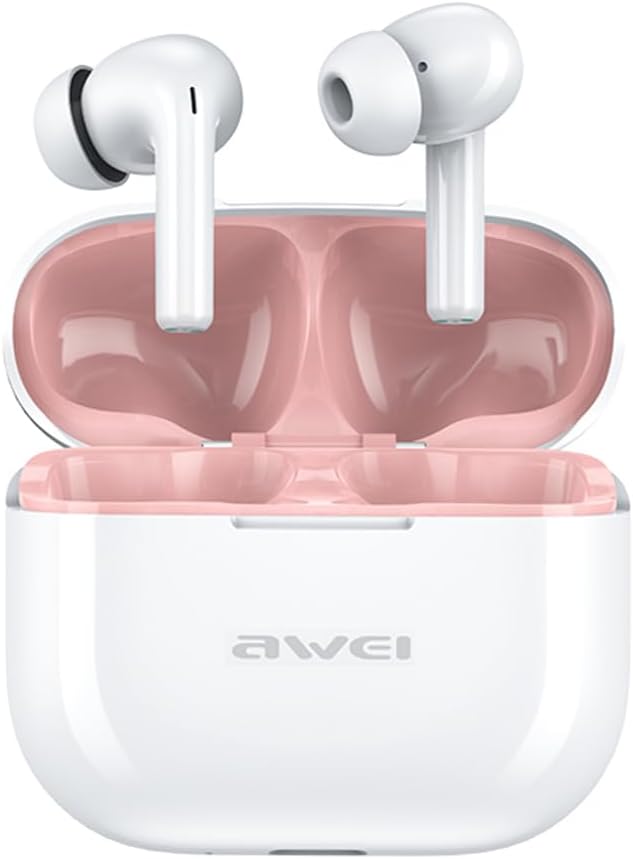
Image: The AWEI T1 Pro wireless earbuds are shown in their open charging case. The earbuds are white with a stem design, and the interior of the charging case is a light pink color. The AWEI logo is visible on the front of the white charging case.
The AWEI T1 Pro earbuds feature an ergonomic in-ear design for a comfortable and secure fit. The compact charging case not only protects the earbuds but also provides multiple charges on the go.
2.3. תכונות עיקריות
- איכות סאונד Hi-Fi: Equipped with 13mm speakers for an immersive audio experience and clear call performance.
- טכנולוגיית Bluetooth 5.4: Ensures a faster, more stable signal transmission with low latency and a wireless range of up to 10 meters. (Note: Some packaging may indicate Bluetooth 5.3, but the device supports 5.4 for enhanced performance).
- בקרת מגע חכמה: Intuitive touch sensors on each earbud allow for easy control of music playback, calls, and voice assistant activation.
- חיי סוללה ארוכים: Enjoy up to 7 hours of continuous playback per charge. The 300mAh charging case extends total playtime to 36 hours in dual-ear mode or up to 60 hours in single-ear mode. The case fully charges in approximately 1 hour via Type-C.
- עיצוב עמיד למים IPX6: Resistant to sweat and rain, making them suitable for sports and outdoor activities.

Image: A detailed diagram illustrating the internal components of an earbud speaker, labeled as 'Drive Units HiFi Stereo', highlighting the layered structure of the audio driver for high-fidelity sound.

Image: A stylized depiction of a microchip labeled '5.3 Bluetooth', surrounded by circuit board elements, emphasizing lower latency and increased stability in wireless communication.

Image: A black earbud is shown next to a smartphone displaying a music player interface. Text indicates 'Touch Control Wake up Voice Assistant', illustrating how touch gestures on the earbud can control phone functions like answering calls or activating a voice assistant.

Image: A smartphone displaying a music player is shown alongside a transparent block, symbolizing extended power. Text highlights 'Full of Energy Long Battery Life', indicating the 300mAh charging case provides 7 hours of continuous use per charge.

Image: Two black earbuds are depicted, one dry and the other surrounded by water droplets, illustrating the 'No Fear of Sweat & Rain IPX6 Waterproof Rate' feature, which prevents water penetration during sports.
3. התקנה
3.1. טעינה ראשונית
- לפני השימוש הראשון, הכניסו את שתי האוזניות לנרתיק הטעינה.
- Connect the provided USB Type-C charging cable to the charging port on the case and a power source (e.g., USB wall adapter, computer USB port).
- The indicator lights on the charging case will show charging status. A full charge for the case takes approximately 1 hour.
- ודאו שהאוזניות טעונות במלואן לפני הצימוד הראשוני.
3.2. התאמה עם מכשיר
- פתחו את מארז הטעינה. האוזניות יידלקו אוטומטית ויכנסו למצב צימוד.
- במכשיר שלך (סמארטפון, טאבלט, מחשב נייד), הפעל את Bluetooth.
- חפש התקני Bluetooth זמינים.
- Select "AWEI T1 Pro" from the list of devices.
- לאחר החיבור, תשמעו צליל אישור, והאוזניות יהיו מוכנות לשימוש.
- האוזניות יתחברו מחדש אוטומטית למכשיר האחרון שקושרו לאחר הוצאתן מהמארז, אם Bluetooth מופעל במכשיר.
4. הוראות הפעלה
4.1. הפעלה/כיבוי
- הפעלה: פתחו את מארז הטעינה, או לחצו לחיצה ארוכה על אזור המגע בשתי האוזניות למשך 3 שניות.
- כיבוי: החזירו את האוזניות למארז הטעינה וסגרו את המכסה, או לחצו לחיצה ארוכה על אזור המגע בשתי האוזניות למשך 5 שניות.
4.2. גע בפקדים
| פוּנקצִיָה | פְּעוּלָה |
|---|---|
| הפעל/השהה מוזיקה | הקשה אחת על אחת האוזניות |
| השיר הבא | הקש פעמיים על האוזניה הימנית |
| השיר הקודם | הקש פעמיים על האוזניה השמאלית |
| הגברת עוצמת הקול | הקשה משולשת על האוזניה הימנית |
| הורדת עוצמת הקול | הקשה משולשת על האוזניה השמאלית |
| מענה/סיום שיחה | הקשה אחת על אחת האוזניות |
| דחה שיחה | לחיצה ארוכה על כל אחת מהאוזניות למשך 2 שניות |
| הפעל את עוזר הקולי | Long press on either earbud for 2 seconds (when not on a call) |
4.3. ביצוע וקבלת שיחות
When a call comes in, you can answer or reject it using the touch controls as described above. During a call, a single tap will end the conversation.
4.4. השמעת מוזיקה
Control your music directly from the earbuds. Use single, double, or triple taps to play, pause, skip tracks, or adjust volume.
5. תחזוקה
5.1. ניקיון
- נקו באופן קבוע את האוזניות ואת נרתיק הטעינה בעזרת מטלית רכה, יבשה ונטולת סיבים.
- אין להשתמש בחומרי ניקוי שוחקים, אלכוהול או ממסים כימיים.
- Gently remove any earwax or debris from the earbud mesh and charging contacts using a dry cotton swab or a small, soft brush.
5.2. אחסון
- כאשר אינן בשימוש, יש לאחסן את האוזניות תמיד בנרתיק הטעינה שלהן כדי להגן עליהן מפני אבק ונזק.
- יש לאחסן את המכשיר במקום קריר ויבש, הרחק מטמפרטורות קיצוניות ואור שמש ישיר.
5.3. עמידות במים
The AWEI T1 Pro earbuds are rated IPX6 waterproof, meaning they are protected against high-pressure water jets from any direction. This makes them suitable for workouts and light rain. However, they are not designed for swimming or submersion in water. Ensure the earbuds are dry before placing them back into the charging case to prevent damage.
6. פתרון תקלות
6.1. בעיות נפוצות ופתרונות
- אוזניות לא מתחברות למכשיר:
Ensure both earbuds are charged. Turn off and on your device's Bluetooth. Forget "AWEI T1 Pro" from your device's Bluetooth list and try pairing again. - רק אוזניה אחת עובדת:
Place both earbuds back into the charging case, close the lid, wait a few seconds, then open the lid and take them out. This should reset their connection. If the issue persists, try resetting the earbuds (refer to manufacturer's webבאתר לקבלת הוראות איפוס ספציפיות במידת הצורך). - אין צליל או עוצמת קול נמוכה:
Check the volume level on both your device and the earbuds. Ensure the earbuds are properly seated in your ears. Try cleaning the earbud mesh for any obstructions. - מארז טעינה לא נטען:
ודא שכבל ה-USB מחובר היטב הן למארז והן למקור החשמל. נסה כבל טעינה או מתאם חשמל אחר. - האוזניות לא נטענות במקרה:
Ensure the charging contacts on both the earbuds and the case are clean and free of debris. Make sure the earbuds are correctly seated in the case.
7. מפרטים

Image: A graphic displaying the technical specifications of the AWEI T1 Pro, including basic information, horn details, Bluetooth version, and battery capacities.
| מידע כללי | |
|---|---|
| שם הדגם | T1 Pro |
| סוג מוצר | אוזניות סטריאו TWS |
| משקל נטו | 36 גרם |
| מידות (מארז) | 58*50*24 מ"מ |
| מיקום אוזניים | אין אוזן |
| סוג בקרה | בקרת מגע |
| רמת עמידות במים | IPX6 עמיד למים |
| בקרת רעש | ביטול רעשים אדפטיבי |
| מפרטי אודיו | |
| קוטר הרמקול | 13 מ"מ |
| רְגִישׁוּת | 100±3dB |
| טווח תגובת תדרים | 20 הרץ ~ 20,000 הרץ |
| עַכָּבָּה | 32 אוהם |
| קישוריות | |
| גרסת בלוטות' | 5.4 (Image shows 5.3) |
| טווח אלחוטי | עד 10 מטר |
| פרוטוקולים נתמכים | HSP, HFP, A2DP, AVRCP |
| מכשירים תואמים | מחשבים ניידים, טאבלטים, טלפונים ניידים |
| סוללה וטעינה | |
| סוללת מארז טעינה | 300mAh / 3.7V |
| קיבולת סוללת אוזניות | 45mAh * 2 |
| זמן השמעת מוזיקה | עד 7 שעות (לכל טעינה) |
| זמן דיבור | עד 8 שעות |
| זמן המתנה | עד 300 שעות |
| זמן טעינה (מארז) | כשעה 1 |
| יציאת טעינה | USB Type-C |
8. אחריות ותמיכה
AWEI products are designed and manufactured to the highest quality standards. For information regarding warranty coverage, please refer to the warranty card included in your product packaging or visit the official AWEI website. If you encounter any issues or require technical assistance, please contact AWEI customer support through the contact information provided on the official webאתר או פלטפורמת הרכישה שלך.