1. הקדמה
This manual provides essential instructions for the safe operation, setup, and maintenance of your Ameta S20 Pro GPS Drone. Please read this manual thoroughly before operating the drone to ensure proper function and to prevent damage or injury.

Image 1.1: The Ameta S20 Pro drone in flight, showcasing its design and operational context.
2. הנחיות בטיחות
Adherence to these safety guidelines is crucial for safe operation and to avoid potential hazards.
- בדיקה לפני טיסה: Always inspect the drone, remote control, and batteries for any damage before each flight.
- תנאים סביבתיים: Avoid flying in strong winds, rain, snow, or fog. Maintain a clear line of sight to the drone.
- אזור טיסה: Operate the drone in open areas, away from people, animals, buildings, and power lines. Do not fly over crowds.
- בטיחות סוללה: Use only approved batteries and chargers. Do not overcharge or puncture batteries. Discontinue use if batteries show signs of swelling or damage.
- Respect Local Regulations: Be aware of and comply with all local aviation laws and regulations regarding drone operation. The Ameta S20 Pro weighs under 249g, which may exempt it from registration requirements in some regions. Always verify local laws.

Image 2.1: The Ameta S20 Pro drone, highlighting its lightweight design (under 249g) and potential exemption from registration in certain jurisdictions. Users should always check local regulations.
3. תכולת החבילה
ודא שכל הפריטים המפורטים להלן כלולים בחבילה שלך:
- רחפן GPS עם מצלמת 4K
- שְׁלַט רָחוֹק
- 2 x Batteries (3000mAh)
- מדריך למשתמש
- תיק נשיאה
- מדחפים רזרביים (8 יחידות)
- כבל טעינה USB
- מַברֵג

Image 3.1: All components included in the Ameta S20 Pro drone package.
4. המוצר נגמרview
4.1 רכיבי רחפן
Familiarize yourself with the various parts of the Ameta S20 Pro drone.

Image 4.1: The Ameta S20 Pro drone with its arms extended.
- מדחפים: Four propellers for lift and propulsion.
- מנועים ללא מברשות: לספק טיסה יעילה ויציבה.
- מצלמת 4K: Integrated camera with 13MP Sony IMX258 sensor for high-resolution photo and video capture.
- תא סוללות: Houses the flight battery.
- מחווני LED: לספק מידע על מצב הטיסה והפעילות.
שלט רחוק 4.2
The remote control allows for precise manipulation of the drone's flight and camera functions.
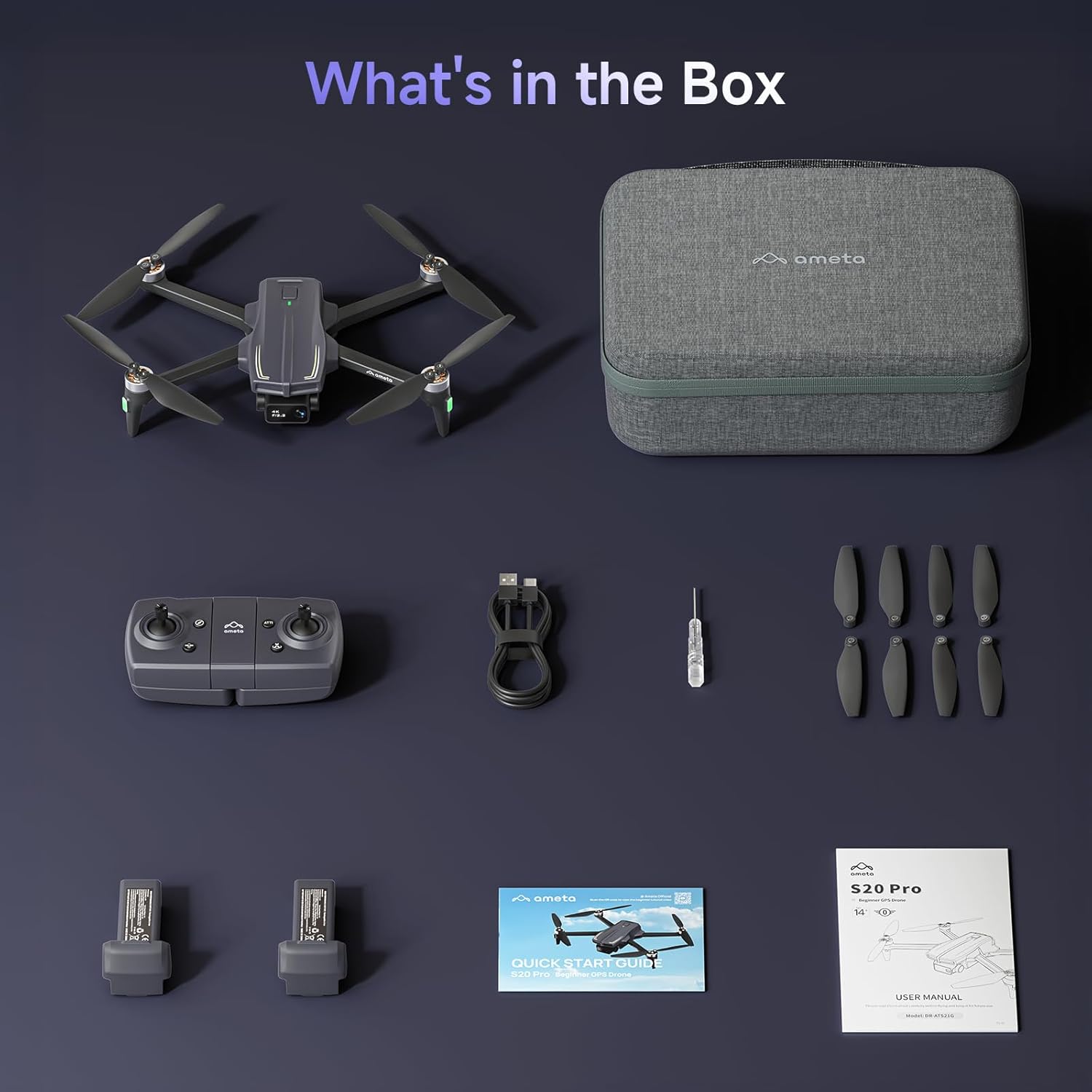
Image 4.2: The remote control with a smartphone holder.
- מקלות שליטה: For directional flight and altitude control.
- מחזיק לסמארטפון: מחזיק את הסמארטפון שלך בצורה מאובטחת עבור FPV viewשליטה ובקרה על אפליקציות.
- לחצני פונקציה: Dedicated buttons for takeoff/landing, Return-to-Home, photo/video capture, and speed adjustment.
5. התקנה
5.1 טעינת סוללה
- Insert the flight battery into the drone's battery compartment.
- Connect the USB charging cable to the drone's charging port and a USB power adapter (not included).
- The LED indicator on the drone will show charging status. A full charge typically takes approximately 2 hours for each 3000mAh battery.
- The drone cannot be flown while the battery is charging.

Image 5.1: Illustration of the drone battery and its extended flight duration.
5.2 התקנת מדחף
Ensure propellers are correctly installed before flight. Match propellers with corresponding motor arms (A and B markings).
- Identify propellers marked 'A' and 'B'.
- Attach 'A' propellers to motor arms marked 'A', and 'B' propellers to motor arms marked 'B'.
- אבטחו כל מדחף עם הברגים המצורפים באמצעות מברג.
5.3 הגדרת שלט רחוק ואפליקציה
- Install 3 AAA batteries (not included) into the remote control.
- Download the Ameta flight app from your device's app store.
- הפעל את הרחפן, לאחר מכן הפעל את השלט רחוק.
- Connect your smartphone to the drone's Wi-Fi network (usually named 'Ameta-S20Pro-XXXX').
- Open the Ameta flight app to establish a connection.
5.4 כיול
Perform compass and gyroscope calibration before the first flight and whenever flying in a new location.
- Follow the on-screen instructions in the Ameta app for compass calibration. This typically involves rotating the drone horizontally and vertically.
- Place the drone on a flat, level surface for gyroscope calibration.
6. הוראות הפעלה
6.1 בדיקות טרום טיסה
- ודאו שהסוללות טעונות במלואן הן ברחפן והן בשלט רחוק.
- המדחפים מחוברים היטב ולא ניזוקו.
- Drone is placed on a flat, open surface.
- GPS signal is acquired (indicated by solid green lights on the drone).
6.2 המראה ונחיתה
- One-Button Takeoff: Press the one-button takeoff icon on the remote control or in the app. The drone will automatically ascend to a safe altitude and hover.
- המראה ידנית: דחוף את שני ידיות הבקרה למטה והחוצה כדי להפעיל את המנועים. דחוף באיטיות את ידית הבקרה השמאלית למעלה כדי לעלות.
- נחיתה בלחיצת כפתור אחת: Press the one-button landing icon. The drone will descend and land automatically.
- נחיתה ידנית: משוך באיטיות את הסטיק השמאלי למטה כדי לרדת. לאחר הנחיתה, דחף את שני הסטיקים למטה ופנימה כדי לעצור את המנועים.

Image 6.1: Key beginner-friendly features of the Ameta S20 Pro drone.
6.3 בקרות טיסה
Use the control sticks on the remote for basic flight maneuvers:
- מוט שמאלי (מצערת/סטיה): למעלה/למטה לגובה, שמאלה/ימינה לסיבוב.
- סטיק ימני (גובה/גלגול): למעלה/למטה לתנועה קדימה/אחורה, שמאלה/ימינה לתנועה שמאלה/ימינה.
6.4 מצבי טיסה חכמים
The Ameta S20 Pro features several intelligent flight modes for enhanced control and creative shots. Note: GPS features are only available when GPS mode is enabled and a strong GPS signal is acquired.
- חזרה הביתה (RTH): Automatically brings the drone back to its takeoff point. Activated by a button press, low battery, or signal loss.

Image 6.2: Visual representation of the Return-to-Home function.
- טיסת נקודת ציון: Set custom points on a map, and the drone will follow the designated path.

Image 6.3: The drone executing a Waypoint Flight path.
- טוס מעגל: The drone orbits around a selected point, capturing circular footage.

Image 6.4: The drone performing a Circle Fly maneuver.
- GPS עקוב אחריי: The drone automatically follows the remote control (and thus the user), keeping them in the frame.

Image 6.5: The drone utilizing GPS Follow Me mode.
- Other Creative Modes: Rocket, Orbit, Dolly Zoom, Panorama, Time-lapse, and Gesture Selfie are available via the app for diverse shooting options.

תמונה 6.6: נגמרview of creative shooting modes.
6.5 תפעול המצלמה
The Ameta S20 Pro is equipped with a 4K camera for high-quality imaging.

Image 6.7: Details of the 4K camera with 13MP sensor.
- לכידת תמונה/וידאו: Use the dedicated buttons on the remote control or the app interface to take photos or start/stop video recording.
- FPV (גוף ראשון) View): The 5G WiFi transmission provides real-time video feed to your connected smartphone.
- עדשה מתכווננת: The camera lens can be adjusted 90 degrees for varied shooting angles.
- אִחסוּן: Photos and videos are saved to a microSD card (not included) inserted into the drone.
7. תחזוקה
7.1 ניקוי
- נגבו את הרחפן והשלט רחוק בעזרת מטלית רכה ויבשה לאחר כל שימוש.
- אל תשתמש בכימיקלים קשים או בממיסים.
- Ensure no dust or debris obstructs the camera lens or motor vents.
7.2 החלפת מדחף
Replace damaged or bent propellers immediately to ensure stable flight.
- כבה את הרחפן.
- Use the provided screwdriver to remove the screws securing the damaged propeller.
- Carefully remove the damaged propeller.
- Install a new propeller, ensuring it matches the 'A' or 'B' marking of the motor arm.
- Secure the new propeller with screws.
7.3 טיפול ואחסון סוללה
- יש לאחסן סוללות במקום קריר ויבש, הרחק מאור שמש ישיר וטמפרטורות קיצוניות.
- לאחסון לטווח ארוך, יש לטעון את הסוללות עד לקיבולת של כ-50-60%.
- אין לאחסן סוללות טעונות במלואן או מרוקנות לחלוטין למשך תקופות ממושכות.
8. פתרון תקלות
| בְּעָיָה | סיבה אפשרית | פִּתָרוֹן |
|---|---|---|
| הרחפן לא נדלק | סוללה חלשה; הסוללה לא הוכנסה כראוי | טען את הסוללה; הכנס מחדש את הסוללה בצורה בטוחה |
| No connection to remote control | Remote control battery low; Pairing failed | Replace remote control batteries; Re-pair drone and remote control |
| טיסה לא יציבה/סחיפה | Improper calibration; Damaged propellers; Strong winds | Perform gyroscope and compass calibration; Replace damaged propellers; Fly in calm conditions |
| אין הזנת וידאו FPV | Phone not connected to drone Wi-Fi; App not open; Weak Wi-Fi signal | Connect to drone Wi-Fi; Open app; Fly closer to drone |
| GPS features not working | Weak GPS signal; GPS mode not enabled | Fly in an open area with clear sky; Ensure GPS mode is enabled in app |
| Drone lost during flight | Out of range; RTH not activated | Use the 'Find Your Drone' feature in the app (if available and GPS was active). Always fly within visual line of sight. |

Image 8.1: The 'Find Your Drone' feature on the app, useful for locating a lost drone if GPS was active.
9. מפרטים
| תכונה | פְּרָט |
|---|---|
| מותג | אמטה |
| שם הדגם | S20 Pro |
| רזולוציית לכידת וידאו | 4K |
| רזולוציית סטילס אפקטיבית | 13 מגה פיקסל |
| טכנולוגיית קישוריות | Wi-Fi (5G) |
| תכונות מיוחדות | 13MP Sensor, 50-Min Flight Time, GPS Drone, One Button Return, Speed Adjustment |
| רמת מיומנות | מַתחִיל |
| משקל פריט | 20.14 אונקיות (כ-571 גרם) |
| קיבולת סוללה | 3000 מיליamp שעות (לכל סוללה) |
| מידות המוצר (מקופל) | אורך 8.27 אינץ', רוחב 10.43 אינץ', גובה 3.15 אינץ' |
| חוֹמֶר | ABS |

Image 9.1: Product dimensions of the Ameta S20 Pro drone.
10. אחריות ותמיכה
The Ameta S20 Pro GPS Drone comes with a standard manufacturer's warranty. For specific warranty terms, duration, and conditions, please refer to the warranty card included in your package or contact Ameta customer support.
For technical assistance, troubleshooting not covered in this manual, or to inquire about replacement parts, please contact Ameta customer support through the contact information provided on the official Ameta webאתר או פלטפורמת הרכישה שלך.