
1. הקדמה
The FNIRSI DST-210 is a compact and versatile 3-in-1 handheld device designed for electronic testing and measurement. It integrates the functions of a digital oscilloscope, a true RMS multimeter, and a signal generator into a single portable unit. This manual provides detailed instructions to help you effectively use and maintain your device.
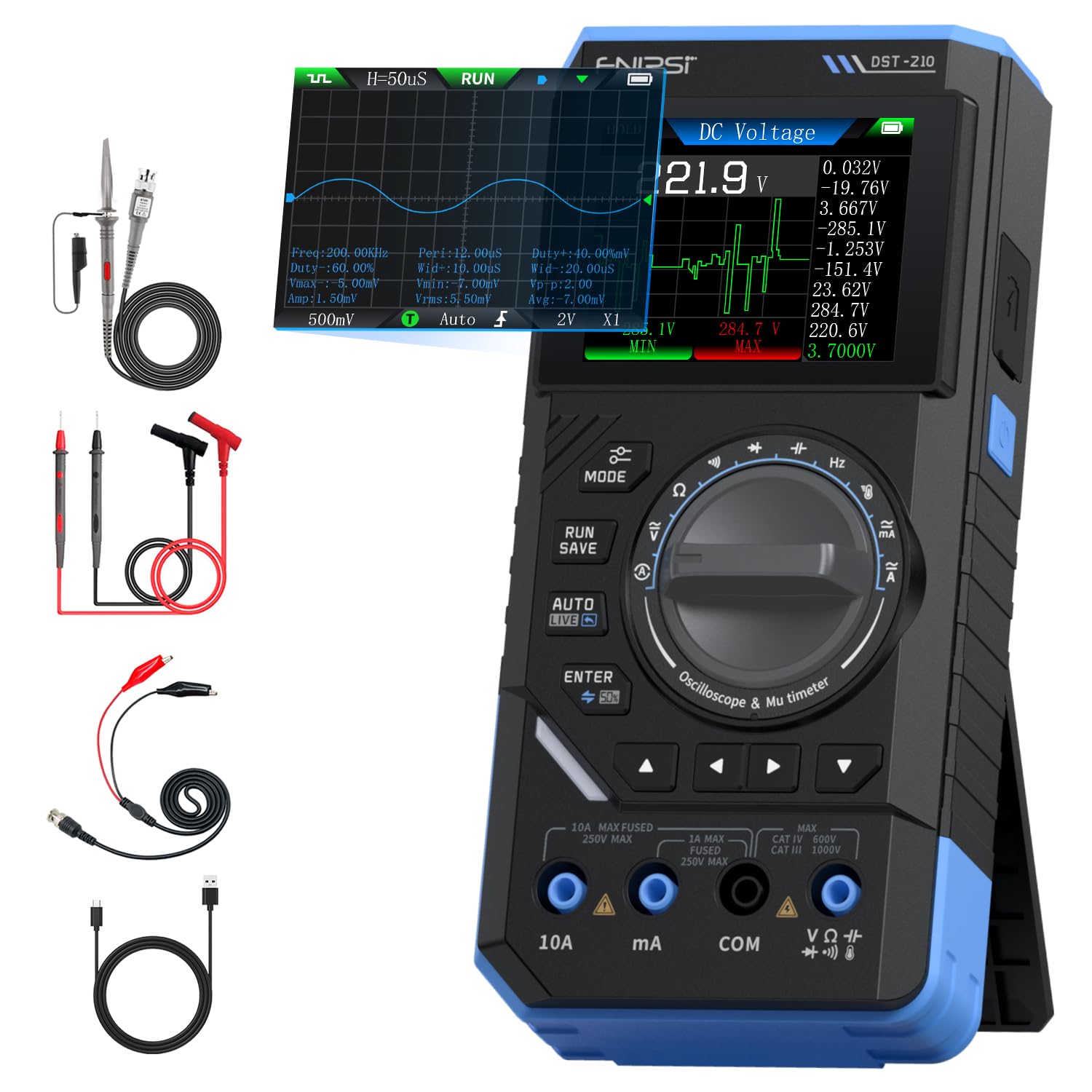
Figure 1: FNIRSI DST-210 3-in-1 Handheld Device
2. המוצר נגמרview
2.1 תכונות עיקריות
- פונקציונליות 3 ב-1: Combines a digital oscilloscope, a true RMS multimeter, and a signal generator.
- לְהַצִיג: 2.8-inch TFT color LCD for clear data visualization.
- אוֹסְצִילוֹסקוּפּ: 10MHz analog bandwidth, 48MSa/s real-time sampling rate, supports Auto/Normal/Single trigger modes, waveform image saving and display.
- מודד: 19999-count true RMS measurement for DC/AC voltage, DC/AC current, resistance, capacitance, frequency, temperature, diode, and continuity. Features data hold, record mode with graphical display, and LIVE function for voltage presence detection.
- מחולל אותות: Outputs 13 types of waveforms (Sine, Square, Sawtooth, Half-wave, Full-wave, Step, Reverse Step, Index Up/Down, DC, Multi-audio, Sink Pulse, Lorentz Wave) with adjustable frequency (0-50KHz), amplitude (0.1-3.0V), and duty cycle (0-100%).
- הִטַלטְלוּת: Compact design with an integrated stand, powered by a 3000mAh rechargeable lithium battery providing up to 10 hours of continuous use. Type-C charging supported.
2.2 תכולת החבילה
ודא שכל הפריטים נמצאים בחבילה:
- FNIRSI DST-210 Main Unit
- P6100 נפח גבוהtage בדיקה
- חוטי בדיקה (אדום ושחור)
- תופסני תנין
- כבל טעינה מסוג C
- Instruction Manual (PDF version available online)
- תיבת אריזה

איור 2: אביזרים כלולים
3. התקנה
3.1 טעינת המכשיר
Before initial use, fully charge the DST-210. Connect the provided Type-C charging cable to the device's Type-C port and a compatible USB power adapter (5V/1A). The battery indicator on the display will show charging status.
3.2 חיבור גלאים
For accurate measurements, ensure probes are correctly connected:
- Multimeter Measurements: Insert the red test lead into the VΩHzmA or 10A jack (depending on the measurement) and the black test lead into the COM jack.
- Oscilloscope Measurements: Connect the P6100 high voltage probe to the oscilloscope input jack. Ensure the probe's attenuation setting (e.g., X1 or X10) matches the device's setting for accurate readings.
- פלט מחולל אותות: Connect the output cable to the signal generator output port.

Figure 3: Input Jacks and Controls
4. הוראות הפעלה
4.1 הפעלה/כיבוי
Press and hold the power button (located on the side) to turn the device on or off.
4.2 בחירת מצבים
Rotate the central knob to switch between Multimeter, Oscilloscope, and Signal Generator modes. Within each mode, further sub-functions can be selected using the knob or dedicated buttons.

Figure 4: Using the Oscilloscope Function
4.3 פעולת המולטימטר
In Multimeter mode, the device offers various measurement functions:
- כרך ידtage/Current (DC/AC): Select the appropriate DC V, AC V, DC A, or AC A setting. Connect test leads to the circuit. The device supports a record mode that displays measurement trends graphically, and can store up to 10 sets of data.
- התנגדות (Ω): Select the resistance function. Connect test leads across the component.
- קיבול (F): Select the capacitance function. Connect test leads across the capacitor.
- תדר (הרץ): Select the frequency function. Connect test leads to the signal source.
- בדיקת דיודה: Select the diode function. Connect test leads across the diode to check its forward voltagטיפה e.
- מבחן המשכיות: Select the continuity function. Connect test leads across a conductor; a beep indicates continuity.
- טֶמפֶּרָטוּרָה: Use a K-type thermocouple (not included) connected to the appropriate jacks for temperature measurement.
- LIVE Function: For single-probe voltage presence detection.

Figure 5: Multimeter Measurement Examples
4.4 Oscilloscope Operation
In Oscilloscope mode, the device displays waveforms:
- תצוגת צורת גל: Connect the oscilloscope probe to the circuit. The device automatically adjusts settings for stable waveform display.
- מצבי טריגר: Select between Auto, Normal, and Single trigger modes to capture different types of signals.
- Waveform Saving: Press the 'RUN/SAVE' button to save the current waveform image. Saved images can be reviewed ויוצא.

Figure 6: Oscilloscope Waveform Display
4.5 Signal Generator Operation
In Signal Generator mode, the device outputs various waveforms:
- בחירת צורת גל: Choose from 13 different waveform types using the menu options.
- התאמת פרמטר: להתאים את התדר (0-50 קילו-הרץ), amplitude (0.1-3.0V), and duty cycle (0-100%) as required for your application.

Figure 7: Signal Generator Waveform Selection
4.6 PC Connection and Data Export
The DST-210 can connect to a PC via its Type-C USB port for data management and firmware updates.
- Waveform Screenshots: Long-press the 'RUN/SAVE' button to save waveform screenshots.
- ייצוא נתונים: Connect the device to a computer to view, save, and export recorded waveform images and data.
- עדכוני קושחה: בדקו מעת לעת את ה-FNIRSI הרשמי website for firmware updates to ensure optimal performance and access to new features. Follow the instructions provided with the firmware update package.

Figure 8: PC Connection for Data Management
5. תחזוקה
- ניקוי: השתמשו במטלית רכה ויבשה לניקוי המכשיר. אין להשתמש בחומרי ניקוי שוחקים או ממסים.
- אִחסוּן: יש לאחסן את המכשיר במקום קריר ויבש, הרחק מאור שמש ישיר וטמפרטורות קיצוניות.
- טיפול בסוללה: כדי להאריך את חיי הסוללה, הימנעו מפריקה מלאה של הסוללה לעתים קרובות. טען את המכשיר באופן קבוע, גם אם אינו בשימוש למשך פרקי זמן ממושכים.
- טיפול בבדיקה: Inspect test leads and probes for damage before each use. Replace any damaged accessories immediately.
6. פתרון תקלות
| בְּעָיָה | סיבה אפשרית | פִּתָרוֹן |
|---|---|---|
| המכשיר לא נדלק. | סוללה חלשה או כפתור הפעלה פגום. | Charge the device fully. If the issue persists, contact support. |
| Unstable or inaccurate readings in Multimeter mode. | Poor probe connection, incorrect mode selection, or external interference. | Ensure probes are securely connected. Verify the correct measurement mode is selected. Minimize external electrical interference. |
| Oscilloscope waveform is not stable. | Incorrect trigger settings or probe attenuation. | Adjust trigger level and mode. Ensure probe attenuation (X1/X10) matches the device setting. |
| פלט מחולל האותות שגוי. | Incorrect waveform type, frequency, amplitude, or duty cycle settings. | Verify all signal generator parameters are set as desired. |
| Cannot connect to PC or export data. | Faulty USB cable, incorrect PC driver, or software issue. | Try a different Type-C cable. Ensure necessary drivers are installed on your PC. Refer to the official webאתר להורדת תוכנות ודרייברים. |
7. מפרטים
7.1 פרמטרים של אוסצילוסקופ
| קָטֵגוֹרִיָה | מִפרָט |
|---|---|
| S בזמן אמתampשיעור ling | 48MSa / s |
| רוחב פס אנלוגי | 10 מגה-הרץ |
| עכבת קלט | 1MΩ |
| שיטת צימוד | AC/DC |
| מדידה כרךtagטווח | 1:1 Probe: ±80Vpp (±40V), 10:1 Probe: ±800Vpp (±400V) |
| רגישות אנכית | 10mV/div ~ 10V/div (at X1) |
| היסט אנכי | Adjustable (with indicator) |
| טווח בסיס זמן אופקי | 50 ננו-שניות ~ 20 שניות |
| מצב טריגר | אוטומטי, רגיל, יחיד |
| קצה טריגר | Rising/Falling Edge |
| רמת טריגר | Adjustable (with indicator) |
| הקפאת צורת גל | Supported (HOLD function) |
| מדידה אוטומטית | Max, Min, Average, RMS, Peak-to-Peak, Frequency, Duty Cycle, etc. |
7.2 פרמטרים של רב-מודד
| פונקציית מדידה | לָנוּעַ | דִיוּק |
|---|---|---|
| DC כרךtage | 1.9999V/19.999V/199.99V/1000V | ±(0.5%+3) |
| AC כרךtage | 1.9999V/19.999V/199.99V/750V | ±(1.0%+3) |
| זרם DC | 19.999mA/199.99mA/1.9999A/9.999A | ±(1.2%+3) |
| זרם חילופין | 19.999mA/199.99mA/1.9999A/9.999A | ±(1.5%+3) |
| הִתנַגְדוּת | 19.999MΩ/199.99kΩ/19.999kΩ | ±(2.0%+5) |
| קיבול | 999.9uF/99.99uF/9.999uF/999.9nF/99.99nF, 9.999mF/99.99mF | ±(2.0%+5) |
| תֶדֶר | 9.999MHz/999.9kHz/99.99kHz/9.999kHz/999.9Hz/99.99Hz | ±(0.1%+2) |
| טֶמפֶּרָטוּרָה | [-55~1300°C] / [-67~2372°F] | ±(2.5%+5) |
| דיודה/רציפות | נתמך | לא |
| LIVE Function | נתמך | לא |
7.3 פרמטרים של מחולל אותות
| קָטֵגוֹרִיָה | מִפרָט |
|---|---|
| צורות גל של פלט | 13 סוגים |
| תדר צורת גל | 0 ~ 50KHz |
| מחזור חובה | 0 ~ 100% (adjustable) |
| צורת גל Ampליטוד | 0.1 ~ 3.0V |
7.4 מפרט כללי
| קָטֵגוֹרִיָה | מִפרָט |
|---|---|
| דגם מוצר | DST-210 |
| לְהַצִיג | 2.8-inch TFT Color Display |
| תאורה אחורית | בהירות מתכווננת |
| ספק כוח | Type-C (5V/1A) |
| סוֹלְלָה | 3000mAh |
| תמיכה בשפה | סינית, אנגלית |
| גודל מוצר | כ. 177.43 מ"מ x 87 מ"מ x 35 מ"מ |
| משקל המוצר | כ. 300 גרם |
8. אחריות ותמיכה
For any questions, issues, or support needs regarding your FNIRSI DST-210, please contact us through the following methods:
- הודעת אמזון: If you purchased the product on Amazon, you can contact us via the Amazon messaging system. Go to your 'Order History', select the relevant order, and click 'Problem with order' or 'Contact Seller'.
- תמיכה בדוא"ל: You can also reach our after-sales service center directly via email at support@fnirsi.com. Please include your order number and a detailed description of your issue for faster assistance.
When attaching large photos or videos, email support is recommended due to potential attachment size limits on Amazon's messaging system.
Video 1: Demonstration of FNIRSI DST-210's Multimeter, Oscilloscope, and Signal Generator Functions.