
1. הקדמה
This manual provides detailed instructions for the installation, operation, and maintenance of your BOTSLAB W510 4K Wireless Outdoor Security Camera System. Please read this manual thoroughly before using the product to ensure proper functionality and safety.
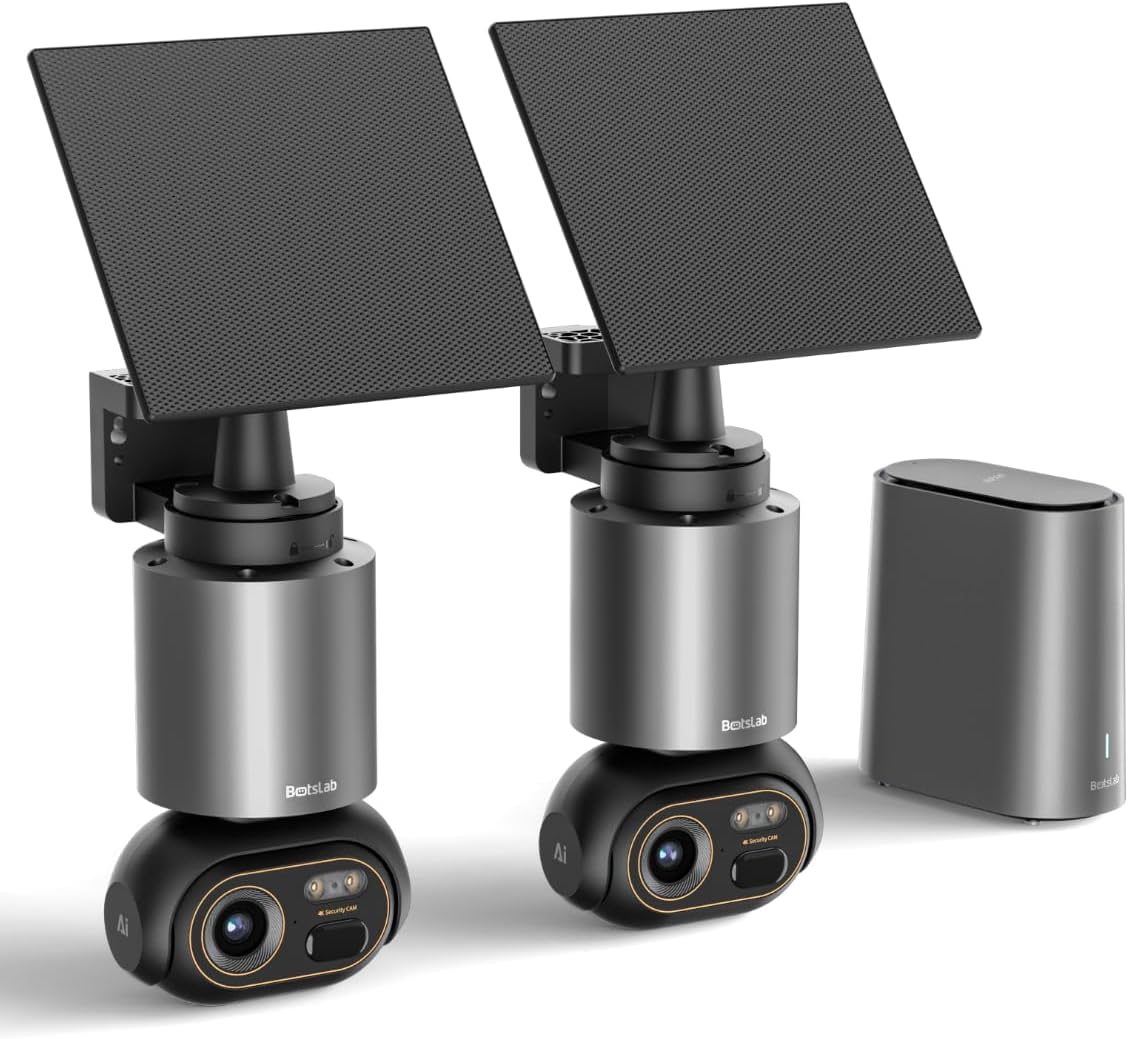
Image 1.1: The BOTSLAB W510 4K Wireless Outdoor Security Camera System, including two cameras with solar panels and the HomeBase unit.
2. מה בקופסה
ודא שכל הרכיבים נמצאים בחבילה שלך:
- W510 Camera body *2
- תושבת הרכבה *2
- פאנל סולארי * 2
- H200 HomeBase *1
- Camera Mounting Brackets / Wall Stickers *2
- Wall Mounting Screws Package *2
- Solar Panel Mounting Bracket / Wall Stickers *2
- Solar Panel Installation Screws (for mounting) *2
- כבל טעינה מסוג C *2
- User Manual (Quick Guide + Certification) *1
- Warning Stickers *2
- Base Station Adapter *1
- Hard Drive Mounting Screws *1
- כבל Ethernet *1
- User Guide Card *1

Image 2.1: All included components of the BOTSLAB W510 2-Cam Kit.
3. המוצר נגמרview
The BOTSLAB W510 system offers advanced security features for outdoor surveillance.
3.1 תכונות עיקריות
- רזולוציית 4K Ultra HD: מצלם וידאו ברור ומפורטtage.
- ראיית לילה צבעונית: Provides vivid, full-color images even in low-light conditions.
- מופעל באמצעות אנרגיה סולארית: Equipped with a 5W external solar panel and a 10,000mAh built-in battery for continuous operation.
- סיבוב והטיה של 360°: Offers a comprehensive panoramic view ללא כתמים עיוורים.
- BOTSLAB IQ (AI-Powered): Features intelligent notifications, customized warnings, quick search, and auto-tracking for people, vehicles, and pets.
- ללא עמלה חודשית: Utilizes local storage via the H200 HomeBase (32GB internal, expandable up to 16TB with HDD).
- עמידות בפני מזג אוויר IP66: נועד לעמוד בתנאי מזג אוויר שונים בחוץ.
- קישוריות Wi-Fi 2.4G: Ensures stable and long-distance wireless communication.

Image 3.1: Demonstrates the clarity of 4K Ultra HD resolution.

Image 3.2: Illustrates the effectiveness of Color Night Vision.
4. מדריך התקנה
4.1 הרכבת המצלמה והפאנל הסולארי
The camera and solar panel can be mounted together or separately, offering flexibility for optimal solar exposure and camera placement.
- בחרו מיקום מתאים למצלמה, וודאו שיש לה שדה ראייה ברור view of the area you wish to monitor and is within Wi-Fi range of the HomeBase.
- Use the provided mounting bracket and screws to securely attach the camera to a wall or ceiling.
- If mounting the solar panel separately, select a location that receives ample direct sunlight throughout the day. The solar panel can be adjusted 360° horizontally and 180° vertically.
- Connect the solar panel's USB-C cable to the camera's charging port. Ensure the port cover is securely closed after connection to maintain weather resistance.

Image 4.1: Various mounting options for the camera and solar panel.
4.2 Connecting to HomeBase
The H200 HomeBase acts as the central hub for your security system, providing local storage and managing camera connections.
- Place the HomeBase in a central location within your home, ensuring it is connected to your router via the provided Ethernet cable and powered on.
- The HomeBase will automatically connect to your cameras once they are powered on and within range.
4.3 התקנה וצימוד של אפליקציה
Manage your cameras and access features through the Botslab app.
- Download the 'Botslab' app from your smartphone's app store (available on Google Play and Apple App Store).
- צור חשבון או היכנס אם כבר יש לך.
- Follow the in-app instructions to add your HomeBase and cameras. This typically involves scanning a QR code on the device or manually selecting the model.
- Ensure your smartphone is connected to a 2.4GHz Wi-Fi network during the initial setup process.

Image 4.2: The Botslab mobile application for device management.
5. הוראות הפעלה
5.1 בשידור חי View ובקרות
Access real-time video feed and control camera movement via the Botslab app.
- Open the Botslab app and select the desired camera to view השידור החי שלו.
- Use the on-screen controls to pan (horizontal movement) and tilt (vertical movement) the camera for a 360° view.
- Digital zoom allows you to magnify specific areas of the live feed or recorded video.

Image 5.1: Illustrates the 360° pan and tilt capabilities and PIR detection range.
5.2 זיהוי תנועה והתראות
The system uses advanced AI to provide intelligent alerts.
- Intelligent Notification: Receive detailed, descriptive notifications on your smartphone, identifying visitors or events without needing to open the app.
- Customized Warnings: The camera analyzes the scene and can send tailored warnings to suspicious individuals based on the perceived threat level.
- Adjust detection sensitivity and set activity zones within the app to minimize false alarms.

תמונה 5.2: דוגמהample of intelligent notifications from the Botslab app.
5.3 הקלטה ואחסון
הכל פוtage is stored locally without monthly fees.
- The H200 HomeBase includes 32GB of internal local storage, automatically looping and saving footage for up to two months.
- Storage can be expanded up to 16TB by adding a hard disk drive (not included).
- גישה foo מוקלטtage through the app's timeline or use the Intelligent Search feature.

Image 5.3: HomeBase H200 with local and expandable storage options.
5.4 שמע דו-כיווני
Communicate with individuals near your camera using the two-way audio feature.
- מהחיים view באפליקציה, הקישו על סמל המיקרופון כדי לדבר דרך הרמקול של המצלמה.
- The camera's built-in microphone allows you to hear audio from the camera's location.
5.5 תכונות בינה מלאכותית
Leverage BOTSLAB IQ for enhanced surveillance capabilities:
- Human Recognition: Identifies human figures and filters videos.
- זיהוי רכב: Recognizes vehicles in the camera's view.
- זיהוי חיות מחמד: Identifies pets (cats and dogs supported).
- מעקב אוטומטי: The camera automatically tracks the movement of detected subjects (people, vehicles, pets) within its 360° field of view.
- חיפוש חכם: Quickly find specific events, people, vehicles, or objects in historical footage.

Image 5.4: Intelligent Search feature in the Botslab app.
6. תחזוקה
6.1 טעינת סוללה
The camera is designed for minimal power intervention.
- The 5W solar panel continuously charges the built-in 10,000mAh battery. Approximately 30 minutes of direct sunlight can power the camera for a full day.
- In periods of low sunlight, the large battery capacity ensures stable operation for extended durations.
- If manual charging is required, detach the camera from its mount and use the provided Type-C charging cable.
6.2 ניקוי
To maintain optimal performance, periodically clean the camera lens and solar panel.
- השתמש רך, דamp cloth to gently wipe the lens and solar panel.
- Avoid using harsh chemicals or abrasive materials that could scratch the surfaces.
6.3 עדכוני קושחה (OTA)
The system supports Over-The-Air (OTA) firmware updates to improve performance and add new features.
- Ensure your camera and HomeBase are connected to the internet.
- The Botslab app will notify you when a new firmware update is available. Follow the in-app instructions to initiate the update.
7. פתרון תקלות
If you encounter issues with your BOTSLAB W510 system, refer to the following common solutions:
- לא בשידור חי View/Offline Device: Check the HomeBase's internet connection (Ethernet cable, router status). Ensure the camera is powered on and within range of the HomeBase. Restart the HomeBase and camera if necessary.
- איכות וידאו ירודה: Verify your Wi-Fi signal strength. Ensure the camera lens is clean and free from obstructions. Adjust the camera's position if there are strong light sources directly facing the lens.
- הסוללה מתרוקנת במהירות: Ensure the solar panel is positioned to receive maximum direct sunlight. Reduce motion detection sensitivity or frequency of recordings if not critical.
- אזעקות שווא: Adjust the motion detection sensitivity in the app. Define specific activity zones to monitor only relevant areas.
- בעיות קישוריות לאפליקציה: Ensure your smartphone has a stable internet connection. Restart the Botslab app.
8. מפרטים
| תכונה | פְּרָט |
|---|---|
| שימוש בפנים/חוץ | בָּחוּץ |
| מכשירים תואמים | סמארטפון (אנדרואיד) |
| מקור כוח | מופעל באמצעות אנרגיה סולארית |
| פרוטוקול קישוריות | Wi-Fi (2.4G) |
| סוג הרכבה | מתקן קיר |
| רזולוציית לכידת וידאו | 4K |
| מספר פריטים | 2 (2-Cam Kit) |
| Viewזווית | 360 מעלות (סיבוב והטיה) |
| מידות פריט L x B x H | 4.72 x 3.8 x 7.54 אינץ' |
| גודל מותקן של זיכרון פלאש | 32 GB (HomeBase) |
| זיכרון פלאש נתמך גודל מקסימלי | 16 TB (with external HDD) |
| סוללות נדרשות? | Yes (1 12V battery included) |
| סוג פוקוס | פוקוס אוטומטי |
| טכנולוגיית תאורה נמוכה | צבע לילה |
| סוג זום | זום דיגיטלי (8x) |
| פורמט לכידת וידאו | AVI |
| שימושים ספציפיים למוצר | כיסוי 360 מעלות, מעקב |
| שיטת בקרה | אפליקציה |
| משקל פריט | 9.13 פאונד |
| שם הדגם | W510 |
| תכונה מיוחדת | 10000mAh Battery, 4K/8MP, No Monthly Fee, 32G Local Storage, Intelligent Notification, Intelligent Alarm, Intelligent Search, Cross-camera Tracking, Facial Detection, Human Detection, Vehicle Detection, Night Vision |
9. אחריות ותמיכה
BOTSLAB is committed to providing reliable products and customer satisfaction.
- אחריות ל-12 חודשים: Your BOTSLAB W510 system is covered by a 12-month warranty from the date of purchase.
- תמיכה טכנית 24/7: For any questions or technical assistance, please contact BOTSLAB customer support.
- מידע ליצירת קשר: You can reach support via Amazon Messages or through the contact details provided in the Botslab app.