
SatelliteSale SS-RC-NOTUS-M2
SatelliteSale Notus M2 Remote Control User Manual
Model: SS-RC-NOTUS-M2 | Brand: SatelliteSale
1. הקדמה
This manual provides detailed instructions for the SatelliteSale Notus M2 Remote Control, a voice-activated Bluetooth replacement designed for Optimum Stream Devices. It covers setup, operation, maintenance, and troubleshooting to ensure optimal performance and user experience.

תמונה: חזית view of the SatelliteSale Notus M2 Remote Control.
2. תכולת החבילה
ודא שכל הפריטים נמצאים בחבילה:
- 1 x SatelliteSale Notus M2 Remote Control
- 2 סוללות AAA (מותקנות מראש או כלולות בנפרד)
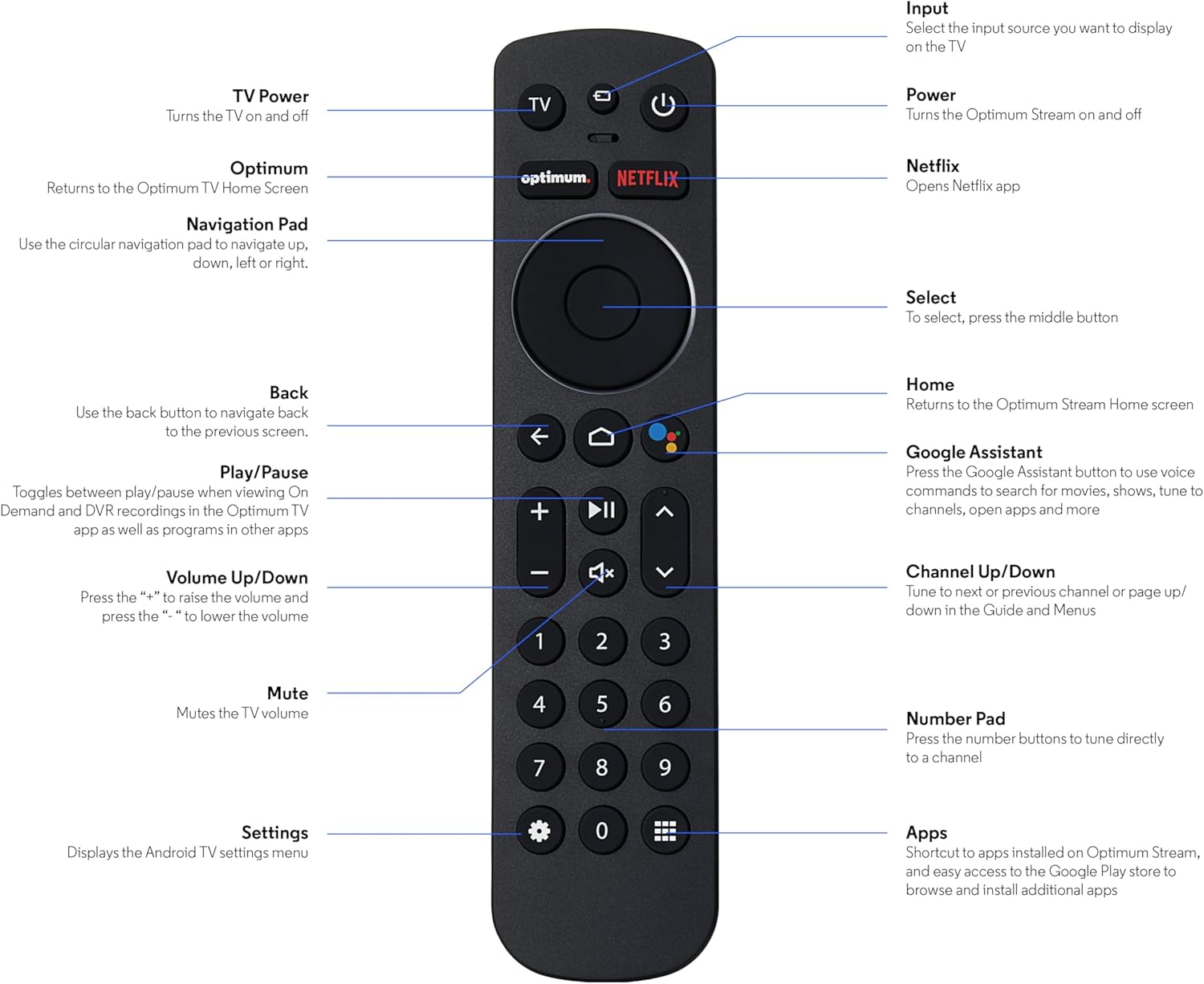
Image: The SatelliteSale Notus M2 Remote Control shown alongside two AAA batteries.
3. פריסה ותפקודים של השלט רחוק
Familiarize yourself with the buttons and their functions on your SatelliteSale Notus M2 Remote Control.

Image: Detailed diagram of the SatelliteSale Notus M2 Remote Control with labels for each button and its corresponding function.
- כוח טלוויזיה: מפעיל ומכבה את הטלוויזיה.
- קֶלֶט: Selects the input source to display on the TV.
- כּוֹחַ: Turns the Optimum Stream device on and off.
- מֵיטָב: Returns to the Optimum TV Home Screen.
- נטפליקס: Opens the Netflix application directly.
- לוח ניווט (מעגלי): Use to navigate up, down, left, or right within menus.
- Select (Middle Button of Nav Pad): מאשר בחירה.
- בְּחֲזָרָה: חוזר למסך הקודם.
- בַּיִת: Returns to the Optimum Stream Home screen.
- Google Assistant (Microphone Icon): Activates voice commands for search, playback control, and hands-free assistance.
- הפעל/השהה: Toggles between play and pause for content.
- עוצמת הקול מעלה/הנמכת (+/-): מכוונן את עוצמת הקול של הטלוויזיה.
- לְהַשְׁתִיק: Mutes the TV volume.
- ערוץ למעלה/למטה (חיצים): Tunes to the next or previous channel, or navigates pages in guides and menus.
- לוח מספרים (0-9): Directly tunes to a channel or enters numerical input.
- הגדרות (סמל גלגל השיניים): Displays the Android TV settings menu.
- Apps (Grid Icon): Provides shortcuts to installed apps on Optimum Stream and access to the Google Play Store.
4. התקנה
4.1 התקנת סוללה
The remote requires two AAA batteries. Ensure correct polarity when inserting.
- אתר את תא הסוללות בגב השלט הרחוק.
- החלק את מכסה הסוללה כלפי מטה כדי לפתוח.
- הכניסו שתי סוללות AAA, תוך התאמת הדקי (+) ו- (-) כפי שמסומן בתוך התא.
- החזר את מכסה הסוללה למקומו על ידי החלקתו בחזרה עד שיישמע קליק.

תְמוּנָה: View של השלט רחוק כאשר תא הסוללות פתוח, המציג את הכיוון הנכון להכנסת סוללות AAA.
4.2 Pairing Your Remote with Optimum Stream Device
Your remote is designed to be paired with your Optimum Stream device for full functionality, including Bluetooth connectivity and voice control. If your remote becomes unpaired or if you are setting up a new remote, follow these steps:

Image: An illustration explaining the importance of direct line of sight for initial pairing and the flexibility of remote placement after pairing.
הערה חשובה: For initial pairing, the Optimum Stream box needs to be in direct line of sight of the remote. If your box is behind a TV or in a cabinet, you may need to temporarily relocate it so the remote can be directly pointed at the Stream box. Once pairing is complete, the Stream box can be moved out of sight as the remote uses Bluetooth.
- Ensure batteries are correctly installed in your remote.
- Turn on your TV and your Optimum Stream cable box.
- Press any button on the Stream remote to ensure you are on the Home Screen.
- ממסך הבית, בחר הגדרות (gear icon).
- לִבחוֹר Device and Remote Settings > שלטים ואביזרים.
- לִבחוֹר Add Stream Remote.
- עקוב אחר ההוראות שעל המסך כדי להשלים את תהליך ההתאמה.
- You will see an on-screen confirmation once the remote is successfully paired.

Image: Visual representation of pairing steps 1 through 5, showing the remote and on-screen prompts.

Image: Visual representation of pairing steps 6 through 9, detailing the final stages of the pairing process.
5. הוראות הפעלה
5.1 שליטה קולית
The SatelliteSale Notus M2 remote features voice control for convenient operation. Press the microphone button (Google Assistant icon) and speak your command clearly. You can use voice commands to:
- חפש content (movies, TV shows, actors).
- שליטה בנגינה (הפעלה, השהיה, הרצה קדימה, הרצה אחורה).
- פתחו יישומים.
- Tune to specific channels.
- Get information (weather, sports scores).

Image: A person using the voice control feature of the remote, with sound waves emanating from the remote towards the TV screen.

תמונה: אקסיתample of a voice command, "Hey Google, turn on the Spider-Man movie," displayed on screen with the remote.
5.2 Bluetooth Wireless Connectivity
Once paired, the remote utilizes Bluetooth for communication with your Optimum Stream device. This means you do not need a direct line of sight to operate the device, allowing for greater flexibility in remote usage and device placement.
5.3 Dedicated Streaming App Buttons
The remote includes dedicated buttons for popular streaming applications, such as Netflix. Pressing these buttons provides one-touch access to your favorite entertainment platforms.
6. תחזוקה
- ניקוי: השתמשו במטלית רכה ויבשה לניקוי השלט. אין להשתמש בחומרי ניקוי נוזליים או בתרסיסים.
- החלפת סוללה: יש להחליף סוללות כאשר תגובת השלט הופכת איטית או מפסיקה לפעול. יש להחליף תמיד את שתי הסוללות בו זמנית בסוללות AAA חדשות.
- אִחסוּן: יש לאחסן את השלט במקום קריר ויבש, הרחק מאור שמש ישיר וטמפרטורות קיצוניות.
7. פתרון תקלות
| בְּעָיָה | סיבה אפשרית | פִּתָרוֹן |
|---|---|---|
| השלט רחוק לא מגיב. | סוללות מתות או חלשות. | החליפו את שתי סוללות ה-AAA בחדשות. |
| Remote not controlling Optimum Stream device. | Remote is unpaired or pairing failed. | Follow the pairing instructions in Section 4.2. Ensure direct line of sight during initial pairing. |
| בקרת קולית לא עובדת. | Remote not paired via Bluetooth, or microphone issue. | Ensure the remote is properly paired via Bluetooth (Section 4.2). Speak clearly and close to the microphone. |
| הכפתורים דביקים או לא מגיבים. | לכלוך או פסולת מתחת לכפתורים. | נקו את השלט בעזרת מטלית רכה ויבשה. הימנעו משפיכות. |
8. מפרטים
| תכונה | פְּרָט |
|---|---|
| מספר דגם | SS-RC-NOTUS-M2 |
| קישוריות | Bluetooth אלחוטי |
| תכונות מיוחדות | Voice Activated (Google Assistant), Dedicated App Buttons, Ergonomic Design |
| מכשירים תואמים | Optimum Stream Box (powered by Android TV) |
| מקור כוח | 2 x AAA סוללות (כלולות) |
| צֶבַע | שחור מט |
| משקל פריט | 3.66 אונקיות |
| מידות חבילה | 7.28 x 1.89 x 1.22 אינץ' |
9. אחריות ותמיכה
For warranty information or technical support, please refer to the official SatelliteSale webאתר או צרו קשר ישירות עם שירות הלקוחות שלהם. שמרו את קבלת הרכישה שלכם לצורך תביעות אחריות.
יַצרָן: סייל לווין
Webאֲתַר: Visit the SatelliteSale Store on Amazon
Ask a question about this manual
Ask about setup, troubleshooting, compatibility, parts, safety, or missing instructions. Manuals+ will review the question and use this page’s manual context to help answer it.