
מָבוֹא
This manual provides detailed instructions for the setup, operation, and maintenance of your Hieasy 4MP 2.5K Dual-Band WiFi Window Dome Camera. Please read this manual thoroughly before using the product to ensure proper functionality and safety.

Image: Hieasy 4MP 2.5K Window Camera mounted on a window, displaying the mobile application interface with live monitoring and recording options, highlighting its dual-band WiFi capability and no monthly fees.
מה יש בקופסה
ודא שכל הפריטים המפורטים להלן כלולים בחבילה שלך:
- גוף המצלמה
- 6.6/Ft Charging Cable
- מדריך הוראות
- מתאם מתח
- כרטיס מיקרו SD בנפח 32GB

Image: All components included in the Hieasy 4MP 2.5K Window Camera package, including the camera body, power adapter, charging cable, instruction manual, and 32GB Micro SD card.
הגדרה
1. הכן את משטח ההרכבה
Ensure the window surface where the camera will be mounted is clean and dry for optimal adhesion of the magnetic fixation system.
2. Attach the Mounting System
The camera features an innovative magnetic fixation system for quick installation. Peel off the protective film from the adhesive side of the mounting pad and firmly press it onto the desired spot on your window. Ensure the central opening aligns with your desired viewאזור ing.
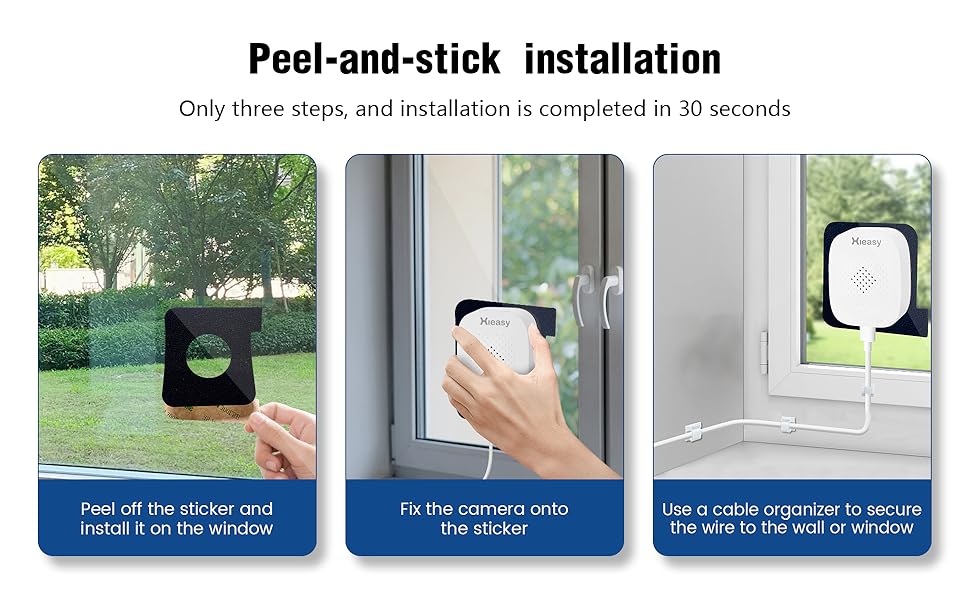
Image: Visual guide demonstrating the three simple steps for peel-and-stick installation of the Hieasy window camera onto glass.
3. התקן את המצלמה
Align the camera body with the magnetic mounting pad on the window. The camera will securely attach magnetically. The design allows for easy removal and reattachment without damaging the window frame.
4. התחבר לחשמל
Connect the provided 6.6/Ft Charging Cable to the camera and then to the Power Adapter. Plug the Power Adapter into a suitable electrical outlet. The camera requires continuous power to operate as it does not have a built-in battery.
5. Download and Install the HiEasy App
Scan the QR code provided in the Instruction Manual or search for
Ask a question about this manual
Ask about setup, troubleshooting, compatibility, parts, safety, or missing instructions. Manuals+ will review the question and use this page’s manual context to help answer it.