
1. הקדמה
This manual provides essential instructions for setting up, operating, maintaining, and troubleshooting your FUNYET 2-in-1 Laptop, Model FUN01-05. This device features a 14.1-inch Full HD touchscreen, an Intel Core i7-1265U processor, 16GB RAM, and a 512GB SSD, running Windows 11 Pro. Its 360-degree reversible screen allows for versatile usage modes.
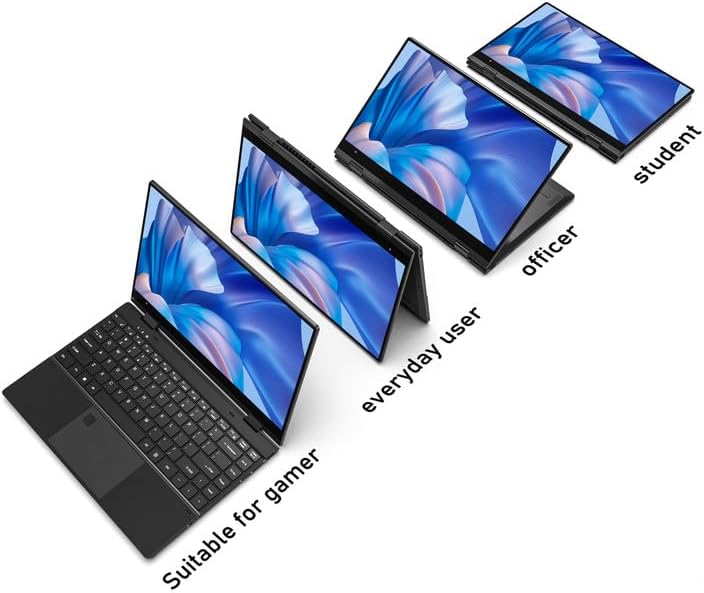
Figure 1: FUNYET 2-in-1 Laptop showcasinמצביו הרב-תכליתיים.
2. תכולת החבילה
ודא שכל הפריטים נמצאים בחבילה:
- FUNYET 2-in-1 Touch Screen Laptop
- מתאם AC
- תעודת אחריות
- הוראות (מדריך זה)
3. התקנה
3.1 טעינה ראשונית והפעלה
- Connect the AC adapter to the DC-IN port on the laptop and plug it into a power outlet.
- אפשרו למחשב הנייד להיטען במשך 30 דקות לפחות לפני השימוש הראשון.
- Press and hold the Power Button (located on the side) until the screen illuminates.
3.2 התקנת Windows 11 Pro
Follow the on-screen prompts to complete the Windows 11 Pro initial setup. This includes selecting your region, language, connecting to a Wi-Fi network, and creating a user account.
3.3 הגדרת קורא טביעות אצבע
For enhanced security and quick access, set up the fingerprint reader:
- נווט אל הגדרות Windows > חשבונות > אפשרויות כניסה.
- Under "Windows Hello Fingerprint," click "Set up" and follow the instructions to register your fingerprint.

Figure 2: Backlit keyboard and integrated fingerprint reader.
4. הוראות הפעלה
4.1 ניהול חשמל
- הפעלה: לחץ על לחצן ההפעלה.
- מצב שינה: Briefly press the Power Button or close the lid.
- כיבוי: עבור אל תפריט התחל > הפעלה > כיבוי.
- הפעל מחדש: עבור אל תפריט התחל > הפעלה > הפעלה מחדש.
4.2 מצבי 2 ב-1
The laptop's 360-degree hinge allows for four primary modes:
- Notebook Mode: תצורת מחשב נייד סטנדרטית להקלדה ופרודוקטיביות.
- מצב עמידה: Fold the keyboard back to prop up the screen for viewתוכן.
- מצב אוהל: Position the laptop in an inverted 'V' shape, ideal for touch interaction or presentations in confined spaces.
- מצב טאבלט: Fold the screen completely back against the base for a tablet experience.

Figure 3: Different operational modes of the 2-in-1 laptop.
4.3 Touchscreen and Keyboard
- מסך מגע: Use gestures similar to a smartphone or tablet for navigation and interaction.
- מקלדת עם תאורה אחורית: The keyboard features a backlight for use in low-light conditions. The backlight can typically be toggled or adjusted using function keys (e.g., Fn + F5).
4.4 קישוריות
Your laptop supports various connectivity options:
- Wi-Fi 6: For high-speed wireless internet access. Connect via Windows Settings > Network & Internet > Wi-Fi.
- Bluetooth 5.2: For connecting wireless peripherals like headphones, mice, or keyboards. Pair devices via Windows Settings > Bluetooth & devices.
- יציאות: The laptop includes various ports for external devices.

Figure 4: Laptop ports and their functions.
יציאות זמינות:
- DC-IN (כניסת חשמל)
- USB 3.1 Type-C (Video Output, Data Transfer, Charging)
- Audio Port (Headphones/Microphone)
- כפתור הפעלה
- TF Card Slot (for storage expansion up to 1TB)
- USB 3.1 Type-A
5. תחזוקה
5.1 ניקוי
- השתמש במטלית רכה ונטולת סיבים כדי לנקות את המסך והחלק החיצוני.
- עבור כתמים עקשניים, דampשטפו את המטלית מעט במים או בחומר ניקוי עמיד למסכים.
- הימנעו מכימיקלים קשים, חומרים שוחקים או לחות מוגזמת.
5.2 טיפול בסוללה
- כדי למקסם את חיי הסוללה, הימנעו מפריקת הסוללה לחלוטין לעתים קרובות.
- אחסנו את המחשב הנייד במקום קריר ויבש כאשר אינו בשימוש למשך תקופות ממושכות.
- The laptop features a 38 Watt-hour Lithium-Ion battery, providing up to 8 hours of usage.
5.3 ניהול תרמי
The laptop is designed with an improved thermal system to maintain optimal operating temperatures. Ensure proper airflow by not blocking the ventilation openings, especially during intensive tasks.

Figure 5: Laptop thermal design for efficient cooling.
6. פתרון תקלות
אם נתקלת בבעיות, נסה את שלבי פתרון הבעיות הבסיסיים הבאים:
- אין כוח: ודא שמתאם ה-AC מחובר היטב הן למחשב הנייד והן לשקע חשמל תקין. נסה שקע אחר.
- המסך לא מוצג: חבר צג חיצוני כדי לבדוק אם הבעיה היא בתצוגה של המחשב הנייד. הפעל מחדש את המחשב הנייד.
- ביצועים איטיים: סגור יישומים מיותרים. בדוק אם קיימים עדכוני Windows. ודא שיש מספיק שטח אחסון פנוי.
- בעיות Wi-Fi/Bluetooth: Toggle Wi-Fi/Bluetooth off and on in Windows Settings. Restart the laptop. Check router/device connections.
- תקלות בתצוגה: Ensure your Windows operating system and graphics drivers are up to date. This can often resolve display anomalies.
- מסך מגע לא מגיב: Restart the laptop. Ensure the screen is clean and free of debris.
עבור בעיות מתמשכות, עיינו במקטע התמיכה או צרו קשר עם שירות הלקוחות.
7. מפרטים
| תכונה | פְּרָט |
|---|---|
| מותג | FUNYET |
| שם הדגם | Magbook |
| מספר דגם | FUN01-05 |
| גודל מסך | 14.1 אינץ' |
| רזולוציית תצוגה | 1920 x 1080 פיקסלים (FHD) |
| סוג תצוגה | LCD, Touchscreen, Glossy Finish |
| מעבד | מעבד Intel Core i7-1265U (עד 4.8 גיגה-הרץ, 8 ליבות, 12 הליכים) |
| אַיִל | זיכרון DDR4 בנפח 16 ג'יגה-בייט (3733 מגה-הרץ) |
| אִחסוּן | 512 GB SSD (PCIE x 4), expandable up to 1TB with TF card |
| מַעֲרֶכֶת הַפעָלָה | Windows 11 Pro |
| גרָפִיקָה | גרפיקת Intel Iris Xe משולבת |
| קישוריות אלחוטית | Wi-Fi 6, Bluetooth 5.2 |
| נמלים | USB 3.1 Type-A, USB 3.1 Type-C, DC-IN, Audio Jack, TF Card Slot |
| מַצלֵמָה | Front 2 MP |
| בִּטָחוֹן | זיהוי טביעת אצבע |
| סוֹלְלָה | 38 Watt Hours Lithium Ion (up to 8 hours) |
| מִשׁקָל | 3 פאונד |
| מידות (אורך x רוחב x גובה) | 12.7 אינץ' x 8.6 אינץ' x 0.6 אינץ' |
8. אחריות ותמיכה
8.1 מידע אחריות
Your FUNYET 2-in-1 Laptop comes with a אחריות מוגבלת לשנהאחריות זו מכסה פגמי ייצור ותקלות חומרה בשימוש רגיל. אנא שמור את הוכחת הרכישה שלך לצורך תביעות אחריות.
בנוסף, א מדיניות החזרה חינם ל-180 יום מוצע החל מיום הרכישה.
8.2 תמיכת לקוחות
For technical assistance, warranty claims, or any product-related inquiries, please contact FUNYET customer support:
- תמיכה טלפונית: +1 800-986-9631 (English phone support available)
- תמיכה מקוונת: 24/7 instant online support is available. Please visit the official FUNYET webהאתר לפרטי יצירת קשר.