
Redmi Redmi Pad 2 Wi-Fi + Cellular
Redmi Pad 2 Wi-Fi + Cellular User Manual
Model: Redmi Pad 2 Wi-Fi + Cellular
1. הקדמה
Welcome to the Redmi Pad 2 Wi-Fi + Cellular user manual. This guide provides essential information to help you get started with your new tablet, understand its features, and ensure optimal performance. Please read this manual thoroughly before using your device.
The Redmi Pad 2 offers a vibrant 2.5K display, powerful MediaTek Helio G100-Ultra processor, long-lasting 9000mAh battery, and supports an Active Pen for enhanced productivity and creativity. With HyperOS 2 and AI-powered features, your tablet experience is designed to be intuitive and efficient.

תמונה: מעלview of the Redmi Pad 2's key features, including its 2.5K display, cellular connectivity, immersive audio, 9000mAh battery, HyperOS 2, AI-Powered capabilities, and MediaTek Helio G100-Ultra processor.
2. הגדרה ראשונית
2.1 פתיחת האריזה ותכולת האריזה
Your Redmi Pad 2 package should contain the following items:
- Redmi Pad 2 Tablet Computer
- מתאם מתח
- כבל USB מסוג C
- כלי מפלט סים
2.2 טעינת המכשיר
Before first use, fully charge your Redmi Pad 2. Connect the USB Type-C cable to the tablet's charging port and the power adapter, then plug the adapter into a wall outlet. The tablet supports 18W fast charging.
2.3 הפעלה/כיבוי
- כדי להפעיל: לחץ והחזק את כפתור ההפעלה עד להופעת הלוגו של Redmi.
- כדי לכבות: לחץ והחזק את לחצן ההפעלה, ולאחר מכן בחר 'כיבוי' מהאפשרויות שעל המסך.
2.4 Inserting a SIM Card (Cellular Models)
For cellular connectivity, insert a nano-SIM card using the provided SIM ejector tool.
- אתר את מגש כרטיס ה-SIM בצד הטאבלט.
- הכנס את כלי חילוץ ה-SIM לחור הקטן שליד המגש ולחץ בעדינות עד שהמגש ייצא החוצה.
- הנח את כרטיס ה-nano-SIM שלך במגש כאשר המגעים הזהובים פונים כלפי מטה.
- דחף בזהירות את המגש בחזרה לתוך הטאבלט עד שייכנס למקומו בנקישה.

תמונה: צד view of the Redmi Pad 2, illustrating the location of the SIM card tray and physical buttons.
2.5 התחברות ל-Wi-Fi
- עבור אל הגדרות > Wi-Fi.
- הפעל את ה-Wi-Fi.
- בחר את הרשת הרצויה מהרשימה.
- הזינו את הסיסמה אם תתבקשו והקישו על לְחַבֵּר.
2.6 הגדרת חשבון גוגל
Follow the on-screen prompts to set up your Google account. This is necessary to access the Google Play Store, synchronize data, and use various Google services.
3. הפעלת ה-Redmi Pad 2 שלך
3.1 Navigation and User Interface (HyperOS 2)
Your Redmi Pad 2 runs on HyperOS 2, based on Android, providing a smooth and intuitive user experience. Swipe gestures and on-screen buttons allow for easy navigation between apps and settings.
3.2 תכונות תצוגה
Experience crystal-clear visuals on the 11-inch 2.5K (2560x1600 pixels) display with a 90Hz refresh rate for smooth scrolling and animations. The display offers up to 600 nits of brightness for clear visibility in various lighting conditions.

Image: The Redmi Pad 2's 2.5K Crystal Clear Display, highlighting its sharp resolution and vibrant color reproduction.
3.3 חוויית שמע
The tablet features quad speakers with Dolby Atmos support, delivering an immersive audio experience for movies, music, and games.

Image: The Redmi Pad 2 demonstrating its immersive audio capabilities with quad speakers and Dolby Atmos technology.
3.4 Active Pen Support
The Redmi Pad 2 supports an Active Pen (sold separately) for precise input. Use it for note-taking, sketching, marking up documents, and navigating the interface with ultra-low latency and 4096 pressure sensitivity levels.

Image: The Redmi Pad 2 demonstrating Active Pen support for creative tasks, instant answers, effortless note-taking, and handwriting recognition.

Image: A close-up of the Redmi Smart Pen in use, detailing its features such as seamless writing, millisecond-level latency, 4096 pressure sensitivity, 10g activation force, and 12 hours of continuous writing.
3.5 AI-Powered Features
Leverage AI capabilities like מעגל לחיפוש for instant information retrieval and בינה מלאכותית של ג'מיני for personalized assistance, enhancing productivity and entertainment.

Image: The Redmi Pad 2 demonstrating AI-powered features, specifically 'Circle to Search' for instant answers.
3.6 שימוש במצלמה
The tablet is equipped with an 8MP rear camera and a 5MP front camera, suitable for video calls and casual photography. Video capture resolutions include FHD 1080p and HD 720p.
3.7 אחסון וביצועים
The Redmi Pad 2 comes with 8GB RAM and 256GB internal storage (UFS 2.2 for fast loads). Storage can be expanded up to 2TB using a microSD card (sold separately).

Image: The Redmi Pad 2 highlighting its storage and RAM capabilities, including up to 16GB RAM, 256GB UFS 2.2 storage, and 2TB expandable storage.
Powered by the MediaTek Helio G100-Ultra processor, the tablet delivers efficient performance for multitasking, gaming, and media consumption.
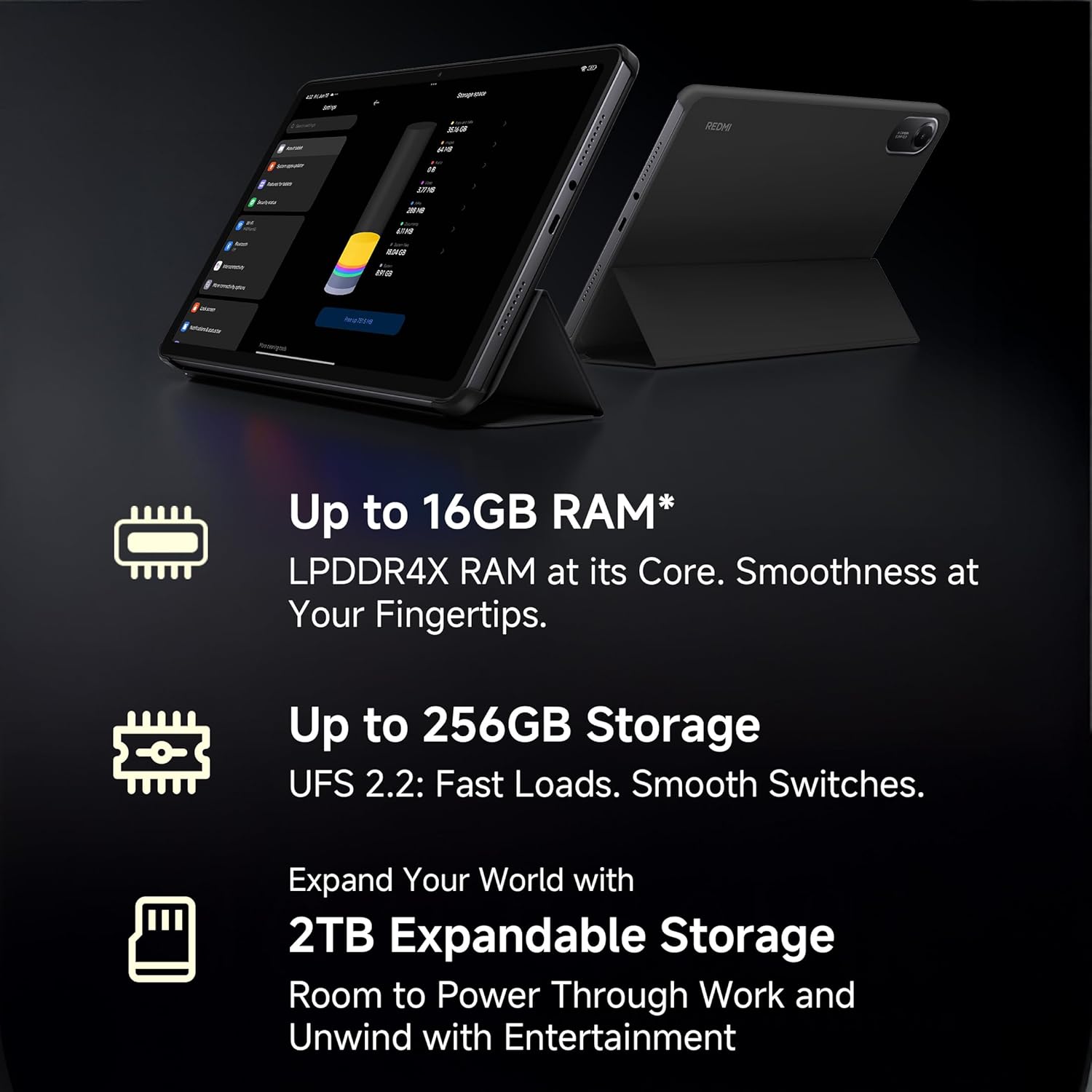
Image: A visual representation of the advanced MediaTek Helio G100-Ultra processor, emphasizing its performance capabilities.
3.8 קישוריות
Stay connected with Wi-Fi (802.11a/b/g/n/ac) and cellular connectivity. The tablet also features Bluetooth for connecting accessories and a USB 2.0 Type-C port for charging and data transfer.

Image: The Redmi Pad 2 demonstrating its cellular connectivity, allowing users to stay connected anytime, anywhere.
4. תחזוקה וטיפול
4.1 ניקוי הטאבלט
Use a soft, lint-free cloth to clean the screen and body of your Redmi Pad 2. Avoid using harsh chemicals or abrasive materials that could damage the display or finish.
4.2 טיפול בסוללה
The 9000mAh battery provides extended usage. To prolong battery life:
- הימנע מטמפרטורות קיצוניות.
- אל תתנו לסוללה להתרוקן לחלוטין לפני טעינה תכופה.
- השתמשו במטען ובכבל המקוריים לטעינה אופטימלית.

Image: The Redmi Pad 2 highlighting its XL 9000mAh battery, capable of providing up to 19 hours of binge-watching, 22 hours of discoveries, and 10 hours of gaming.
4.3 עדכוני תוכנה
בדוק באופן קבוע אם קיימים עדכוני תוכנה והתקן אותם כדי לוודא שהטאבלט שלך כולל את התכונות, תיקוני האבטחה ושיפורי הביצועים העדכניים ביותר. עבור אל הגדרות > לגבי טאבלט > עדכון מערכת.
4.4 אופטימיזציה של אחסון
מעת לעת מחדשview ולמחוק מיותר files, apps, and media to maintain optimal performance. Utilize cloud storage or the expandable storage option for large files.
5. פתרון תקלות
This section addresses common issues you might encounter with your Redmi Pad 2.
5.1 המכשיר לא נדלק
- ודא שהסוללה טעונה. חבר את הטאבלט למטען למשך 30 דקות לפחות.
- לחץ והחזק את לחצן ההפעלה למשך 10-15 שניות כדי לבצע הפעלה מחדש כפויה.
5.2 בעיות קישוריות (Wi-Fi/סלולרי)
- Wi-Fi: Check if Wi-Fi is enabled in settings. Restart your router. Forget the network and reconnect.
- תָאִי: Ensure the SIM card is correctly inserted and activated. Check your mobile data settings. Restart the tablet.
5.3 ביצועים איטיים
- סגור יישומים שאינם בשימוש הפועלים ברקע.
- נקה נתוני מטמון עבור אפליקציות.
- ודא/י מספיק מקום אחסון פנוי.
- הפעל מחדש את הטאבלט באופן קבוע.
5.4 Active Pen Not Responding
- Ensure the Active Pen is charged (if applicable).
- Check Bluetooth connection for the pen in tablet settings.
- הפעל מחדש את הטאבלט.
6. מפרטים
| תכונה | פְּרָט |
|---|---|
| מותג | רדמי |
| שם הדגם | Redmi Pad 2 Wi-Fi + Cellular |
| מַעֲרֶכֶת הַפעָלָה | Android, HyperOS 2 |
| מעבד | MediaTek Helio G100-Ultra (2.2 GHz) |
| מעבד גרפי | Mali-G57 MC2 |
| אַיִל | 8 ג'יגה-בייט |
| אחסון פנימי | 256 ג'יגה-בייט |
| אחסון ניתן להרחבה | Yes (up to 2TB) |
| גודל מסך | 11 אינץ' (27.94 ס"מ) |
| רזולוציית תצוגה | 2560x1600 פיקסלים (2.5K) |
| סוג תצוגה | LCD |
| קצב רענון | 90 הרץ |
| בהירות מרבית | 600 Nits |
| מצלמה אחורית | 8 מגה פיקסל |
| מצלמה קדמית | 5 מגה פיקסל |
| קיבולת סוללה | 9000 מיליאמפר/שעה |
| חיי סוללה ממוצעים | 10 שעות |
| קישוריות | Wi-Fi (802.11a/b/g/n/ac), Cellular |
| ממשק אנושי | מסך מגע עם תמיכה בסטיילוס |
| ג'ק אודיו | 3.5 מ"מ |
| מידות (אורך x רוחב x עומק) | 25.5L x 16.6W x 0.7Th Centimeters |
| משקל פריט | 519 גרם |
| צֶבַע | כחול שמיים |
7. מידע על אחריות
The Redmi Pad 2 Wi-Fi + Cellular comes with a אחריות יצרן לשנה. Please retain your proof of purchase for warranty claims. For detailed terms and conditions, refer to the warranty card included in your product packaging or visit the official Redmi webאֲתַר.
8. תמיכת לקוחות
For further assistance, technical support, or service inquiries, please contact Redmi customer support. You can find contact information on the official Redmi webבאתר או דרך מדור התמיכה בהגדרות המכשיר שלך.
יַצרָן: BYD (India) Private Limited, Xiaomi
מידע ליצירת קשר עם היצרן: BYD (India) Private Limited, Developed Plot No. OZ 7, Sipcot, Oragadam, Sriperambudur, Kancheepuram, Tamil Nadu 602105, India
For online support, visit the official Redmi India Support Page.
Ask a question about this manual
Ask about setup, troubleshooting, compatibility, parts, safety, or missing instructions. Manuals+ will review the question and use this page’s manual context to help answer it.