
מָבוֹא
This manual provides detailed instructions for the VINABTY Voice Remote Control, designed as a direct replacement for various OK. QLED TV models. This remote control features voice search capabilities, an ergonomic design, and durable construction for reliable performance. Please read this manual carefully to ensure proper setup and operation.
הגדרה
1. התקנת סוללה
השלט רחוק דורש שתי סוללות AAA (לא כלולות). בצע את השלבים הבאים כדי להתקין אותן:
- פתחו את מכסה תא הסוללות הממוקם בגב השלט רחוק.
- הכנס שתי סוללות AAA, וודא שהקוטבים החיוביים (+) והשליליים (-) תואמים לדיאגרמות שבתוך התא.
- סגור היטב את מכסה תא הסוללות.

תמונה: אחורי view of the remote control with the battery cover removed, illustrating the correct placement for two AAA batteries.
2. צימוד עם הטלוויזיה שלך
This remote control is designed for easy use and typically requires no programming. However, for voice search functionality, it must be paired with your TV. Refer to your TV's user manual for specific pairing instructions for a new remote control. Generally, this involves:
- ודא שהטלוויזיה שלך דולקת.
- Navigate to the TV's settings menu, usually under 'Remotes & Accessories' or 'Bluetooth Settings'.
- Select 'Add new device' or 'Pair remote control'.
- Follow the on-screen prompts to complete the pairing process. This may involve holding down specific buttons on the remote.

Image: The VINABTY remote control positioned beside a television, highlighting its ready-to-use nature and material quality.
הוראות הפעלה
The VINABTY Voice Remote Control offers intuitive control over your OK. QLED TV. Below are the primary functions:
- כפתור הפעלה (⏻): מפעיל או מכבה את הטלוויזיה.
- לחצני מספרים (0-9): בחירה ישירה של ערוצי טלוויזיה.
- לוח ניווט (למעלה, למטה, שמאלה, ימינה, אישור): ניווט בין תפריטים ואימות בחירות.
- עוצמת הקול מעלה/הנמכת (+/-): כוונן את עוצמת הקול של הטלוויזיה.
- ערוץ למעלה/למטה (P^/P˅): החלפת ערוצי טלוויזיה.
- לחצן השתקה (🔇): Mute or unmute the TV audio.
- כפתור חזרה (←): חזרה למסך או לתפריט הקודם.
- כפתור בית (🏠): Access the TV's home screen or smart hub.
- כפתור בקרת קול (🎤): Press and hold to activate voice search or commands (requires successful pairing).
- כפתורי גישה מהירה: Dedicated buttons for popular streaming services like Netflix, YouTube, Prime Video, and Google Play for direct access. A USB button is also included for media playback.
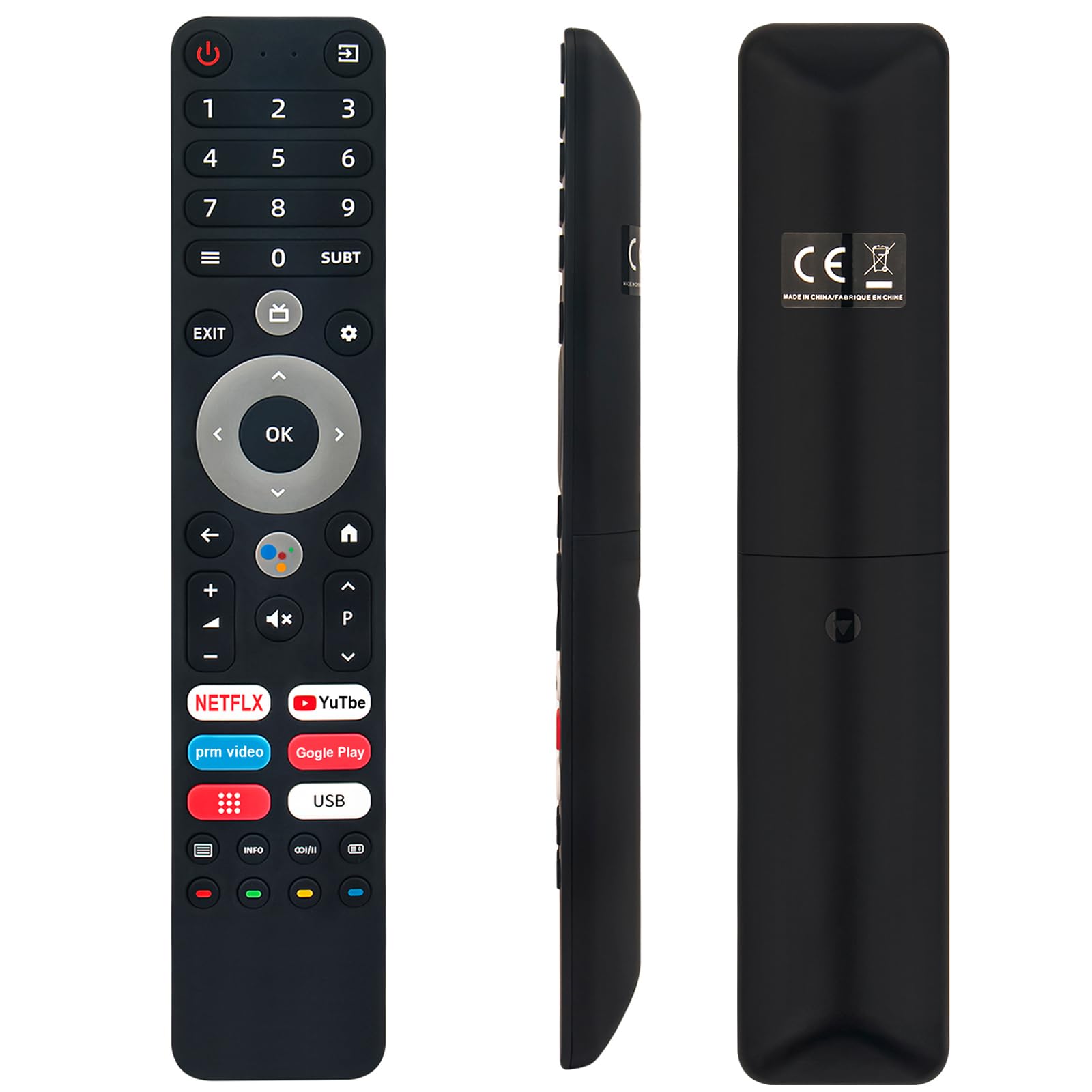
Image: The remote control with a visual emphasis on the voice command button, indicating its functionality.
תַחזוּקָה
To ensure the longevity and optimal performance of your VINABTY Voice Remote Control, follow these maintenance guidelines:
- ניקוי: Use a soft, dry cloth to clean the remote control. Avoid using liquid cleaners, aerosols, or harsh chemicals, as these can damage the surface or internal components.
- החלפת סוללה: החלף סוללות כאשר תגובת השלט רחוק הופכת איטית או שהוא מפסיק לתפקד. החלף תמיד את שתי הסוללות בו זמנית בחדשות מאותו סוג (AAA).
- אִחסוּן: יש לאחסן את השלט הרחוק במקום קריר ויבש, הרחק מאור שמש ישיר, טמפרטורות קיצוניות ולחות גבוהה. אם השלט לא ישמש למשך תקופה ממושכת, יש להוציא את הסוללות כדי למנוע דליפה.
- טיפול: הימנעו מהפלת השלט הרחוק או מחשיפתו לפגיעות חזקות, שכן הדבר עלול לגרום נזק למעגלים הפנימיים.
פתרון בעיות
If you encounter issues with your VINABTY Voice Remote Control, try the following solutions:
- שלט לא מגיב:
- בדוק אם הסוללות מותקנות כראוי ואינן התרוקנות. החלף אותן במידת הצורך.
- ודא שאין מכשולים בין השלט רחוק למקלט האינפרא אדום של הטלוויזיה.
- ודא שהשלט רחוק מכוון ישירות אל הטלוויזיה.
- בקרת קול לא עובדת:
- Verify that the remote control is successfully paired with your TV. Refer to the 'Pairing with Your TV' section or your TV's manual.
- Ensure your TV's internet connection is stable, as voice commands often rely on online services.
- הכפתורים לא עובדים:
- Clean the remote control, especially around the buttons, to remove any dirt or debris that might be causing sticking.
אם שלבים אלה אינם פותרים את הבעיה, אנא פנו לתמיכת הלקוחות לקבלת סיוע נוסף.
מפרטים
| תכונה | פְּרָט |
|---|---|
| מותג | VINABTY |
| דגמים תואמים | OK. QLED TV OTV 55AU-5023C, OTV43AU-5023C, OTV50AU-5023C, OTV 43AU-5023C, OTV 50AU-5023C |
| טכנולוגיית קישוריות | אינפרא אדום |
| טווח מקסימלי | 10 מטר |
| סוג סוללה | 2 x AAA (לא כלול) |
| חוֹמֶר | ABS (body), Soft Rubber (buttons) |
| צֶבַע | שָׁחוֹר |
| מידות (L x W x H) | 18 ס"מ x 3 ס"מ x 1.5 ס"מ (כ-7.09 x 1.18 x 0.59 אינץ') |
| מִשׁקָל | 60 גרם |
| תכונות מיוחדות | Voice Control, No Programming Required, Ergonomic Design |

Image: The remote control displayed with its precise length and width measurements.
תְמִיכָה
For any questions regarding the VINABTY Voice Remote Control, or if you are unsure about its compatibility with your specific TV model, please contact our customer support team. We are committed to providing assistance and ensuring your satisfaction.
If you received a remote control that does not function as expected, or if you require further technical support, please reach out to us via email. We will respond promptly to address your concerns.