
1. הקדמה
This instruction manual provides essential information for the safe and efficient operation, maintenance, and troubleshooting of your 3i P10 Ultra Robot Vacuum and Mop Combo. Please read this manual thoroughly before using the product and retain it for future reference.
2. מידע בטיחות
יש להקפיד תמיד על אמצעי זהירות בסיסיים בעת שימוש במכשירים חשמליים כדי להפחית את הסיכון לשריפה, התחשמלות או פציעה. מכשיר זה מיועד לשימוש ביתי בלבד.
- אין לאפשר לילדים להפעיל את הרובוט. יש לפקח על ילדים וחיות מחמד בזמן שהרובוט פועל.
- ודא את עוצמת הקולtage תואם לתווית הדירוג שעל תחנת הטעינה.
- אין להשתמש ברובוט על משטחים רטובים או באזורים עם מים עומדים.
- Remove loose cables, small objects, and fragile items from the cleaning path before operation.
- Do not use the robot to pick up large or sharp objects, flammable materials, or liquids.
- Only use manufacturer-specified accessories and replacement parts.
- אם כבל החשמל פגום, יש להחליף אותו על ידי היצרן או סוכן שירות מוסמך כדי למנוע סכנות.
3. המוצר נגמרview
3.1 רכיבים כלולים
החבילה כוללת את הפריטים הבאים:
- 1 x שואב אבק רובוטי
- 1 x תחנת בסיס
- 2 x רפידות סמרטוט
- 2 x מברשות צד
- 1 x 800ml Cleaning Solution
- 1 x בסיס נתיק
- 1 x כבל מתח
- 1 x מדריך למשתמש
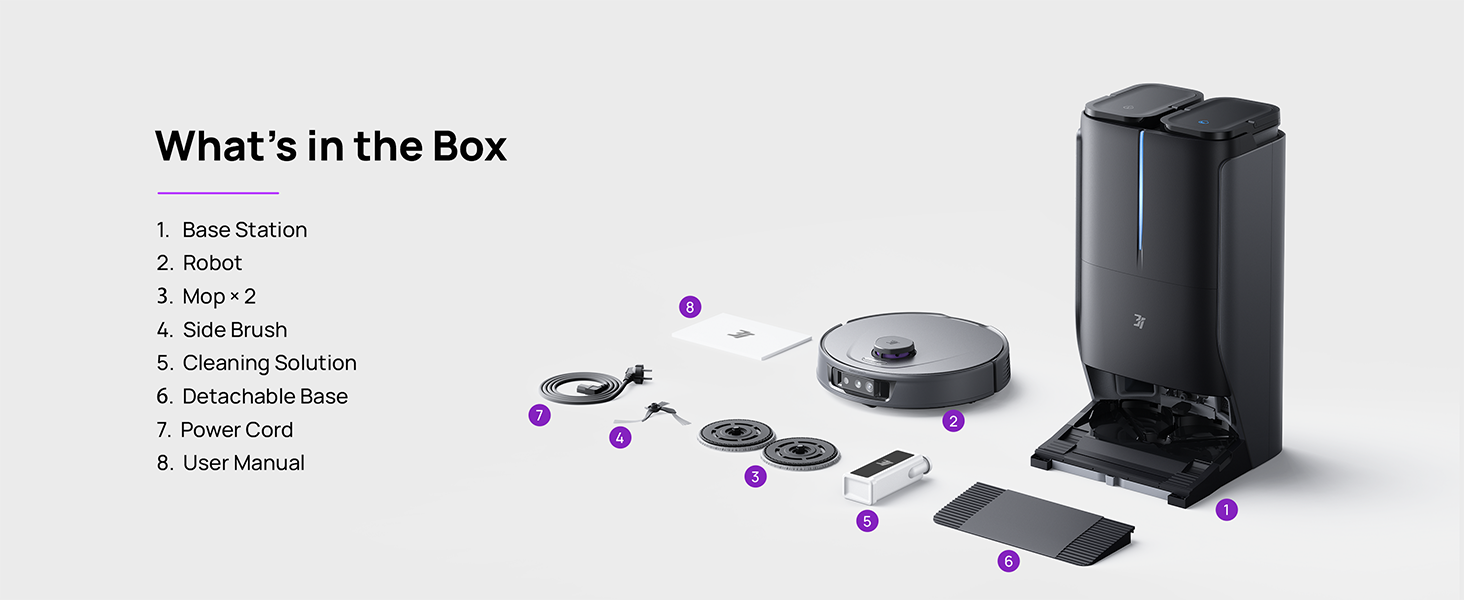
Figure 3.1: Contents of the 3i P10 Ultra package.
3.2 Robot Vacuum Features
- סמרטוט אולטרה-ריץ': The auto-extending mop system cleans edges and corners thoroughly. Dual mops spin at 220 RPM for effective stain removal.
- יניקה של 18,000 פאסל: Provides powerful suction for deep cleaning on various floor types, including carpets and hard floors. Features smart carpet detection to boost suction and lift mops.
- תחנה אוטומטית הכל באחד: Offers automatic hot-water mop washing, hot air drying, solution adding, and hands-free dust collection for up to 70 days.
- ניווט מתקדם: Utilizes LiDAR for 3D mapping, dual 3D structured light, and an AI camera for obstacle avoidance, threshold crossing, and collision resistance.
- סריקת לכלוך מבוססת בינה מלאכותית: Identifies over 100 household objects and messes, adapting cleaning methods for optimal results, even in low light conditions.
- ניהול שיער: Equipped with anti-tangle brushes and a TangleCut blade to prevent hair from wrapping around components.
- Smart Route Planning: Learns home layouts for efficient cleaning routes. Supports scheduled cleaning, no-go zones, and app control. Compatible with Alexa and Google Assistant.
- קישוריות Wi-Fi: Supports both 2.4G and 5G Wi-Fi networks.

איור 3.2: למעלה view of the 3i P10 Ultra Robot Vacuum.

Figure 3.3: The 3i P10 Ultra Base Station.
4. התקנה
4.1 פריקה ומיקום
- הסר בזהירות את כל הרכיבים מהאריזה.
- Choose a suitable location for the base station. Ensure it is placed against a wall, on a hard, level surface, with at least 0.5 meters (1.6 feet) of clear space on both sides and 1.5 meters (4.9 feet) in front. Avoid areas with direct sunlight or strong Wi-Fi interference.
- חבר את כבל החשמל לתחנת הבסיס וחבר אותו לשקע חשמל.
4.2 הכנת רובוט
- Install the side brushes by pressing them into their slots until they click.
- Attach the mop pads to the mop holders on the robot.
- Place the robot onto the base station to charge. Ensure the charging contacts align. The robot will announce its charging status.
4.3 התקנה וחיבור של אפליקציה
- Download the 3i app from your mobile device's app store (iOS or Android).
- Open the app and follow the on-screen instructions to create an account and add your 3i P10 Ultra robot.
- Ensure your phone is connected to a 2.4GHz or 5GHz Wi-Fi network during the pairing process.
5. הוראות הפעלה
5.1 ניקוי ראשוני ומיפוי
For the first use, allow the robot to complete a full cleaning cycle to create a map of your home. This map is crucial for advanced features.

Figure 5.1: Precision 3D Mapping in the 3i App.
5.2 התחלת מחזור ניקוי
- דרך רובוט: לחץ פעם אחת על כפתור ההפעלה ברובוט כדי להתחיל או להשהות את הניקוי.
- דרך האפליקציה: Open the 3i app, select the desired cleaning mode (Vacuum, Mop, Vac & Mop, AI Auto, Custom), and tap 'Start'.
- באמצעות שליטה קולית: Use compatible voice assistants (Alexa, Google Assistant) with commands like "Hey Google, start vacuuming."

Figure 5.2: Using voice control to operate the 3i P10 Ultra.
5.3 תכונות האפליקציה
The 3i app provides extensive control and customization options:
- הגדרות ניקוי: Schedule cleaning, select rooms, set no-go zones, customize carpet cleaning.
- הגדרות מפה: View 3D maps, quick mapping, multi-floor maps, edit rooms and furniture.
- Station Settings: Customize dust collection, mop washing, auto-drying, and TangleCut.
- הגדרות אחרות: Do Not Disturb mode, Smart Route Planning, Pet Recognition, Child Lock.
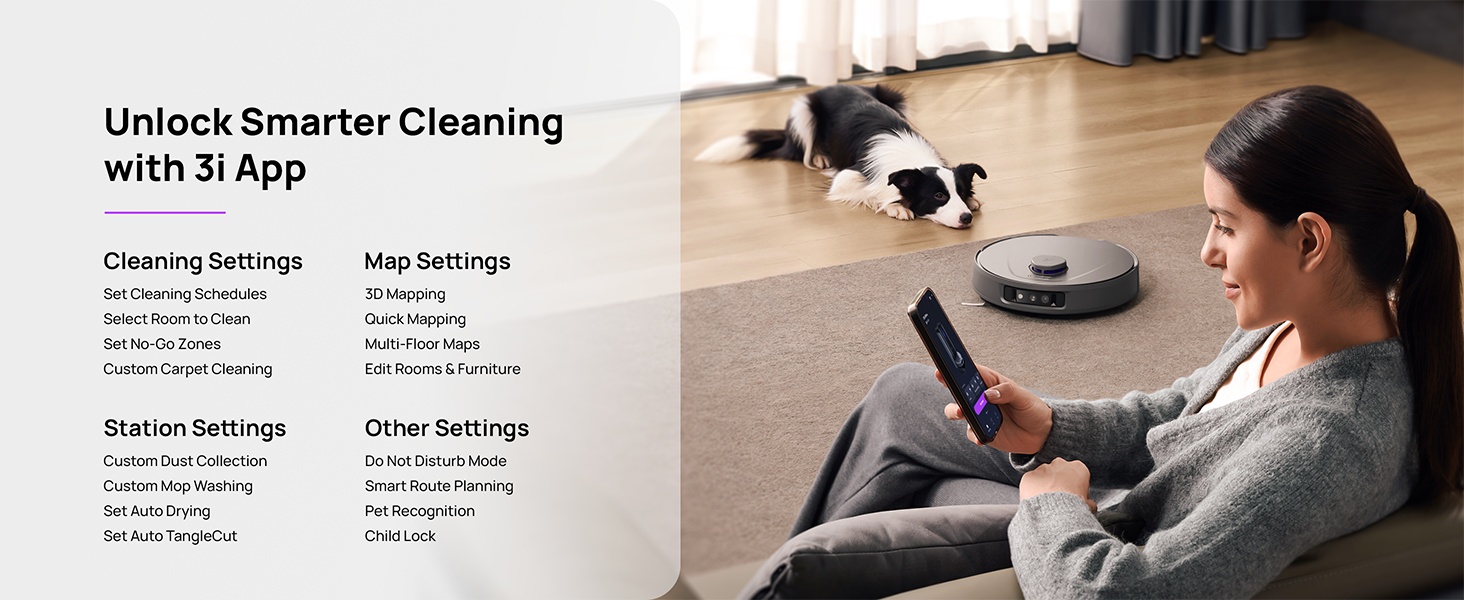
Figure 5.3: The 3i App interface for smart cleaning.
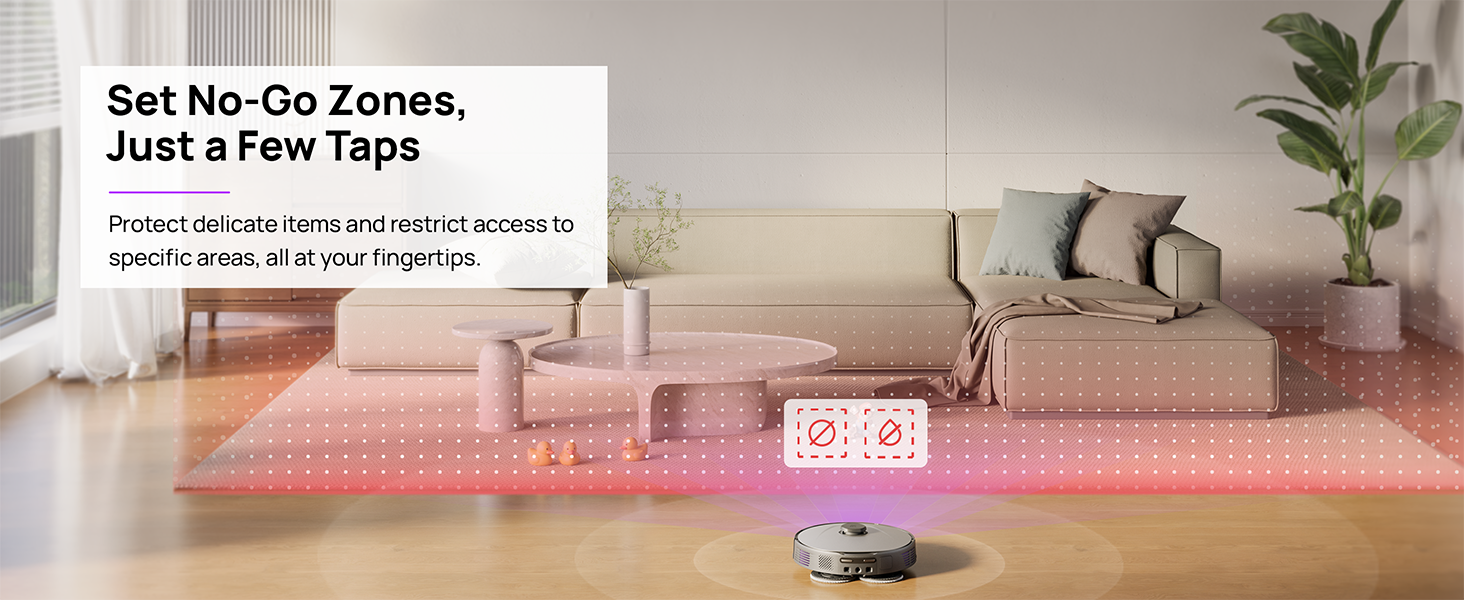
Figure 5.4: Setting No-Go Zones in the 3i App.
6. תחזוקה
Regular maintenance ensures optimal performance and extends the lifespan of your 3i P10 Ultra.
6.1 תחזוקת תחנת הבסיס
- ריקון פח האשפה: The base station automatically empties the robot's dustbin into a 3L bag. Replace the dust bag approximately every 70 days, or as indicated by the app.
- שטיפת סמרטוטים וייבוש: The base station automatically washes mop pads with 140°F / 60°C hot water and dries them with hot air (131°F / 55°C) after each cleaning cycle. Ensure the clean and dirty water tanks are properly installed.
- מילוי מיכל מים: The extra-large 4L clean water tank automatically refills the robot. Refill the clean water tank as needed. The base station also collects dirty water into a separate wastewater tank. Empty the wastewater tank regularly.
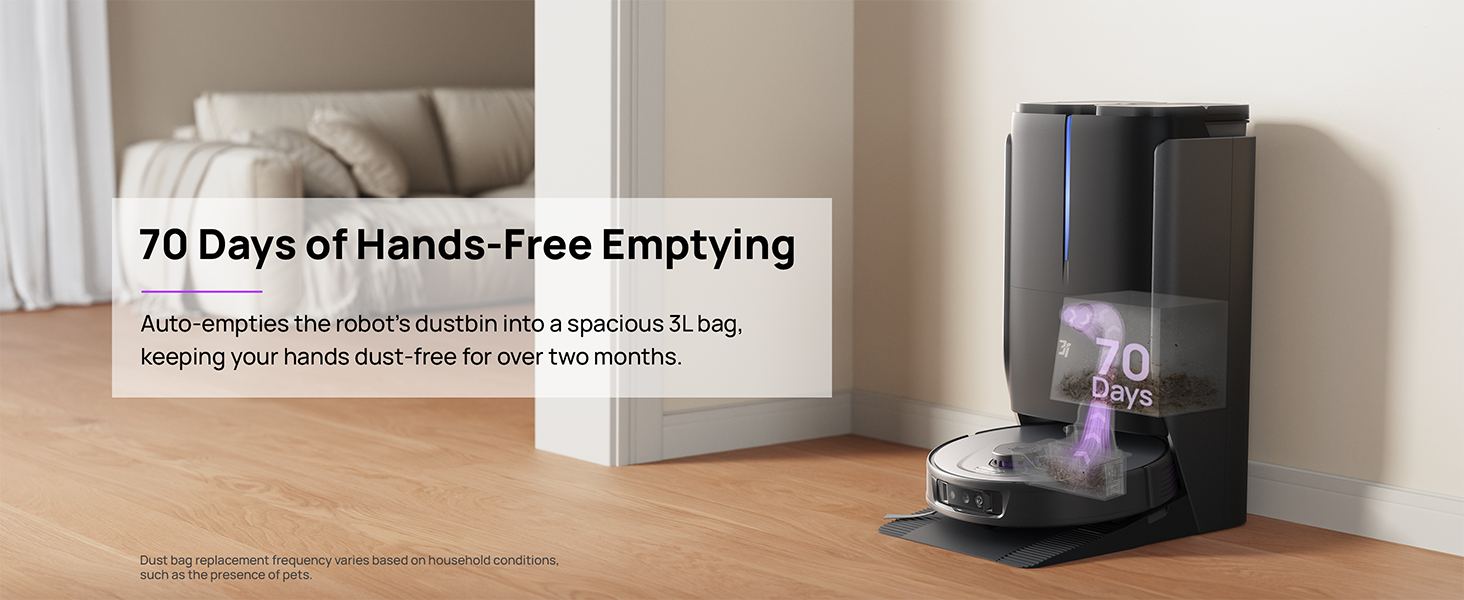
Figure 6.1: Automatic dustbin emptying at the base station.
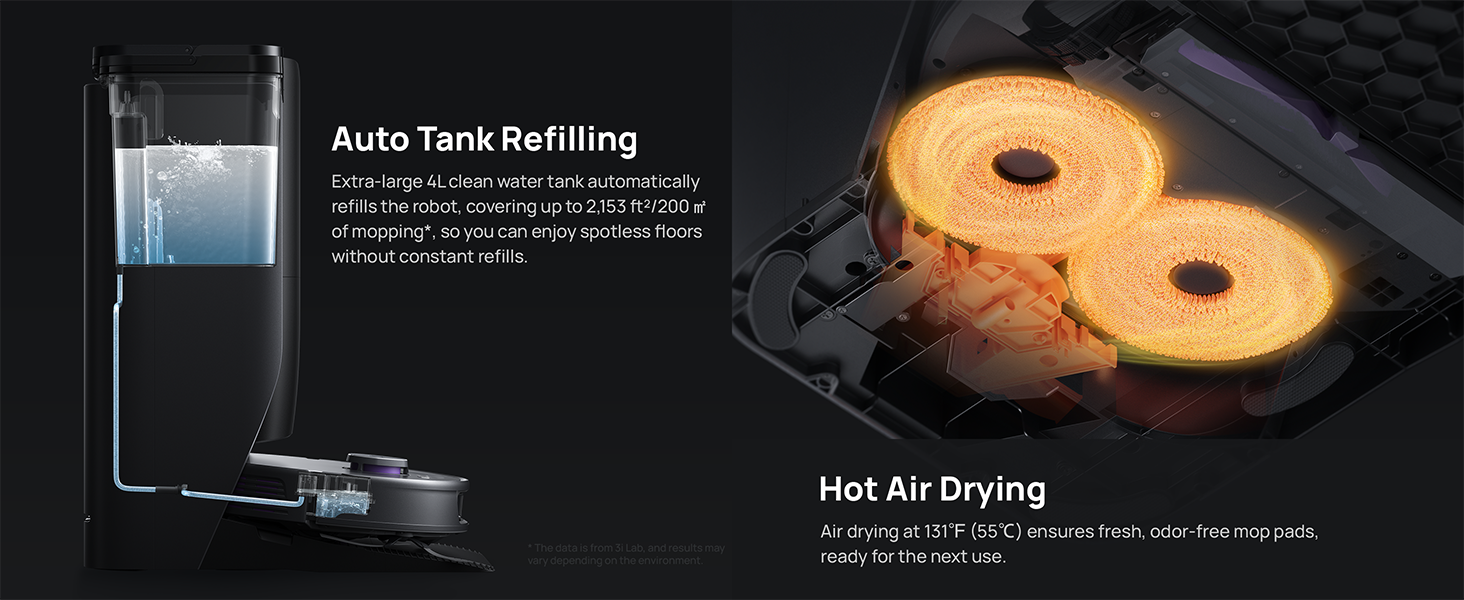
Figure 6.2: Auto tank refilling and hot air drying process.
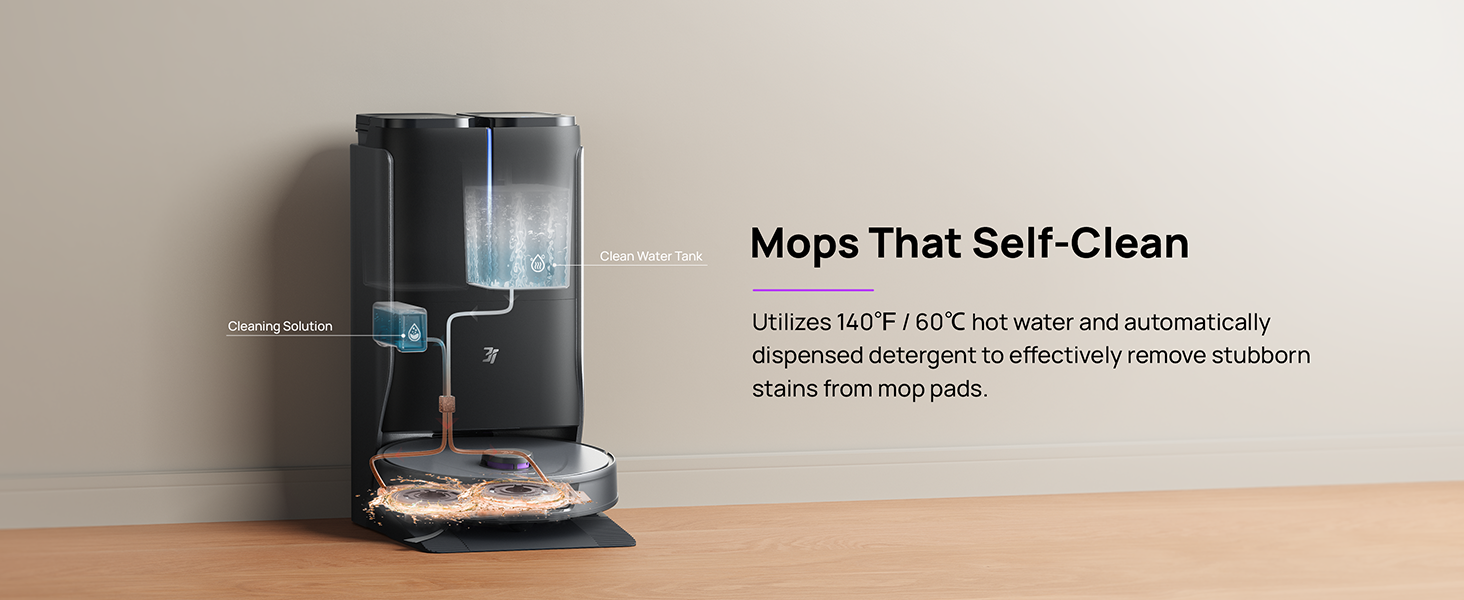
Figure 6.3: Mop self-cleaning function.
6.2 תחזוקת רכיבי הרובוט
- מברשת ראשית: Regularly check the main brush for tangled hair or debris. Use the cleaning tool provided to remove any obstructions. The TangleCut blade helps prevent excessive tangling.
- מברשות צד: Inspect side brushes for wear or damage. Clean them periodically and replace if necessary.
- רפידות סמרטוט: Although self-cleaned, inspect mop pads for excessive wear or stubborn stains. Replace them when their cleaning effectiveness diminishes.
- לְסַנֵן: The filter is washable. Remove and rinse it under running water. Allow it to air dry completely before reinstalling.
- חיישנים: Wipe all sensors (LDS, anti-drop, wall-following, charging contacts) with a clean, dry cloth to ensure proper function.
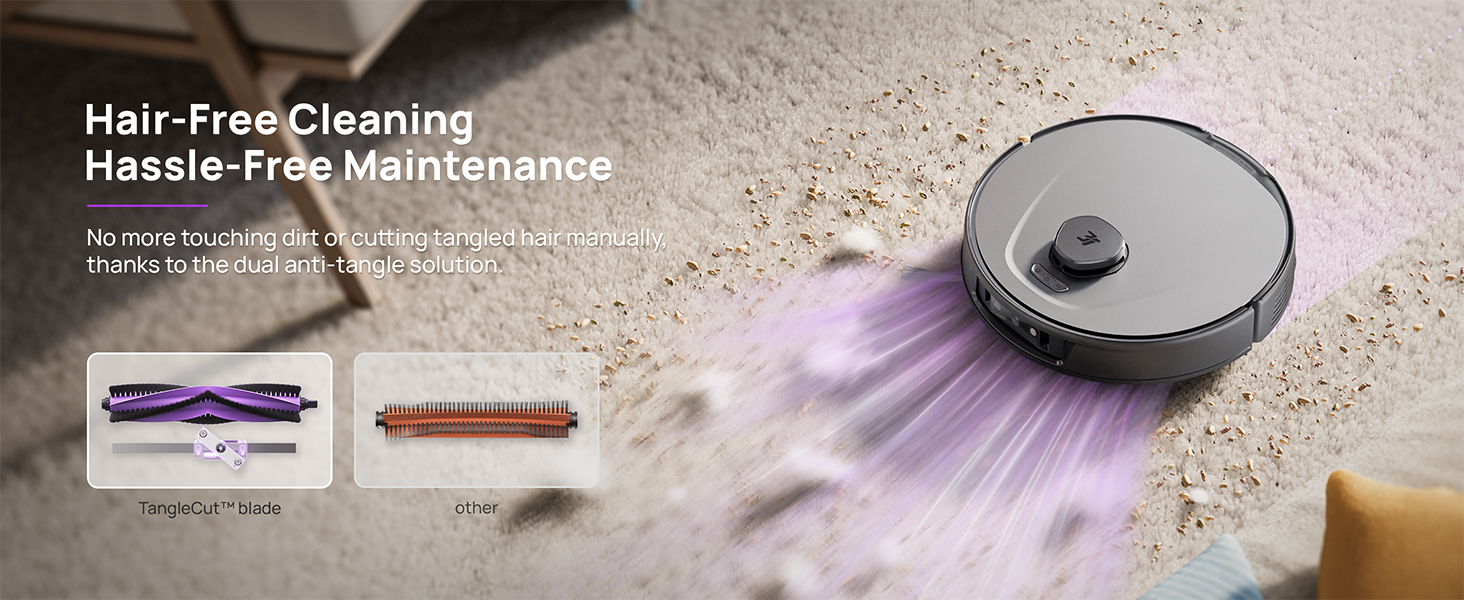
Figure 6.4: Hair-free cleaning with anti-tangle design.
7. פתרון תקלות
If you encounter issues with your 3i P10 Ultra, refer to the following common problems and solutions:
| בְּעָיָה | סיבה אפשרית | פִּתָרוֹן |
|---|---|---|
| הרובוט לא נדלק. | סוללה חלשה; כפתור ההפעלה לא נלחץ נכון. | Place robot on charging dock; Press and hold power button for 3 seconds. |
| הרובוט לא מוצא את עמדת הטעינה. | Dock is obstructed or too far; Poor Wi-Fi signal. | Ensure dock is in an open area; Check Wi-Fi connection. |
| ביצועי הניקוי ירודים. | Dustbin full; Brushes tangled; Filter clogged; Mop pads dirty. | Empty dustbin; Clean brushes; Clean/replace filter; Clean/replace mop pads. |
| רובוט נתקע לעתים קרובות. | מכשולים על הרצפה; חיישנים מלוכלכים. | Clear floor of obstacles; Clean all sensors. |
| בעיות חיבור לאפליקציה. | סיסמת Wi-Fi שגויה; בעיות בנתב; רובוט לא מקוון. | Verify Wi-Fi password; Restart router; Restart robot; Re-pair device in app. |
For further assistance, please refer to the 3i app's help section or contact customer support.
8. מפרטים
| תכונה | פְּרָט |
|---|---|
| מותג | 3i |
| שם הדגם | שואב אבק רובוטי 3i P10 אולטרה |
| מידות מוצר (רובוט) | אורך 13.78 אינץ', רוחב 13.78 אינץ', גובה 3.94 אינץ' |
| מידות מוצר (תחנה) | אורך 12.2 אינץ', רוחב 18.43 אינץ', גובה 23.39 אינץ' |
| משקל פריט | 37.3 פאונד |
| חיי סוללה | דקות 180 |
| סוג מסנן | רָחִיץ |
| המלצת משטח | שטיח, שיש, עץ, אריחים |
| כוח יניקה | 18,000 פאה |
| מערכת ניווט | LDS LiDAR, Dual 3D Structured Light, AI Camera |
| תמיכה ב-Wi-Fi | 2.4G ו-5G |

Figure 8.1: Dimensions of the 3i P10 Ultra Robot and Base Station.
9. אחריות ותמיכה
For warranty information, please refer to the warranty card included with your product or visit the official 3i website. For technical support, troubleshooting beyond this manual, or to inquire about replacement parts, please contact 3i customer service through the contact information provided on their official website or within the 3i app.