
1. הקדמה
This manual provides detailed instructions for the installation, operation, and maintenance of your Ulecoce Keyless Entry Door Lock Deadbolt with Handle Set. This smart lock offers multiple access methods and enhanced security features for your home or office.

Image 1.1: The Ulecoce Keyless Entry Door Lock Deadbolt with Handle Set in satin nickel finish, installed on a dark door.
2. תכונות מוצר
- כניסה ללא מפתח: Supports 100 user codes (97 user, 3 admin), one-time codes, and 2 backup physical keys.
- Smart Access Management: Generate and share temporary or permanent codes for family, house sitters, or guests.
- אבטחה משופרת: Features auto-lock, one-touch locking, anti-peeping code input, and low battery alerts.
- עֲמִידוּת: Designed to withstand extreme temperatures (-4℉ to 140℉) and is IP54 waterproof.
- כּוֹחַ: Operates on 4 AA batteries (not included) with an approximate 180-day lifespan.

תמונה 2.1: נגמרview of the Ulecoce Keyless Entry Door Lock Set highlighting its main features.
3. מפרטים
| תְכוּנָה | פְּרָט |
|---|---|
| מותג | אולקוצ'ה |
| שם הדגם | WZ-U18L-S-0513-TP |
| סוג מנעול | דדבולט |
| חוֹמֶר | מַתֶכֶת |
| צֶבַע | סאטן ניקל |
| מידות פריט (L x W x H) | 1 x 1 x 1 אינץ' |
| משקל פריט | 3.36 פאונד |
| תכונות מיוחדות | Anti-Peeping Password, Auto-Lock, Keyless Entry, One-Touch Lock |
| שימוש מומלץ | דלת קדמית |
| מקור כוח | 4 סוללות AA (לא כלולות) |
| טמפרטורת הפעלה | -4℉ עד 140℉ (-20℃ עד 60℃) |
| לחות הפעלה | 0% עד 95% |
| דירוג עמיד למים | IP54 |
| הסמכה | מאושר על ידי ANSI דרגה 3 |
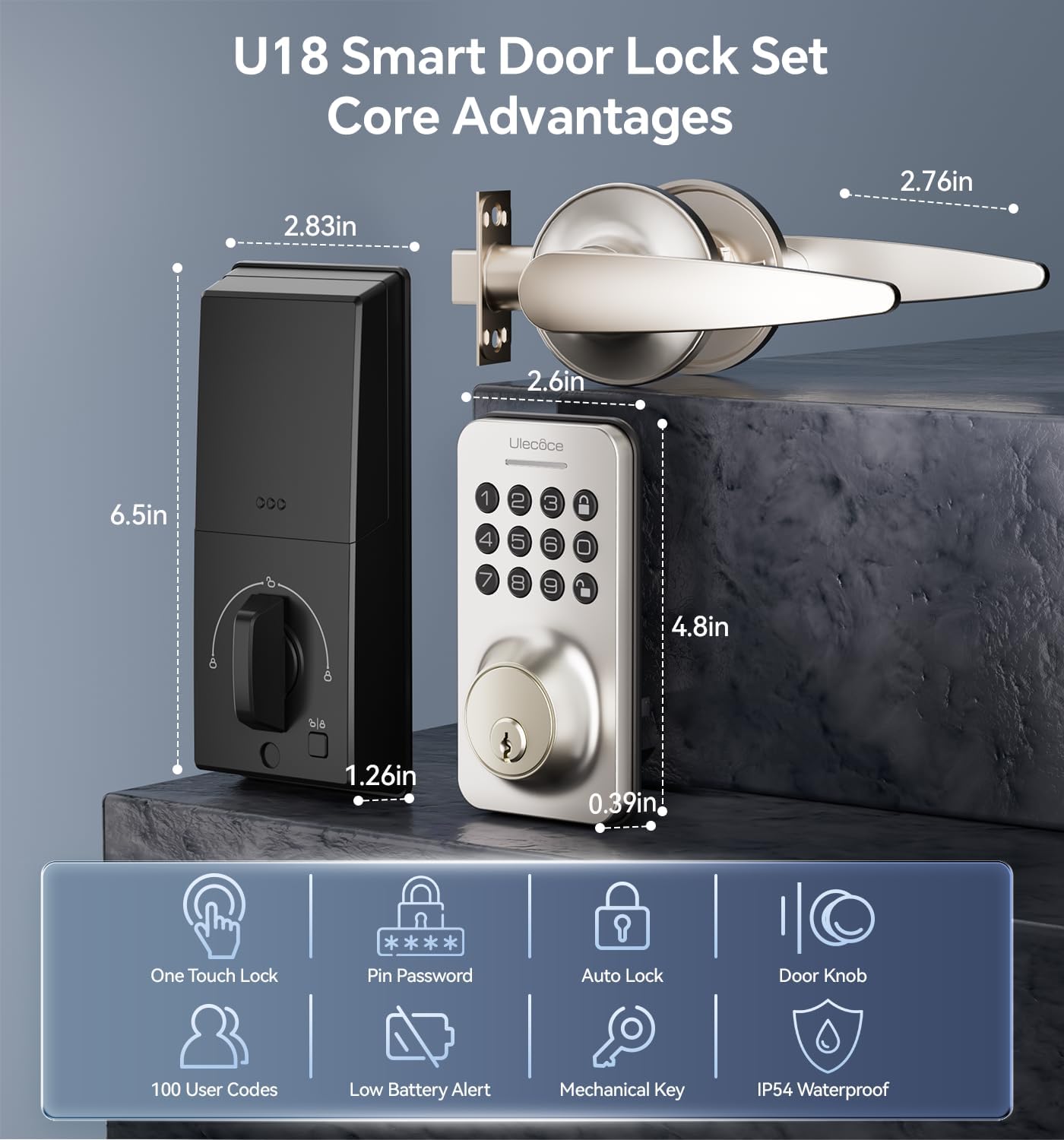
Image 3.1: Dimensions and key features of the Ulecoce U18 Smart Door Lock Set.

Image 3.2: ANSI Grade 3 certification and durability test results for the Ulecoce smart lock.
4. התקנה והתקנה
The Ulecoce Keyless Entry Door Lock is designed for easy installation, requiring only a screwdriver. No additional drilling or professional locksmith services are typically needed. It is compatible with both left and right-hand doors.
4.1 בדיקת טרום התקנה
Before beginning installation, ensure your door meets the compatibility requirements for latch hole and backset dimensions.
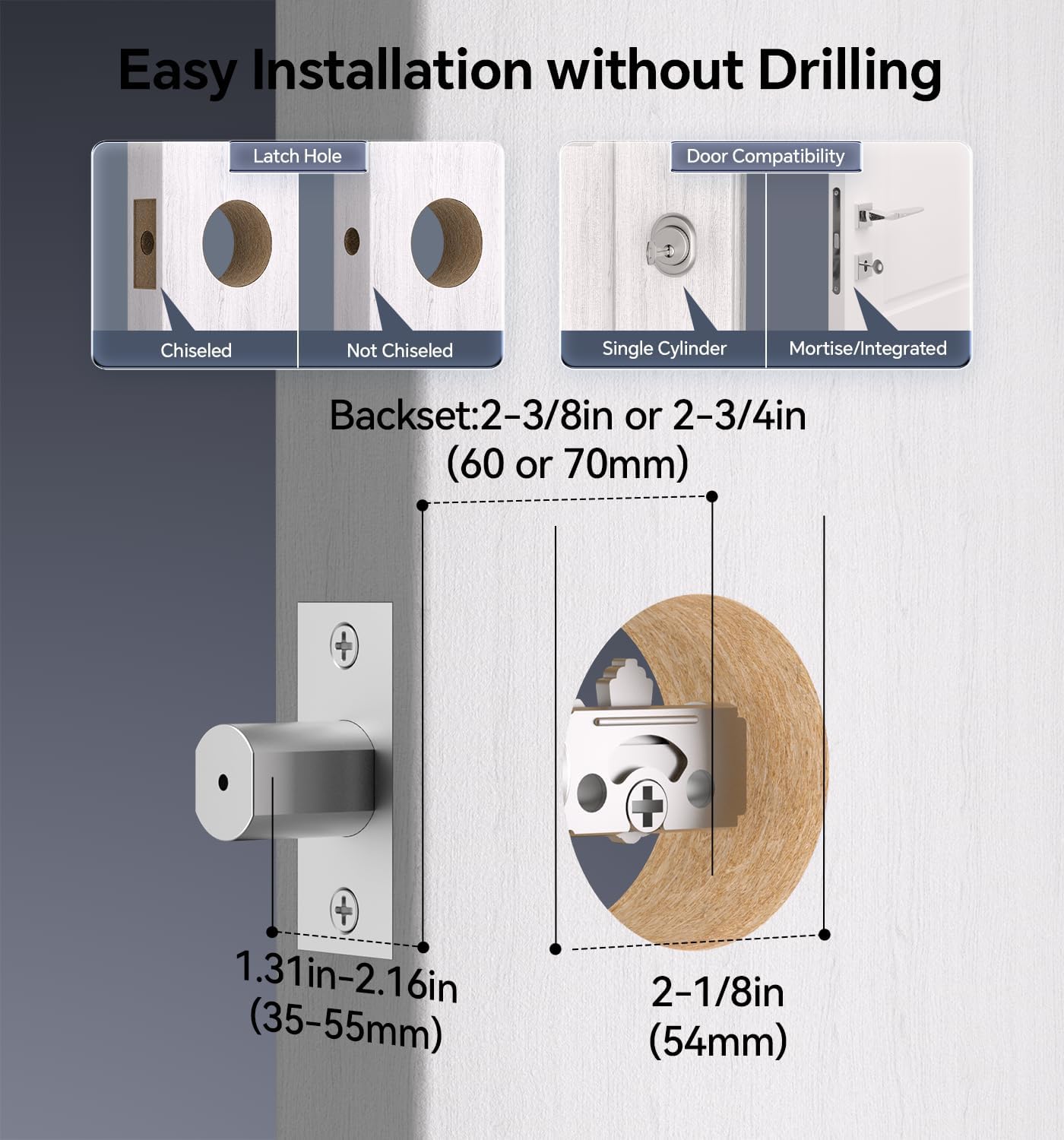
Image 4.1: Door compatibility and latch hole requirements for installation.

Image 4.2: Check door dimensions and lock measurements before purchase.
4.2 שלבי התקנה
- Prepare the door: Ensure the door is properly prepped with the correct bore hole and backset.
- התקן את הבריח ואת לוחית הבטיחות.
- התקן את מכלול לוח המקשים החיצוני.
- Install the interior assembly, connecting the cable.
- Secure the lock with screws.
- הכנס 4 סוללות AA (לא כלולות) לתא הסוללות.
- בדוק את תפקוד המנעול.

Image 4.3: Installation process using a screwdriver.

Image 4.4: The lock is compatible with both left and right-hand door orientations.
5. הוראות הפעלה
The Ulecoce smart lock offers various convenient ways to unlock and manage access.
5.1 שיטות פתיחה
- קוד לוח מקשים: הזן את קוד המשתמש המתוכנת שלך בלוח המקשים.
- One-Time Codes: Generate temporary codes for single use.
- מפתח פיזי: השתמש במפתחות הגיבוי המסופקים לפתיחה ידנית.
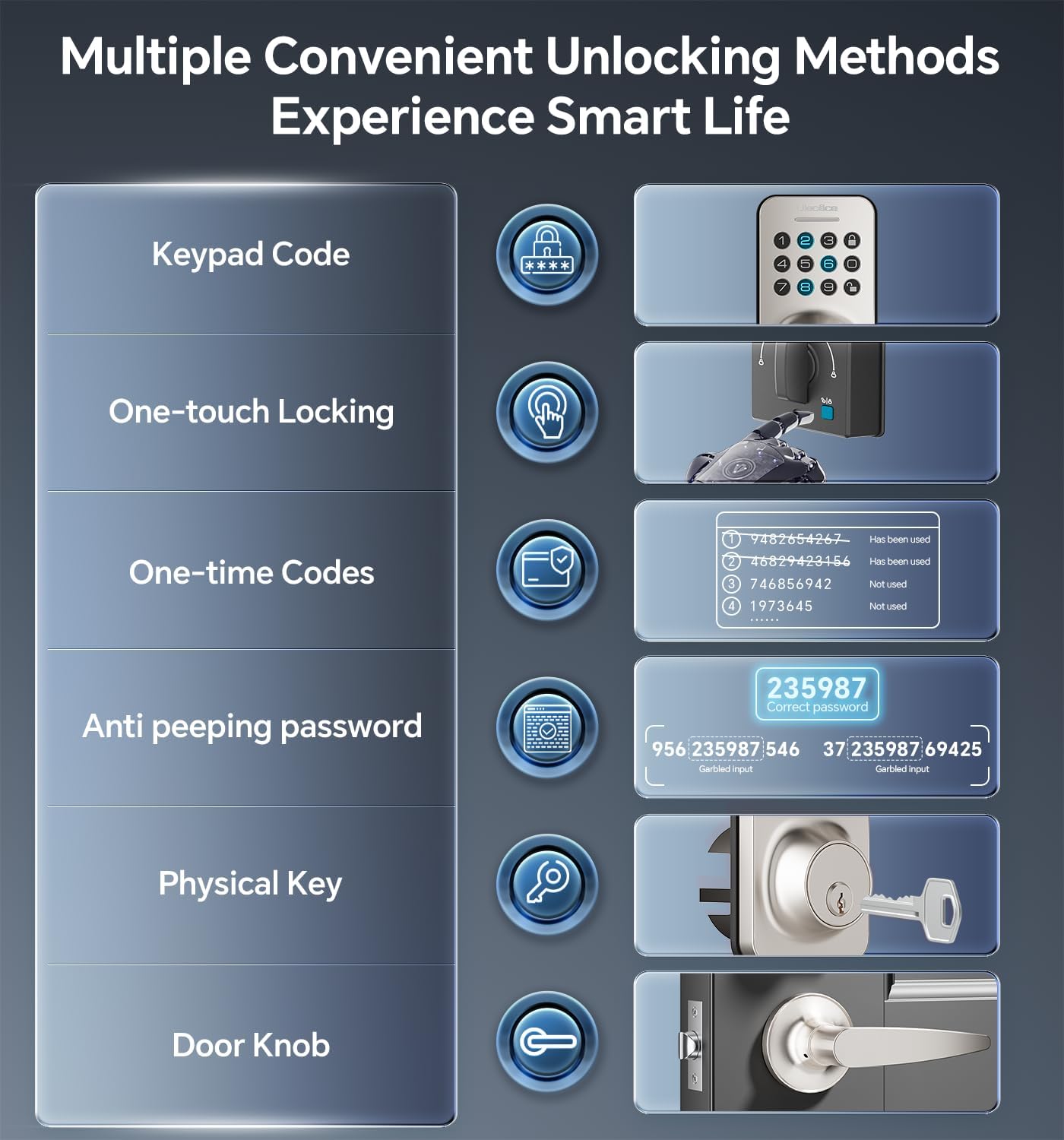
Image 5.1: Multiple methods available for unlocking the door.
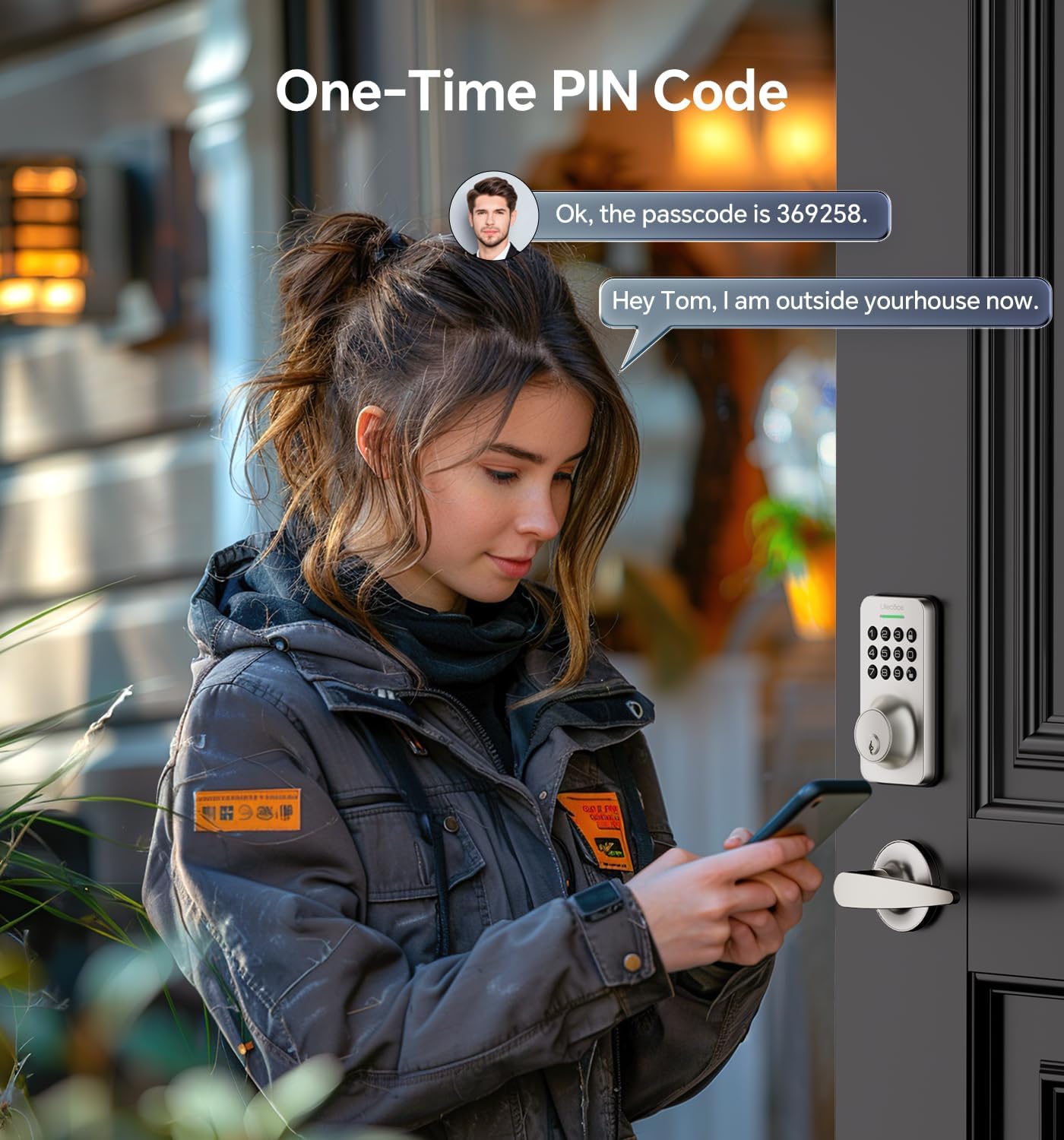
Image 5.2: Using a one-time PIN code for temporary access.
5.2 סיסמה נגד הצצה
To prevent others from guessing your code, you can enter random digits before or after your actual passcode. The lock will recognize the correct consecutive sequence within the input.
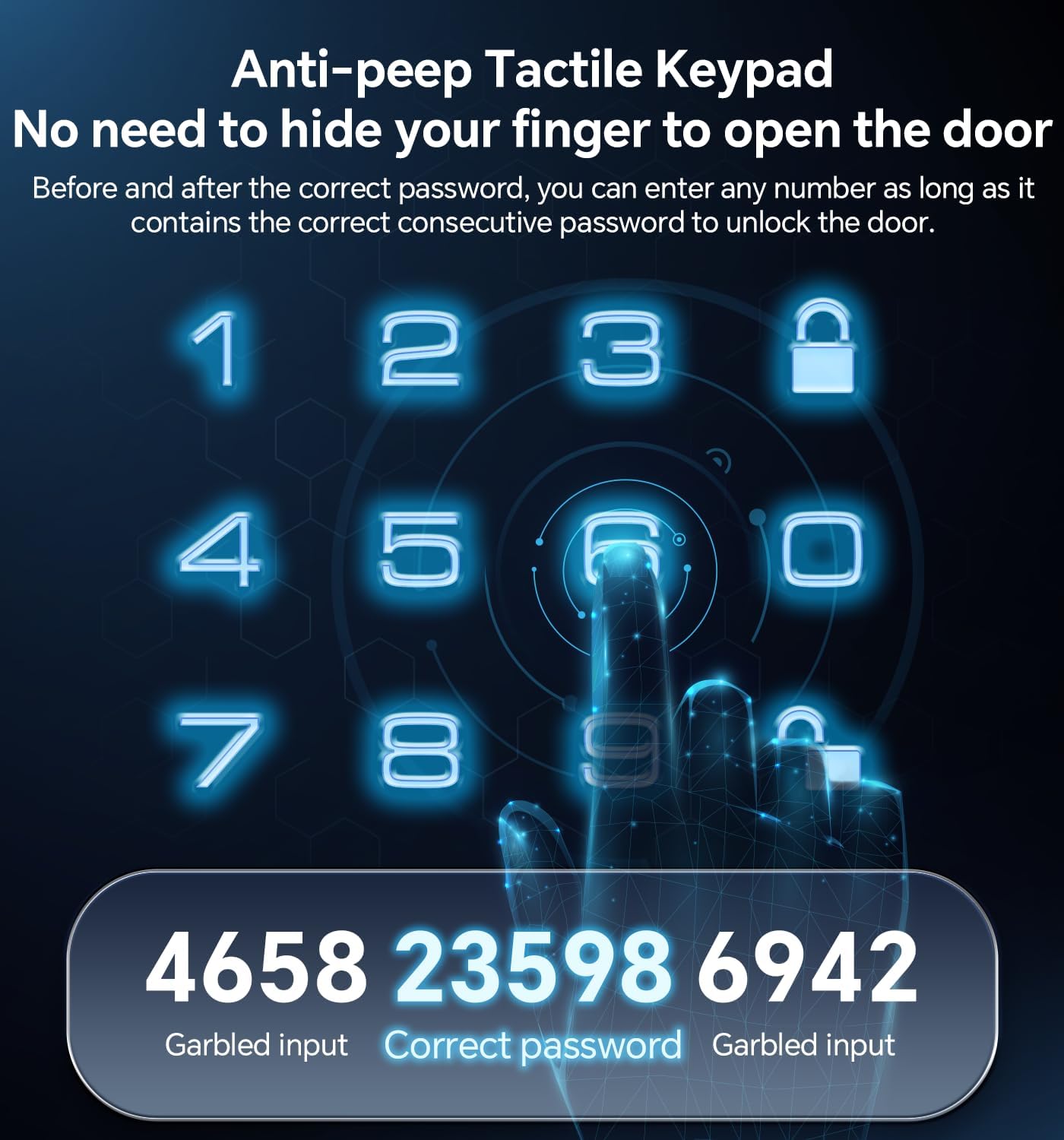
תמונה 5.3: דוגמהample of using the anti-peeping password feature.
5.3 נעילה אוטומטית ונעילה בנגיעה אחת
- נעילה אוטומטית: The lock can be programmed to automatically lock after a set period (10-30 seconds) once the door is closed.
- נעילה בנגיעה אחת: A dedicated button on the interior assembly allows for quick manual locking.

Image 5.4: The auto-lock feature provides convenience and security.
6. תחזוקה
6.1 החלפת סוללה
The lock is powered by 4 AA batteries (not included). When the battery level is low, the lock will provide an alert. Replace all four batteries promptly to ensure continuous operation.

Image 6.1: Low battery indicator and backlit keypad for visibility.
6.2 ניקוי
Clean the lock's exterior with a soft, dry cloth. Avoid using abrasive cleaners or solvents, as these can damage the finish or electronic components.
7. פתרון תקלות
- מנעול לא מגיב: Check battery levels and replace if necessary. Ensure the keypad is clean and free of debris.
- קוד לא עובד: Verify the code is entered correctly. Ensure the anti-peeping feature is used as intended. If issues persist, reset the code or use a physical key.
- נעילה אוטומטית לא מופעלת: Check the auto-lock settings to ensure it is enabled and the timer is set appropriately.
- מפתח פיזי לא עובד: Ensure the key is fully inserted and turned correctly. Check for any obstructions in the keyway.
לסיוע נוסף, אנא עיינו בסעיף אחריות ותמיכה.
8. אחריות ותמיכה
Ulecoce provides a 3 שנות אחריות למוצר and lifetime after-sales service for this product. Our customer support team is available 24/7 via email to assist with any questions or concerns you may have.
Please feel free to contact us for support.