
מָבוֹא
This manual provides detailed instructions for the assembly, operation, and maintenance of your FLEXISPOT One-Piece Standing Desk with Rattan Drawers. Please read this manual thoroughly before installation and use to ensure proper function and safety. Keep this manual for future reference.

Image: The FLEXISPOT One-Piece Standing Desk in black with rattan drawers, featuring a monitor shelf and an integrated control panel.
מידע בטיחות חשוב
כדי למנוע פגיעה או נזק למוצר, יש להקפיד על הנחיות הבטיחות הבאות:
- פעל תמיד לפי הוראות ההרכבה בקפידה.
- הרחק ילדים וחיות מחמד מאזור ההרכבה.
- Use appropriate tools and safety gear during assembly.
- ודא שכל החיבורים מאובטחים לפני הפעלת השולחן.
- אין להעמיס על השולחן. משקל מקסימלי הוא 110 פאונד (450 ק"ג).
- הרחיקו ידיים וחפצים מחלקים נעים במהלך כוונון הגובה.
תוכן החבילה
Verify that all components are present before beginning assembly. The desk ships in two separate packages.
- Desktop with integrated monitor shelf and rattan drawers
- Desk frame and legs
- לוּחַ בַּקָרָה
- מתאם מתח וכבלים
- חומרת הרכבה (ברגים, boltים, כלים)
- מדריך למשתמש

Image: A diagram illustrating the dimensions of the desk components and indicating that the product ships in two separate packages.
הוראות הרכבה
Assembly typically takes approximately one hour. Refer to the separate detailed assembly guide included in your package for step-by-step instructions and diagrams. Ensure all fasteners are correctly identified and used in their designated locations.
- הוצא את כל הרכיבים מהאריזה ובדוק זאת מול רשימת תכולת החבילה.
- Attach the desk legs to the desktop frame using the provided hardware.
- Connect the control panel and motor cables as instructed.
- Secure any cable management components.
- מקמו את שולחן העבודה במיקומו הרצוי.
הגדרה
After assembly, connect the desk to a power source.
- Plug the power adapter into the desk's control box.
- חבר את כבל החשמל לשקע חשמל רגיל.
- The desk is now ready for initial use.
הוראות הפעלה
התאמת גובה
The desk features an electric motor system for smooth height transitions.
- הקש על חץ למעלה כפתור להרמת השולחן.
- הקש על חץ למטה כפתור להורדת השולחן.
- The desk can adjust between 28.9 inches (minimum) and 46.5 inches (maximum).
- The motor operates quietly, typically below 50dB.

Image: The desk shown at its minimum (28.9") and maximum (46.5") adjustable heights.
הגדרות זיכרון מוגדרות מראש
Program up to three preferred height settings for quick adjustments.
- כוונן את שולחן העבודה לגובה הרצוי.
- הקש על M button, then press one of the numbered preset buttons (1, 2, או 3) within 3 seconds to save the current height.
- To recall a saved height, simply press the corresponding numbered preset button.

תמונה: תקריב view of the desk's control panel, highlighting the up/down arrows and memory preset buttons.
מדף מוניטור
The integrated monitor shelf is designed to elevate screens to an ergonomic eye level.
- Place your monitor(s) on the shelf to reduce neck and back strain.
- This helps maintain proper posture during extended work sessions.

Image: Visual comparison of poor posture versus ergonomic sitting and standing postures facilitated by the adjustable desk.
Rattan Drawers
The desk includes both sliding-door desktop compartments and an under-desk drawer for organized storage.
- Use the desktop compartments (47.2"x8.7"x5.5") for easy access to frequently used items.
- The under-desk drawer (23.6"x11.8"x3.9") provides discreet storage for documents or books.
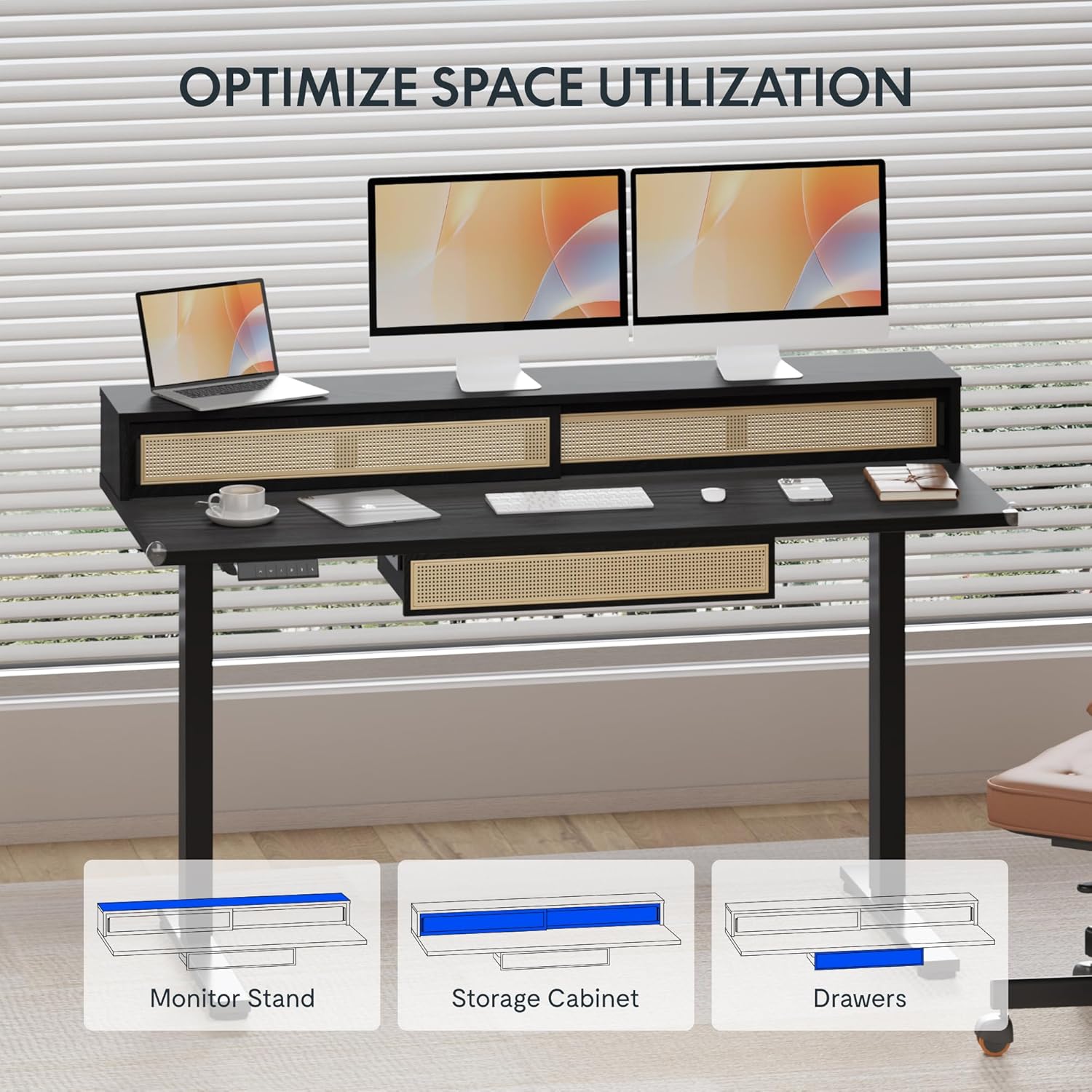
Image: An illustration demonstrating the various storage options, including the monitor stand, storage cabinet, and drawers, for optimal space utilization.
תַחזוּקָה
תחזוקה שוטפת מבטיחה את אורך חייו וביצועיו האופטימליים של שולחן העבודה שלכם.
- ניקוי: נגבו את משטחי השולחן בעזרת מטלית רכהamp בַּד. הימנע מחומרי ניקוי שוחקים או כימיקלים קשים שעלולים לפגוע בגימור.
- בְּדִיקָה: בדקו מעת לעת את כל הברגים והברגים כדי לוודא שהם מהודקים היטב. הדקו מחדש במידת הצורך.
- ניהול כבלים: Ensure cables are neatly organized and not interfering with the desk's movement.
פתרון בעיות
אם אתם נתקלים בבעיות עם שולחן העבודה שלכם, עיינו בפתרונות הנפוצים הבאים:
| בְּעָיָה | סיבה אפשרית | פִּתָרוֹן |
|---|---|---|
| השולחן לא זז או מגיב לבקרות. | Power connection issue, cable disconnected, motor error. | Check power cord connection to outlet and desk. Ensure all motor cables are securely connected. Unplug and replug the power for 10 seconds to reset. |
| השולחן זז לא אחיד או משמיע רעש חריג. | Uneven load, loose connections, obstruction. | Ensure weight is evenly distributed. Check for any obstructions under the desk. Verify all assembly screws are tight. |
| Memory presets are not working. | הגדרות קבועות מראש לא נשמרו כהלכה. | Re-save the desired height settings by pressing 'M' then the preset number within 3 seconds. |
מפרטים
| תכונה | פְּרָט |
|---|---|
| מותג | FLEXISPOT |
| מידות המוצר (D x W x H) | 23.6"D x 47.2"W x 29"H (at lowest point) |
| צֶבַע | שָׁחוֹר |
| חומר בסיס | סגסוגת פלדה |
| סוג החומר העליון | עֵץ |
| גובה מינימלי | 28.9 אינץ' |
| גובה מקסימלי | 46.5 אינץ' |
| מספר המגירות | 1 (under-desk) |
| Enclosed Shelves | 2 (sliding-door desktop compartments) |
| תכונה מיוחדת | Corded electric height adjustment, Memory Presets |
| הרכבה נדרשת | כֵּן |
אחריות ותמיכה
FLEXISPOT provides comprehensive warranty coverage for your standing desk:
- Frame and Motor: כיסוי לשנתיים.
- אֶלֶקטרוֹנִיקָה: כיסוי לשנתיים.
This warranty ensures lasting security for your workspace investment. For customer support, technical assistance, or warranty claims, please refer to the contact information provided in your product packaging or visit the official FLEXISPOT webאֲתַר.