
1. הקדמה
תודה על הרכישהasing the Greadio CD-W16 Multifunction Portable CD Player. This device offers a comprehensive audio experience with multiple playback options including CD, cassette, FM radio, Bluetooth 5.1, USB, AUX, and TF/SD card. Designed for ease of use and portability, it features a rechargeable battery, remote control, and high-quality stereo sound. Please read this manual carefully to ensure proper operation and to fully enjoy all the features of your new audio system.
2. מידע בטיחות
- אין לחשוף את המכשיר לגשם או לחות כדי למנוע שריפה או התחשמלות.
- אל תפתח את ה-casinז. יש לפנות לטיפול באנשי מקצוע מוסמכים בלבד.
- הימנע מהצבת היחידה ליד מקורות חום או באור שמש ישיר.
- השתמש רק במתאם החשמל ובכבלים שצוינו.
- הרחק מהישג ידם של ילדים.
3. תכולת החבילה
- Greadio CD-W16 CD Radio Cassette Player x 1
- כבל AUX x 1
- כבל סוג C x 1
- שלט רחוק x 1
- מדריך למשתמש x 1
4. המוצר נגמרview
The Greadio CD-W16 is a versatile audio system designed for various listening preferences. It combines classic and modern features in a compact, portable design.
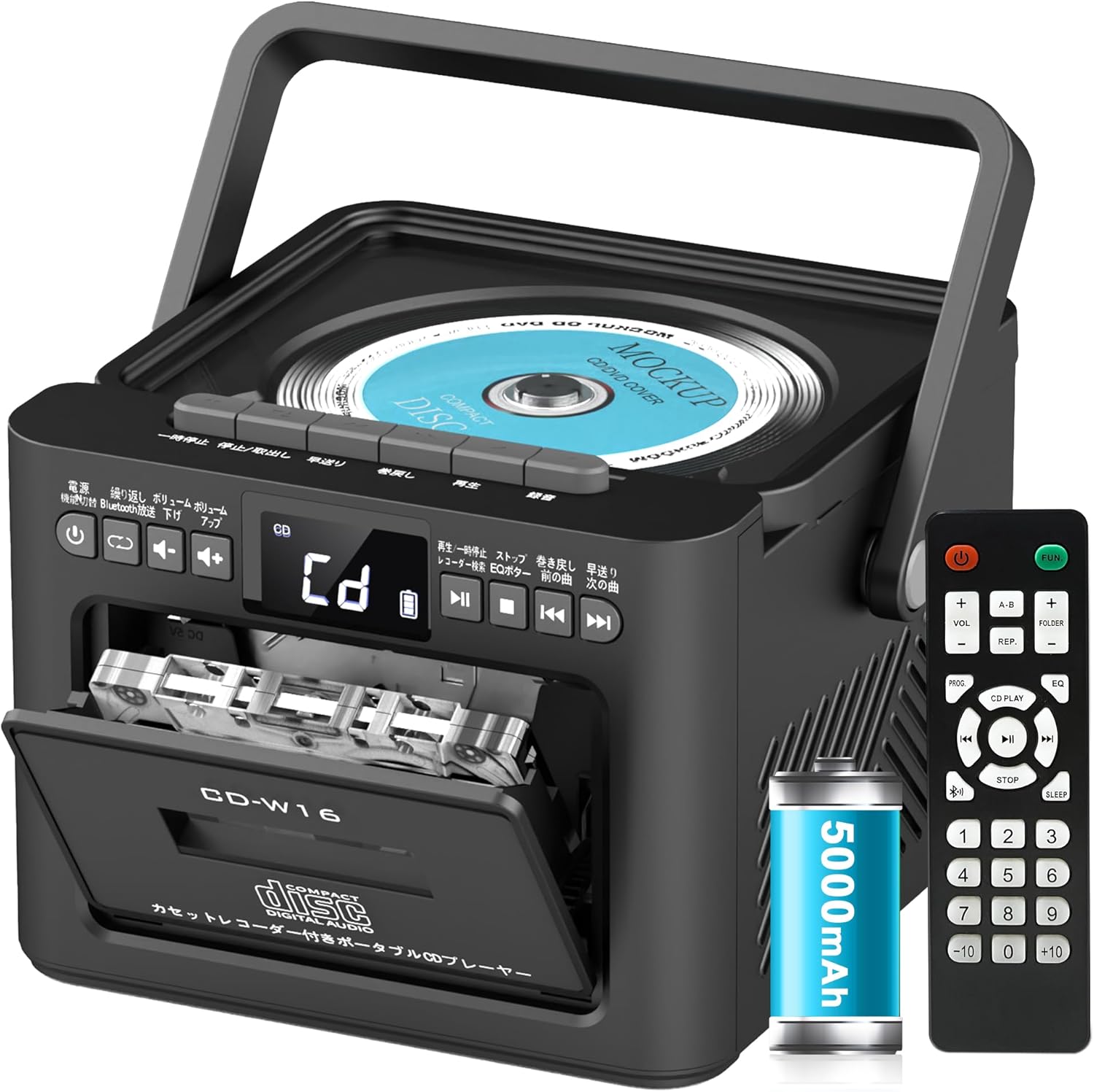
תכונות מפתח כוללות:
- CD Player (CD, CD-R, CD-RW compatible)
- Cassette Player & Recorder
- רדיו FM (76-108 מגהרץ)
- Bluetooth 5.1 (Transmitter & Receiver)
- הפעלת USB
- כניסת AUX
- TF/SD Card Playback
- סוללה נטענת 5000mAh
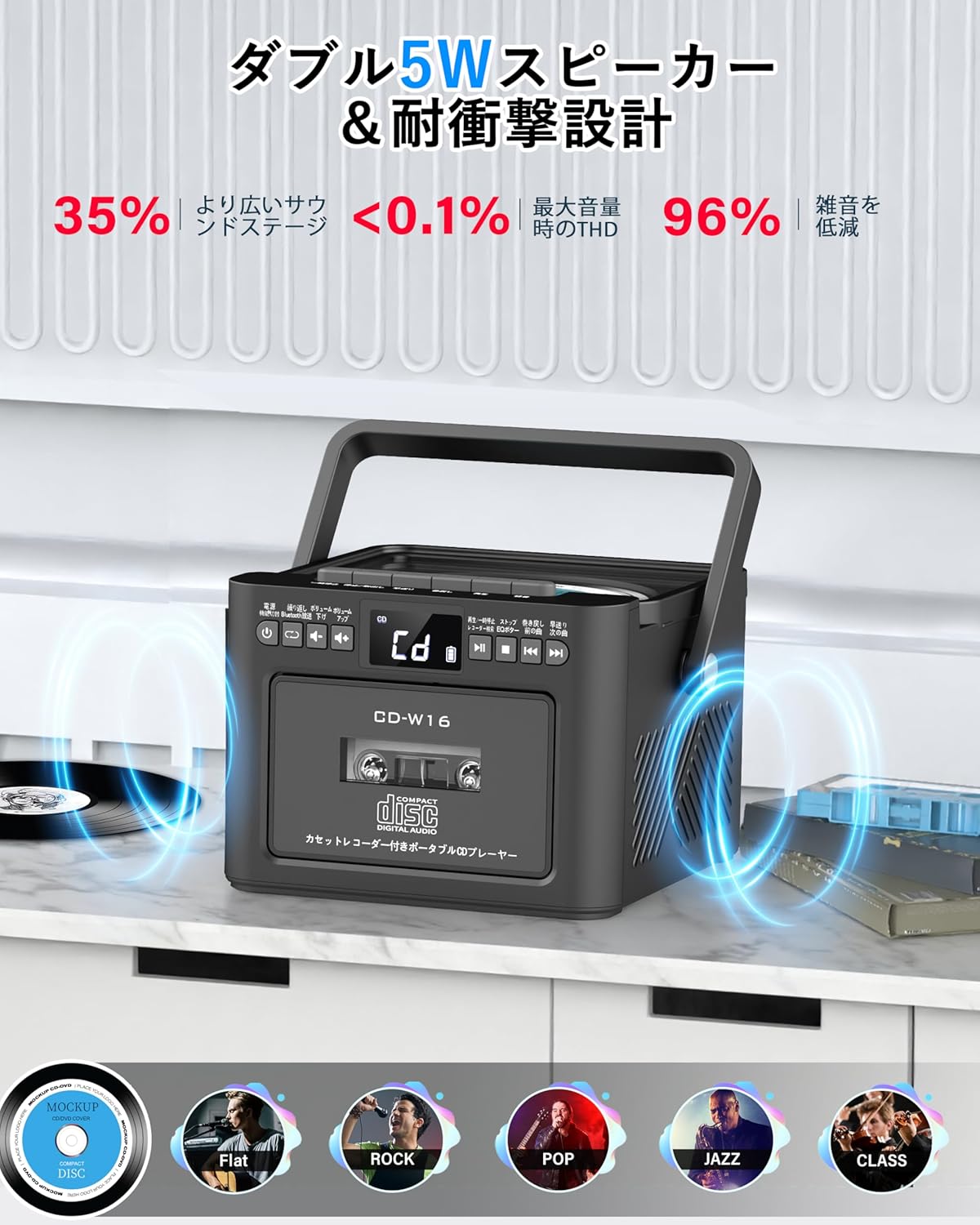
- רמקולי סטריאו כפולים 5W
- שְׁלַט רָחוֹק
- טיימר שינה
- 5 מצבי צליל אקולייזר

5. התקנה
5.1. טעינת הסוללה
The Greadio CD-W16 is equipped with a built-in 5000mAh rechargeable battery. To charge the device:
- Connect the provided Type-C cable to the charging port on the unit.
- Connect the other end of the Type-C cable to a 5V/2A USB power adapter (not included).
- The charging indicator will illuminate. A full charge takes approximately 3 hours and provides up to 16 hours of playback.

5.2. הפעלה/כיבוי
To power on or off the CD player:
- לחץ והחזק את כפתור הפעלה on the unit or the remote control for 2 seconds.
- לחלופין, לחץ לחיצה קצרה על כפתור הפעלה on the remote control to toggle the CD player on/off.
6. הוראות הפעלה
6.1. General Controls (Remote Control)
The remote control provides convenient access to all functions. Refer to the video below for a demonstration of remote control operations.
- הפעלה/כיבוי: לחץ קצר על כפתור הפעלה.
- בחירת מצב פונקציה: לחץ קצר על FUNC. לַחְצָן to cycle through CD, Bluetooth, Radio, Cassette, AUX, USB, and TF/SD card modes.
- התאמת עוצמת הקול: לחיצה קצרה VOL+ or כרך- כפתורים.
- ניווט במסלול: לחיצה קצרה NEXT (>>|) for the next track or PREV (|<<) עבור הרצועה הקודמת.
- הרצה קדימה/אחורה: לחיצה ארוכה NEXT (>>|) for fast forward or PREV (|<<) להרצה אחורה.
- בחירת מסלול ישירה: In CD mode, input 0-9 on the remote to quickly skip to the desired track.
- מצב EQ: לחץ קצר על כפתור EQ to cycle through NORMAL, ROCK, POP, JAZZ, and CLASS sound modes.
- מצב חזרה: לחץ קצר על כפתור REP to cycle through repeat options (ONE, FOLDER, ALL, SHUFFLE, OFF).
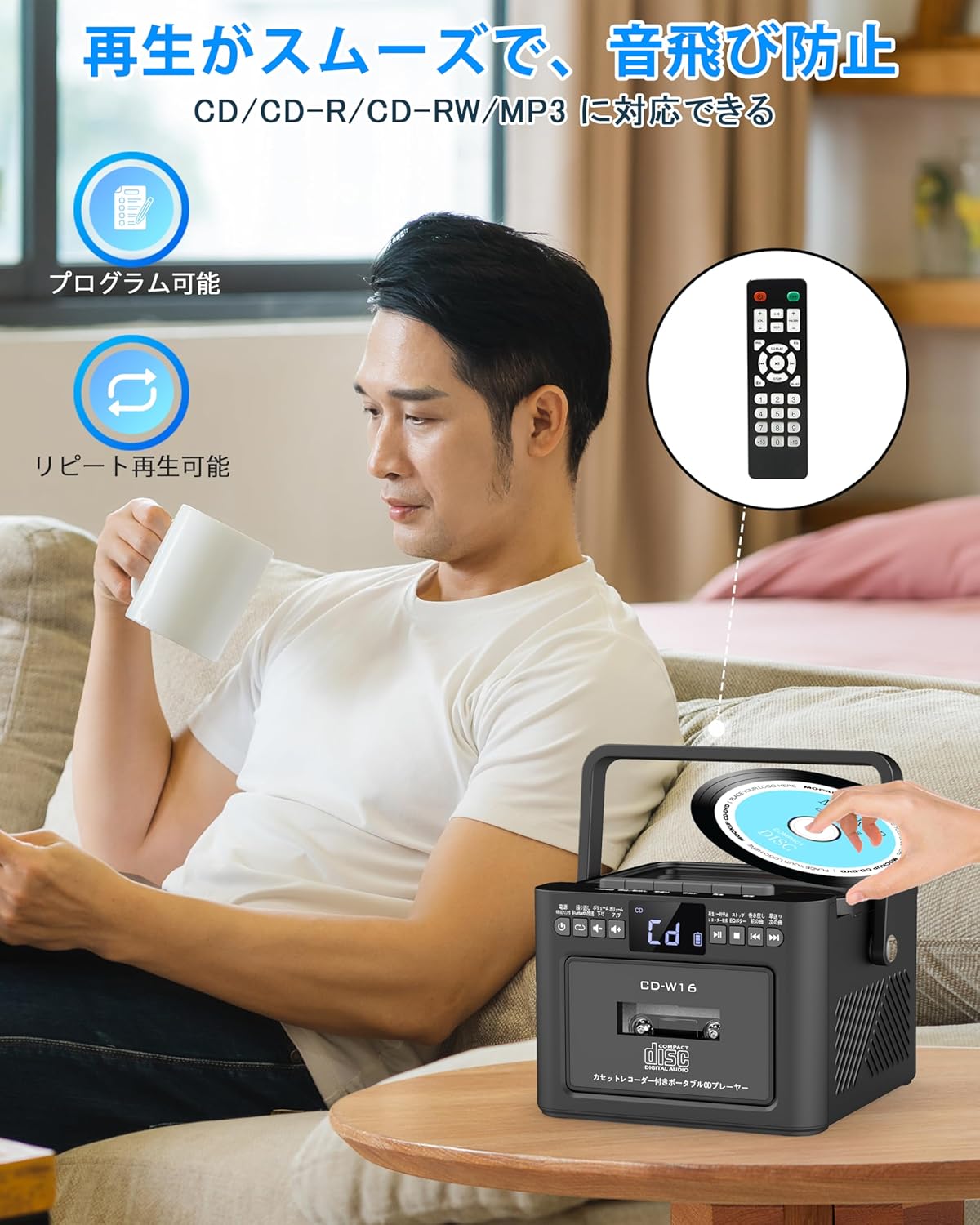
6.2. השמעת תקליטורים
- ודא שהיחידה מופעלת.
- לחץ קצר על FUNC. לַחְצָן to select CD mode. The display will show "CD".
- פתחו את מכסה תא התקליטורים על ידי הרמה עדינה שלו.
- Place a CD (CD, CD-R, CD-RW compatible) onto the spindle with the label side facing up.
- סגור את מכסה תא התקליטורים. התקליטור יתחיל להתנגן באופן אוטומטי.
- השתמש ב- הפעלה/השהיה (||) button for temporary stop/resume.
- לְהִשְׁתַמֵשׁ NEXT (>>|) ו PREV (|<<) כפתורים לניווט במסלולים.
6.3. Cassette Playback & Recording
- לחץ קצר על FUNC. לַחְצָן to select Tape mode. The display will show "TAPE".
- הקש על STOP/EJ. button to open the cassette compartment.
- Insert a cassette tape into the compartment and close the lid.
- הקש על כפתור PLAY to start cassette playback.
- To fast forward or rewind, long press the FFWD or FREW כפתורים בהתאמה.
- To stop playback, short press the STOP/EJ. button.
הקלטת קלטת:
To record audio from other modes (CD, FM Radio, USB, AUX, TF/SD) onto a blank cassette:
- Insert a blank cassette into the cassette compartment.
- Select the desired source mode (e.g., CD, FM Radio).
- לחץ בו זמנית על לְשַׂחֵק ו REC (שיא) buttons. Recording will begin.
- הקש על STOP/EJ. button כדי להפסיק את ההקלטה.

6.4. תפעול רדיו FM
- לחץ קצר על FUNC. לַחְצָן to select FM Radio mode. The display will show the FM frequency.
- הרחב את האנטנה הטלסקופית לקבלת קליטה טובה יותר.
Auto Scan & Preset Stations:
- לחץ לחיצה ארוכה על לחצן סריקה to automatically scan and save available FM stations. The unit can store up to 30 preset stations.
- לחץ קצר על לחצן סריקה to recall preset stations (P01, P02, etc.).
כוונון ידני:
- לחץ קצר על NEXT (>>|) or PREV (|<<) כפתורים כדי לכוון ידנית לתדר הרצוי.

6.5. הפעלת בלוטות '
The Greadio CD-W16 supports Bluetooth 5.1 for both transmitting and receiving audio.
מצב משדר בלוטות':
To transmit audio from the CD player to a Bluetooth speaker or headphones:
- לחץ לחיצה ארוכה על כפתור בלוטות' on the unit or remote to activate Bluetooth transmission mode. The display will show "BT".
- Ensure your Bluetooth receiving device (speaker, headphones) is in pairing mode.
- The CD-W16 will automatically search for nearby Bluetooth devices. Once found, it will connect.

מצב מקלט בלוטות':
To play audio from your smartphone or other Bluetooth device through the CD player's speakers:
- לחץ קצר על FUNC. לַחְצָן כדי לבחור מצב Bluetooth. הצג יציג "BLUE".
- בטלפון החכם או במכשיר ה-Bluetooth שלך, הפעל את Bluetooth וחפש מכשירים זמינים.
- Select "CD-W16" from the list to connect.
- Once connected, you can play music from your device, and the audio will output through the CD-W16 speakers.
6.6. USB & TF/SD Card Playback
The unit supports playback from USB drives and TF/SD cards (up to 32GB, not included).
- לחץ קצר על FUNC. לַחְצָן to select USB mode or TF/SD card mode. The display will show "USB" or "TF" respectively.
- Insert your USB drive into the USB port or your TF/SD card into the card slot.
- The unit will automatically detect and begin playing MP3 audio files.
- השתמש ב- NEXT (>>|) ו PREV (|<<) כפתורים לניווט במסלולים.

6.7. קלט AUX
To play audio from an external device via AUX cable:
- לחץ קצר על FUNC. לַחְצָן to select AUX mode. The display will show "LINE".
- Connect one end of the provided AUX cable to the AUX port on the CD-W16.
- חבר את הקצה השני ליציאת השמע של המכשיר החיצוני שלך (למשל, סמארטפון, נגן MP3).
- Play audio on your external device, and it will be output through the CD-W16 speakers.
6.8. טיימר שינה
The sleep timer allows you to set a duration after which the unit will automatically power off.
- לחץ קצר על כפתור שינה on the remote control. The display will show the current sleep timer setting (e.g., 10, 20, 30 minutes).
- השתמש ב- NEXT (>>|) or PREV (|<<) buttons to adjust the sleep timer duration (10-120 minutes).
- לחץ קצר על כפתור שינה שוב כדי לאשר את ההגדרה.

6.9. EQ Sound Modes
Customize your audio experience with five different EQ sound modes.
- לחץ קצר על כפתור EQ on the unit or remote control to cycle through the available modes: NORMAL, ROCK, POP, JAZZ, and CLASS.
7. תחזוקה
7.1. ניקיון
- נגבו את היחידה במטלית רכה ויבשה. אין להשתמש בחומרי ניקוי שוחקים או ממסים.
- עבור עדשת התקליטור, השתמש בחומר ניקוי עדשות תקליטורים מיוחד.
- Keep the cassette head clean to ensure optimal playback and recording quality.
7.2. אחסון
- יש לאחסן את המכשיר במקום קריר ויבש, הרחק מאור שמש ישיר וטמפרטורות קיצוניות.
- הוציאו סוללות מהשלט רחוק אם לא נעשה בו שימוש למשך תקופות ממושכות.
8. פתרון תקלות
| בְּעָיָה | סיבה אפשרית | פִּתָרוֹן |
|---|---|---|
| אין כוח | Battery depleted or power cable not connected. | Charge the unit or ensure the power cable is securely connected. |
| תקליטור לא מתנגן | CD inserted incorrectly, dirty, scratched, or incompatible format. | Reinsert CD correctly, clean the CD, try a different CD. Ensure it's CD/CD-R/CD-RW. |
| הקלטת לא מתנגנת/מקליטה | Cassette inserted incorrectly, tape damaged, or dirty head. | Reinsert cassette, try a different tape, clean the cassette head. |
| קליטת רדיו FM גרועה | האנטנה לא מורחבת או אזור אות חלש. | פרש את האנטנה הטלסקופית במלואה. נסה למקם מחדש את היחידה. |
| בלוטות' לא מתחבר | Device not in pairing mode, too far, or already connected to another device. | Ensure both devices are in pairing mode and within range. Disconnect from other devices. |
| USB/TF/SD card not recognized | Card/drive not inserted correctly, incompatible format, or damaged. | Reinsert, ensure files are MP3 format, try a different card/drive. |
9. מפרטים
- מותג: גראדיו
- דֶגֶם: CD-W16
- טכנולוגיית קישוריות: AUX, בלוטות', USB
- צֶבַע: שָׁחוֹר
- סוג רמקול: סטריאו
- מקור כוח: מופעל על סוללה
- מכשירים תואמים: טלפונים חכמים, טאבלטים, מחשבים אישיים
- מהtage: 5 W (Dual 5W speakers)
- פורמטי שמע נתמכים: תקליטורים/תקליטורי-ר/תקליטורי-רוו
- מספר רמקולים: 2
- מצב פלט אודיו: סטריאו
- קיבולת סוללה: 5000mAh
- זמן טעינה: כ. 3 שעות
- זמן השמעה: עד 16 שעות
- טווח תדר FM: 76-108 מגה-הרץ
10. אחריות ותמיכה
This product comes with a 1-year manufacturer's warranty. For any issues or support inquiries, please contact Greadio customer service.