
Montech HS02 PRO Glass Black with Fans
MONTECH HS02 PRO ATX Mid-Tower PC Case User Manual
Model: HS02 PRO Glass Black with Fans (HS02PB)
Brand: Montech
1. מידע בטיחות
Please read and understand all safety instructions before installing or using the MONTECH HS02 PRO PC Case. Failure to follow these instructions may result in damage to the product, personal injury, or voiding of the warranty.
- בטיחות חשמל: Ensure all power components are properly grounded and connected. Disconnect power before performing any installation or maintenance.
- טיפול: The case contains tempered glass panels. Handle with care to prevent breakage. Avoid dropping or subjecting the case to strong impacts.
- אוורור: Ensure adequate airflow around the case to prevent overheating. Do not block ventilation openings.
- סְבִיבָה: Operate the case in a dry, stable environment. Avoid extreme temperatures, humidity, and direct sunlight.
- ילדים וחיות מחמד: Keep the product and its components out of reach of children and pets. Small parts can be a choking hazard.
2. תכולת החבילה
Verify that all items listed below are present in your package. If any items are missing or damaged, please contact Montech customer support.
- MONTECH HS02 PRO ATX Mid-Tower PC Case
- קופסת אביזרים (ברגים, אזיקונים, מרווחים וכו')
- מדריך למשתמש (מסמך זה)
- Pre-installed GF120 V2 ARGB Fans (5x)
3. המוצר נגמרview
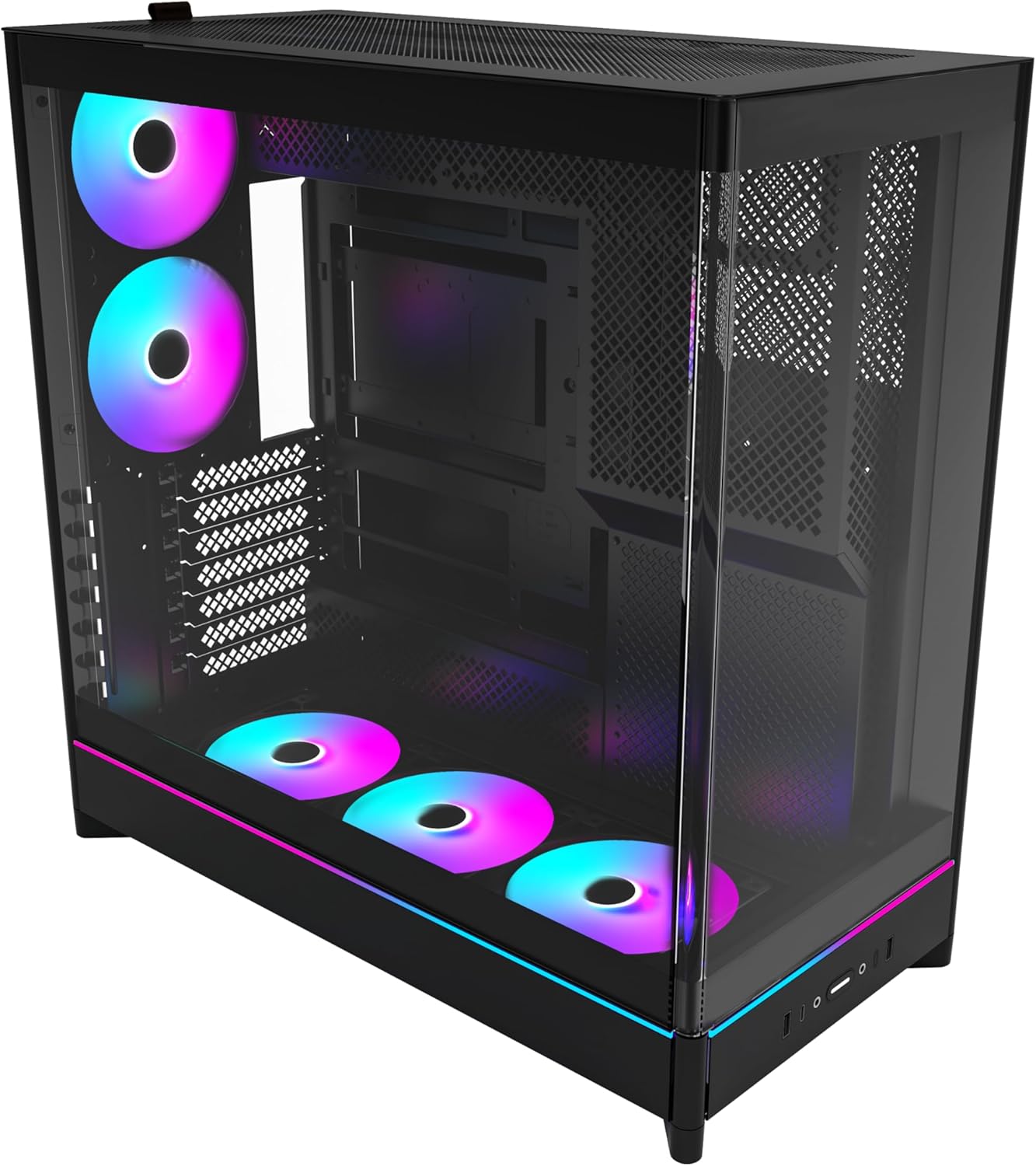
The MONTECH HS02 PRO is a high-airflow ATX mid-tower PC case designed for optimal thermal performance and aesthetic appeal. It features a unique reversible layout and a sturdy curved tempered glass front panel.
תכונות עיקריות:
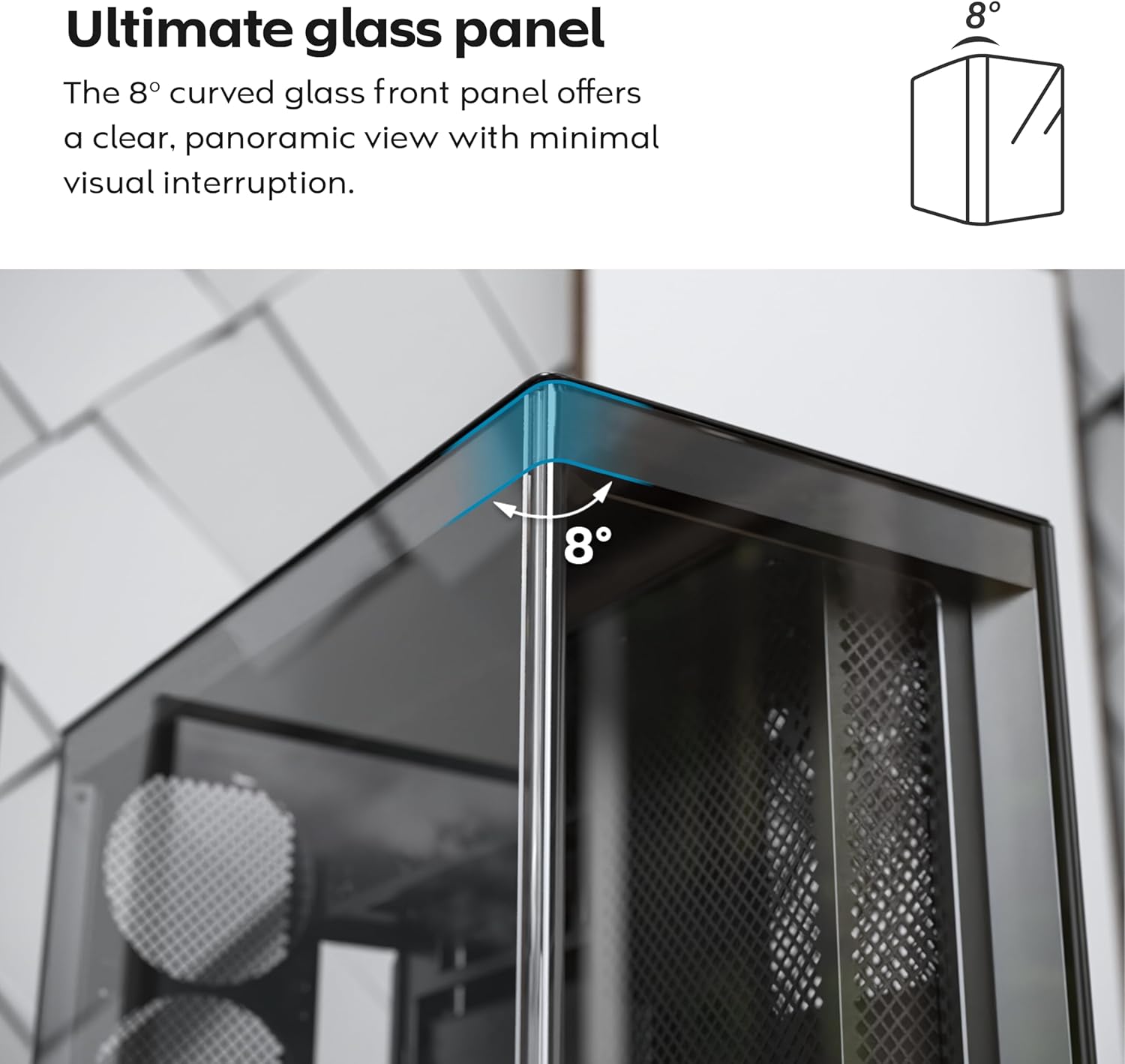
- 8-Degree Curved Glass Panel: The front tempered glass panel features a subtle 8-degree curved edge, offering a distinctive and refined view of the interior with minimal visual distortion.
- עיצוב הפיך: A top-down reversible layout allows the entire setup to be positioned on either the left or right side, showcasing your build from your preferred angle.
- Vertical Ventilation: Bottom air intake and top exhaust create a natural chimney effect for efficient heat dissipation.
- Vertical GPU Ready: Rotatable PCIe slots enable an instant vertical GPU setup without requiring an extra holder or stand.
- Sink-In Design: A recessed bottom fan and motherboard layout maintain a clean, unobstructed side view.
- Pre-installed ARGB PWM Fans: Comes with 5 pre-installed GF120 V2 ARGB fans, fully syncable with motherboard lighting control.
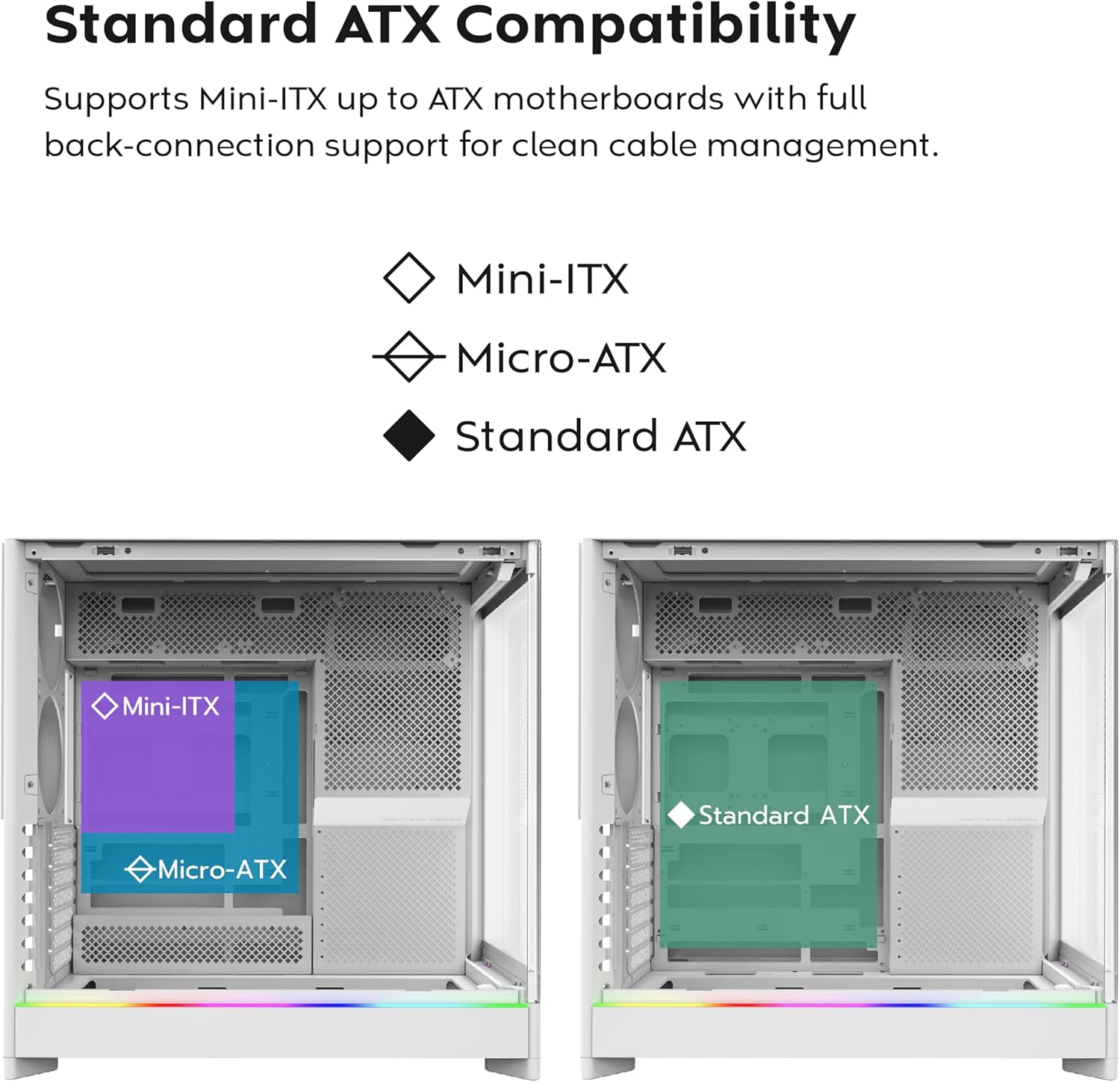
- מוכן לחיבור אחורי של לוח אם: Supports standard and back-connect motherboards, including MSI Project Zero, ASUS BTF, and more.
- Ampקיבולת אחסון: Supports multiple storage drives (HDD/SSD) for flexible and expandable storage options.
זיהוי רכיב:





4. התקנה והתקנה
This section provides general guidelines for setting up your MONTECH HS02 PRO PC case. For detailed component-specific instructions, refer to your motherboard, GPU, and PSU manuals.
4.1 הכנת התיק
- פריקת אריזה: הוצא בזהירות את המארז מאריזתו. בדוק אם יש נזקים במהלך המשלוח.
- הסרת לוח: Gently remove the tempered glass side panel and the rear metal side panel. The tempered glass panel is secured with toolless latches.
- תיבת אביזרים: אתר את קופסת האביזרים בתוך המארז, המכילה את כל הברגים וחומרי ההרכבה הדרושים.
4.2 התקנת לוח אם
- Standoffs: Ensure the correct standoffs are installed for your motherboard form factor (Mini-ITX, Micro-ATX, or ATX). Adjust if necessary.
- I/O Shield: Install your motherboard's I/O shield into the rear opening of the case.
- הַרכָּבָה: Carefully align your motherboard with the standoffs and gently lower it into place. Secure it with the provided screws.
- Back-Connect Motherboards: If using a back-connect motherboard, ensure proper alignment with the designated cutouts for cable routing.
4.3 התקנת יחידת ספק כוח (PSU)
- הַרכָּבָה: The PSU mounts at the bottom of the case. Slide the PSU into its designated bay from the rear.
- אַבטָחָה: אבטחו את ספק הכוח באמצעות ברגים מחלקו האחורי של המארז.
- כבלים: Route necessary power cables through the cable management cutouts to the motherboard and other components.
4.4 התקנת כונן אחסון (כונן קשיח/כונן SSD)
- מפרצי כונן: Utilize the designated drive bays for 3.5" HDDs and 2.5" SSDs.
- הַרכָּבָה: Secure drives using the provided screws or toolless mechanisms where applicable.
4.5 התקנת כרטיס מסך (GPU)
- חריצי PCIe: Remove the necessary PCIe slot covers.
- התקנה אופקית: Insert the GPU into the primary PCIe slot on your motherboard and secure it with screws.
- Vertical Installation (Optional): The rotatable PCIe slots allow for vertical GPU mounting. Rotate the bracket and install your GPU vertically. A PCIe riser cable (not included) is required for vertical mounting.
4.6 Cooling System Installation (Fans/Radiators)
- מאווררים מותקנים מראש: The case comes with 5 pre-installed ARGB PWM fans. Connect their power and ARGB cables to your motherboard or a fan controller.
- Additional Fans/Radiators: The case supports additional fans and radiators at the top, rear, and bottom. Refer to the specifications for supported sizes.
- AIO Cooler: Install your All-in-One (AIO) liquid cooler radiator and fans according to the cooler's instructions, utilizing the available mounting points.
4.7 ניהול כבלים
נצל את ample space behind the motherboard tray and the cable management cutouts to route and secure cables. This improves airflow and aesthetics.
5. הוראות הפעלה
Once all components are installed and secured, you can power on your system.
5.1 הפעלה
- חבר ציוד היקפי: Connect your monitor, keyboard, mouse, and other peripherals to your system.
- כבל חשמל: Connect the PSU power cable to a wall outlet and flip the PSU's power switch to the 'ON' position.
- לחצן הפעלה: Press the power button on the front I/O panel of the case.
5.2 Front I/O Panel Functions
- יציאות USB 3.0: For connecting USB 3.0 compatible devices.
- יציאת USB Type-C: For connecting USB Type-C compatible devices.
- שקע אודיו: לאוזניות או רמקולים.
- שקע מיקרופון: לחיבור מיקרופון.
- לחצן הפעלה: כדי להפעיל או לכבות את המערכת.
- לחצן LED: To cycle through the 29 ARGB lighting modes for the pre-installed fans and integrated light strip.
6. תחזוקה
תחזוקה שוטפת מסייעת להבטיח ביצועים אופטימליים ואורך חיים של רכיבי המחשב שלך.
- ניקוי אבק: Periodically clean dust filters (top, bottom, front) to maintain optimal airflow. Use compressed air to remove dust from internal components.
- ניקוי פאנל זכוכית: השתמשו במטלית רכה ונטולת סיבים ובנוזל ניקוי זכוכית שאינו שוחק כדי לנקות את לוחות הזכוכית המחוסמת. הימנעו מכימיקלים חזקים.
- ניהול כבלים: בדקו מעת לעת את ניתוב הכבלים כדי לוודא שאין כבלים שחוסמים את זרימת האוויר או את להבי המאוורר.
- בדיקת מאוורר: Ensure all fans are spinning freely and quietly. Clean fan blades if dust buildup is significant.
7. פתרון תקלות
This section addresses common issues you might encounter. For more complex problems, consult Montech customer support or a qualified technician.
בעיות ופתרונות נפוצים:
| בְּעָיָה | סיבה אפשרית | פִּתָרוֹן |
|---|---|---|
| המערכת לא נדלקת. | PSU switch off, power cables loose, faulty PSU/motherboard. | Ensure PSU switch is ON. Check all power connections (24-pin, CPU, GPU). Test PSU if possible. |
| Fans are not spinning or RGB is not working. | Fan cables disconnected, ARGB cables disconnected, faulty fan/controller. | Verify fan power and ARGB headers are securely connected to motherboard/controller. Use the LED button to cycle modes. |
| זרימת אוויר לקויה או טמפרטורות גבוהות | Dust buildup, obstructed vents, incorrect fan orientation. | Clean dust filters and internal components. Ensure fans are oriented correctly for intake/exhaust. Check for cable obstructions. |
| Front I/O ports not functioning. | Front panel connectors loose or incorrectly connected to motherboard. | Refer to your motherboard manual to ensure all front panel headers (USB, audio) are correctly connected. |
8. מפרטים
Detailed technical specifications for the MONTECH HS02 PRO ATX Mid-Tower PC Case.
| תכונה | מִפרָט |
|---|---|
| שם הדגם | HS02 PRO Glass Black with Fans |
| מספר דגם | HS02PB |
| סוג מקרה | מגדל אמצע |
| תאימות לוח אם | ATX, Micro-ATX, Mini-ITX (with back-connect support) |
| מידות (LxWxH) | 32 x 52.4 x 58.8 אינץ' (כ-81.3 x 133.1 x 149.4 ס"מ) |
| משקל פריט | 24.2 פאונד (כ-10.98 ק"ג) |
| פאנל קדמי | Curved Tempered Glass (8-degree) |
| מאווררים מותקנים מראש | 5x GF120 V2 ARGB PWM Fans |
| שיטת קירור | Air (Vertical Ventilation / Chimney Effect) |
| סוג הרכבה של ספק כוח | הר תחתון |
| יציאות קלט / פלט קדמיות | 2x USB 3.0, 1x USB Type-C, Audio, Mic, Power Button, LED Button |
| אישור GPU | Up to 420mm (supports vertical GPU with rotatable PCIe slots) |
| מפרצי אחסון | Multiple HDD/SSD support |
| צֶבַע | שָׁחוֹר |
9. אחריות ותמיכה
למידע על אחריות ותמיכה טכנית, אנא עיינו באתר הרשמי של Montech webאתר או צרו קשר ישירות עם שירות הלקוחות שלהם. שמרו את הוכחת הרכישה שלכם לצורך תביעות אחריות.
- מונטק רשמי Webאֲתַר: www.montechpc.com
- שֵׁירוּת לָקוֹחוֹת: עיין ב website for contact details, including email and phone support.
Ask a question about this manual
Ask about setup, troubleshooting, compatibility, parts, safety, or missing instructions. Manuals+ will review the question and use this page’s manual context to help answer it.