
1. המוצר נגמרview
The Attoe AK680 is a wired mechanical gaming keyboard designed for performance and customization. It features a compact 60% layout, RGB backlighting, hot-swappable switches, and durable double-shot PBT keycaps. This manual provides essential information for setting up, operating, and maintaining your keyboard.

Figure 1: Attoe AK680 Mechanical Gaming Keyboard.
2. תכולת החבילה
ודא שכל הפריטים נמצאים בחבילה:
- Attoe AK680 Mechanical Gaming Keyboard
- כבל USB-C
- פולר Keycap
- Switch Puller (often integrated with keycap puller or separate)
- מדריך למשתמש (מסמך זה)
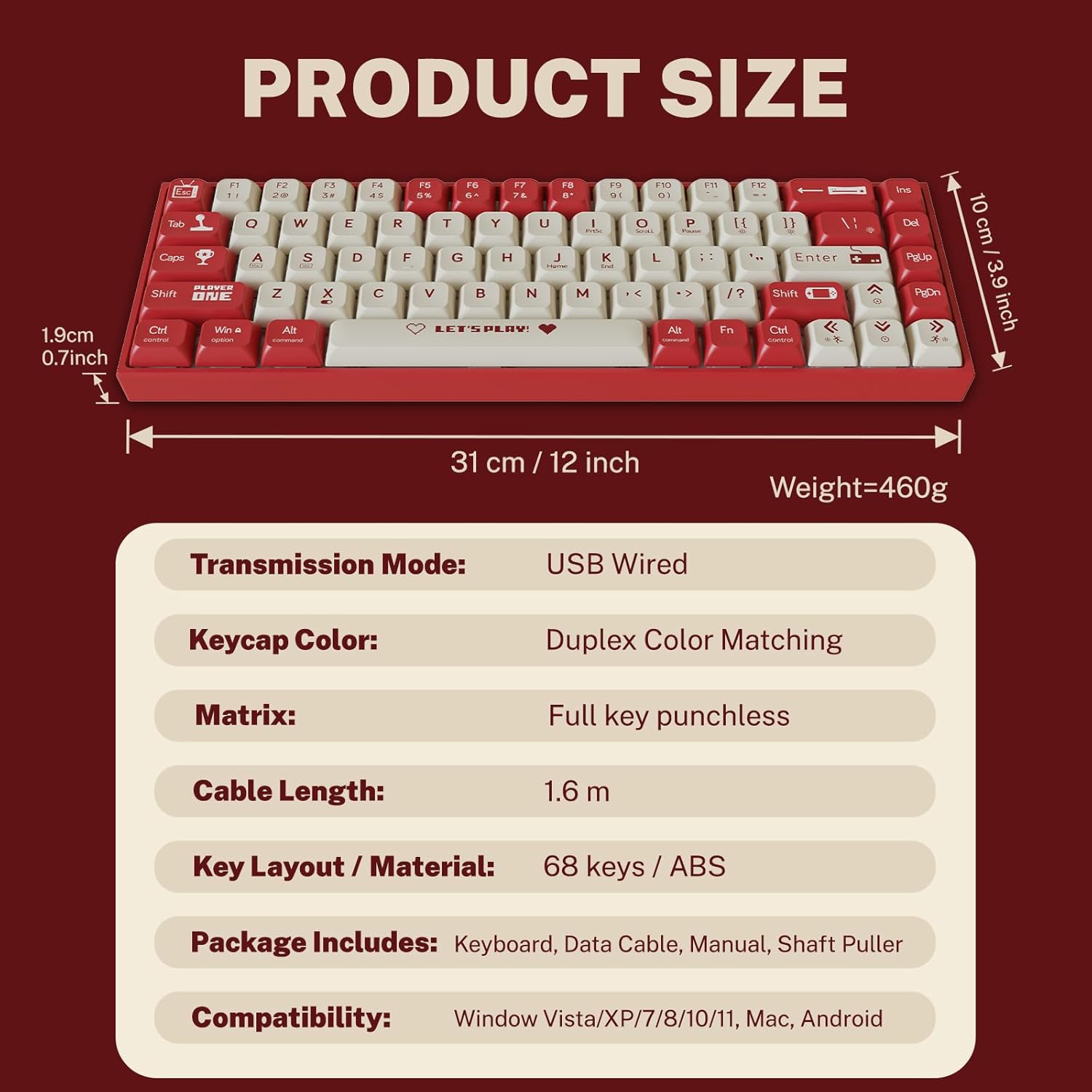
Figure 2: Package contents and product dimensions.
3. הוראות התקנה
3.1 חיבור המקלדת
- Locate the USB-C port on the back or side of the keyboard.
- חבר קצה אחד של כבל ה-USB-C המצורף ליציאת ה-USB-C של המקלדת.
- Connect the other end of the USB-A connector to an available USB port on your computer.
- מערכת ההפעלה שלך תזוהה אוטומטית עם המקלדת. בדרך כלל לא נדרשים מנהלי התקנים נוספים לתפקוד בסיסי.
3.2 תאימות מערכת
The Attoe AK680 keyboard is compatible with the following operating systems:
- Windows Vista / XP / 7 / 8 / 10 / 11
- macOS
- דְמוּי אָדָם

Figure 3: Multi-system compatibility of the keyboard.
4. הוראות הפעלה
4.1 פונקציות בסיסיות של המקלדת
The AK680 features a 68-key layout, providing essential keys while maintaining a compact form factor. All keys support anti-ghosting, ensuring accurate input even during rapid key presses.

Figure 4: The 68-key layout for efficient use.
4.2 תאורה אחורית של RGB
The keyboard features 16.8 million color RGB backlighting with various effects. Specific key combinations (often involving the Fn key) are used to cycle through lighting modes, adjust brightness, and change colors. Refer to the quick start guide or product page for detailed key combinations for lighting control.

Figure 5: RGB Backlighting in operation.
4.3 מתגים הניתנים להחלפה חמה
The AK680 supports hot-swappable 3-pin and 5-pin mechanical switches. This allows you to easily change switches without soldering, customizing the typing feel to your preference. Use the included switch puller for safe removal and installation.
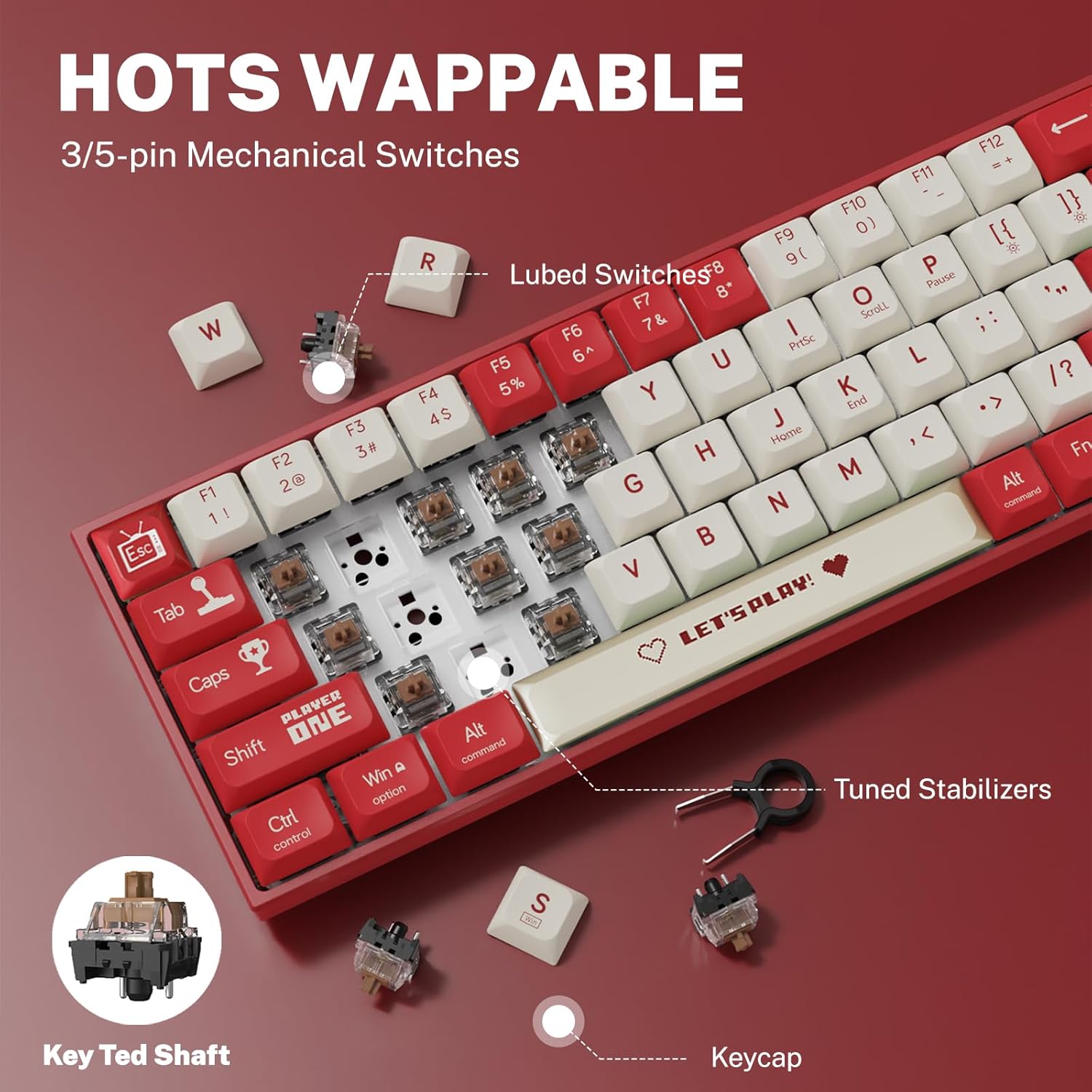
איור 6: מנגנון מתג הניתן להחלפה חמה.
5. תחזוקה
5.1 ניקוי המקלדת
- ניקיון כללי: השתמשו במטלית רכה ויבשה כדי לנגב את פני השטח של המקלדת. במקרה של לכלוך עיקש, נגבו מעטampen את המטלית עם מים או חומר ניקוי עדין ולא שוחק.
- Between Keycaps: השתמש באוויר דחוס כדי להסיר אבק ופסולת בין מכסי המקשים.
- ניקוי כיפות המקשים: For thorough cleaning, remove keycaps using the provided keycap puller. Wash keycaps with mild soap and water, rinse thoroughly, and ensure they are completely dry before reattaching.
5.2 החלפת מכסי מקשים ומתגים
The AK680's hot-swappable design allows for easy replacement of keycaps and switches.
- הסרת מכסי מקשים: Use the keycap puller to gently grip and lift keycaps straight up.
- הסרת מתגים: After removing the keycap, use the switch puller to carefully grip the top and bottom clips of the switch and pull it straight out.
- התקנת מתגים: Align the new switch's pins with the holes on the PCB. Press down firmly until the switch clicks into place. Ensure pins are not bent.
- התקנת מקשים: Align the keycap with the switch stem and press down gently until it is seated securely.

Figure 7: Components of a mechanical switch and tools for maintenance.
6. פתרון תקלות
- המקלדת לא מגיבה:
- ודא שכבל ה-USB-C מחובר היטב גם למקלדת וגם למחשב.
- נסה לחבר את המקלדת ליציאת USB אחרת במחשב שלך.
- בדוק את המקלדת במחשב אחר כדי לשלול בעיות ספציפיות למערכת.
- מפתחות לא נרשמים:
- Remove the keycap and switch for the affected key. Reinstall the switch, ensuring it is properly seated and its pins are not bent.
- Clean any debris that might be obstructing the switch mechanism.
- תאורת RGB אחורית לא עובדת:
- Check if the backlighting is turned off or set to minimum brightness using the keyboard's function keys.
- ודא שהמקלדת מקבלת מספיק חשמל מיציאת ה-USB.
7. מפרטים
| תכונה | פְּרָט |
|---|---|
| מספר דגם | AK680 |
| מותג | Attoe |
| סוג חיבור | חוטי (USB-C) |
| מספר מפתחות | 68 מפתחות |
| טכנולוגיה מפתח | Mechanical Shaft (Red/Teal Shaft), Hot-Swappable (3-pin/5-pin) |
| חומר Keycap | PBT כפול |
| תאורה אחורית | RGB (16.8 מיליון צבעים) |
| אנטי רפאים | Full Keys Anti-Ghosting |
| אורך כבל | 1.6 מטר |
| מידות המוצר | 12 x 3.9 x 0.7 אינץ' (31 x 10 x 1.9 ס"מ) |
| משקל פריט | 1.01 פאונד (460 גרם) |
| תְאִימוּת | Windows Vista/XP/7/8/10/11, macOS, Android |
| פונקציה עמידה למים | IPX4 rated protection (splash resistant) |
8. אחריות ותמיכה
Attoe provides a אחריות ל-12 חודשים for the AK680 Mechanical Gaming Keyboard from the date of purchase.
If you encounter any problems or have questions regarding your product, please contact Attoe customer service. We are committed to providing the best service and will respond within 24 hours to assist you.
For support, please refer to the contact information provided with your purchase or visit the official Attoe webאֲתַר.