
1. הקדמה
The BOSEAN BH-W01 is a portable 3-in-1 Electromagnetic Field (EMF) meter designed for detecting Electric Field (EF), Magnetic Field (MF), and Radio Frequency (RF) radiation. This device features an integrated sensor for accurate signal capture and a 2.4-inch TFT color display for intuitive data visualization. It is suitable for use in various environments, including homes, offices, computer rooms, and communication base stations, to identify and manage radiation sources.

איור 1: חֲזִית view of the BOSEAN BH-W01 Portable 3-in-1 EMF Meter, showing its display and control buttons.
2. תכונות מוצר
- 3-in-1 EMF Detection: Measures Electric Field (EF), Magnetic Field (MF), and Radio Frequency (RF) with high precision.
- תצוגה אינטואיטיבית: Features a 2.4-inch TFT color screen for real-time, maximum, and average value display, along with dynamic line graphs for trend visualization.
- מצבי אזעקה מרובים: Supports audible, LED light, vibration, and on-screen alarms. Numeric values and curves change color when thresholds are exceeded.
- יישום רחב: Suitable for measuring radiation levels from electronic devices like mobile phones, routers, microwaves, and identifying excessive radiation sources in various environments.
- סוללה נטענת: Equipped with an 1800mAh Lithium-ion battery, rechargeable via Type-C port.
- כיבוי אוטומטי: Configurable auto-shutdown timer (e.g., 15 minutes) to conserve battery.

איור 2: Illustration of the BOSEAN BH-W01's 3-in-1 measurement capabilities for Electric Field (EF), Magnetic Field (MF), and Radio Frequency (RF).
3. הגדרה וטעינה
3.1 טעינה ראשונית
לפני השימוש הראשון, יש לטעון את המכשיר במלואו.
- Locate the Type-C charging port on the side or bottom of the device.
- Connect the provided Type-C USB cable to the device and the other end to a standard USB power adapter (not included) or a computer USB port.
- The charging indicator on the display will show the charging status. Allow the device to charge until the battery icon indicates a full charge.

איור 3: The BOSEAN BH-W01 features a Type-C charging port and an 1800mAh rechargeable battery.
3.2 הפעלה/כיבוי
- להפעלה, לחץ והחזק את Hold/Power כפתור עד שהתצוגה תיאר.
- כדי לכבות, לחץ והחזק את המקש Hold/Power לחצן עד שהתצוגה תכבה.
4. תפעול
4.1 הבנת התצוגה
The 2.4-inch TFT color display provides comprehensive information about the measured fields. Refer to the diagram below for an explanation of each indicator and function.

איור 4: Detailed diagram of the BOSEAN BH-W01 display interface and button functions.
| לֹא. | פוּנקצִיָה | לֹא. | פוּנקצִיָה |
|---|---|---|---|
| 1 | Sound Alarm Icon (Mute icon appears if alarm is off) | 9 | Real-Time Magnetic Field (MF) Measurement |
| 2 | Alarm Light Icon | 10 | Real-Time Radio Frequency (RF) Measurement |
| 3 | Vibration Alarm Icon | 11 | Alarm Status Indicators: Low, Medium, High |
| 4 | Auto Shutdown Timer Icon | 12 | Graph Display Icon |
| 5 | Hold (Data Hold) | 13 | Real-Time Measurement Value |
| 6 | רמת סוללה | 14 | Average Measurement Value |
| 7 | מחוון טעינה | 15 | Maximum Measurement Value |
| 8 | Real-Time Electric Field (EF) Measurement | 16 | Real-Time Curve Chart |
4.2 מצבי מדידה
The device automatically measures EF, MF, and RF simultaneously.
- Electric Field (EF): Measures in V/m (Volts per meter). Range: 1 ~ 1999 V/m.
- Magnetic Field (MF): Measures in mG (milligauss) or µT (microtesla). Range: 0.1 ~ 1999.9 mG / 0.01 ~ 99.99 µT.
- תדר רדיו (RF): Measures in mW/m² (milliwatts per square meter). Range: 0.1 ~ 999.9 mW/m².

איור 5: Common sources of Electric Field (EF), Magnetic Field (MF), and Radio Frequency (RF) radiation.
4.3 פונקציות כפתורים
- לחצן יחידה: Press to cycle through measurement units for Magnetic Field (mG/µT) or to adjust other unit-related settings if available.
- Hold/Power Button:
- Short press: Activates/deactivates Data Hold function, freezing the current readings on the display.
- Long press: Powers the device on or off.
- לחצן מצב: Press to cycle through display modes (e.g., real-time values, graph display) or to adjust alarm settings.
4.4 פירוש קריאות ואזעקות
The device displays real-time, average, and maximum values. The color of the numeric values and curves will change to indicate different radiation levels (e.g., green for low, yellow for medium, red for high).
- ספי אזעקה: The device has pre-set thresholds for low, medium, and high radiation levels. When a measured value exceeds a threshold, the corresponding alarm (audible, LED, vibration, screen color change) will activate.
- אזעקת עומס יתר: If the electromagnetic radiation exceeds the measurable range, an overload alarm will be triggered.
- התראת סוללה: The device continuously monitors battery status and provides alerts for low power.
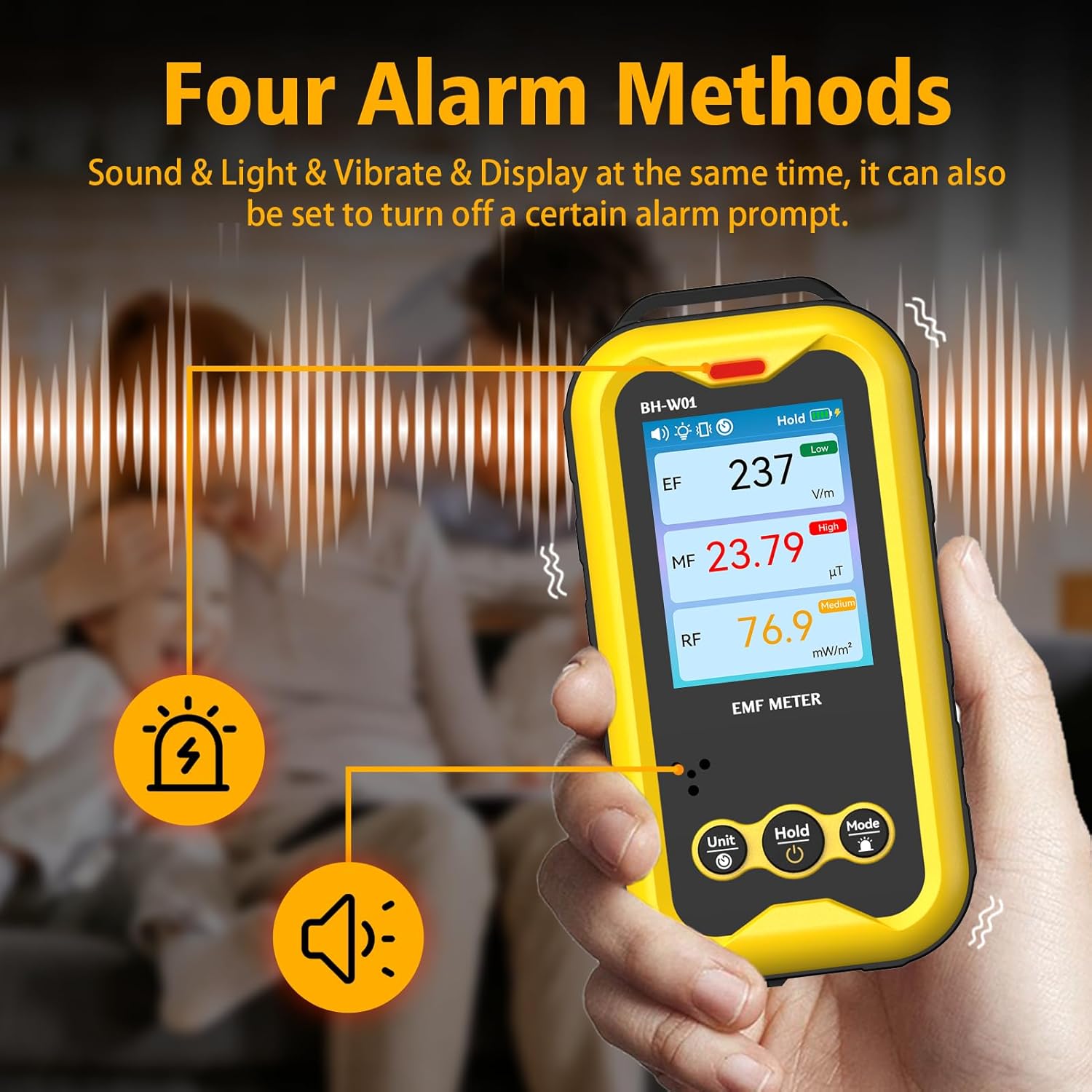
איור 6: The BOSEAN BH-W01 offers four distinct alarm methods: sound, light, vibration, and display changes.
4.5 Real-Time Curve Chart
The device can display a real-time curve chart (Figure 4, item 16) to visualize the dynamic changes in magnetic field strength over time. This feature helps in observing trends and identifying intermittent radiation sources.
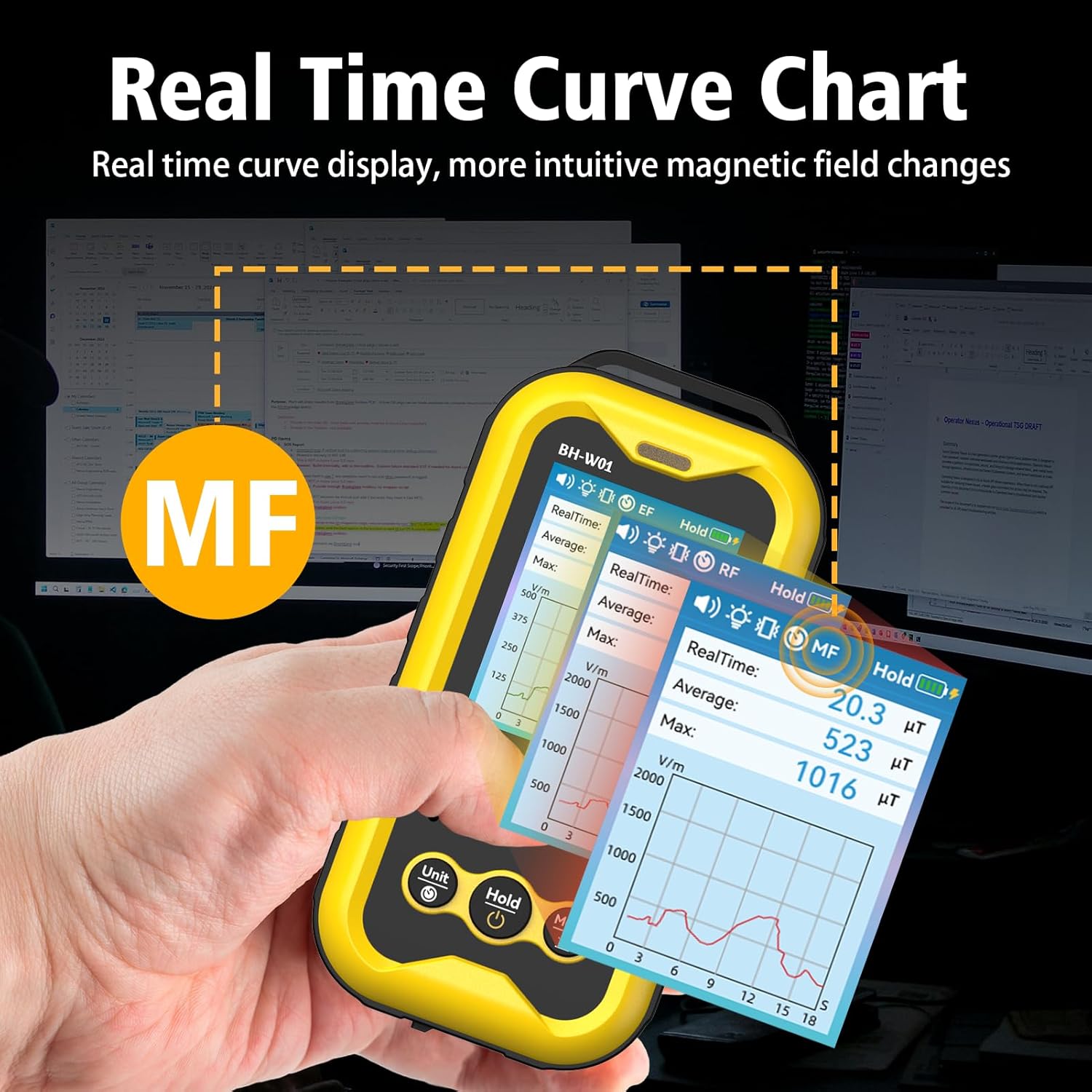
איור 7: The real-time curve chart provides a visual representation of magnetic field changes over time.
5. תחזוקה
- ניקוי: השתמשו במטלית רכה ויבשה לניקוי המכשיר. אין להשתמש בחומרי ניקוי שוחקים או ממסים.
- אִחסוּן: יש לאחסן את המכשיר במקום קריר ויבש, הרחק מאור שמש ישיר וטמפרטורות קיצוניות.
- טיפול בסוללה: To prolong battery life, avoid fully discharging the battery frequently. If storing for an extended period, charge the device to approximately 50% and recharge every few months.
- הימנע מהשפעה: הגן על המכשיר מפני נפילות ופגיעות חזקות, אשר עלולות לפגוע ברכיבים הפנימיים.
6. פתרון תקלות
- המכשיר לא נדלק:
- ודא שהסוללה טעונה. חבר את המכשיר למקור חשמל באמצעות כבל Type-C.
- לחץ והחזק את לחצן ההפעלה למשך מספר שניות.
- קריאות לא מדויקות:
- Ensure the device is held steadily during measurement. Rapid movements can affect accuracy.
- Keep the device away from strong magnetic fields or other electronic devices that might interfere with readings, unless those are the intended measurement targets.
- The device's calibration is based on manual operation; hold it by hand for best results.
- אזעקות לא פועלות:
- Check the alarm settings using the Mode button to ensure they are enabled.
- Verify that the measured values exceed the set thresholds.
- התצוגה ריקה או קפואה:
- נסה להפעיל מחדש את המכשיר על ידי לחיצה ממושכת על כפתור ההפעלה.
- אם הבעיה נמשכת, צור קשר עם תמיכת הלקוחות.
7. מפרטים
| פָּרָמֶטֶר | עֵרֶך |
|---|---|
| מספר דגם | BH-W01 |
| מותג | BOSEAN (Manufacturer) / GLXY (Sub-brand/Distributor) |
| מידות (L x W x H) | 6.5 x 2.7 x 12.7 ס"מ |
| מִשׁקָל | 240 גרם |
| Electric Field (EF) Range | 1 V/m עד 1999 V/m |
| Magnetic Field (MF) Range | 0.1 mG to 1999.9 mG (0.01 µT to 99.99 µT) |
| Radio Frequency (RF) Range | 0.1 mW/m² to 999.9 mW/m² |
| לְהַצִיג | מסך TFT צבעוני בגודל 2.4 אינץ' |
| מקור כוח | 1 סוללת ליתיום-יון (כלול) |
| קיבולת סוללה | 1800mAh |
| יציאת טעינה | סוג C-USB |
| כיבוי אוטומטי | Configurable (e.g., 15 minutes) |
8. מידע בטיחות
- אל תנסה לפתוח או לשנות את המכשיר. פעולה זו עלולה לבטל את האחריות ולהוות סיכוני בטיחות.
- הרחק את המכשיר ממים ומנוזלים אחרים.
- Avoid exposing the device to extreme temperatures or high humidity.
- Dispose of the battery and device according to local regulations. Do not dispose of in household waste.
- This device is for informational measurement purposes only and should not be used as a substitute for professional safety assessments or medical advice.
9. אחריות ותמיכה
Specific warranty details are typically provided with the product packaging or by the retailer at the time of purchase. For technical support, warranty claims, or further assistance, please refer to the contact information provided by your seller or the manufacturer, BOSEAN.
Manufacturer: BOSEAN
Model: BH-W01